Solved How do I create a Wired Home Network ?

tznomani

New member
Local time
9:48 PM
Messages
12
Hi,

I am having trouble creating a wired home network. As per instructions I will give you all the details first.

My network configuration is:
CompleteHomeNetworkConfiguration.png

My internet service provider is Etisalat in the United Arab Emirates. They have provided me with a Huawei HG231F Router. The router has four LAN wires going to four different sockets in our home. Currently, we are using only two sockets: 1) Study Room, 2)Bedroom (Both PCs have Windows 7 Ultimate 32bit SP1).

I just started the Debug Log on my Huawei Router so don't have much of a debug log for this router, but this is what it shows as of now:
View attachment HuaweiLog.txt

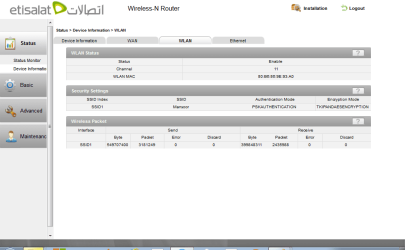
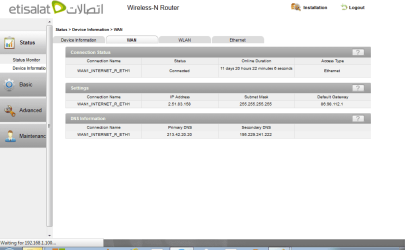
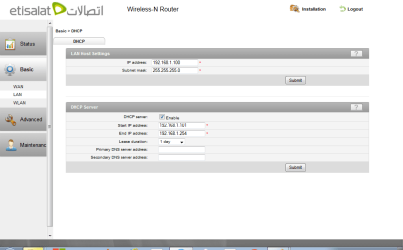
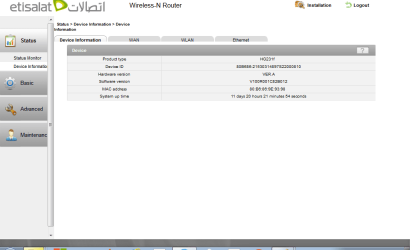
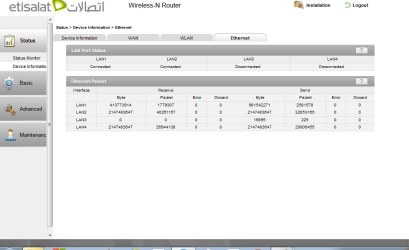
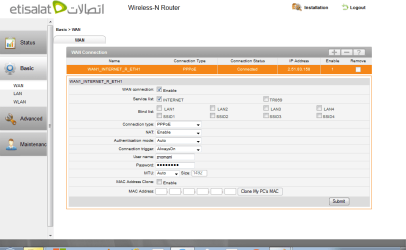
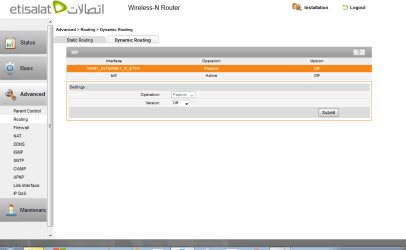
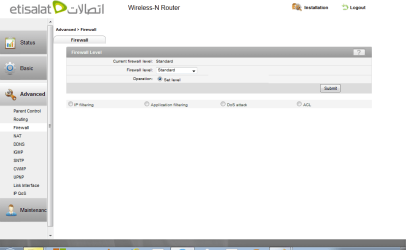
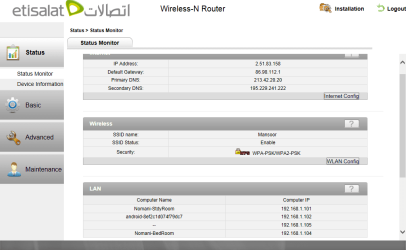
When I open the router administration page 192.168.1.100, I have the following screens:
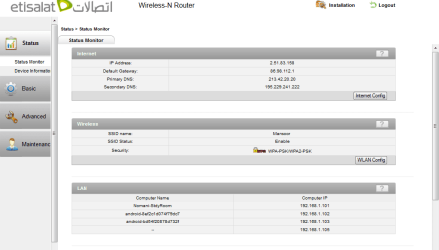
HuaweiRouterStatus.png
HuaweiRouterDeviceInformationWLAN.png
HuaweiRouterDeviceInformationWAN.png
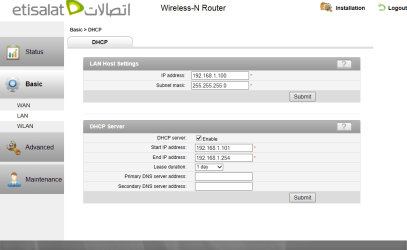
HuaweiRouterBasicLANDHCP.png
HuaweiRouterDeviceInformation.png
HuaweiRouterDeviceInformationEthernet.png
HuaweiRouterBasicWAN.png
HuaweiRouterAdvancedDynamicRouting.png
HuaweiRouterAdvancedFirewall.png
HuaweiRouterBasicWLAN.png

When I try to get the network map on my study room PC it says no network devices detected. I am attaching the ipconfig /all file for my study room computer.
View attachment ipconfigstudyroom.txt

Also I am attaching the Network Connection Properties window from my study room PC
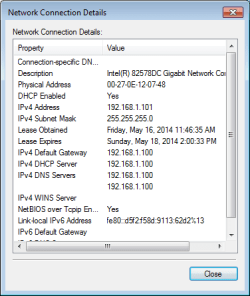
Nomani-StdyRoom_NetworkConnectionDetails.png

Now, I will details the status of devices in my bedroom.
a) From the socket I have used a cable to connect to the internet port in my Belkin Router N300.
b) From the LAN port of the Belkin Router to my Bedroom PC.

The ipconfig /all file from the Bedroom PC has these details:
View attachment ipconfigbedroom.txt

The Network Connection Properties has these details:
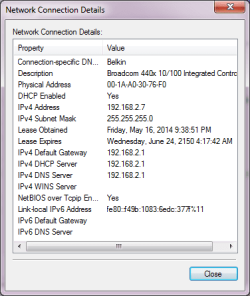
Nomani-BedRoom_NetworkConnectionDetails.png

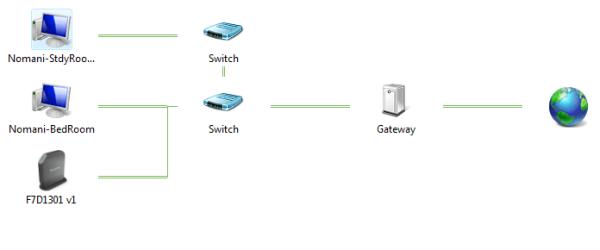
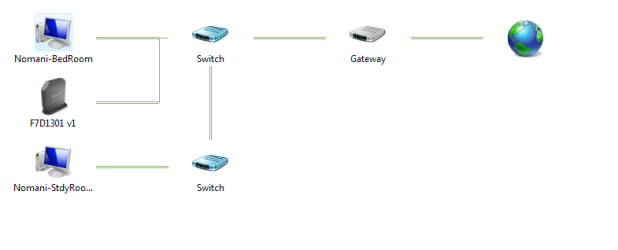
And the Network Connection Map is so:

Nomani-BedRoom_NetworkMap.png

I have done this so that the Belkin Router can give me WIFI access in rooms close to my bedroom.

The Belkin System Log is here:
View attachment BELKIN_sys_log.txt

The details of the Belkin Router N300 router admin access page are as follows:
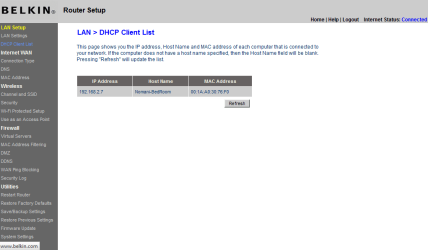
BelkinRouterDHCPClientList.png
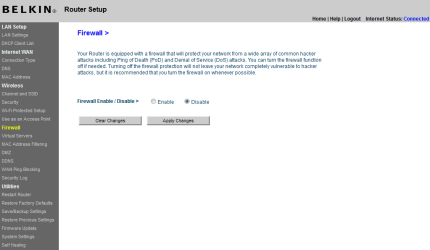
BelkinRouterFirewall.png
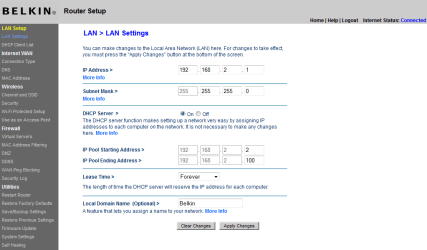
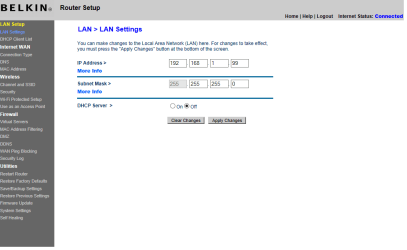
BelkinRouterLANSettings.png
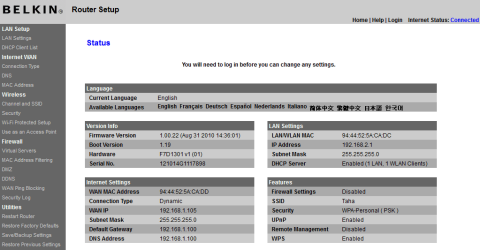
BelkinRouterStatus.png
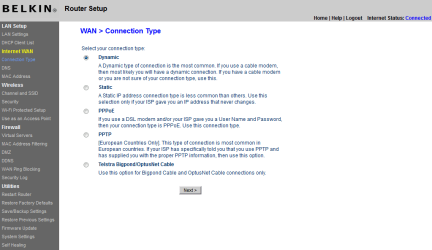
BelkinRouterWANConnectionType.png
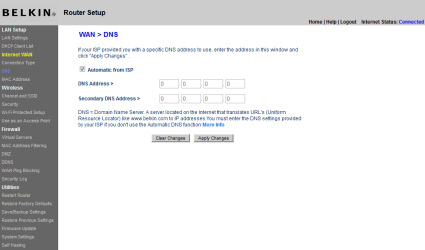
BelkinRouterWANDNS.png
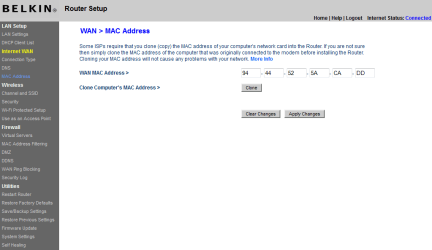
BelkinRouterWANMacAddress.png

Now what I have already tried:
1. I have tried creating a homegroup on one PC and trying to join on the other, but it doesn't show the homegroup created by other PC.

2. I have simply tried to allow file sharing by going into the properties of certain folders and allowing sharing, but those folder are not displayed on the network or on the other PC. Also the both PCs are not detected by each other anyway, so file sharing I knew was pointless.

3. I tried to go to BELKIN router access page from the StudyRoom PC by using its LAN Address 192.168.1.105, this was to see if I can access that router through this PC, but that didn't work either.

Finally, what I would like to setup is a home network with file and printer sharing between both PC's through the wired network itself, without using a wireless connection.

Sorry, for such a long post but I wanted to be thorough and give you as many details as possible.

Thanks in advance.
 

My Computer

Computer type
PC/Desktop
Computer Manufacturer/Model Number
Custom Build
OS
Windows 7 Ultimate 32 bit
CPU
Intel Core i3
Memory
2 GB Ram
Graphics Card(s)
ATI Radeon HD 4300/4500 Series
Hard Drives
500 MB Western Digital
Antivirus
Microsoft Security Essentials
Browser
Firefox or Chrome
Use your Huawei router as DHCP server. Then use your Belkin as an Access Point so that it acts as a switch for your wired clients. This way all of the devices should be able to see one another on the network as long as the network profile is set to "home". As for printer, you can use homegroup to share printer but the PC has to be on and fully connected to network to work.
 

My Computer

Computer type
Laptop
Computer Manufacturer/Model Number
Dell Optiplex SX270, Lenovo Z470
OS
Windows 7 Professional x64 SP1
CPU
Intel® Pentium® 4 @ 2.26 GHz, Intel Core i7-2670QM @ 2.20 GH
Motherboard
Dell, Lenovo
Memory
512MB Dual channel DDR SDRAM @ 400MHz 2.5-3-3-7, 8 GB DDR3
Graphics Card(s)
Intel 82865G, Nvidia GeForce 520M Graphics
Sound Card
SoundMax Integrated Audio, Integrated HD Audio
Monitor(s) Displays
LG W1952
Screen Resolution
1440x900, 1366 x 768
Hard Drives
40 GB 2.5" IDE 4200 RPM HDD, 500 GB 5400 RPM Sata 1.5 + 32 GB SSD
PSU
Dell 145 Watt, Lenovo 120 Watt Power Adapter
Case
Optiplex SX270 Small Form Factor, Laptop
Cooling
Dell Proprietary Air Cooling, Stock laptop cooling
Keyboard
Dell SK-8125 USB Keyboard
Mouse
Dell PS/2 2 button ball mouse with wheel scroll
Internet Speed
300 Mbit down / 20 Mbps up Time Warner Cable
Antivirus
MSE, Malwarebytes Scanner
Browser
Internet (Aizawa) Explorer 11
Other Info
Running Windows Server 2012 Datacenter on a virtual machine to run Metro Apps.
Hi,

Thanks for the prompt reply.

Could you guide me as to what settings on both routers would I have to change ?

I understand what you are saying but how do I practically do it. If you could post me some details, or guide me to some threads which could help me setup both these routers as you mentioned, that would be extremely helpful.

Thanks.
 

My Computer

Computer type
PC/Desktop
Computer Manufacturer/Model Number
Custom Build
OS
Windows 7 Ultimate 32 bit
CPU
Intel Core i3
Memory
2 GB Ram
Graphics Card(s)
ATI Radeon HD 4300/4500 Series
Hard Drives
500 MB Western Digital
Antivirus
Microsoft Security Essentials
Browser
Firefox or Chrome
They are in different subnets is the answer.

192.168.1.0/24 is one subnet is what the huewei is using.

192.168.2.0/24 is one subnet is using.

Different subnets.

For Homegroup to work it has to be in the same subnet either 192.168.1.0/24 or 192.168.2.0/24.

theveterans is correct.

A Lan port to Lan port will put them in the same subnet and work.

Is there any reason for you to have a Belkin as well as Huwei maybe signal issues?

the veterans can take you tru it or I will take you thru a Lan port to Lan port connection.
 
Last edited:

My Computer

Computer Manufacturer/Model Number
HP Compaq 6715B
OS
Windows 7 Ultimate x64
CPU
AMD turion 64x2 TL-64 2.2Ghz
Motherboard
HC030
Memory
Sodimm DDR2 4GB
Graphics Card(s)
ATI Radeon 1250 128MB IGP
Hard Drives
Fujitsu Siemens 500GB sata 3.0 Gb/s
Thanks TheCyberMan. I'll give the guide.

First take a look at your screenshot here: http://www.sevenforums.com/attachme...red-home-network-huaweirouterbasiclandhcp.png

It says the DHCP server ranges from 192.168.1.101 to 192.168.1.254

The trick is to change your Belkin's IP address to anything outside of 192.168.1.101 to 192.168.1.254
However, for maximum compatibility, keep the Belkin's IP between 192.168.1.1 to 192.168.1.99
As you can see the "192.168.1." is the one of the factors for all of your devices to see each other on the same network.

As an example, you can set your Belkin's IP to 192.168.1.99 and that should work. Just go to "LAN" settings in your Belkin and change the IP to 192.168.1.99

After changing, you must unplug your Ethernet on the Belkin then reconnect it so that Windows can obtain the new IP from the Belkin. Go to your Belkin's configuration by typing 192.168.1.99 on your browser.
If successful, you should be able to go the Belkin's configuration with the new IP

Finally, confirm that the subnet mask for Huawei and Belkin are both 255.255.255.0 (another factor to ensure all devices see each other) If not the same, just make both 255.255.255.0 on the LAN page (not WAN)

Do not connect both routers on LAN to LAN yet as there's one more final step to do


On the Belkin's LAN settings (with the new IP of course), Turn off the DHCP Server. This is so that the Belkin doesn't supply its own IP lease to the clients connected to it. The Belkin at this point is now setup as Access Point.

At this point, you may not be able to go to your Belkin router settings. It's normal because the Belkin is not "leasing" an IP to Windows (not sure if this is the correct reason).

Disconnect your Belkin from computer and connect it to the Huawei. Then reboot the Belkin manually (i.e. unplug and replug the power). When the Belkin is ready, connect your computer to the belkin and another computer to the Huawei. Both should see each other provided that both computers are set to "home" network.
 

My Computer

Computer type
Laptop
Computer Manufacturer/Model Number
Dell Optiplex SX270, Lenovo Z470
OS
Windows 7 Professional x64 SP1
CPU
Intel® Pentium® 4 @ 2.26 GHz, Intel Core i7-2670QM @ 2.20 GH
Motherboard
Dell, Lenovo
Memory
512MB Dual channel DDR SDRAM @ 400MHz 2.5-3-3-7, 8 GB DDR3
Graphics Card(s)
Intel 82865G, Nvidia GeForce 520M Graphics
Sound Card
SoundMax Integrated Audio, Integrated HD Audio
Monitor(s) Displays
LG W1952
Screen Resolution
1440x900, 1366 x 768
Hard Drives
40 GB 2.5" IDE 4200 RPM HDD, 500 GB 5400 RPM Sata 1.5 + 32 GB SSD
PSU
Dell 145 Watt, Lenovo 120 Watt Power Adapter
Case
Optiplex SX270 Small Form Factor, Laptop
Cooling
Dell Proprietary Air Cooling, Stock laptop cooling
Keyboard
Dell SK-8125 USB Keyboard
Mouse
Dell PS/2 2 button ball mouse with wheel scroll
Internet Speed
300 Mbit down / 20 Mbps up Time Warner Cable
Antivirus
MSE, Malwarebytes Scanner
Browser
Internet (Aizawa) Explorer 11
Other Info
Running Windows Server 2012 Datacenter on a virtual machine to run Metro Apps.
Match the wireless settings and security of your belkin to the huawei wireless settings and security as well.
 

My Computer

Computer Manufacturer/Model Number
HP Compaq 6715B
OS
Windows 7 Ultimate x64
CPU
AMD turion 64x2 TL-64 2.2Ghz
Motherboard
HC030
Memory
Sodimm DDR2 4GB
Graphics Card(s)
ATI Radeon 1250 128MB IGP
Hard Drives
Fujitsu Siemens 500GB sata 3.0 Gb/s
Hi,

Ok so far so good. I converted the Belkin Router N300 to an access point. I am still getting my wireless signal on my wifi devices from the Belkin Router as before. Also I changed the Belkin Router IP address to 192.168.1.99 and now on my Huawei Router status it shows both computers connected Nomani-StdyRoom as well as Nomani-BedRoom. However, both computer still don't detect each other through Windows. I tried making a home group on one and then trying to locate and join on the other and vice versa both don't detect each other still.

This is the ipconfig file from the Bedroom PC after changes:
View attachment ipconfigbedroom.txt

This is the ipconfig file from the Studyroom PC after changes:
View attachment ipconfigstdyroom.txt

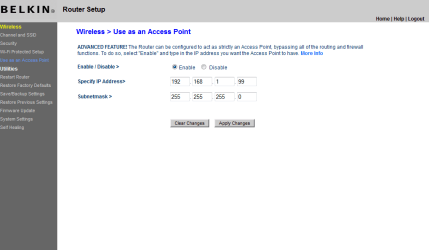
These are the new BELKIN Router settings which show that I have enabled access point mode:
BelkinChangedToAccessPoint.png

And these are the BELKIN Router new LAN Settings:
BelkinNewLanSettings.png

Finally, the Huawei Router status which shows both computers connected to its LAN network:
HuaweiRouterChangedStatus.png

And here is the Huawei Router DHCP Server settings:
HuaweiRouterDHCPServerSettings.png

Please guide me from here as to what to do from here. My study room PC has Microsoft security essentials anti virus and windows firewall, and the bedroom doesn't even have an anti virus and using Windows firewall as well.

I was going to install free home avast antivirus on both but I wanted to wait until this network and firewall issues are cleared up.

Thanks for you help so far. And further help would be very much appreciated. Thanks in advance.
 

My Computer

Computer type
PC/Desktop
Computer Manufacturer/Model Number
Custom Build
OS
Windows 7 Ultimate 32 bit
CPU
Intel Core i3
Memory
2 GB Ram
Graphics Card(s)
ATI Radeon HD 4300/4500 Series
Hard Drives
500 MB Western Digital
Antivirus
Microsoft Security Essentials
Browser
Firefox or Chrome
There is no need to mess with the IP on the Belkin router at all. You guys are over thinking this quite a bit and for no apparent reason.

Simply disable DHCP on the Belkin, the first router will eventually assign the Belkin an IP in the correct subnet automatically. I've helped many others with the same problem and this works.

There is no reason to do this manually and it only makes the process harder to set up again should the router require a reset.

Connect the two routers LAN port to LAN port. The modem appears to be missing from the map as well.
 

My Computer

Computer type
PC/Desktop
Computer Manufacturer/Model Number
Home built
OS
Windows 7 Ult, Windows 8.1 Pro,
CPU
Q9650-4.275GHz, E8600 4.5GHz, E6750-3.8GHz
Motherboard
Evga 780i FTW
Memory
G.Skill PC2 9600 1200Mhz 5 5 5 15 2T
Graphics Card(s)
GTX480
Sound Card
Asus Xonar D2
Monitor(s) Displays
HannsG
Screen Resolution
1680X1050
Hard Drives
GSkill Phoenix Pro 120GB SSD
PSU
ThermalTake Toughpower 1000Watt modular
Case
ThermalTake XaserV
Cooling
Xigmatek S1283
Keyboard
Logitech G15
Mouse
Logitech G9
Internet Speed
T1
Hi,

As I told you before my two computers were not detecting each other even though both were shown in the status window of my Huawei Router.

So I took your advice didn't mess with anymore settings and just disconnected all the devices, shut down both PCs and then started the systems in this order:
1) Huawei Router (which is the DHCP server also)
2) Belkin Router (which is configured as an access point with IP Address: 192.168.1.99)
3) Started both PCs

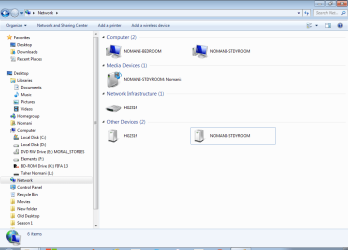
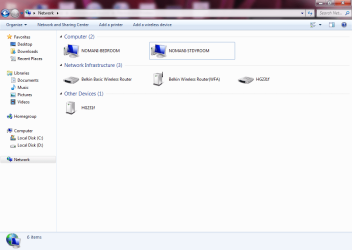
Now both the PCs detect each other, here is the network map and network devices detected from my Stdyroom PC:

NetworkMapStdyRoom.PNG
NetworkDevicesStdyroom.png

And here is the network map and network devices detected from my Bedroom PC:

NetworkMapBedroom.PNG
NetworkDevicesBedroom.PNG

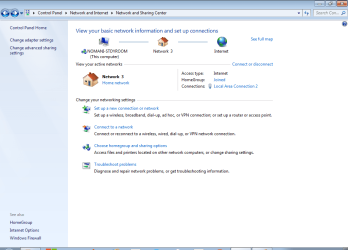
As, you can see both are connected and detecting each other. Also created a HomeGroup on my StudyRoom PC as you can see in the image below, the home group is created and says: "Joined"

NetworkAndSharingCenterStdyRoom.png

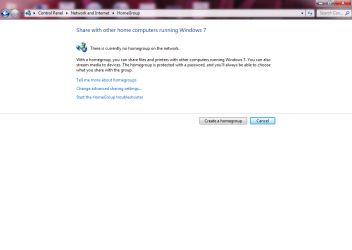
However when I tried joining in the other room, but it doesnot detect this homegroup. So here is what I tried:
a) I restarted the PC, but still it didn't detect the Homegroup
b) Then I ran the HomeGroup troubleshooter, but neither did it find the HomeGroup nor it solved the problem.

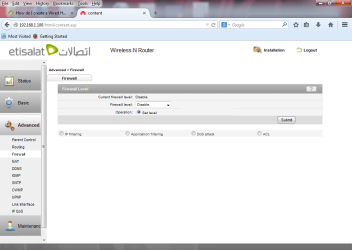
So, what could be the problem now, could anyone guide me. As I mentioned before both PC's are using Windows Firewall. I am also attaching below and image of the firewall settings of the main Huawei Router which is also the DHCP server, as you can see the firewall is set on standard, do you think I should disable it ??

HuaweiRouterFirewallSettings.png

Now, really confused as to what could be the problem, any help would be really appreciated. Thanks in advance.
 

My Computer

Computer type
PC/Desktop
Computer Manufacturer/Model Number
Custom Build
OS
Windows 7 Ultimate 32 bit
CPU
Intel Core i3
Memory
2 GB Ram
Graphics Card(s)
ATI Radeon HD 4300/4500 Series
Hard Drives
500 MB Western Digital
Antivirus
Microsoft Security Essentials
Browser
Firefox or Chrome
There is no need to mess with the IP on the Belkin router at all. You guys are over thinking this quite a bit and for no apparent reason.
No over thinking there we don't have to do an ipconfig or ipconfig /all look at default gateway do we, we have a fixed IP address.

Can you ping normani study room and normani bedroom and post results please mark them so we know which is which please?
 
Last edited:

My Computer

Computer Manufacturer/Model Number
HP Compaq 6715B
OS
Windows 7 Ultimate x64
CPU
AMD turion 64x2 TL-64 2.2Ghz
Motherboard
HC030
Memory
Sodimm DDR2 4GB
Graphics Card(s)
ATI Radeon 1250 128MB IGP
Hard Drives
Fujitsu Siemens 500GB sata 3.0 Gb/s
Hi,

Ok done that I just ping both PC's from one to another both are receiving packets with 0 pkts lost on both sides.

Here are the results using "ping Nomani-StdyRoom" from the BedRoom Pc:
View attachment pingStdyRoomWithName.txt

Here are the results when using directly the IP Address "ping 192.168.1.104" from the BedRoom PC:
View attachment pingStdyRoom.txt

And now vice versa using both "ping Nomani-BedRoom" and "ping 192.168.1.103" from the StudyRoom PC:
View attachment pingBedRoomWithName.txt
View attachment pingBedRoom.txt

No packets lost, so data is being transmitted.

I also tried adding the printer which is connected to the BedRoom PC in the StudyRoom PC but no joy, it doesn't detect it at all. Also HomeGroup on StudyRoom PC is still active, so I again tried to restart the BedRoom PC thinking it might connect on the restart but still nothing.

Any ideas, how to proceed further ?
 

My Computer

Computer type
PC/Desktop
Computer Manufacturer/Model Number
Custom Build
OS
Windows 7 Ultimate 32 bit
CPU
Intel Core i3
Memory
2 GB Ram
Graphics Card(s)
ATI Radeon HD 4300/4500 Series
Hard Drives
500 MB Western Digital
Antivirus
Microsoft Security Essentials
Browser
Firefox or Chrome
So i missed where it said joined.

What exactly is the problem because it has joined which says Homegroup has worked maybe permissions are not right?
 

My Computer

Computer Manufacturer/Model Number
HP Compaq 6715B
OS
Windows 7 Ultimate x64
CPU
AMD turion 64x2 TL-64 2.2Ghz
Motherboard
HC030
Memory
Sodimm DDR2 4GB
Graphics Card(s)
ATI Radeon 1250 128MB IGP
Hard Drives
Fujitsu Siemens 500GB sata 3.0 Gb/s
No it says its Joined on the StudyRoom PC that I created it on, not on the other BedRoom PC here is a picture from the other BedRoom PC:
HomeGroupNotFound.png

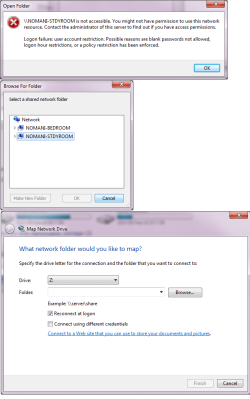
And also from the same BedRoom PC I tried to map a Network drive to the StdyRoom PC here is the error I got:
MappingNetworkDriveError.png

What now ??
 

My Computer

Computer type
PC/Desktop
Computer Manufacturer/Model Number
Custom Build
OS
Windows 7 Ultimate 32 bit
CPU
Intel Core i3
Memory
2 GB Ram
Graphics Card(s)
ATI Radeon HD 4300/4500 Series
Hard Drives
500 MB Western Digital
Antivirus
Microsoft Security Essentials
Browser
Firefox or Chrome
Sorry I forgot to mention that I also have now disabled my Huawei Router firewall just in case if that was blocking it. I changed the firewall setting from Standard to Disable, just to be sure there is no firewall in the way.

HuaweiRouterFirewallDisabled.png

Thanks in advance.
 

My Computer

Computer type
PC/Desktop
Computer Manufacturer/Model Number
Custom Build
OS
Windows 7 Ultimate 32 bit
CPU
Intel Core i3
Memory
2 GB Ram
Graphics Card(s)
ATI Radeon HD 4300/4500 Series
Hard Drives
500 MB Western Digital
Antivirus
Microsoft Security Essentials
Browser
Firefox or Chrome
Enable the firewall on your huwei and set it up as the veterans described.

Remove from Homegroup:

Leave a homegroup

Do this on both computers.

Select Home Network:

http://windows.microsoft.com/en-gb/...-finish=windows-81&v1h=win81tab1&v2h=win7tab1


Do this on both Computers Homegroup only works with Home Network selected on each computer.

Create a Homegroup:

http://windows.microsoft.com/en-gb/...-finish=windows-81&v1h=win81tab1&v2h=win7tab1

Create Homegroup on one computer only keep the password safe. THe other computer to join enter the password.
Homegroup Read/Write:

Sharing files with someone - Microsoft Windows Help
 

My Computer

Computer Manufacturer/Model Number
HP Compaq 6715B
OS
Windows 7 Ultimate x64
CPU
AMD turion 64x2 TL-64 2.2Ghz
Motherboard
HC030
Memory
Sodimm DDR2 4GB
Graphics Card(s)
ATI Radeon 1250 128MB IGP
Hard Drives
Fujitsu Siemens 500GB sata 3.0 Gb/s
I have tried doing that many times. I have left homegroup on both, then created a home group on one PC and tried to join the home group from the other and vice versa. It just doesn't find the home group. And also both of my Networks on both PC's have been setup as Home Network. So, I have tried that before but it hasn't worked any ideas why it won't work ??

Thanks.
 

My Computer

Computer type
PC/Desktop
Computer Manufacturer/Model Number
Custom Build
OS
Windows 7 Ultimate 32 bit
CPU
Intel Core i3
Memory
2 GB Ram
Graphics Card(s)
ATI Radeon HD 4300/4500 Series
Hard Drives
500 MB Western Digital
Antivirus
Microsoft Security Essentials
Browser
Firefox or Chrome

My Computer

Computer Manufacturer/Model Number
HP Compaq 6715B
OS
Windows 7 Ultimate x64
CPU
AMD turion 64x2 TL-64 2.2Ghz
Motherboard
HC030
Memory
Sodimm DDR2 4GB
Graphics Card(s)
ATI Radeon 1250 128MB IGP
Hard Drives
Fujitsu Siemens 500GB sata 3.0 Gb/s
Hi,

I tried downloading the fix it tool but it doesn't work. It says you have to upgrade the tool and takes me to a new fix it site but that site doesn't have anything on Home groups.


Any other links that could be useful ???

Thanks.
 

My Computer

Computer type
PC/Desktop
Computer Manufacturer/Model Number
Custom Build
OS
Windows 7 Ultimate 32 bit
CPU
Intel Core i3
Memory
2 GB Ram
Graphics Card(s)
ATI Radeon HD 4300/4500 Series
Hard Drives
500 MB Western Digital
Antivirus
Microsoft Security Essentials
Browser
Firefox or Chrome
There is no need to mess with the IP on the Belkin router at all. You guys are over thinking this quite a bit and for no apparent reason.
No over thinking there we don't have to do an ipconfig or ipconfig /all look at default gateway do we, we have a fixed IP address.

Can you ping normani study room and normani bedroom and post results please mark them so we know which is which please?

That is just the point, there is no need to use a fixed IP for this router. It's adds complications to the network for no apparent reason.

And the following statement is the result of doing nothing, still the Belkin doesn't require a static IP as the first router will eventually give it an IP in the correct subnet. My point was that there is no reason to use a static IP just to make a router be an access point. Yes you would start by plugging in the DHCP server gateway router first, all lights on etc. then you can plug in other routers to the LAN, each one should eventually receive an IP in the correct subnet.

=tznomani;2779627]Hi,

As I told you before my two computers were not detecting each other even though both were shown in the status window of my Huawei Router.

So I took your advice didn't mess with anymore settings and just disconnected all the devices, shut down both PCs and then started the systems in this order:
1) Huawei Router (which is the DHCP server also)
2) Belkin Router (which is configured as an access point with IP Address: 192.168.1.99)
3) Started both PCs

Now both the PCs detect each other, here is the network map and network devices detected from my Stdyroom PC:

I do have three A/P's here at my house, no need to use any type of static IP's, I use DHCP reservation on the gateway router so each device gets the same IP.

These types of Homegroup problems are fairly typical, sometimes you can fix them, other times not so much. All routers would need to support IPv6 etc.

Certain chipsets with unapproved drivers can cause this problem although I've found ways around these problems in most cases.

There is this Homegroup trouble shooting guide, go through the guide and see if anything stands out.
http://helpdeskgeek.com/windows-7/windows-7-cannot-connect-to-homegroup/

There are a couple more tricks to getting the Homegroup to work like removing all files that reside at the PeerNetworking folder which can fix joining problems as well as problems with leaving the Homegroup.
 
Last edited:

My Computer

Computer type
PC/Desktop
Computer Manufacturer/Model Number
Home built
OS
Windows 7 Ult, Windows 8.1 Pro,
CPU
Q9650-4.275GHz, E8600 4.5GHz, E6750-3.8GHz
Motherboard
Evga 780i FTW
Memory
G.Skill PC2 9600 1200Mhz 5 5 5 15 2T
Graphics Card(s)
GTX480
Sound Card
Asus Xonar D2
Monitor(s) Displays
HannsG
Screen Resolution
1680X1050
Hard Drives
GSkill Phoenix Pro 120GB SSD
PSU
ThermalTake Toughpower 1000Watt modular
Case
ThermalTake XaserV
Cooling
Xigmatek S1283
Keyboard
Logitech G15
Mouse
Logitech G9
Internet Speed
T1
Either way gives you a static(fixed IP) you did not in the first place that you give a fixed IP using DHCP reservation chev65. I don't have a cyrstal ball you know.:p:)
 
Last edited:

My Computer

Computer Manufacturer/Model Number
HP Compaq 6715B
OS
Windows 7 Ultimate x64
CPU
AMD turion 64x2 TL-64 2.2Ghz
Motherboard
HC030
Memory
Sodimm DDR2 4GB
Graphics Card(s)
ATI Radeon 1250 128MB IGP
Hard Drives
Fujitsu Siemens 500GB sata 3.0 Gb/s
Back
Top