
Solved How Do I Defragment Virtual Machines?

Klaw117

New member
Power User
VIP
Local time
11:40 AM
Messages
433
On one of my computers, I use XP Mode and on my other computer, I use Windows XP on VMware Player. I'm not sure how I would go about defragmenting these virtual machines since I heard that it's not a good idea to use defragmenting programs inside virtual machines. From what I've been told, using defragmenting programs inside virtual machines will write data on all of the space designated to the virtual machines. Is this true? If so, then how do I improve the performance of my virtual machines? I know VMware Player has a tool that can be used to defragment the virtual machine when it's not running, but how do I defragment XP Mode?
 

My Computer

Computer Manufacturer/Model Number
Dell Inspiron 14R N4110
OS
Windows 7 Home Premium x64
CPU
Intel Core i5-2410M Quad Core CPU @ 2.30 GHz
Memory
8 GB Shared Channel DDR3 Memory
Graphics Card(s)
Intel HD Graphics 3000, AMD Radeon HD 6470M
Sound Card
Intel Display Audio, Realtek High Definition Audio
Monitor(s) Displays
14" HD 720p LED Display
Screen Resolution
1366x768
Hard Drives
500 GB 5400 RPM SATA Hard Drive
Mouse
Microsoft USB IntelliMouse Explorer 3.0
On one of my computers, I use XP Mode and on my other computer, I use Windows XP on VMware Player. I'm not sure how I would go about defragmenting these virtual machines since I heard that it's not a good idea to use defragmenting programs inside virtual machines. From what I've been told, using defragmenting programs inside virtual machines will write data on all of the space designated to the virtual machines. Is this true? If so, then how do I improve the performance of my virtual machines? I know VMware Player has a tool that can be used to defragment the virtual machine when it's not running, but how do I defragment XP Mode?

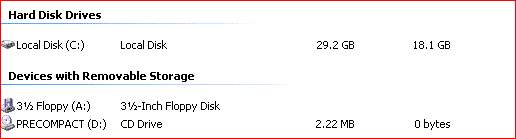
Klaw117, if you installed the integration utilities then you should have a cdrom
attached such as:


you can compact the drive by running the precompact cdrom.


Rich
 

Attachments

  • xp-compact-virtualpc.GIF
    xp-compact-virtualpc.GIF
    3.3 KB · Views: 15
  • xp-compact-virtualpc-1.GIF
    xp-compact-virtualpc-1.GIF
    11.6 KB · Views: 13

My Computer

Computer type
Laptop
Computer Manufacturer/Model Number
Toshiba Laptop Qosimo X870
OS
Windows 7 Pro x64 SP1
CPU
Intel Core I7
Motherboard
Toshiba Qosmio
Memory
16 Gigs
Graphics Card(s)
NVIDIA GeForce GTX 670M
Monitor(s) Displays
17.7" laptop
Screen Resolution
1600 x 900
Hard Drives
256 Gig SanDisk SSD for C
256 Gig Intel SSD for D
Internet Speed
50/25 FIOS
Antivirus
Vipre (all you can eat for 10 machines)
Browser
IE and FF
Other Info
I have dos 6.22, wfwg 3.11, win98, 2000 and xp VHD's available for testing. MS's Virtual PC works great.
Is compaction the same as defragmentation for Windows Virtual PC?
 

My Computer

Computer Manufacturer/Model Number
Dell Inspiron 14R N4110
OS
Windows 7 Home Premium x64
CPU
Intel Core i5-2410M Quad Core CPU @ 2.30 GHz
Memory
8 GB Shared Channel DDR3 Memory
Graphics Card(s)
Intel HD Graphics 3000, AMD Radeon HD 6470M
Sound Card
Intel Display Audio, Realtek High Definition Audio
Monitor(s) Displays
14" HD 720p LED Display
Screen Resolution
1366x768
Hard Drives
500 GB 5400 RPM SATA Hard Drive
Mouse
Microsoft USB IntelliMouse Explorer 3.0
Is compaction the same as defragmentation for Windows Virtual PC?

No, defrag for virtual PC is not the same as compaction. As the virtual PC can grow in size as you need more space, compation moves all the data to the front of the drive and frees up the slack space. So it then can grow as you need more space. But Defragmentation just moves all the data around in your virtual drive to make the files contigious and does not free up unused space.


If you look at the layout of a virtual disk when you first creat it, it only is as big as the space needed. It will automatically add more space as you create new data or install other programs.

Rich
 

My Computer

Computer type
Laptop
Computer Manufacturer/Model Number
Toshiba Laptop Qosimo X870
OS
Windows 7 Pro x64 SP1
CPU
Intel Core I7
Motherboard
Toshiba Qosmio
Memory
16 Gigs
Graphics Card(s)
NVIDIA GeForce GTX 670M
Monitor(s) Displays
17.7" laptop
Screen Resolution
1600 x 900
Hard Drives
256 Gig SanDisk SSD for C
256 Gig Intel SSD for D
Internet Speed
50/25 FIOS
Antivirus
Vipre (all you can eat for 10 machines)
Browser
IE and FF
Other Info
I have dos 6.22, wfwg 3.11, win98, 2000 and xp VHD's available for testing. MS's Virtual PC works great.
Ok, thanks a lot.
 

My Computer

Computer Manufacturer/Model Number
Dell Inspiron 14R N4110
OS
Windows 7 Home Premium x64
CPU
Intel Core i5-2410M Quad Core CPU @ 2.30 GHz
Memory
8 GB Shared Channel DDR3 Memory
Graphics Card(s)
Intel HD Graphics 3000, AMD Radeon HD 6470M
Sound Card
Intel Display Audio, Realtek High Definition Audio
Monitor(s) Displays
14" HD 720p LED Display
Screen Resolution
1366x768
Hard Drives
500 GB 5400 RPM SATA Hard Drive
Mouse
Microsoft USB IntelliMouse Explorer 3.0
Back
Top