how do i delete a service please

sunnystaines

New member
Member
Local time
8:12 PM
Messages
73
a while back I ran the sage beta. I deleted the beta and scoured the registry and windows explorer clearing the leftovers.

decided to look in event viewer and found loads of errors re a service called

"sage SData service" I have set it to disable but how do i delete it please in services.

have run ccleaner, eusing, winaso, and iobit ASC registry cleaners to no avail.

after some help and advice please.
 

My Computer

Computer Manufacturer/Model Number
self build
OS
vista xp w7
CPU
ci920 quad core
Motherboard
msi x58
Memory
3gb ddr3
Graphics Card(s)
ati hd4350
Sound Card
ati hd4350
Monitor(s) Displays
samsung t240hd
Hard Drives
sata2 c drive
ide backups
PSU
700
Case
no name
Cooling
standard intel cpu fan
Go to search
Type msconfig
Go to tab startup services
If it is checked un check it.

Stop with the reg cleaners, they do more harm than good.

If it has just been installed, use system restore to get rid of it and have everything back to the way it was, including any potential reg damage from the cleaners.
 

My Computer

Computer type
PC/Desktop
Computer Manufacturer/Model Number
Dell XPS 420
OS
Windows 10, Home Clean Install
CPU
Intel Core2 processsor Q8200(2.33Ghz 1333FSB) Quad Core Tech
Motherboard
Dell
Memory
6 gb
Graphics Card(s)
ATI Radeon 256MB HD3650
Sound Card
Intergrated 7.1 Channel Audio
Monitor(s) Displays
Dell SP2009W 20"
Hard Drives
640 GB Serial ATA Hard drive
Cooling
Fan
Keyboard
Dell USB Keyboard
Mouse
Dell Premium Optical USB
Internet Speed
DSL 2.85

My Computer

Computer type
PC/Desktop
Computer Manufacturer/Model Number
Bruce ... somewhere in his 40's
OS
Windows 7 Ultimate 32bit SP1
CPU
Intel(R) Core(TM)2 Quad CPU @ 2.40GHz, 2400 MHz
Motherboard
INTEL/D975XBX2
Memory
4 GB
Graphics Card(s)
ATI Radeon HD 2600 Pro
Monitor(s) Displays
Samsung SyncMaster 914v
Screen Resolution
1280 x 1024
Hard Drives
2/500GB each ... ST3500630AS ATA Device.
One is not connected
PSU
Rocketfish 700 W
Case
G.Skill Gigabyte Chassis
Keyboard
Standard PS/2 Keyboard
Mouse
Microsoft PS/2 Mouse
Internet Speed
DSL
Antivirus
Avira Internet Security
Browser
IE 11
Other Info
ATI HDMI Audio
use the sc command, fixed the problem.

thanks all for replies.
 

My Computer

Computer Manufacturer/Model Number
self build
OS
vista xp w7
CPU
ci920 quad core
Motherboard
msi x58
Memory
3gb ddr3
Graphics Card(s)
ati hd4350
Sound Card
ati hd4350
Monitor(s) Displays
samsung t240hd
Hard Drives
sata2 c drive
ide backups
PSU
700
Case
no name
Cooling
standard intel cpu fan
Thanks for posting back and glad it worked for you. :)
 

My Computer

Computer type
PC/Desktop
Computer Manufacturer/Model Number
Bruce ... somewhere in his 40's
OS
Windows 7 Ultimate 32bit SP1
CPU
Intel(R) Core(TM)2 Quad CPU @ 2.40GHz, 2400 MHz
Motherboard
INTEL/D975XBX2
Memory
4 GB
Graphics Card(s)
ATI Radeon HD 2600 Pro
Monitor(s) Displays
Samsung SyncMaster 914v
Screen Resolution
1280 x 1024
Hard Drives
2/500GB each ... ST3500630AS ATA Device.
One is not connected
PSU
Rocketfish 700 W
Case
G.Skill Gigabyte Chassis
Keyboard
Standard PS/2 Keyboard
Mouse
Microsoft PS/2 Mouse
Internet Speed
DSL
Antivirus
Avira Internet Security
Browser
IE 11
Other Info
ATI HDMI Audio
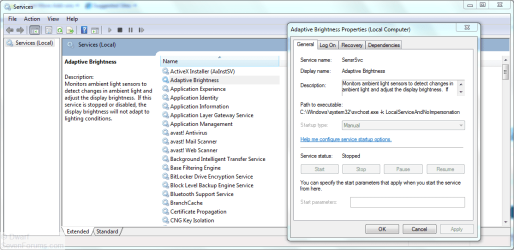
This can be done from an administrative command prompt with the SC command. The required syntax is SC delete <servicename> where <servicename> is the short name for the service that you wish to remove. To find the short name for a particular service, open Services. Browse to the service in question and double click on the name.

For example, here I have double clicked on Adaptive Brightness. You can see that the associated short name is SensrSvc. It is that name that is used in the SC command.

Capture.PNG
 

My Computer

Computer type
PC/Desktop
Computer Manufacturer/Model Number
Dwarf Dwf/11/2012 r09/2013
OS
Windows 8.1 Pro RTM x64
CPU
Intel Core-i5-3570K 4-core @ 3.4GHz (Ivy Bridge) (OC 4.4GHz)
Motherboard
ASRock Z77 Extreme4-M
Memory
4 x 4GB DDR3-1600 Corsair Vengeance CMZ8GX3M2A1600C9B (16GB)
Graphics Card(s)
MSI GeForce GTX770 Gaming OC 2GB
Sound Card
Realtek High Definition on board solution (ALC 898)
Monitor(s) Displays
ViewSonic VA1912w Widescreen (VGA)
Screen Resolution
1440x900
Hard Drives
OCZ Agility 3 SSD 120GB SATA III x2 (RAID 0)
Samsung HD501LJ 500GB SATA II x2
Hitachi HDS721010CLA332 1TB SATA II
Iomega 1.5TB Ext USB 2.0
WD 2.0TB Ext USB 3.0
PSU
XFX Pro Series 850W Semi-Modular
Case
Gigabyte IF233
Cooling
1 x 120mm Front Inlet 1 x 120mm Rear Exhaust
Keyboard
Microsoft Comfort Curve Keyboard 3000 (USB)
Mouse
Microsoft Comfort Mouse 3000 for Business (USB)
Internet Speed
NetGear DG834Gv3 ADSL Modem/Router (Ethernet) ~4.0 Mb/s (O2)
Antivirus
Avast! 8.0.1497
Browser
IE 11
Other Info
Optical Drive: HL-DT-ST BD-RE BH10LS30 SATA Bluray
Lexmark S305 Printer/Scanner/Copier (USB)
WEI Score: 8.1/8.1/8.5/8.5/8.25
Asus Eee PC 1011PX Netbook (Windows 7 x86 Starter)
Back
Top