
Hi there,
Last week I installed Adobe Reader (the latest version) for some strange reason, even though I already had Foxit Reader installed. Anyways after a day I decided to uninstall Adobe Reader due to it's bloated feel and overall insecure interface. Unfortunately the uninstall process was cut short and there were errors involved, so the only way I could uninstall it completely from my system was to do it manually the "hard way". So I deleted the program file and the keys from the registry. I also used "Windows Install Cleanup Utility" in a hope to remove everything relating to Adobe Reader from my system. After finishing the process, I set Foxit Reader as my default PDF reader once again and I thought I was all set.
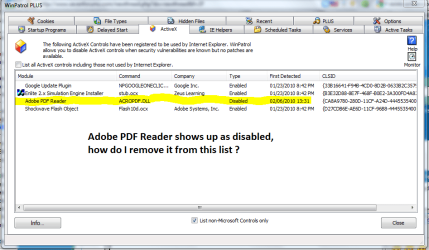
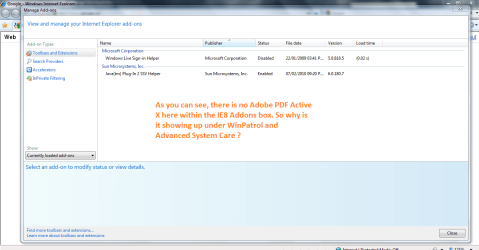
A few days later I realized under the ActiveX tab in WinPatrol (see screenshot), that the Adobe PDF reader Active X is somehow still lurking on my system, despite removing it from the IE8 "manage Addons Window". (see screenshot)
Why is WinPatrol and Advanced System Care still reporting that the Adobe PDF ActiveX is disabled when in fact it is not in my IE8 Manager Addons ?
In other words, I think that the Adobe PDF reader Active X is still in the registry somewhere, If I can somehow gain access to that key and delete then I believe that it will not show up under WinPatrol and ASC.
So long story short, how do I "completely" remove the Adobe PDF ActiveX ?
Last week I installed Adobe Reader (the latest version) for some strange reason, even though I already had Foxit Reader installed. Anyways after a day I decided to uninstall Adobe Reader due to it's bloated feel and overall insecure interface. Unfortunately the uninstall process was cut short and there were errors involved, so the only way I could uninstall it completely from my system was to do it manually the "hard way". So I deleted the program file and the keys from the registry. I also used "Windows Install Cleanup Utility" in a hope to remove everything relating to Adobe Reader from my system. After finishing the process, I set Foxit Reader as my default PDF reader once again and I thought I was all set.
A few days later I realized under the ActiveX tab in WinPatrol (see screenshot), that the Adobe PDF reader Active X is somehow still lurking on my system, despite removing it from the IE8 "manage Addons Window". (see screenshot)
Why is WinPatrol and Advanced System Care still reporting that the Adobe PDF ActiveX is disabled when in fact it is not in my IE8 Manager Addons ?
In other words, I think that the Adobe PDF reader Active X is still in the registry somewhere, If I can somehow gain access to that key and delete then I believe that it will not show up under WinPatrol and ASC.
So long story short, how do I "completely" remove the Adobe PDF ActiveX ?
Attachments

My Computer
- Computer Manufacturer/Model Number
- HP Envy 17 4054ca
- OS
- Windows 7 baby ! : D
- CPU
- Intel Core i7 720QM @ 1.60GHz
- Motherboard
- Hewlett-Packard 1449 (CPU)
- Memory
- 6.0GB Dual-Channel DDR3 @ 662MHz
- Graphics Card(s)
- ATI Mobility Radeon HD 5650
- Sound Card
- IDT High Definition Audio CODEC
- Monitor(s) Displays
- Generic PnP Monitor @ 1600x900
- Screen Resolution
- 1600X900
- Hard Drives
- 78.15GB INTEL SSDSA2M080G2GC ATA Device (IDE)


