
You are using an out of date browser. It may not display this or other websites correctly.
You should upgrade or use an alternative browser.
You should upgrade or use an alternative browser.
how do i disable a program
- Thread starter dgudgel
- Start date

Ummm...disable? A program? Just don't run it?!  DOES NOT COMPUTE
DOES NOT COMPUTEMy Computer
- Computer type
- PC/Desktop
- Computer Manufacturer/Model Number
- Alienware Aurora ALX R4
- OS
- Windows 10 Pro (x64)
- CPU
- Intel Core i7-3930K (3.2GHz - 4.5GHz)
- Motherboard
- Alienware Aurora-R4 x79
- Memory
- 4x Samsung 4GB PC3-12800 DDR3 (16GB 1600MHz)
- Graphics Card(s)
- Nvidia Geforce GTX 690
- Sound Card
- SteelSeries Siberia Elite
- Monitor(s) Displays
- Dell UltraSharp U3011
- Screen Resolution
- 2560x1600
- Hard Drives
- Samsung 850 Pro 256 GB, Seagate 1TB Desktop Hybrid HDD, 2x Western Digital 4TB Green HDD
- PSU
- 875W Some Dell PSU <.<
- Case
- Alienware Aurora ALX
- Cooling
- Custom Liquid Cooling (EK CPU & GPU blocks) dual EK 480RAD
- Keyboard
- Logitech G710+ Mechanical
- Mouse
- Logitech G700s
- Internet Speed
- Verizon Fios (50 mbps average)
- Other Info
- Server: Intel NUC D54250WYK: i5-4250U, 16GB, 256 GB mSATA, Windows Server 2012 R2
seavixen32
New member
Have a look at windows Autoruns, which has a more comprehensive list of programs that run at startup.
Autoruns for Windows
Just disable any that you don't want to run at startup.
Autoruns for Windows
Just disable any that you don't want to run at startup.
My Computer
- Computer Manufacturer/Model Number
- HP Pavilion Elite 495UK
- OS
- Windows 7 Ultimate SP1 64-Bit
- CPU
- Intel Core i7 870 @ 2.93GHz
- Motherboard
- MSI 2A9C (CPU1)
- Memory
- 8Gb Dual-Channel DDR3 @ 664MHz
- Graphics Card(s)
- nVidia GeForce GTX 460 1024MB dedicated RAM
- Sound Card
- Realtek HD Audio
- Monitor(s) Displays
- HP2310i
- Screen Resolution
- 1920 x 1080
- Hard Drives
- 1x1954GB Hitachi HDS22020ALA 330 (RAID), 1x1954GB Hitachi External for backup and storage
- PSU
- 460W
- Case
- HP Elite
- Cooling
- Air cooled
- Keyboard
- Logitech K750 solar-powered keyboard
- Mouse
- Logitech Wireless M180 mouse
- Internet Speed
- 2Mb
- Other Info
- Pure Avanti Flow Internet Radio with iPod Dock, 64Gb iPod, HP USB Speakers, Sony MDR-V500 Headphones, Sony Vaio F-Series Laptop
- Local time
- 3:49 PM
- Messages
- 34

WHAT program is it that you don't want to run?
What and where makes a big difference.
That's why you will get so many answers. Give more info please.
What and where makes a big difference.
That's why you will get so many answers. Give more info please.
My Computer
- Computer type
- PC/Desktop
- Computer Manufacturer/Model Number
- Built 2/11/2011
- OS
- Windows 7 Pro-x64
- CPU
- i7-2600 3.4GHz - 3.8GHz Turbo
- Motherboard
- Intel DH67BL-B3
- Memory
- 8Gb - 2x4GB, Muskin 991770 PC3-1333
- Graphics Card(s)
- Integrated Intel HD 2000
- Sound Card
- Integrated Intel 10.1 HD, RealTek ALC892
- Monitor(s) Displays
- Asus LCD VH222H, Haier HL24XSL2a
- Screen Resolution
- 1920x1080, 1920x1080
- Hard Drives
- Crucial SSD C300-128Gb,
Western Digital WD5002AALX - 500Gb,
Western Digital WD7501AALS - 750Gb
- PSU
- Seasonic 650W 80+ Gold Modular
- Case
- Rosewill Defender
- Cooling
- Stock CPU, Four 120mm case fans, PCH fan added
- Keyboard
- Logitech EX100 Y-RBH94 Wireless
- Mouse
- Logitech EX100 M-RCE95 Wireless
- Internet Speed
- 3.0/1.5 Mbs
- Antivirus
- Microsoft Security Essentials
- Browser
- Microsoft Internet Explorer 11
- Other Info
- Antec Veris Premier-Multimedia IR Station,
Cyber Accoustics-3602 Speakers,
AFT XM-5U Card Reader,
Hauppauge TV-HVR-2250,
Sony LX300 USB Turntable

- Local time
- 1:49 PM
- Messages
- 50,634
Anything you turn off in msconfig>startup (and I would turn off everthing except AV to avoid freeloaders and spyware) may also need to be turned off in msconfig>Services after Hiding all MS Services.
Then in addition you'll need to check back regularly to kick out freeloaders who sneak back into both places.
Then you have turned off everything except your OS and AV at boot, known as running a Clean Boot.
Then in addition you'll need to check back regularly to kick out freeloaders who sneak back into both places.
Then you have turned off everything except your OS and AV at boot, known as running a Clean Boot.
Somewhere in control panel is a command to disable a program. Whether all of them can be I don't know. I have disabled keyboard mouse because on reboot if I uninstall it it is re-installed. I cant remember where I found the command. So for my own reasons I would like to disable internet explorer not uninstall it. I do not want to just leave it there not used. I want to disable it if possible.
I have my reasons maybe wrong but mine nonetheless. I sincerely thank anyone who took the time to try to answer my request. Have a nice day.
I have my reasons maybe wrong but mine nonetheless. I sincerely thank anyone who took the time to try to answer my request. Have a nice day.
My Computer
- OS
- windows home premium 32bit

- Local time
- 4:49 PM
- Messages
- 5,063
You can forbid a program to run using Group Policy. However it's not bullet proof. I was using it to stop IE from running. But some program I installed, since it had high privilege granted by the installer during the install process, decided it wanted to use IE or some part of it, and bingo! IE was able to run again.
I find it simpler and more reliable to just use an automatic app killer. I'm still using ProcessKiller 2.0 in Vista:
http://wareseeker.com/Utilities/process-killer-2.0.zip/402349
I find it simpler and more reliable to just use an automatic app killer. I'm still using ProcessKiller 2.0 in Vista:
http://wareseeker.com/Utilities/process-killer-2.0.zip/402349
My Computer
- Computer Manufacturer/Model Number
- HP Media Center
- OS
- Windows 7 32 bit
- CPU
- AMD 5200+ dual core
- Memory
- 2 GB
- Graphics Card(s)
- NVidia GeForce 6150SE 128 MB
- Monitor(s) Displays
- CRT
- Screen Resolution
- 1280x1024
- Hard Drives
- 500 GB Sata internal :
SIIG USB 3.0 docking stations w/WD Caviar Black 6 Gb/s drives
- Keyboard
- PS/2
- Mouse
- PS/2 Wheel Mouse
- Other Info
- SIIG USB 3.0 PCIexpress card.
seavixen32
New member
You can disable IE9 in Windows Features in your Control Panel.
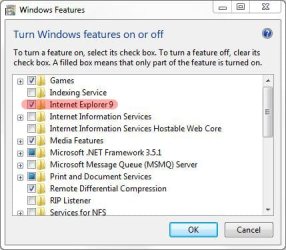
My Computer
- Computer Manufacturer/Model Number
- HP Pavilion Elite 495UK
- OS
- Windows 7 Ultimate SP1 64-Bit
- CPU
- Intel Core i7 870 @ 2.93GHz
- Motherboard
- MSI 2A9C (CPU1)
- Memory
- 8Gb Dual-Channel DDR3 @ 664MHz
- Graphics Card(s)
- nVidia GeForce GTX 460 1024MB dedicated RAM
- Sound Card
- Realtek HD Audio
- Monitor(s) Displays
- HP2310i
- Screen Resolution
- 1920 x 1080
- Hard Drives
- 1x1954GB Hitachi HDS22020ALA 330 (RAID), 1x1954GB Hitachi External for backup and storage
- PSU
- 460W
- Case
- HP Elite
- Cooling
- Air cooled
- Keyboard
- Logitech K750 solar-powered keyboard
- Mouse
- Logitech Wireless M180 mouse
- Internet Speed
- 2Mb
- Other Info
- Pure Avanti Flow Internet Radio with iPod Dock, 64Gb iPod, HP USB Speakers, Sony MDR-V500 Headphones, Sony Vaio F-Series Laptop
- Local time
- 1:49 PM
- Messages
- 50,634
Next time tell us what program up front and you'd have your answer in a post or two.
You can mark this thread Solved at top.
You can mark this thread Solved at top.
seavixen32
New member
+1 Agreed.
My Computer
- Computer Manufacturer/Model Number
- HP Pavilion Elite 495UK
- OS
- Windows 7 Ultimate SP1 64-Bit
- CPU
- Intel Core i7 870 @ 2.93GHz
- Motherboard
- MSI 2A9C (CPU1)
- Memory
- 8Gb Dual-Channel DDR3 @ 664MHz
- Graphics Card(s)
- nVidia GeForce GTX 460 1024MB dedicated RAM
- Sound Card
- Realtek HD Audio
- Monitor(s) Displays
- HP2310i
- Screen Resolution
- 1920 x 1080
- Hard Drives
- 1x1954GB Hitachi HDS22020ALA 330 (RAID), 1x1954GB Hitachi External for backup and storage
- PSU
- 460W
- Case
- HP Elite
- Cooling
- Air cooled
- Keyboard
- Logitech K750 solar-powered keyboard
- Mouse
- Logitech Wireless M180 mouse
- Internet Speed
- 2Mb
- Other Info
- Pure Avanti Flow Internet Radio with iPod Dock, 64Gb iPod, HP USB Speakers, Sony MDR-V500 Headphones, Sony Vaio F-Series Laptop
- Local time
- 4:49 PM
- Messages
- 5,063
Thanks
My bet is the only way to absolutely guarantee IE doesn't run is to uninstall.
Any option that's reflected in a Registry setting can be set by a program with privilege(such as during installation.)
Next best thing is an auto kill utility to kill it every time it tries to pop up.
My Computer
- Computer Manufacturer/Model Number
- HP Media Center
- OS
- Windows 7 32 bit
- CPU
- AMD 5200+ dual core
- Memory
- 2 GB
- Graphics Card(s)
- NVidia GeForce 6150SE 128 MB
- Monitor(s) Displays
- CRT
- Screen Resolution
- 1280x1024
- Hard Drives
- 500 GB Sata internal :
SIIG USB 3.0 docking stations w/WD Caviar Black 6 Gb/s drives
- Keyboard
- PS/2
- Mouse
- PS/2 Wheel Mouse
- Other Info
- SIIG USB 3.0 PCIexpress card.
Hello,
Running Windows 7 Home Premium, 64 bit.
For what it’s worth, an observation:
I turned IE Explorer 8 “off” (start / control panel / programs and features / Turn Windows Features On or Off / Uncheck Internet Explorer 8) as I use Firefox and thought turning off IE would reduce background memory usage and close any vulnerabilities. However, even when turned “off”, it still seems run in the background. I say this because when running CCleaner, items from IE still show up as having been cleaned, such as History, index.dat and temp. files.
I tried an experiment by blocking IE with Zone Alarm firewall while IE was “off” but found some sites would not function properly. Unblocking restored full function. So it seems that some sites/software needs IE to function.
Running Windows 7 Home Premium, 64 bit.
For what it’s worth, an observation:
I turned IE Explorer 8 “off” (start / control panel / programs and features / Turn Windows Features On or Off / Uncheck Internet Explorer 8) as I use Firefox and thought turning off IE would reduce background memory usage and close any vulnerabilities. However, even when turned “off”, it still seems run in the background. I say this because when running CCleaner, items from IE still show up as having been cleaned, such as History, index.dat and temp. files.
I tried an experiment by blocking IE with Zone Alarm firewall while IE was “off” but found some sites would not function properly. Unblocking restored full function. So it seems that some sites/software needs IE to function.
My Computer
- Computer type
- PC/Desktop
- Computer Manufacturer/Model Number
- ASUS PRO
- OS
- Windows 7, Pro, 64 bit, SP1
- CPU
- AMD A4-6300
- Motherboard
- ASUSTeK COMPUTER INC. D415MT_BM2DK (FM2+ )
- Memory
- 4.00GB Single-Channel DDR3 @ 797MHz (11-11-12-28)
- Graphics Card(s)
- 768MB ATI AMD Radeon HD 8370D
- Sound Card
- Realtek High Definition Audio
- Monitor(s) Displays
- SAMSUNG 1680 x 1050
- Hard Drives
- 465GB TOSHIBA DT01ACA050 SATA Disk Device (SATA)
- PSU
- ?
- Case
- ?
- Cooling
- ?
- Internet Speed
- 1.3 down load, .34 upload
- Antivirus
- N/A
- Browser
- Pale Moon
- Local time
- 1:49 PM
- Messages
- 50,634
IE won't use any resources while left enabled but not used. It isn't an issue.
What can be an issue is using a 3rd party firewall on Win7 which works best using it's own firewall with a lightweight AV like Microsoft Security Essentials or Avast 6, not old-school bloatware AV's and firewalls.
What can be an issue is using a 3rd party firewall on Win7 which works best using it's own firewall with a lightweight AV like Microsoft Security Essentials or Avast 6, not old-school bloatware AV's and firewalls.
- Local time
- 4:49 PM
- Messages
- 5,063
To my knowledge index.dat files are created on reboot no matter what you do. You can delete them but the zombies keep coming back. 
I never run IE but I just searched with Everything Search and I have dozens of index.dat files. I have it set in CCleaner to remove them. I run CCleaner several times a day. But there are plenty of non-empty index.dat files on my system.
In fact I'm starting to wonder if CCleaner works. I just ran it and immediately checked with Everything Search after rescanning the drives. All kinds of index.dat with stuff in them. Weird!!
I never run IE but I just searched with Everything Search and I have dozens of index.dat files. I have it set in CCleaner to remove them. I run CCleaner several times a day. But there are plenty of non-empty index.dat files on my system.
In fact I'm starting to wonder if CCleaner works. I just ran it and immediately checked with Everything Search after rescanning the drives. All kinds of index.dat with stuff in them. Weird!!
My Computer
- Computer Manufacturer/Model Number
- HP Media Center
- OS
- Windows 7 32 bit
- CPU
- AMD 5200+ dual core
- Memory
- 2 GB
- Graphics Card(s)
- NVidia GeForce 6150SE 128 MB
- Monitor(s) Displays
- CRT
- Screen Resolution
- 1280x1024
- Hard Drives
- 500 GB Sata internal :
SIIG USB 3.0 docking stations w/WD Caviar Black 6 Gb/s drives
- Keyboard
- PS/2
- Mouse
- PS/2 Wheel Mouse
- Other Info
- SIIG USB 3.0 PCIexpress card.
- Local time
- 1:49 PM
- Messages
- 50,634
I wouldn't run CCleaner more than once monthly, followed by a defrag done in boot mode with Puran Defragger.
- Local time
- 4:49 PM
- Messages
- 5,063
I wouldn't run CCleaner more than once monthly, followed by a defrag done in boot mode with Puran Defragger.
Why not? What's the good of leaving all those index.dat scattered around?
Come to find out it only marks them for deletion at the next boot. That's really bogus.
I use chromium and firefox. I save those cookies and history. It doesn't hamper me since I don't use IE.
My Computer
- Computer Manufacturer/Model Number
- HP Media Center
- OS
- Windows 7 32 bit
- CPU
- AMD 5200+ dual core
- Memory
- 2 GB
- Graphics Card(s)
- NVidia GeForce 6150SE 128 MB
- Monitor(s) Displays
- CRT
- Screen Resolution
- 1280x1024
- Hard Drives
- 500 GB Sata internal :
SIIG USB 3.0 docking stations w/WD Caviar Black 6 Gb/s drives
- Keyboard
- PS/2
- Mouse
- PS/2 Wheel Mouse
- Other Info
- SIIG USB 3.0 PCIexpress card.
- Local time
- 1:49 PM
- Messages
- 50,634
I set my browsers to delete temporary internet files when closed.
Nothing else bothers me there. Should it?
I've been advised for years by those I respect not to overdo it on CCleaner and have found monthly is what works best for me. Others have their own rhythms.
Nothing else bothers me there. Should it?
I've been advised for years by those I respect not to overdo it on CCleaner and have found monthly is what works best for me. Others have their own rhythms.
- Local time
- 4:49 PM
- Messages
- 5,063
You can't delete index.dat while Windows is running except in safe mode. All these cleaners mark for deletion on boot. Doesn't sound like privacy to me.
I just tried killing them with Privacy Mantra. Refused to delete 2 index.dat files. This crap has been going on since Win98 if not earlier. I never even open IE and I get this crap. Must be built into the networking.
I just tried killing them with Privacy Mantra. Refused to delete 2 index.dat files. This crap has been going on since Win98 if not earlier. I never even open IE and I get this crap. Must be built into the networking.
My Computer
- Computer Manufacturer/Model Number
- HP Media Center
- OS
- Windows 7 32 bit
- CPU
- AMD 5200+ dual core
- Memory
- 2 GB
- Graphics Card(s)
- NVidia GeForce 6150SE 128 MB
- Monitor(s) Displays
- CRT
- Screen Resolution
- 1280x1024
- Hard Drives
- 500 GB Sata internal :
SIIG USB 3.0 docking stations w/WD Caviar Black 6 Gb/s drives
- Keyboard
- PS/2
- Mouse
- PS/2 Wheel Mouse
- Other Info
- SIIG USB 3.0 PCIexpress card.