
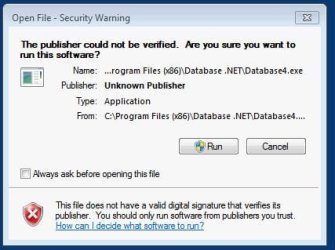
How do I disable the "The publisher could not be verified..." warning?
My toolbar contains an icon that links to a program in my "C:\Program Files (x86)\" folder. Every single time I click on the icon I get the attached pop-up window. The window keeps appearing even if I uncheck "Always ask before opening this file" and click "Run" and enter in the admin username and password. Why does the message keep appearing and how do I disable it entirely?
My toolbar contains an icon that links to a program in my "C:\Program Files (x86)\" folder. Every single time I click on the icon I get the attached pop-up window. The window keeps appearing even if I uncheck "Always ask before opening this file" and click "Run" and enter in the admin username and password. Why does the message keep appearing and how do I disable it entirely?
Attachments
My Computer
At a glance
Windows 7 Professional x64
- OS
- Windows 7 Professional x64


