
You are using an out of date browser. It may not display this or other websites correctly.
You should upgrade or use an alternative browser.
You should upgrade or use an alternative browser.
Solved How do I do that Windows will make restore points automatically
- Thread starter sharon122
- Start date
How do I do that Windows will make restore points automatically every day?
Thanks.
How about something like this? Two different methods to create one at startup.
http://www.sevenforums.com/tutorials/67114-system-restore-point-create-system-startup.html
My Computer
- Computer type
- PC/Desktop
- Computer Manufacturer/Model Number
- Self Built
- OS
- Win 10 Pro x64
- CPU
- Intel I5-2500K @3.3GHz
- Motherboard
- Asrock P67 Extreme4
- Memory
- 16GB G.Skill Ripjaws X (4x4GB)
- Graphics Card(s)
- EVGA GeForce 750 Ti SC 2GB
- Sound Card
- ASUS Xonar DG 5.1 Channels 24-bit 96KHz PCI Interface Sound
- Monitor(s) Displays
- auria eq2367
- Screen Resolution
- 1920 x 1080
- Hard Drives
- 250GB Samsung 850 EVO SSD
1TB WD Blue
1TB Hitachi
- PSU
- SeaSonic X 650W 80 Plus Gold
- Case
- Corsair Obsidian 750D
- Cooling
- Corsair H60, Three 140mm case fans
- Keyboard
- Logitech Wireless Keyboard K520
- Mouse
- Logitech Wireless Mouse M310
- Internet Speed
- Wave Broadband ~ 100 dn 5 up
- Antivirus
- Windows Defender, Malwarebytes Premium
- Browser
- Edge, IE11, Chrome
- Other Info
- Laptop specs: HP g7-1365dx /
CPU: AMD A6-3420M APU with Radeon(tm) HD Graphics /
RAM: Crucial 8Gb (2x4Gb) /
SSD: Crucial M4-CT128M4SSD2 ATA Device/ FW 000F /
GFX: AMD Radeon HD 6520G /
OS: Windows 10 Pro x64

- Local time
- 2:00 AM
- Messages
- 3,194
Your computer should be set up by default to make restore points, but I would not do everyday. the reason is the restore points take up a bit of space and you will loose the oldest ones when it reaches its limit. You can use this tutorial to check if system protection is turned on or not:
http://www.sevenforums.com/tutorials/330-system-protection-turn-off.html
If you have a big enough hard drive to devote a good bit of space to the restore points then you could change the amount of space by following this tutorial:
http://www.sevenforums.com/tutorials/335-system-protection-change-disk-space-usage.html
also what Derekimo suggested
http://www.sevenforums.com/tutorials/330-system-protection-turn-off.html
If you have a big enough hard drive to devote a good bit of space to the restore points then you could change the amount of space by following this tutorial:
http://www.sevenforums.com/tutorials/335-system-protection-change-disk-space-usage.html
also what Derekimo suggested
Last edited:
My Computer
- Computer type
- Laptop
- Computer Manufacturer/Model Number
- ASUS G60-RBBX05
- OS
- Win7 Home Premium 64x
- CPU
- Intel Core 2 Duo P7450 / 2.13 GHz (2.29 with Extreme Turbo)
- Memory
- 4 GB PC-6400 Hyundai (2X2) at 800Mhz
- Graphics Card(s)
- NVIDIA GeForce GTX 260M 1GB DDR3 VRAM
- Monitor(s) Displays
- 16" LED Backlit
- Screen Resolution
- 1366 x 768 on laptop 1600x1050 max res on 22" external mon
- Hard Drives
- OCZ Agility 3 60GB SSD / 320 GB - Serial ATA-150 - 7200 rpm
- PSU
- 6-cell Lithium ion { lasts 1.5 hours }
- Case
- ASUS G60 Laptop
- Keyboard
- Chicklet type back-lit (white light) keyboard
- Mouse
- Logitech G9 Laser Mouse 3200dpi and 1000 reports per minute
- Internet Speed
- Comcast 8.60mb/s up - 3.11mb/s down
- Antivirus
- MSE
- Browser
- Firefox
- Other Info
- General mid-budget gaming Comp. Low batterylife - High FrameRates - currently overheating problems :(
2nd Rig: Case: Rosewill BLACKHAWK Gaming ATX Mid Tower Computer Case
Mobo: GIGABYTE GA-990FXA-UD3
CPU: AMD FX-6200 Zambezi 3.8GHz (4.1GHz Turbo)
Heatsink: COOLER MASTER V8 CPU Cooler
RAM: Patriot Viper 3 8GB (2 x 4GB) 240-Pin DDR3 SDRAM 1866 (PC3 15000)
GPU: SAPPHIRE Radeon HD 6850 1GB 2

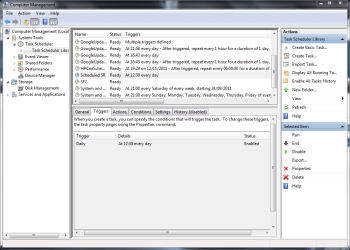
If you don't want to do a RP every time you start your computer you can of course use the task scheduler to do it as often as you want. I have a task to do one every day at 12:30.
My Computer
- Computer type
- Laptop
- Computer Manufacturer/Model Number
- Hewlett-Packard/G62-107SA Notebook
- OS
- Microsoft Windows 7 Home Premium 64-bit Service Pack 1
- CPU
- Intel(R) Core(TM) i3 CPU M 330 @ 2.13GHz
- Motherboard
- Hewlett-Packard 1425
- Memory
- 8 GB DDR3
- Graphics Card(s)
- Intel(R) HD Graphics
- Sound Card
- Realtek High Definition Audio
- Monitor(s) Displays
- Builtin
- Screen Resolution
- 1366 x 768 x 32 bits (4294967296 colors) @ 60 Hz
- Hard Drives
- 250 GB SATA Hard Disk Drive 7200 rpm
2TB Seagate GoFlex USB 2 Drive
1TB Iomega Prestige USB 2 Drive
1.5TB Iomega Prestige USB 2 Drive (Samsung)
2TB WD MyBook Live NAS.
- Mouse
- Logitech Anywhere MX
- Internet Speed
- 152 Mbs download 10 Mbs upload
- Antivirus
- Norton 360
- Browser
- Chrome

- Local time
- 2:00 AM
- Messages
- 1,379
I know it's none of my business -- but I'm curious as to WHY you want to create daily RPs. If you're seeing this as some form of Windows backup, then you've been mislead because that is not what System Restore does. It saves versions of operating system files and the registry and other items. It does not save your settings (as far as I know) or your data files.
I used to do a lot of experimenting with apps and other stuff in the past and learned the hard way that System Restore is not a backup solution.
So, if what you really want is to save daily backups of your files, then you need to consider a different approach.
I used to do a lot of experimenting with apps and other stuff in the past and learned the hard way that System Restore is not a backup solution.
So, if what you really want is to save daily backups of your files, then you need to consider a different approach.
My Computer
- Computer type
- PC/Desktop
- Computer Manufacturer/Model Number
- Custom
- OS
- Win7 Pro 32-bit, Win8 Pro 32-bit
- CPU
- AMD Phenom II X6 1090T
- Motherboard
- Gigabyte
- Memory
- 4GB ddr3 1300
- Graphics Card(s)
- AMD HD 4290 onboard
- Sound Card
- Builtin Realtek HD Audio
- Monitor(s) Displays
- Samsung 24" widescreen, LG 23" widescreen
- Screen Resolution
- 1920x1200/1920x1080
- Hard Drives
- Kingston 256GB SSD
- Keyboard
- Logitech Illuminated Keyboard
- Mouse
- Logitech M705 wireless mouse
- Antivirus
- Norton Av 2013
- Browser
- IE v10
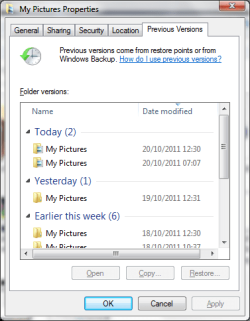
A lot of installs and uninstalls don't create an RP plus previous versions.
My Computer
- Computer type
- Laptop
- Computer Manufacturer/Model Number
- Hewlett-Packard/G62-107SA Notebook
- OS
- Microsoft Windows 7 Home Premium 64-bit Service Pack 1
- CPU
- Intel(R) Core(TM) i3 CPU M 330 @ 2.13GHz
- Motherboard
- Hewlett-Packard 1425
- Memory
- 8 GB DDR3
- Graphics Card(s)
- Intel(R) HD Graphics
- Sound Card
- Realtek High Definition Audio
- Monitor(s) Displays
- Builtin
- Screen Resolution
- 1366 x 768 x 32 bits (4294967296 colors) @ 60 Hz
- Hard Drives
- 250 GB SATA Hard Disk Drive 7200 rpm
2TB Seagate GoFlex USB 2 Drive
1TB Iomega Prestige USB 2 Drive
1.5TB Iomega Prestige USB 2 Drive (Samsung)
2TB WD MyBook Live NAS.
- Mouse
- Logitech Anywhere MX
- Internet Speed
- 152 Mbs download 10 Mbs upload
- Antivirus
- Norton 360
- Browser
- Chrome
I support this view.I know it's none of my business -- but I'm curious as to WHY you want to create daily RPs. If you're seeing this as some form of Windows backup, then you've been mislead because that is not what System Restore does. It saves versions of operating system files and the registry and other items. It does not save your settings (as far as I know) or your data files.
I used to do a lot of experimenting with apps and other stuff in the past and learned the hard way that System Restore is not a backup solution.
So, if what you really want is to save daily backups of your files, then you need to consider a different approach.
Restore points have let me down more than once. I rely on file/folder backups and imaging.
My Computer
- Computer type
- PC/Desktop
- Computer Manufacturer/Model Number
- Own build
- OS
- Windows 7x64 Home Premium SP1
- CPU
- Intel i7 2600k
- Motherboard
- ASUS P8Z68 Deluxe
- Memory
- G.Skill Ripjaws (DDR3-1600) 2x4GB
- Graphics Card(s)
- Nvidia GeForce GTS 450; Intel HD Graphics 3000(GT2+)
- Monitor(s) Displays
- Dell Ultrasharp IPS panel U2311H, Samsung SyncMaster P2350
- Screen Resolution
- 1920x1080
- Hard Drives
- Samsung 850 Pro SSD 256GB, Samsung SSD 840 120GB, Seagates 1TB Barracuda ST31000528AS x2
- PSU
- Seasonic M12II 520W
- Case
- Lian Li Lancool PC-K60
- Cooling
- Case: 1x120mm, 3x140mm CPU: Hyper 212+
- Keyboard
- Logitech MK520 (wireless)
- Mouse
- Logitech MK520
- Internet Speed
- 6-7 Mbps
- Antivirus
- Norton Security Premium, Malwarebytes on 2 (MSE on 3rd PC)
- Browser
- FireFox
- Other Info
- Audio: Logitech Z523 2.1
I support this view.I know it's none of my business -- but I'm curious as to WHY you want to create daily RPs. If you're seeing this as some form of Windows backup, then you've been mislead because that is not what System Restore does. It saves versions of operating system files and the registry and other items. It does not save your settings (as far as I know) or your data files.
I used to do a lot of experimenting with apps and other stuff in the past and learned the hard way that System Restore is not a backup solution.
So, if what you really want is to save daily backups of your files, then you need to consider a different approach.
Restore points have let me down more than once. I rely on file/folder backups and imaging.
I also image frequently but a daily image is too often and takes a lot of space. Daily RPs give you a finer granularity and for me work more often than not. As I mentioned earlier previous version are also useful for recovering older versions of files and recently deleted files which are no longer in the recycle bin.
My Computer
- Computer type
- Laptop
- Computer Manufacturer/Model Number
- Hewlett-Packard/G62-107SA Notebook
- OS
- Microsoft Windows 7 Home Premium 64-bit Service Pack 1
- CPU
- Intel(R) Core(TM) i3 CPU M 330 @ 2.13GHz
- Motherboard
- Hewlett-Packard 1425
- Memory
- 8 GB DDR3
- Graphics Card(s)
- Intel(R) HD Graphics
- Sound Card
- Realtek High Definition Audio
- Monitor(s) Displays
- Builtin
- Screen Resolution
- 1366 x 768 x 32 bits (4294967296 colors) @ 60 Hz
- Hard Drives
- 250 GB SATA Hard Disk Drive 7200 rpm
2TB Seagate GoFlex USB 2 Drive
1TB Iomega Prestige USB 2 Drive
1.5TB Iomega Prestige USB 2 Drive (Samsung)
2TB WD MyBook Live NAS.
- Mouse
- Logitech Anywhere MX
- Internet Speed
- 152 Mbs download 10 Mbs upload
- Antivirus
- Norton 360
- Browser
- Chrome
I never said not to use restore points and accept that many people in fact do use them in a limited way. They are no substitute for a complete backup strategy and for me they play a small role.
A backup strategy depends on purpose. For me:
1) Daily file/folder backups (generally incremental). Used synchronized backup if desired.
2) Weekly images or prior to a significant system reconfiguration such as a driver installation or major installed software update. I never suggested daily imaging. But even that may be fine for some. With a USB external HDD a 40GB image takes me ~10min.
3) Keep appropriate older images to suite your purpose periodically deleting weeklies.
4) Rely on redundancy. Keep images on more than one external HDD and use a different secondary backup imaging software less frequently in case your primary software fails. In my case I use
Primary: Windows inbuilt imaging
Secondary: Macrium Reflect free
Hopefully that's specific enough.
Edit: If the OP wishes to make routine daily restore points regardless, the question I believe has been answered.
A backup strategy depends on purpose. For me:
1) Daily file/folder backups (generally incremental). Used synchronized backup if desired.
2) Weekly images or prior to a significant system reconfiguration such as a driver installation or major installed software update. I never suggested daily imaging. But even that may be fine for some. With a USB external HDD a 40GB image takes me ~10min.
3) Keep appropriate older images to suite your purpose periodically deleting weeklies.
4) Rely on redundancy. Keep images on more than one external HDD and use a different secondary backup imaging software less frequently in case your primary software fails. In my case I use
Primary: Windows inbuilt imaging
Secondary: Macrium Reflect free
Hopefully that's specific enough.
Edit: If the OP wishes to make routine daily restore points regardless, the question I believe has been answered.
Last edited:
My Computer
- Computer type
- PC/Desktop
- Computer Manufacturer/Model Number
- Own build
- OS
- Windows 7x64 Home Premium SP1
- CPU
- Intel i7 2600k
- Motherboard
- ASUS P8Z68 Deluxe
- Memory
- G.Skill Ripjaws (DDR3-1600) 2x4GB
- Graphics Card(s)
- Nvidia GeForce GTS 450; Intel HD Graphics 3000(GT2+)
- Monitor(s) Displays
- Dell Ultrasharp IPS panel U2311H, Samsung SyncMaster P2350
- Screen Resolution
- 1920x1080
- Hard Drives
- Samsung 850 Pro SSD 256GB, Samsung SSD 840 120GB, Seagates 1TB Barracuda ST31000528AS x2
- PSU
- Seasonic M12II 520W
- Case
- Lian Li Lancool PC-K60
- Cooling
- Case: 1x120mm, 3x140mm CPU: Hyper 212+
- Keyboard
- Logitech MK520 (wireless)
- Mouse
- Logitech MK520
- Internet Speed
- 6-7 Mbps
- Antivirus
- Norton Security Premium, Malwarebytes on 2 (MSE on 3rd PC)
- Browser
- FireFox
- Other Info
- Audio: Logitech Z523 2.1
1. Weekend Macrium image of OS partitions (and fast moving data) to backup disk 1
2. Midweek Windows image to backup disk 2
3. Archive Data Files selective backups as and when.
4. NAS files synced on backup disks (I have had problems with the NAS).
I don't really trust long incremental backup chains and use differential instead where needed.
I am currently trying augmenting my weekly Macrium images with daily differentials but I've only been going for two weeks with that so it's work in progress and I haven't needed to restore yet.
If that works maybe I will cut down on the daily RP.
2. Midweek Windows image to backup disk 2
3. Archive Data Files selective backups as and when.
4. NAS files synced on backup disks (I have had problems with the NAS).
I don't really trust long incremental backup chains and use differential instead where needed.
I am currently trying augmenting my weekly Macrium images with daily differentials but I've only been going for two weeks with that so it's work in progress and I haven't needed to restore yet.
If that works maybe I will cut down on the daily RP.
My Computer
- Computer type
- Laptop
- Computer Manufacturer/Model Number
- Hewlett-Packard/G62-107SA Notebook
- OS
- Microsoft Windows 7 Home Premium 64-bit Service Pack 1
- CPU
- Intel(R) Core(TM) i3 CPU M 330 @ 2.13GHz
- Motherboard
- Hewlett-Packard 1425
- Memory
- 8 GB DDR3
- Graphics Card(s)
- Intel(R) HD Graphics
- Sound Card
- Realtek High Definition Audio
- Monitor(s) Displays
- Builtin
- Screen Resolution
- 1366 x 768 x 32 bits (4294967296 colors) @ 60 Hz
- Hard Drives
- 250 GB SATA Hard Disk Drive 7200 rpm
2TB Seagate GoFlex USB 2 Drive
1TB Iomega Prestige USB 2 Drive
1.5TB Iomega Prestige USB 2 Drive (Samsung)
2TB WD MyBook Live NAS.
- Mouse
- Logitech Anywhere MX
- Internet Speed
- 152 Mbs download 10 Mbs upload
- Antivirus
- Norton 360
- Browser
- Chrome
I reimage quite frequently (~once a month). It gives me the confidence to try and learn things I would otherwise be too conservative to attempt.
My Computer
- Computer type
- PC/Desktop
- Computer Manufacturer/Model Number
- Own build
- OS
- Windows 7x64 Home Premium SP1
- CPU
- Intel i7 2600k
- Motherboard
- ASUS P8Z68 Deluxe
- Memory
- G.Skill Ripjaws (DDR3-1600) 2x4GB
- Graphics Card(s)
- Nvidia GeForce GTS 450; Intel HD Graphics 3000(GT2+)
- Monitor(s) Displays
- Dell Ultrasharp IPS panel U2311H, Samsung SyncMaster P2350
- Screen Resolution
- 1920x1080
- Hard Drives
- Samsung 850 Pro SSD 256GB, Samsung SSD 840 120GB, Seagates 1TB Barracuda ST31000528AS x2
- PSU
- Seasonic M12II 520W
- Case
- Lian Li Lancool PC-K60
- Cooling
- Case: 1x120mm, 3x140mm CPU: Hyper 212+
- Keyboard
- Logitech MK520 (wireless)
- Mouse
- Logitech MK520
- Internet Speed
- 6-7 Mbps
- Antivirus
- Norton Security Premium, Malwarebytes on 2 (MSE on 3rd PC)
- Browser
- FireFox
- Other Info
- Audio: Logitech Z523 2.1
I reimage quite frequently (~once a month). It gives me the confidence to try and learn things I would otherwise be too conservative to attempt.
If I need to try anything that might cause problems I do it in a VM first.
My Computer
- Computer type
- Laptop
- Computer Manufacturer/Model Number
- Hewlett-Packard/G62-107SA Notebook
- OS
- Microsoft Windows 7 Home Premium 64-bit Service Pack 1
- CPU
- Intel(R) Core(TM) i3 CPU M 330 @ 2.13GHz
- Motherboard
- Hewlett-Packard 1425
- Memory
- 8 GB DDR3
- Graphics Card(s)
- Intel(R) HD Graphics
- Sound Card
- Realtek High Definition Audio
- Monitor(s) Displays
- Builtin
- Screen Resolution
- 1366 x 768 x 32 bits (4294967296 colors) @ 60 Hz
- Hard Drives
- 250 GB SATA Hard Disk Drive 7200 rpm
2TB Seagate GoFlex USB 2 Drive
1TB Iomega Prestige USB 2 Drive
1.5TB Iomega Prestige USB 2 Drive (Samsung)
2TB WD MyBook Live NAS.
- Mouse
- Logitech Anywhere MX
- Internet Speed
- 152 Mbs download 10 Mbs upload
- Antivirus
- Norton 360
- Browser
- Chrome
We could go on forever but...I reimage quite frequently (~once a month). It gives me the confidence to try and learn things I would otherwise be too conservative to attempt.
If I need to try anything that might cause problems I do it in a VM first.
A VM is not a complete substitute for the real operational environment and in my case reimaging is so fast.
The fact that I have reimaged full systems so often to existing and new HDDs using both Windows and Macrium also gives me some confidence I am providing imaging advice that I have learned from personal experience.
My Computer
- Computer type
- PC/Desktop
- Computer Manufacturer/Model Number
- Own build
- OS
- Windows 7x64 Home Premium SP1
- CPU
- Intel i7 2600k
- Motherboard
- ASUS P8Z68 Deluxe
- Memory
- G.Skill Ripjaws (DDR3-1600) 2x4GB
- Graphics Card(s)
- Nvidia GeForce GTS 450; Intel HD Graphics 3000(GT2+)
- Monitor(s) Displays
- Dell Ultrasharp IPS panel U2311H, Samsung SyncMaster P2350
- Screen Resolution
- 1920x1080
- Hard Drives
- Samsung 850 Pro SSD 256GB, Samsung SSD 840 120GB, Seagates 1TB Barracuda ST31000528AS x2
- PSU
- Seasonic M12II 520W
- Case
- Lian Li Lancool PC-K60
- Cooling
- Case: 1x120mm, 3x140mm CPU: Hyper 212+
- Keyboard
- Logitech MK520 (wireless)
- Mouse
- Logitech MK520
- Internet Speed
- 6-7 Mbps
- Antivirus
- Norton Security Premium, Malwarebytes on 2 (MSE on 3rd PC)
- Browser
- FireFox
- Other Info
- Audio: Logitech Z523 2.1
We could go on forever but...I reimage quite frequently (~once a month). It gives me the confidence to try and learn things I would otherwise be too conservative to attempt.
If I need to try anything that might cause problems I do it in a VM first.
A VM is not a complete substitute for the real operational environment and in my case reimaging is so fast.
The fact that I have reimaged full systems so often to existing and new HDDs using both Windows and Macrium also gives me some confidence I am providing imaging advice that I have learned from personal experience.
Oh I don't say that I haven't reimaged. I have several times with both Windows and Macrium but I prefer to do it only when needed as it is not without risk.
My Computer
- Computer type
- Laptop
- Computer Manufacturer/Model Number
- Hewlett-Packard/G62-107SA Notebook
- OS
- Microsoft Windows 7 Home Premium 64-bit Service Pack 1
- CPU
- Intel(R) Core(TM) i3 CPU M 330 @ 2.13GHz
- Motherboard
- Hewlett-Packard 1425
- Memory
- 8 GB DDR3
- Graphics Card(s)
- Intel(R) HD Graphics
- Sound Card
- Realtek High Definition Audio
- Monitor(s) Displays
- Builtin
- Screen Resolution
- 1366 x 768 x 32 bits (4294967296 colors) @ 60 Hz
- Hard Drives
- 250 GB SATA Hard Disk Drive 7200 rpm
2TB Seagate GoFlex USB 2 Drive
1TB Iomega Prestige USB 2 Drive
1.5TB Iomega Prestige USB 2 Drive (Samsung)
2TB WD MyBook Live NAS.
- Mouse
- Logitech Anywhere MX
- Internet Speed
- 152 Mbs download 10 Mbs upload
- Antivirus
- Norton 360
- Browser
- Chrome
I have reimaged over 30 times on my 2 PCs and never had a problem. Lucky maybe but for me that's statistically very low risk. Hardware failures aside, the chance that I couldn't recover any of my images would be close to zero.
Edit: Let me get back to the core issue I am attempting to address that's related to the thread.
Restore points have let me down badly.
Images have never let me down.
Edit: Let me get back to the core issue I am attempting to address that's related to the thread.
Restore points have let me down badly.
Images have never let me down.
Last edited:
My Computer
- Computer type
- PC/Desktop
- Computer Manufacturer/Model Number
- Own build
- OS
- Windows 7x64 Home Premium SP1
- CPU
- Intel i7 2600k
- Motherboard
- ASUS P8Z68 Deluxe
- Memory
- G.Skill Ripjaws (DDR3-1600) 2x4GB
- Graphics Card(s)
- Nvidia GeForce GTS 450; Intel HD Graphics 3000(GT2+)
- Monitor(s) Displays
- Dell Ultrasharp IPS panel U2311H, Samsung SyncMaster P2350
- Screen Resolution
- 1920x1080
- Hard Drives
- Samsung 850 Pro SSD 256GB, Samsung SSD 840 120GB, Seagates 1TB Barracuda ST31000528AS x2
- PSU
- Seasonic M12II 520W
- Case
- Lian Li Lancool PC-K60
- Cooling
- Case: 1x120mm, 3x140mm CPU: Hyper 212+
- Keyboard
- Logitech MK520 (wireless)
- Mouse
- Logitech MK520
- Internet Speed
- 6-7 Mbps
- Antivirus
- Norton Security Premium, Malwarebytes on 2 (MSE on 3rd PC)
- Browser
- FireFox
- Other Info
- Audio: Logitech Z523 2.1
Yes and I suppose with frequent imaging bringing the system fully back up to date is not so time consuming. It is one of the reasons I am experimenting with the daily differentials. I still prefer not to reimage if I don't need to though.
I also do an sfc /scannow before each image as I have been caught out in the past with images having the problem I am trying to resolve.
I also do an sfc /scannow before each image as I have been caught out in the past with images having the problem I am trying to resolve.
Last edited:
My Computer
- Computer type
- Laptop
- Computer Manufacturer/Model Number
- Hewlett-Packard/G62-107SA Notebook
- OS
- Microsoft Windows 7 Home Premium 64-bit Service Pack 1
- CPU
- Intel(R) Core(TM) i3 CPU M 330 @ 2.13GHz
- Motherboard
- Hewlett-Packard 1425
- Memory
- 8 GB DDR3
- Graphics Card(s)
- Intel(R) HD Graphics
- Sound Card
- Realtek High Definition Audio
- Monitor(s) Displays
- Builtin
- Screen Resolution
- 1366 x 768 x 32 bits (4294967296 colors) @ 60 Hz
- Hard Drives
- 250 GB SATA Hard Disk Drive 7200 rpm
2TB Seagate GoFlex USB 2 Drive
1TB Iomega Prestige USB 2 Drive
1.5TB Iomega Prestige USB 2 Drive (Samsung)
2TB WD MyBook Live NAS.
- Mouse
- Logitech Anywhere MX
- Internet Speed
- 152 Mbs download 10 Mbs upload
- Antivirus
- Norton 360
- Browser
- Chrome
Similar threads
- Replies
- 4
- Views
- 981
- Replies
- 0
- Views
- 2K
- Replies
- 1
- Views
- 921


- Replies
- 0
- Views
- 2K

- Replies
- 2
- Views
- 8K