
How do I edit taskbar within a custom theme

Bongo97

New member
Local time
12:16 AM
Messages
1
I have recently started using the 7_LTDF from deviantart.
The theme is great however the desktop button on the taskbar is buggy and does not colour properly.
I would like to know how to either fix this or edit them msstlyes sheet to not edit the taskbar and let windows do the job?


Is it also because I may not have installed it properly?
 

Attachments
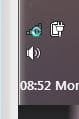
  • Capture.JPG
    Capture.JPG
    8.9 KB · Views: 21

My Computer

Computer type
Laptop
Computer Manufacturer/Model Number
Dell
OS
Windows 7 Home Premium 64bit
Antivirus
Malwarebytes
Browser
Firefox
Welcome to the Seven Forums

Here are the image #s
1265 verticals show desktop button
1264 horizontal show desktop button

921, 922, 923, 924, that is bottom, right, top, left this is only one part of the taskbar(if it is set to Always combine, high labels) if it is horizontal and would be the far right and the far left if it is vertical it will be the very top in the very bottom. If set to Never combine or Combine when taskbar is full then those numbers above will do the whole taskbar.

If you have your taskbar set to Always combine, high labels then these images will also be used.
Horizontal
1166 bottom 1168 bottom small icons
1167 top 1169 top small icons
Vertical
1170 left 1172 left small icons
1171 right 1173 right small icons

Here are two tutorials that may help you.
http://www.sevenforums.com/tutorials/4315-taskbar-customize-skin.html
http://www.sevenforums.com/tutorials/29646-theme-customize-custom-themes.html

Let me know if you need any more help.
Jerry
 

My Computer

Computer type
Laptop
Computer Manufacturer/Model Number
Sager NP9170
OS
Win 7 Pro x64 / Win 10 Pro
CPU
Intel(R) Core(TM) i7-3630QM CPU @ 2.40GHz
Motherboard
CLEVO P170EM
Memory
12 GB
Graphics Card(s)
(1) Intel(R) HD Graphics 4000 (2) NVIDIA GeForce GTX 675M
Sound Card
(1) Realtek High Definition Audio (2) Intel(R) Display Aud
Monitor(s) Displays
17.3
Screen Resolution
1920x1080
Hard Drives
(1) Samsung 860 EVO 500GB(OS) (1) Samsung 860 EVO 500GB(Data)
Keyboard
Backlite
Antivirus
MSE, Malwarebytes Pro
Browser
Firefox
Other Info
DESKTOP: Custom-built.
OS: Win 10 Pro x64.
CASE: Rosewill R5.
CPU: Intel I5 4670K CPU @ 3.40GHz.
CPU COOLER: Cool Master Hyper 212 EVO.
MOTHERBOARD: Asus Z87-A.
MEMORY: Kingston HyperX 2x4 GB.
GPU: Nvidia Geforce 650 TI.
PSU: Corsair TX750.
DRIVES: (1) Samsung 840 120 GB SSD (2) Western Digital blue 500 GB 7200 RPM.
Back
Top