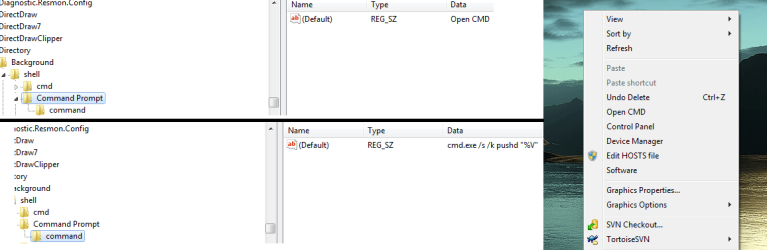
I am wondering how you would edit the context menu when you right click on the desktop. I want to be able to add the cmd there so I can open it whenever I want with just a simple right click.
I already know how to edit the Send To function through: C:\Users\<username>\AppData\Roaming\Microsoft\Windows\SendTo. I therefore assume that there is a folder which contains the commands for executing the right click options in the context menu (e.g. - personalization)
I do not want to download a program to edit the context menu, I simply want to know where the files for it are stored.
Here is a pic of the context menu if any of you are confused: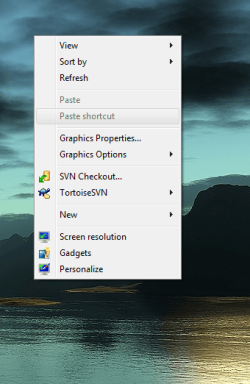
I already know how to edit the Send To function through: C:\Users\<username>\AppData\Roaming\Microsoft\Windows\SendTo. I therefore assume that there is a folder which contains the commands for executing the right click options in the context menu (e.g. - personalization)
I do not want to download a program to edit the context menu, I simply want to know where the files for it are stored.
Here is a pic of the context menu if any of you are confused:
My Computer
At a glance
Windows 7 Ultimate x64Intel Core i3 330M @ 2.13GHz4.00 GB Dual-Channel DDR3 @ 532MHzIntel(R) HD Graphics
- Computer Manufacturer/Model Number
- Dell Studio 1558 Laptop
- OS
- Windows 7 Ultimate x64
- CPU
- Intel Core i3 330M @ 2.13GHz
- Motherboard
- Dell Inc. 0G939P (U2E1)
- Memory
- 4.00 GB Dual-Channel DDR3 @ 532MHz
- Graphics Card(s)
- Intel(R) HD Graphics
- Sound Card
- IDT High Definition Audio CODEC
- Monitor(s) Displays
- Generic PnP Monitor
- Screen Resolution
- 1280x720@60Hz
- Hard Drives
- 488GB Seagate ST9500420AS ATA Device (SATA)
- Keyboard
- Standard PS/2 Keyboard
- Mouse
- Dell Touchpad

 .
.