Solved How do I eliminate a virtual disk in a virtual machine?

tuscanguy

New member
Local time
2:58 PM
Messages
16
Instead of using XP mode which is not available in Windows 7 Home Premium, I installed a virtual machine and installed Windows XP prof from an installation DVD.
My HD has three partions, two of about 80 GB and one of 340 GB. The CPU is Intel core i5 with 3 GB Ram.

It works fine, I have XP in a window inside of my Windows 7 desktop and can change easily among the two.
But unfortunately I set up one fixed size virtual disk of 70GB for the VM on the second partition although I don't need so much space.
Now I want to redistribute the disk space, reducing the second partition and increasing the 3rd.
When I tried to eliminate the 70GB virtual disk, I found out that there is no way to eliminate a virtual disk once it has been set up. So I tried to change it into a dynamic virtual disk and thus reduce its size, but I get the error that my host system does not have sufficient resources to change the VD type.

The only way to eliminate a VD appears to be the elimination of the entire virtual machine, but I would like to avoid this as installing XP with the applications took nearly a day of work.

So what can I do to eliminate the VD or at least change it to dynamic or otherwise reduce its size?
 

My Computer My Computer

At a glance

Windows 7 Home Premium 64bit spanish2,50 gigahertz Intel Core i5-2450M4 GBIntel
Computer type
Laptop
Computer Manufacturer/Model Number
Samsung NP300V4A A0FVE
OS
Windows 7 Home Premium 64bit spanish
CPU
2,50 gigahertz Intel Core i5-2450M
Memory
4 GB
Graphics Card(s)
Intel
Sound Card
Realtek High Definition Audio
Hard Drives
500GB
Internet Speed
2.5 MBps
Antivirus
Avast!
Browser
IE10, Chrome
Given that I did not receive a fast answer, I simply tried to eliminate the file representing the virtual disk. After this the VM did not open any more and I received the error message that the virtual disk was missing. So I created a new VD with the same name but this time as a dynamic disk with a smaller volume. This worked.

The question how to eliminate a VD completely remains unanswered for now, though.

Perhaps someone can also answer what sense it has to create up to three different virtul disks for a VM if within the VM all the virtual disk space is shown as one single disk C: with the maximum allowed diskspace.
 
Last edited:

My Computer My Computer

At a glance

Windows 7 Home Premium 64bit spanish2,50 gigahertz Intel Core i5-2450M4 GBIntel
Computer type
Laptop
Computer Manufacturer/Model Number
Samsung NP300V4A A0FVE
OS
Windows 7 Home Premium 64bit spanish
CPU
2,50 gigahertz Intel Core i5-2450M
Memory
4 GB
Graphics Card(s)
Intel
Sound Card
Realtek High Definition Audio
Hard Drives
500GB
Internet Speed
2.5 MBps
Antivirus
Avast!
Browser
IE10, Chrome
I'm fooling around with Virtual PC. All you need do is delete the .vhd, that clears that virtual drive. I haven't yet tried another one inside the first, but I think it can be done. I saw a member here have 98 inside XP inside Win7.:)
In VPC, it has settings which can be changed it the virtual machine is shut off. Maybe yours does too? I can change allocated RAM, DVD drive, HDD recognition, and VHD size...I think.
 

My Computer My Computer

At a glance

Windows 7 Ultimate X64 SP1Intel i5-2550K, Differing ~4.4-4.8GHz No buil...16GB G.Skill Sniper 1866MHz @ 2133MHz 2x8GBASUS GTX650TIB-DC2OC-2GD5, (650TI Boost)
Computer type
PC/Desktop
Computer Manufacturer/Model Number
Home Built Desktop By DataTech
OS
Windows 7 Ultimate X64 SP1
CPU
Intel i5-2550K, Differing ~4.4-4.8GHz No built in GPU
Motherboard
ASUS P8Z68-V PRO/GEN3
Memory
16GB G.Skill Sniper 1866MHz @ 2133MHz 2x8GB
Graphics Card(s)
ASUS GTX650TIB-DC2OC-2GD5, (650TI Boost)
Sound Card
Onboard Realtek 5-1
Monitor(s) Displays
Samsung P2570HD
Screen Resolution
1920x1080
Hard Drives
Samsung 840 Pro 256GB SSD for OS, 500GB Seagate Constellation (Enterprise drive) for Data
PSU
Corsair HX650W
Case
Inwin Dragon Rider
Cooling
Hyper 212 EVO w/two Noctua fans, push-pull, @1300 RPM
Keyboard
E-Z Eyes, bright yellow keys with large characters
Mouse
steelseries SENSEI Laser Pro Gaming
Internet Speed
48-51Mbs Mbs down, 11 Mbs up Xfinity Cable
Antivirus
Norton Internet Security 2013
Browser
IE 10, Opera, Pale Moon if needed
Other Info
4 case fans, LG BluRay-RE, ASUS DVD-RW, Mr. Fusion power supply, 1.21 gigawatts.
All you need do is delete the .vhd, that clears that virtual drive.
I did this, but when I tried to open VM after that I got an error message saying that VM cannot open because a VD is missing. In order to avoid this I had to create another file of the same name, with the difference that this time I could define the max. size of this VD.

I have not found a way to eliminate the setting in the VM. that causes this. Practically when I delete the .vhd file I don't delete the setting in the VM. I am looking for a way to delete this setting, so the VD can be eliminated completely. As I said in my previous post, all the 3 VD that i set up with the VM closed appear as one single disk C from within the VM, so there does not appear to be a true reason why one should set up more than one VD. They cannot be distinguished from inside the VM.

In VPC, it has settings which can be changed it the virtual machine is shut off. Maybe yours does too? I can change allocated RAM, DVD drive, HDD recognition, and VHD size...I think.

Yes, certainly mine works the same way. I downloaded it from Microsoft. This is how I set up the virtual disks. But there does not seem to be a way to undo their creation. And you cannot change the size of a VD after its creation. Still looking for a way to accomplish this.
 

My Computer My Computer

At a glance

Windows 7 Home Premium 64bit spanish2,50 gigahertz Intel Core i5-2450M4 GBIntel
Computer type
Laptop
Computer Manufacturer/Model Number
Samsung NP300V4A A0FVE
OS
Windows 7 Home Premium 64bit spanish
CPU
2,50 gigahertz Intel Core i5-2450M
Memory
4 GB
Graphics Card(s)
Intel
Sound Card
Realtek High Definition Audio
Hard Drives
500GB
Internet Speed
2.5 MBps
Antivirus
Avast!
Browser
IE10, Chrome
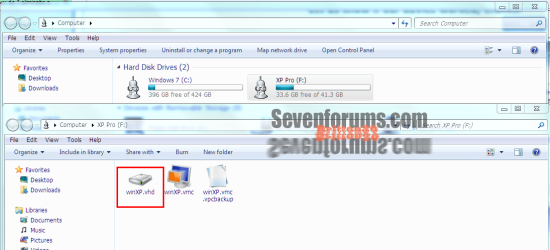
This is how I eliminated my first attempt at VMing. I opened Computer, then the partition the VM is installed on. I deleted the file with the .vhd extension. At that time the other files were gone, this is a new install, also not XP mode.
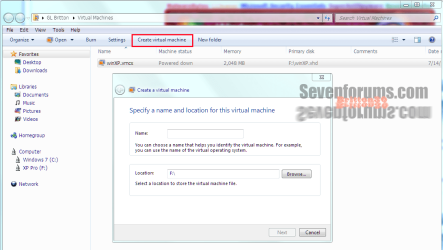
To create a new VHD you click the Create Virtual Machine at the top of the window.
VHD.PNG new VHD.PNG

Since the VM is on one partition I don't think it will show more VHD's until you create them, I've not tried that yet. I haven't been able to see my Win7 drive from the VM either yet.
Also I think....think each OS will need its own VHD, not positive, but seems logical.

OH, right click you VM partition and see if there is a Dismount xxxx image. I had one of those from somewhere.
 

My Computer My Computer

At a glance

Windows 7 Ultimate X64 SP1Intel i5-2550K, Differing ~4.4-4.8GHz No buil...16GB G.Skill Sniper 1866MHz @ 2133MHz 2x8GBASUS GTX650TIB-DC2OC-2GD5, (650TI Boost)
Computer type
PC/Desktop
Computer Manufacturer/Model Number
Home Built Desktop By DataTech
OS
Windows 7 Ultimate X64 SP1
CPU
Intel i5-2550K, Differing ~4.4-4.8GHz No built in GPU
Motherboard
ASUS P8Z68-V PRO/GEN3
Memory
16GB G.Skill Sniper 1866MHz @ 2133MHz 2x8GB
Graphics Card(s)
ASUS GTX650TIB-DC2OC-2GD5, (650TI Boost)
Sound Card
Onboard Realtek 5-1
Monitor(s) Displays
Samsung P2570HD
Screen Resolution
1920x1080
Hard Drives
Samsung 840 Pro 256GB SSD for OS, 500GB Seagate Constellation (Enterprise drive) for Data
PSU
Corsair HX650W
Case
Inwin Dragon Rider
Cooling
Hyper 212 EVO w/two Noctua fans, push-pull, @1300 RPM
Keyboard
E-Z Eyes, bright yellow keys with large characters
Mouse
steelseries SENSEI Laser Pro Gaming
Internet Speed
48-51Mbs Mbs down, 11 Mbs up Xfinity Cable
Antivirus
Norton Internet Security 2013
Browser
IE 10, Opera, Pale Moon if needed
Other Info
4 case fans, LG BluRay-RE, ASUS DVD-RW, Mr. Fusion power supply, 1.21 gigawatts.
I went a bit with trial and error as I did not want to waste much time reading all the manual.
So I installed first the VM in the default folder which is in the same partition C: as the Windows 7 OS. Then I installed Windows XP in the VM from an installation DVD. Then I created the additional vhd files in another partition. Initially the mouse was captured by the VM, so I could not move it freely between the two systems. Also I did not see the other partitions or other disks in the Win 7 system when I was in XP. Then I installed and enabled the integration characteristics from inside the VM via the Tools menu. I also enabled all risources. After this I was able to see the entire system including the Win 7 partition and external HD and could also move the mouse freely between both parts of the screen. When it is on the VM window, it affects the VM. Otherwise you can click also on stuff in the Win7 system.

I was astonished that installing XP in a VM is so relatively easy in Windows Home Premium. Microsoft does not tell you this, they do everything to make you believe you can run XP only on Win 7 prof or ultimate.
I was convinced I had to upgrade, but where I live this seems to be impossible (Central America). Windows Anytime Upgrade is not available here and my computershop has no idea how to get the upgrade key. They sell the laptop with preinstalled Win7 home premium and don't know anything about software.
So I started playing around downloading Virtual PC and discovered that the upgrade was not at all necessary.
Works fine, but I still don't understand how to eliminate the additional virtual disks that I created. Yes I can delete the files, but then the VM gives me the error message and cannot start. I tried to find the "Dismount xxxx image" menu that you mentioned but cannot find it. How do you get there?
You say "right click your VM partition" but this is the same partition where Win7 is installed. There is no such menu item. It should be in the VM configuration menu, but there you can only "create" or "modify" a vhd, not release or eliminate it.

I think the problem is not to eliminate the vhd files (done that) but to tell the virtual machine that it does not look for them anymore. This would require a menu item somewhere that unmounts these vhd so the VM knows they are gone, not just a file delete.
Did you try to create and then delete a 2nd or 3rd vhd file without eliminating the entire virtual machine?
 

My Computer My Computer

At a glance

Windows 7 Home Premium 64bit spanish2,50 gigahertz Intel Core i5-2450M4 GBIntel
Computer type
Laptop
Computer Manufacturer/Model Number
Samsung NP300V4A A0FVE
OS
Windows 7 Home Premium 64bit spanish
CPU
2,50 gigahertz Intel Core i5-2450M
Memory
4 GB
Graphics Card(s)
Intel
Sound Card
Realtek High Definition Audio
Hard Drives
500GB
Internet Speed
2.5 MBps
Antivirus
Avast!
Browser
IE10, Chrome
Finally I got it.

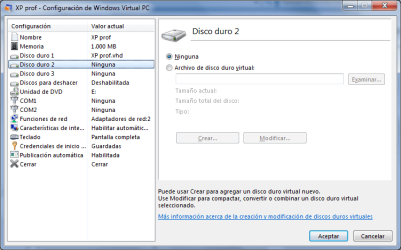
All the time I had overlooked the possibility to select "None" in the configuration menu of the virtual disks. If you select "none" for disk 2 and 3, the VM won't look for them anymore and their vhd files can be deleted. :o

Of course the first disk must stay defined. In my case it is a dynamic virtual disk with a limit of 130 GB, actually it hold only 4 GB. But it can be placed anywhere on my HD, so I can free the partition that I want to modify.
 

My Computer My Computer

At a glance

Windows 7 Home Premium 64bit spanish2,50 gigahertz Intel Core i5-2450M4 GBIntel
Computer type
Laptop
Computer Manufacturer/Model Number
Samsung NP300V4A A0FVE
OS
Windows 7 Home Premium 64bit spanish
CPU
2,50 gigahertz Intel Core i5-2450M
Memory
4 GB
Graphics Card(s)
Intel
Sound Card
Realtek High Definition Audio
Hard Drives
500GB
Internet Speed
2.5 MBps
Antivirus
Avast!
Browser
IE10, Chrome
Good to hear buddy! I don't quite follow when you say select none, but I'm still experimenting too.
As for the Dismount item I had, I have no ide where it came from. I do have Macrium imaging installed, but I've not used it to mount an image. Crazy, huh?

You're right about MS and XP mode. I may try it if this XP VM goes south again. XP mode has all this stuff pre-comfigured, if I read the specs right. The one limitation of VPC is it won't take a 64bit OS.
 

My Computer My Computer

At a glance

Windows 7 Ultimate X64 SP1Intel i5-2550K, Differing ~4.4-4.8GHz No buil...16GB G.Skill Sniper 1866MHz @ 2133MHz 2x8GBASUS GTX650TIB-DC2OC-2GD5, (650TI Boost)
Computer type
PC/Desktop
Computer Manufacturer/Model Number
Home Built Desktop By DataTech
OS
Windows 7 Ultimate X64 SP1
CPU
Intel i5-2550K, Differing ~4.4-4.8GHz No built in GPU
Motherboard
ASUS P8Z68-V PRO/GEN3
Memory
16GB G.Skill Sniper 1866MHz @ 2133MHz 2x8GB
Graphics Card(s)
ASUS GTX650TIB-DC2OC-2GD5, (650TI Boost)
Sound Card
Onboard Realtek 5-1
Monitor(s) Displays
Samsung P2570HD
Screen Resolution
1920x1080
Hard Drives
Samsung 840 Pro 256GB SSD for OS, 500GB Seagate Constellation (Enterprise drive) for Data
PSU
Corsair HX650W
Case
Inwin Dragon Rider
Cooling
Hyper 212 EVO w/two Noctua fans, push-pull, @1300 RPM
Keyboard
E-Z Eyes, bright yellow keys with large characters
Mouse
steelseries SENSEI Laser Pro Gaming
Internet Speed
48-51Mbs Mbs down, 11 Mbs up Xfinity Cable
Antivirus
Norton Internet Security 2013
Browser
IE 10, Opera, Pale Moon if needed
Other Info
4 case fans, LG BluRay-RE, ASUS DVD-RW, Mr. Fusion power supply, 1.21 gigawatts.
I have attached a screen shot. My OS is in spanish, so the top radio button says "ninguno" instead of "none".
Right click on the virtual machine, select configuration, then select one of the 3 hard disks shown and either select "none" or enter a folder address.
I hope this makes it clear. Let me know if you have other questions, will try to figure it out.
 

Attachments

  • MS VM disk config.png
    MS VM disk config.png
    21.6 KB · Views: 11

My Computer My Computer

At a glance

Windows 7 Home Premium 64bit spanish2,50 gigahertz Intel Core i5-2450M4 GBIntel
Computer type
Laptop
Computer Manufacturer/Model Number
Samsung NP300V4A A0FVE
OS
Windows 7 Home Premium 64bit spanish
CPU
2,50 gigahertz Intel Core i5-2450M
Memory
4 GB
Graphics Card(s)
Intel
Sound Card
Realtek High Definition Audio
Hard Drives
500GB
Internet Speed
2.5 MBps
Antivirus
Avast!
Browser
IE10, Chrome
:)Ahhh, OK. Mine was preselected as none for those since I'd not tried more than one disk.
 

My Computer My Computer

At a glance

Windows 7 Ultimate X64 SP1Intel i5-2550K, Differing ~4.4-4.8GHz No buil...16GB G.Skill Sniper 1866MHz @ 2133MHz 2x8GBASUS GTX650TIB-DC2OC-2GD5, (650TI Boost)
Computer type
PC/Desktop
Computer Manufacturer/Model Number
Home Built Desktop By DataTech
OS
Windows 7 Ultimate X64 SP1
CPU
Intel i5-2550K, Differing ~4.4-4.8GHz No built in GPU
Motherboard
ASUS P8Z68-V PRO/GEN3
Memory
16GB G.Skill Sniper 1866MHz @ 2133MHz 2x8GB
Graphics Card(s)
ASUS GTX650TIB-DC2OC-2GD5, (650TI Boost)
Sound Card
Onboard Realtek 5-1
Monitor(s) Displays
Samsung P2570HD
Screen Resolution
1920x1080
Hard Drives
Samsung 840 Pro 256GB SSD for OS, 500GB Seagate Constellation (Enterprise drive) for Data
PSU
Corsair HX650W
Case
Inwin Dragon Rider
Cooling
Hyper 212 EVO w/two Noctua fans, push-pull, @1300 RPM
Keyboard
E-Z Eyes, bright yellow keys with large characters
Mouse
steelseries SENSEI Laser Pro Gaming
Internet Speed
48-51Mbs Mbs down, 11 Mbs up Xfinity Cable
Antivirus
Norton Internet Security 2013
Browser
IE 10, Opera, Pale Moon if needed
Other Info
4 case fans, LG BluRay-RE, ASUS DVD-RW, Mr. Fusion power supply, 1.21 gigawatts.
Back
Top