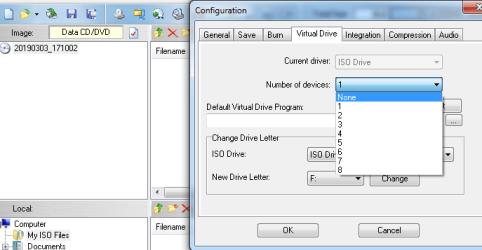
There doesn't seem to be a way to get rid of the virtual drive.
UltraISO shows no way to delete it, and the virtual drive does not show up in Disk Management.
Virtual drive does who up in Windows Explorer.
Windows 7 Prof 64 bit.
I just looked over at the EZB Systems forums and found a couple of virtual drive problems similar to yours. Seems like the common solution is to run the UltraISO program as administrator and set the number of virtual drives to "0".
If you can't find the UltraISO .exe, you might have to download and install the program again.
I uninstalled UltraISO and the virtual drive was delete/purged/whatever.
I rebooted and the virtual drive was still gone. Yippie!
I reinstalled UltraISO and the virtual drive appeared. Problem is the virtual drive doesn't work.
Unintslled UltraISO and rebooted and the virtual drive is gone.
Well I guess I should not use that product. Unless buying it would solve the problem.
THE configuration should work, once this case is presented to me. erase completely and reinstall the software with that and I could configure the virtual drives.