
Solved How do I enable my DNS Cache and my DHCP? I am having internet issues.

MyFaceHole

New member
Local time
4:41 AM
Messages
9
Location
Cant say for sure...
I have been looking everywhere to no avail. None of the things, hotfixes, registry editing, flushing or reseting of my DNS Cache has fixed this issue I have been having for the past week. I have been able to connect to the internet but it is so much slower than usual. I have already contacted my service provider and they are not the problem. Here is some info: My computer is a Windows 7 Ultimate 64-bit connected at a 15mbps down speed and a 3mbps up speed through Comcast. And here is what shows up when I type ipconfig /all in the command prompt with admin permission:

C:\Windows\system32>ipconfig /all

Windows IP Configuration

Host Name . . . . . . . . . . . . : homecomp
Primary Dns Suffix . . . . . . . :
Node Type . . . . . . . . . . . . : Mixed
IP Routing Enabled. . . . . . . . : Yes
WINS Proxy Enabled. . . . . . . . : No

Ethernet adapter Local Area Connection:

Connection-specific DNS Suffix . :
Description . . . . . . . . . . . : NVIDIA nForce 10/100 Mbps Ethernet
Physical Address. . . . . . . . . : 44-87-FC-7A-E2-3B
DHCP Enabled. . . . . . . . . . . : Yes
Autoconfiguration Enabled . . . . : Yes
Link-local IPv6 Address . . . . . : fe80::fdb0:53d0:bb4a:806f%16(Prefer
IPv4 Address. . . . . . . . . . . : 192.168.1.9(Preferred)
Subnet Mask . . . . . . . . . . . : 255.255.255.0
Lease Obtained. . . . . . . . . . : Thursday, November 17, 2011 9:39:48
Lease Expires . . . . . . . . . . : Friday, November 18, 2011 9:39:48 P
Default Gateway . . . . . . . . . : 192.168.1.1
DHCP Server . . . . . . . . . . . : 192.168.1.1
DHCPv6 IAID . . . . . . . . . . . : 272926716
DHCPv6 Client DUID. . . . . . . . : 00-01-00-01-15-2A-E1-43-44-87-FC-7A

DNS Servers . . . . . . . . . . . : 192.168.1.1
NetBIOS over Tcpip. . . . . . . . : Enabled

Tunnel adapter isatap.{8D9B809C-5D6A-4C5F-B3A0-E3CEB3FED1C4}:

Media State . . . . . . . . . . . : Media disconnected
Connection-specific DNS Suffix . :
Description . . . . . . . . . . . : Microsoft ISATAP Adapter
Physical Address. . . . . . . . . : 00-00-00-00-00-00-00-E0
DHCP Enabled. . . . . . . . . . . : No
Autoconfiguration Enabled . . . . : Yes

Tunnel adapter Local Area Connection* 12:

Media State . . . . . . . . . . . : Media disconnected
Connection-specific DNS Suffix . :
Description . . . . . . . . . . . : Teredo Tunneling Pseudo-Interface
Physical Address. . . . . . . . . : 00-00-00-00-00-00-00-E0
DHCP Enabled. . . . . . . . . . . : No
Autoconfiguration Enabled . . . . : Yes

Tunnel adapter 6TO4 Adapter:

Media State . . . . . . . . . . . : Media disconnected
Connection-specific DNS Suffix . :
Description . . . . . . . . . . . : Microsoft 6to4 Adapter #3
Physical Address. . . . . . . . . : 00-00-00-00-00-00-00-E0
DHCP Enabled. . . . . . . . . . . : No
Autoconfiguration Enabled . . . . : Yes

My IPv6 use to be connected and worked just fine but as soon as it disconnected my computer shows this:(attached image) saying I have no connection but when I scroll over it with my mouse it says I am connected. I have tried virtually and physically almost everything to fix this issue but I need somebody smarter and who knows more about this type of issue to help. If you need anymore information I would be glad to supply it.
 

Attachments

  • noconnect.JPG
    noconnect.JPG
    7.6 KB · Views: 622

My Computer My Computer

At a glance

Windows 7 Ultimate 64-bitAMD FX-6100 (6-core)G.SKILL Sniper 8GB DDR3 1333EVGA Classified GTX 560ti 448
OS
Windows 7 Ultimate 64-bit
CPU
AMD FX-6100 (6-core)
Motherboard
ASRock 990FX Extreme4
Memory
G.SKILL Sniper 8GB DDR3 1333
Graphics Card(s)
EVGA Classified GTX 560ti 448
Sound Card
Intergrated Audio Realtek ALC892
Monitor(s) Displays
Envision G19LWk 19"
Screen Resolution
1440X900
Hard Drives
(Primary OS) 80GB: ST380013AS ATA Device
Storage (Broken OS) 1TB: WDC WD10EADS-22M2B0 ATA Device
PSU
RocketFish 900W Peak 1000W
Case
Rosewill Armor Mid Tower PC Case
Cooling
ZALMAN CNPS9900MAX-B (Heatsink) + 10 Case Fans
Keyboard
Standard Walmart eMachines PS2 Keyboard
Mouse
CM Storm Inferno
Internet Speed
25mbps
Other Info
Other Random Stuff:
Eagle Technology ET-AR506-BK Eagle Speaker Arion 2.1 Speakers
3-in-1 Magic Joy Box Gamecube Playstation and Xbox (for emulators)
I have fit the case with as many fans as I could possibly fit, they are in a push pull configuration.
Welcome to SF,

Visit NVIDIA site and download the most recent driver for your network adapter.

Also, are there a few of you sharing the bandwidth in your network?
 

My Computer My Computer

At a glance

Win7 & Win8 64bitIntel i5
Computer Manufacturer/Model Number
Lenovo Desktop/Samsung Laptop
OS
Win7 & Win8 64bit
CPU
Intel i5
Internet Speed
Charter-20 Mbps
Antivirus
Avast
Browser
FF, IE9 and Chrome
I tried to install the Nvidia network access driver version 15.35 from their site and i got fatal errors during the installation but I'm sure the other things that came with it installed. I am still having issues with my connection its still slow as it was yesterday and the IPv6 still hasn't been able to connect. I think the issue may be internal look at the screenshot I attached it says the IPv6 isn't connected. Before these issues had started my IPv6 was connected and my internet speed was smooth and fast, my connection status on the bottom right corner also didn't have the red X through it. Do you think there is anything I can do to fix my DNS cache? Or my IPv6. Thanks for the fast reply by the way. ;)
 

My Computer My Computer

At a glance

Windows 7 Ultimate 64-bitAMD FX-6100 (6-core)G.SKILL Sniper 8GB DDR3 1333EVGA Classified GTX 560ti 448
OS
Windows 7 Ultimate 64-bit
CPU
AMD FX-6100 (6-core)
Motherboard
ASRock 990FX Extreme4
Memory
G.SKILL Sniper 8GB DDR3 1333
Graphics Card(s)
EVGA Classified GTX 560ti 448
Sound Card
Intergrated Audio Realtek ALC892
Monitor(s) Displays
Envision G19LWk 19"
Screen Resolution
1440X900
Hard Drives
(Primary OS) 80GB: ST380013AS ATA Device
Storage (Broken OS) 1TB: WDC WD10EADS-22M2B0 ATA Device
PSU
RocketFish 900W Peak 1000W
Case
Rosewill Armor Mid Tower PC Case
Cooling
ZALMAN CNPS9900MAX-B (Heatsink) + 10 Case Fans
Keyboard
Standard Walmart eMachines PS2 Keyboard
Mouse
CM Storm Inferno
Internet Speed
25mbps
Other Info
Other Random Stuff:
Eagle Technology ET-AR506-BK Eagle Speaker Arion 2.1 Speakers
3-in-1 Magic Joy Box Gamecube Playstation and Xbox (for emulators)
I have fit the case with as many fans as I could possibly fit, they are in a push pull configuration.
Sorry here is the image I mentioned.
 

Attachments

  • ipv6.JPG
    ipv6.JPG
    28.3 KB · Views: 12

My Computer My Computer

At a glance

Windows 7 Ultimate 64-bitAMD FX-6100 (6-core)G.SKILL Sniper 8GB DDR3 1333EVGA Classified GTX 560ti 448
OS
Windows 7 Ultimate 64-bit
CPU
AMD FX-6100 (6-core)
Motherboard
ASRock 990FX Extreme4
Memory
G.SKILL Sniper 8GB DDR3 1333
Graphics Card(s)
EVGA Classified GTX 560ti 448
Sound Card
Intergrated Audio Realtek ALC892
Monitor(s) Displays
Envision G19LWk 19"
Screen Resolution
1440X900
Hard Drives
(Primary OS) 80GB: ST380013AS ATA Device
Storage (Broken OS) 1TB: WDC WD10EADS-22M2B0 ATA Device
PSU
RocketFish 900W Peak 1000W
Case
Rosewill Armor Mid Tower PC Case
Cooling
ZALMAN CNPS9900MAX-B (Heatsink) + 10 Case Fans
Keyboard
Standard Walmart eMachines PS2 Keyboard
Mouse
CM Storm Inferno
Internet Speed
25mbps
Other Info
Other Random Stuff:
Eagle Technology ET-AR506-BK Eagle Speaker Arion 2.1 Speakers
3-in-1 Magic Joy Box Gamecube Playstation and Xbox (for emulators)
I have fit the case with as many fans as I could possibly fit, they are in a push pull configuration.
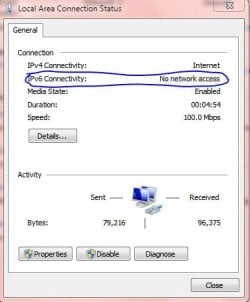
I don't think that IPV6 is an issue, even if you completely disable it.

I don't recall getting an answer for this:
Also, are there a few of you sharing the bandwidth in your network?

Also, what type of AV, Security or Firewall Software do you have installed?

Have you tried booting in Safe Mode with Networking, see if browsing is faster?

Any other computers in your home network experiencing the same issue?

Disabling unnecessary Startup Apps and Services might help. Click on Start and type msconfig press enter, locate the Startup and Services Tabs.
 

My Computer My Computer

At a glance

Win7 & Win8 64bitIntel i5
Computer Manufacturer/Model Number
Lenovo Desktop/Samsung Laptop
OS
Win7 & Win8 64bit
CPU
Intel i5
Internet Speed
Charter-20 Mbps
Antivirus
Avast
Browser
FF, IE9 and Chrome
There is usually only 1 other person in the house using the network at the same time but not as often as i do. I use Avast Antivirus with Internet Security and I have never had any problems with that. None of the other computers have the same issue. I think the issue started when I changed some internet options a little while back but I do not recall what they were. What I would really like to do is delete my current connection and setup a new one but I do not know how to delete and internet connection, and when I try to make a new one it says: "It may take up to 90 seconds for unconfigured devices on your network to appear." Nothing happens even after 20 minutes of having this up. I will try to boot in safe mode with networking and tell you how it goes.
 

My Computer My Computer

At a glance

Windows 7 Ultimate 64-bitAMD FX-6100 (6-core)G.SKILL Sniper 8GB DDR3 1333EVGA Classified GTX 560ti 448
OS
Windows 7 Ultimate 64-bit
CPU
AMD FX-6100 (6-core)
Motherboard
ASRock 990FX Extreme4
Memory
G.SKILL Sniper 8GB DDR3 1333
Graphics Card(s)
EVGA Classified GTX 560ti 448
Sound Card
Intergrated Audio Realtek ALC892
Monitor(s) Displays
Envision G19LWk 19"
Screen Resolution
1440X900
Hard Drives
(Primary OS) 80GB: ST380013AS ATA Device
Storage (Broken OS) 1TB: WDC WD10EADS-22M2B0 ATA Device
PSU
RocketFish 900W Peak 1000W
Case
Rosewill Armor Mid Tower PC Case
Cooling
ZALMAN CNPS9900MAX-B (Heatsink) + 10 Case Fans
Keyboard
Standard Walmart eMachines PS2 Keyboard
Mouse
CM Storm Inferno
Internet Speed
25mbps
Other Info
Other Random Stuff:
Eagle Technology ET-AR506-BK Eagle Speaker Arion 2.1 Speakers
3-in-1 Magic Joy Box Gamecube Playstation and Xbox (for emulators)
I have fit the case with as many fans as I could possibly fit, they are in a push pull configuration.
If you recall when your internet issue starts acting up, you may want to consider a System Restore if you have not done it yet, restore it to a point where it was trouble free.

I would also highly suggest uninstalling your Avast Security software by using this Utility Tool. Reinstall Avast if your issue gets resolved.
 

My Computer My Computer

At a glance

Win7 & Win8 64bitIntel i5
Computer Manufacturer/Model Number
Lenovo Desktop/Samsung Laptop
OS
Win7 & Win8 64bit
CPU
Intel i5
Internet Speed
Charter-20 Mbps
Antivirus
Avast
Browser
FF, IE9 and Chrome
My internet speed is back to normal in safe mode so that excludes my hardware as being an issue. Is there a way i can restore to a previous version of my internet setting only? If there is not I will restore the whole computer.
 

My Computer My Computer

At a glance

Windows 7 Ultimate 64-bitAMD FX-6100 (6-core)G.SKILL Sniper 8GB DDR3 1333EVGA Classified GTX 560ti 448
OS
Windows 7 Ultimate 64-bit
CPU
AMD FX-6100 (6-core)
Motherboard
ASRock 990FX Extreme4
Memory
G.SKILL Sniper 8GB DDR3 1333
Graphics Card(s)
EVGA Classified GTX 560ti 448
Sound Card
Intergrated Audio Realtek ALC892
Monitor(s) Displays
Envision G19LWk 19"
Screen Resolution
1440X900
Hard Drives
(Primary OS) 80GB: ST380013AS ATA Device
Storage (Broken OS) 1TB: WDC WD10EADS-22M2B0 ATA Device
PSU
RocketFish 900W Peak 1000W
Case
Rosewill Armor Mid Tower PC Case
Cooling
ZALMAN CNPS9900MAX-B (Heatsink) + 10 Case Fans
Keyboard
Standard Walmart eMachines PS2 Keyboard
Mouse
CM Storm Inferno
Internet Speed
25mbps
Other Info
Other Random Stuff:
Eagle Technology ET-AR506-BK Eagle Speaker Arion 2.1 Speakers
3-in-1 Magic Joy Box Gamecube Playstation and Xbox (for emulators)
I have fit the case with as many fans as I could possibly fit, they are in a push pull configuration.
You are not restoring your computer to the factory setting, only a couple of weeks back. Anything that was installed, modification, Windows Updates will be affected.
System Restore - Windows 7 features - Microsoft Windows

If System Restore didn't help please proceed with the following tasks in this order:
Please see Post #7 and uninstall Avast, see if your browsing goes back to normal.

If that didn't help, something else might be going on. I would recommend for you to install Free SuperAntiSpyware. Scan for any malicious contents and there's no need for you to post the log, remove any infections found.
 

My Computer My Computer

At a glance

Win7 & Win8 64bitIntel i5
Computer Manufacturer/Model Number
Lenovo Desktop/Samsung Laptop
OS
Win7 & Win8 64bit
CPU
Intel i5
Internet Speed
Charter-20 Mbps
Antivirus
Avast
Browser
FF, IE9 and Chrome
I restored back to November 12th about 2 days before this issue started and the network connectivity icon at the bottom rights still shows an X through it. I just disabled Avast and my internet speed is faster than before, but I still want protection from internet attacks what do you suggest I do? Change Avast settings? Uninstall it completely?
 

My Computer My Computer

At a glance

Windows 7 Ultimate 64-bitAMD FX-6100 (6-core)G.SKILL Sniper 8GB DDR3 1333EVGA Classified GTX 560ti 448
OS
Windows 7 Ultimate 64-bit
CPU
AMD FX-6100 (6-core)
Motherboard
ASRock 990FX Extreme4
Memory
G.SKILL Sniper 8GB DDR3 1333
Graphics Card(s)
EVGA Classified GTX 560ti 448
Sound Card
Intergrated Audio Realtek ALC892
Monitor(s) Displays
Envision G19LWk 19"
Screen Resolution
1440X900
Hard Drives
(Primary OS) 80GB: ST380013AS ATA Device
Storage (Broken OS) 1TB: WDC WD10EADS-22M2B0 ATA Device
PSU
RocketFish 900W Peak 1000W
Case
Rosewill Armor Mid Tower PC Case
Cooling
ZALMAN CNPS9900MAX-B (Heatsink) + 10 Case Fans
Keyboard
Standard Walmart eMachines PS2 Keyboard
Mouse
CM Storm Inferno
Internet Speed
25mbps
Other Info
Other Random Stuff:
Eagle Technology ET-AR506-BK Eagle Speaker Arion 2.1 Speakers
3-in-1 Magic Joy Box Gamecube Playstation and Xbox (for emulators)
I have fit the case with as many fans as I could possibly fit, they are in a push pull configuration.
I thought it was Avast playing up, please proceed to uninstall it, I have provided you the link to use the Uninstall Tool to remove all remnants as well.

Replace Avast with Free MSE, it's an excellent software, use your Windows built-in Firewall and you're good to go.
Microsoft Security Essentials - Free Antivirus for Windows
 

My Computer My Computer

At a glance

Win7 & Win8 64bitIntel i5
Computer Manufacturer/Model Number
Lenovo Desktop/Samsung Laptop
OS
Win7 & Win8 64bit
CPU
Intel i5
Internet Speed
Charter-20 Mbps
Antivirus
Avast
Browser
FF, IE9 and Chrome
Thank you so much for your help I'm glad you took the time to fix my issue.
 

My Computer My Computer

At a glance

Windows 7 Ultimate 64-bitAMD FX-6100 (6-core)G.SKILL Sniper 8GB DDR3 1333EVGA Classified GTX 560ti 448
OS
Windows 7 Ultimate 64-bit
CPU
AMD FX-6100 (6-core)
Motherboard
ASRock 990FX Extreme4
Memory
G.SKILL Sniper 8GB DDR3 1333
Graphics Card(s)
EVGA Classified GTX 560ti 448
Sound Card
Intergrated Audio Realtek ALC892
Monitor(s) Displays
Envision G19LWk 19"
Screen Resolution
1440X900
Hard Drives
(Primary OS) 80GB: ST380013AS ATA Device
Storage (Broken OS) 1TB: WDC WD10EADS-22M2B0 ATA Device
PSU
RocketFish 900W Peak 1000W
Case
Rosewill Armor Mid Tower PC Case
Cooling
ZALMAN CNPS9900MAX-B (Heatsink) + 10 Case Fans
Keyboard
Standard Walmart eMachines PS2 Keyboard
Mouse
CM Storm Inferno
Internet Speed
25mbps
Other Info
Other Random Stuff:
Eagle Technology ET-AR506-BK Eagle Speaker Arion 2.1 Speakers
3-in-1 Magic Joy Box Gamecube Playstation and Xbox (for emulators)
I have fit the case with as many fans as I could possibly fit, they are in a push pull configuration.
You're most Welcome!

I'm grateful that your issue has been resolved.
 

My Computer My Computer

At a glance

Win7 & Win8 64bitIntel i5
Computer Manufacturer/Model Number
Lenovo Desktop/Samsung Laptop
OS
Win7 & Win8 64bit
CPU
Intel i5
Internet Speed
Charter-20 Mbps
Antivirus
Avast
Browser
FF, IE9 and Chrome
Back
Top