How do I *enable* Open File - Security Warning?

alphaphase

New member
Local time
3:27 AM
Messages
6
Hello there,

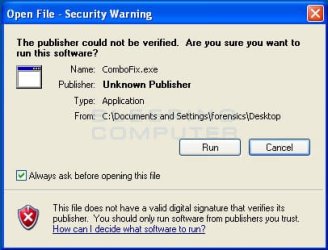
My problem is that mysteriously this pop-up prompt (image: http://www.evernote.com/shard/s2/res/92a15445-b9c2-4981-a7c0-1321339e4e09/open-file-warning.jpg) has stopped appearing with new software albeit I have not (to my knowledge) touched any options that tinker with it.

To no avail, I have reversedly tried everything offered here to *disable* it:
http://www.sevenforums.com/system-security/8642-how-get-rid-open-file-security-warning.html

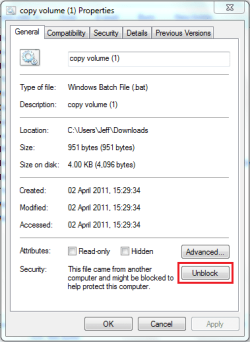
When I go to the properties window of a new file (eg. .exe), I can't find the "Unblock" option in the General tab, though it should be there.

Does anyone have any idea what could be the cause behind this? I have to mention that I have disabled Windows Defender, Windows Firewall, Internet Explorer and a variety of other programs, though I am certain this security prompt does not depend on at least these three aforementioned ones.

Any reply and clue is much appreciated! I hope I didn't leave essential details out, but if I did, please say. Thanks in advance.
 

My Computer

OS
Windows 7 Professional 32bit
Hi and welcome to the Forum. Tiny problem your link to a screenshot returns "Access denied - need to sign in to account" so unable to view! Can you not use the Forum attachment system? Perhaps it is not available to a new member. Try "Image shack" instead
 

My Computer

Computer type
PC/Desktop
OS
Microsoft Windows 7 Home Premium 64-bit 7601 Multiprocessor Free Service Pack 1
CPU
Intel(R) Core(TM) i7-3770 CPU @ 3.40GHz
Motherboard
ASUSTeK COMPUTER INC. P8H77-M
Memory
8.00 GB
Graphics Card(s)
Intel(R) HD Graphics 4000
Sound Card
On Board
Monitor(s) Displays
Dell 24"
Screen Resolution
1920 x 1080
Hard Drives
(1) INTEL SSDSC2CT180A3 ATA Device (2) ST500DM002-1BD142 ATA Device (3) WDC WD3200AAKS-75L9A0 ATA Device (4) Generic- Compact Flash USB Device (5) Generic- MS/MS-Pro USB Device (6) Generic- SD/MMC USB Device (7) Generic- SM/xD-Picture USB
PSU
500w Corsair
Case
Cooler Master
Cooling
3 Fans
Keyboard
Logitech MK300
Mouse
Logitech WOM
Internet Speed
75Mb
Antivirus
Norton 360
Browser
Firefox, Opera, IE
Sure, sorry about that. I would have embedded it but apparently this forum does not support it (?).

Anyway, here's an ImageShack link:

open-file-warning.jpg

I also attached it. Hopefully it works now either way.
 
Last edited by a moderator:

My Computer

OS
Windows 7 Professional 32bit
Your screenshot is from Windows XP. Similar feature in Windows Seven is called UAC (User Account Control). Here's our Brink's tutorial on how to enable and use UAC: http://www.sevenforums.com/tutorials/299-user-account-control-uac-change-notification-settings.html

And here "All you need to know" article by Microsoft: User Account Control Step-by-Step Guide

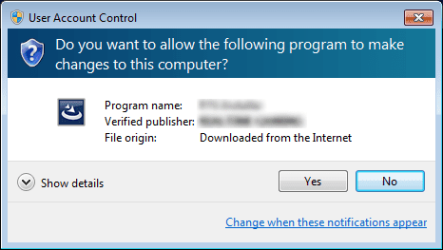
When UAC is enabled, you get this warning when the publisher of the application is verified:

UAC_Blue.png

And this warning when publisher is not verified:

UAC_Yellow.png

Kari
 

My Computer

Computer type
Laptop
Computer Manufacturer/Model Number
HP ENVY 17-1150eg
OS
Windows 10 Pro x64 EN-GB
CPU
1.6 GHz Intel Core i7-720QM Processor
Memory
6 GB
Graphics Card(s)
ATI Mobility Radeon HD 5850 Graphics
Sound Card
Beats sound system with integrated subwoofer
Monitor(s) Displays
17" laptop display, 22" LED and 32" Full HD TV through HDMI
Screen Resolution
1600*900 (1), 1920*1080 (2&3)
Hard Drives
Internal: 2 x 500 GB SATA Hard Disk Drive 7200 rpm
External: 2TB for backups, 3TB USB3 network drive for media
Cooling
As Envy runs a bit warm, I have it on a Cooler Master pad
Keyboard
Logitech diNovo Media Desktop Laser (bluetooth)
Mouse
Logitech Performance Mouse MX
Internet Speed
50/10 Mbps VDSL
Antivirus
Windows Defender 4.3.9431.0
Browser
Maxthon 3.5.2., IE11
Hi Kari, thanks for your reply and you are right, it is from windows XP by the looks of that screenshot (I hunted it down from Google Images in a matter of seconds, so this is my bad). However, there IS almost an exactly similar pop-up prompt in Windows 7. I know this because I have Windows 7 also on my laptop and it displays this prompt when I try to launch new .exes whatsoever - with Internet Explorer disabled. It's not UAC related to my best knowledge. So, the problem still persists.

EDIT: http://www.sevenforums.com/tutorial...urity-warning-allow-prevent-unblock-file.html Here's a thread that relates to my problem. I simply do not have that "Unblock" button there which can be seen in the screenshots. Not for any file, not even the untrusted ones.

What I'm thinking is that I have somehow disabled this "Security" thing, whatever it stands for as a whole. Windows Defender is not behind it, but something must be. My install is pretty fresh (less than two months old), so registry and the like should still be intact.
 

My Computer

OS
Windows 7 Professional 32bit
Have you changed your default browser lately?

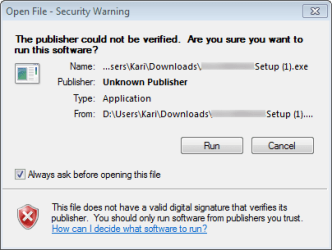
If you download a file and then execute it using IE or Opera, you get the normal Windows UAC message as shown in my previous post when running the file. If you download and then execute a file using Chrome or Firefox, you get a "double check", first this:

Open File - Security Warning.png

And then the normal Windows 7 UAC prompt as shown in my previous post, blue one if publisher is verified and yellow one if publisher is not verified.

This is completely normal behavior of different browsers. To check if I'm right I just tested with a random file from tucows.com. As I said, IE and Opera go directly to blue or yellow Windows 7 UAC prompt, whereas Chrome and Firefox present first the message you are missing and thereafter the UAC prompt.

Kari
 

My Computer

Computer type
Laptop
Computer Manufacturer/Model Number
HP ENVY 17-1150eg
OS
Windows 10 Pro x64 EN-GB
CPU
1.6 GHz Intel Core i7-720QM Processor
Memory
6 GB
Graphics Card(s)
ATI Mobility Radeon HD 5850 Graphics
Sound Card
Beats sound system with integrated subwoofer
Monitor(s) Displays
17" laptop display, 22" LED and 32" Full HD TV through HDMI
Screen Resolution
1600*900 (1), 1920*1080 (2&3)
Hard Drives
Internal: 2 x 500 GB SATA Hard Disk Drive 7200 rpm
External: 2TB for backups, 3TB USB3 network drive for media
Cooling
As Envy runs a bit warm, I have it on a Cooler Master pad
Keyboard
Logitech diNovo Media Desktop Laser (bluetooth)
Mouse
Logitech Performance Mouse MX
Internet Speed
50/10 Mbps VDSL
Antivirus
Windows Defender 4.3.9431.0
Browser
Maxthon 3.5.2., IE11
I'm using Firefox on both this PC and the laptop. On the laptop that message you attached is presented when I click an exe on the desktop, whether Firefox is on or off. On this PC, I only get the UAC message when I run an exe through Firefox. If I click on it on my desktop, I get nothing at all. So that security warning is still missing. Do you know of any settings I should check on top of those that I have already tried in the threads I linked before?
 

My Computer

OS
Windows 7 Professional 32bit
Hi,

The reason for this is because, in Vista/7, the file's zone information is being preserved within the file. As a general practice, this identifies where the file came from and kicks off warnings as appropriate, telling you to be careful.

Unblock.PNG

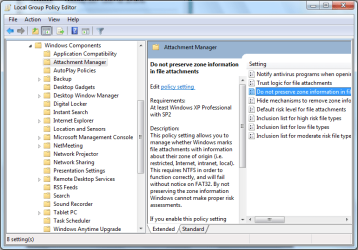
You can try changing the default behavior for this in the Group Policy Editor, type GPEDIT.MSC into the search box (Start Menu) and press enter. Navigate to User Configuration/Administrator Templates/Windows Components/Attatchment Settings and change the value of Do not preserve xone information in file attachments to Enabled.

GPEDIT 1.PNG

   Note
You may need to restart your machine after changing this setting


Hope it helps :)


OS
 

My Computer

Computer Manufacturer/Model Number
Compaq Desktop
OS
Windows 7 Ultimate x64
CPU
AMD Sempron Dual Core
Memory
3GB
Graphics Card(s)
NVIDIA GeForce 6150SE nForce 430
Screen Resolution
1024x768
Hard Drives
150GB Sata
Thanks OS!

In general, that "Open File - Security Warning" is a remain from XP era. It's basically not needed with Seven. When present, enabled, it only causes an extra step; you get first this prompt, and when clicking Run, you get the windows 7 UAC prompt asking the same question.

Kari
 

My Computer

Computer type
Laptop
Computer Manufacturer/Model Number
HP ENVY 17-1150eg
OS
Windows 10 Pro x64 EN-GB
CPU
1.6 GHz Intel Core i7-720QM Processor
Memory
6 GB
Graphics Card(s)
ATI Mobility Radeon HD 5850 Graphics
Sound Card
Beats sound system with integrated subwoofer
Monitor(s) Displays
17" laptop display, 22" LED and 32" Full HD TV through HDMI
Screen Resolution
1600*900 (1), 1920*1080 (2&3)
Hard Drives
Internal: 2 x 500 GB SATA Hard Disk Drive 7200 rpm
External: 2TB for backups, 3TB USB3 network drive for media
Cooling
As Envy runs a bit warm, I have it on a Cooler Master pad
Keyboard
Logitech diNovo Media Desktop Laser (bluetooth)
Mouse
Logitech Performance Mouse MX
Internet Speed
50/10 Mbps VDSL
Antivirus
Windows Defender 4.3.9431.0
Browser
Maxthon 3.5.2., IE11
Yes but some like the added security ;)
 

My Computer

Computer Manufacturer/Model Number
Compaq Desktop
OS
Windows 7 Ultimate x64
CPU
AMD Sempron Dual Core
Memory
3GB
Graphics Card(s)
NVIDIA GeForce 6150SE nForce 430
Screen Resolution
1024x768
Hard Drives
150GB Sata
LOL!

My opinion of added security is not to have same question asked twice ;)

Kari
 

My Computer

Computer type
Laptop
Computer Manufacturer/Model Number
HP ENVY 17-1150eg
OS
Windows 10 Pro x64 EN-GB
CPU
1.6 GHz Intel Core i7-720QM Processor
Memory
6 GB
Graphics Card(s)
ATI Mobility Radeon HD 5850 Graphics
Sound Card
Beats sound system with integrated subwoofer
Monitor(s) Displays
17" laptop display, 22" LED and 32" Full HD TV through HDMI
Screen Resolution
1600*900 (1), 1920*1080 (2&3)
Hard Drives
Internal: 2 x 500 GB SATA Hard Disk Drive 7200 rpm
External: 2TB for backups, 3TB USB3 network drive for media
Cooling
As Envy runs a bit warm, I have it on a Cooler Master pad
Keyboard
Logitech diNovo Media Desktop Laser (bluetooth)
Mouse
Logitech Performance Mouse MX
Internet Speed
50/10 Mbps VDSL
Antivirus
Windows Defender 4.3.9431.0
Browser
Maxthon 3.5.2., IE11
Thanks Orbital Shark, but even that didn't help. I tried it with Enabled and Disabled, restarted each time, but I still don't get the Security Warning. Only UAC. Are we running out of options soon?
 

My Computer

OS
Windows 7 Professional 32bit
Do you have any add-ons installed for Firefox? If so, 1 of them may be making security changes to your downloaded files. I've just downloaded something using FF and get the Warning message every time, even running from the Downloads popup.
 

My Computer

Computer Manufacturer/Model Number
Compaq Desktop
OS
Windows 7 Ultimate x64
CPU
AMD Sempron Dual Core
Memory
3GB
Graphics Card(s)
NVIDIA GeForce 6150SE nForce 430
Screen Resolution
1024x768
Hard Drives
150GB Sata
Alphaphase, please do not misunderstand me now, please believe I have only positive motives to ask you this:

Why do you think it is so important for you to get the same question asked twice? Basically, the "Open File - Security Warning" is a predecessor of UAC feature used by Seven. The only thing it does is to ask precisely the same question UAC asks you straight after you have first answered yes to this security warning. The only effect is you get the same question asked twice, with a slightly different prompt (old versus new).

:) Kari
 

My Computer

Computer type
Laptop
Computer Manufacturer/Model Number
HP ENVY 17-1150eg
OS
Windows 10 Pro x64 EN-GB
CPU
1.6 GHz Intel Core i7-720QM Processor
Memory
6 GB
Graphics Card(s)
ATI Mobility Radeon HD 5850 Graphics
Sound Card
Beats sound system with integrated subwoofer
Monitor(s) Displays
17" laptop display, 22" LED and 32" Full HD TV through HDMI
Screen Resolution
1600*900 (1), 1920*1080 (2&3)
Hard Drives
Internal: 2 x 500 GB SATA Hard Disk Drive 7200 rpm
External: 2TB for backups, 3TB USB3 network drive for media
Cooling
As Envy runs a bit warm, I have it on a Cooler Master pad
Keyboard
Logitech diNovo Media Desktop Laser (bluetooth)
Mouse
Logitech Performance Mouse MX
Internet Speed
50/10 Mbps VDSL
Antivirus
Windows Defender 4.3.9431.0
Browser
Maxthon 3.5.2., IE11
I tried it with a clean Firefox profile (ie. without addons and such) to no avail, so it cannot be about addons or my current FF profile either.

Kari, yes, you are making a valid point. I too have to stress that this is not the most important issue and certainly not something I would lose my sleep over. My view to this matter is, though, that since I am relatively new to Windows 7 (I was a dedicated Windows XP advocate for the last six years, with the very same install from start to finish) I would like to get to know all the twists and knobs it offers - just to familiarize with the system. Usually when I've run into small problems like these, Google has been of help, but not this time. So it reached almost annoying heights for me and I decided to ask here... :)

I know my security won't be breached by this, of course, and if this remains unsolved so be it. But it never hurts to ask.
 

My Computer

OS
Windows 7 Professional 32bit
Usually when I've run into small problems like these, Google has been of help, but not this time.
:) I know what you are saying... Trying to find a solution for you, I tried to Google (and Bing ;)) "Turn on Open File - Security Warning". Nothing, only how to turn it off. "Reverse Engineering" seems not to be working, reenabling everything does not bring the warning back.

Funny, when you think of it! I very sincerely hope you find a valid answer. Sorry I am not capable of helping you.

Kari
 

My Computer

Computer type
Laptop
Computer Manufacturer/Model Number
HP ENVY 17-1150eg
OS
Windows 10 Pro x64 EN-GB
CPU
1.6 GHz Intel Core i7-720QM Processor
Memory
6 GB
Graphics Card(s)
ATI Mobility Radeon HD 5850 Graphics
Sound Card
Beats sound system with integrated subwoofer
Monitor(s) Displays
17" laptop display, 22" LED and 32" Full HD TV through HDMI
Screen Resolution
1600*900 (1), 1920*1080 (2&3)
Hard Drives
Internal: 2 x 500 GB SATA Hard Disk Drive 7200 rpm
External: 2TB for backups, 3TB USB3 network drive for media
Cooling
As Envy runs a bit warm, I have it on a Cooler Master pad
Keyboard
Logitech diNovo Media Desktop Laser (bluetooth)
Mouse
Logitech Performance Mouse MX
Internet Speed
50/10 Mbps VDSL
Antivirus
Windows Defender 4.3.9431.0
Browser
Maxthon 3.5.2., IE11
Back
Top