Hi forum. I have an OCZ 512GB SSD and 6TB Wesern Digital HD running on Win 7 64bit ultimate custom build. The previous not so old previous sata Hd's being 3tb and 1.5tb I wont to add without losing any data that is on them. I had terrible problems with Acronis software that came with the SSD and gave up on it as were unable to help me. So purchased a new 6tb HD as a 2nd HD to get up and running.
However I now Have a 3tb HD ? formatted as had Win 10 on it a free download - but not happy with it and went back to win 7- which keeps trying to give this back to me as an important update (no mention at all it is a win 10 permanent advert). So as I now know this I don't download it but is easy to do so as mixed in with other (important)updates as is the intention and very sneaky) Plus a 1.5 TB HD also full with video/photos etc.
Now I have installed these two drives (not as a 1st boot of course) - looked at Bios and changed boot sequence a few times.1st lised as UEFI. But having not done this before I thought it would be simple- but so far not seen theses HD's in the Bios or shown on computer. I understand I need to give them drive letter's i.e V for video as Letters F.G.H.I already used up as a portable device i.e card reader. It appears most help assume it is to format new HD's. Which I most definately don't want on the 1.5tb as need data for my video editing software. I recall putting important info onto the 512gb SSD from the 3TB HD and I think I formatted this one to get rid of win 10 as was nowhere as secure as win 7 probably why it was free ( assumption based on Bitdefender reports). I know I can possibly use these as external HD's via extrnal USB. But USB seems stupid. I would like to use the remaing space and keep for storage- I recall the 1.5 tb is actually full.
Sorry if this is a bit long/dis-jointed. Basically am trying to add these two drives without losing any data ? via disk management. I'm sure im missing something silly in getting pc to recognise these drives. etc.
Any one able to put me in the right place and or give an exact plan to follow. Or at least get the 1.5tb HD up and running in system as this has important video data I use in conjunction with my editing software.
Many thanks for any help Robo 5.
Just connect the drives to sata data and power, boot the system.
If you cannot see the drives in windows check the drive management and make sure they are assigned drive letters.
Once you can see the drives in windows go to properties at the root of each drive and give your current (admin) user full access, may need to take ownership, and make sure this is cascaded to all sub folders
If you have issues as one or more of the old drives are still marked active from the previous system installs you can correct this using Partition wizard
Once you are up and running it is probably a good idea to move the required data onto the new drive, temporarily and wipe and reformat the older drives
Windows 11 Pro x64 [Latest Release and Releas...Ryzen 9 5950X, 3.8 - 5.2 MHz64GB [2 x 32GB] DDR4 3200MHz4GB NVIDIA GEFORCE GTX 1650 Ti
Computer type
PC/Desktop
Computer Manufacturer/Model Number
ChillBlast - Custom to my design
OS
Windows 11 Pro x64 [Latest Release and Release Preview]
CPU
Ryzen 9 5950X, 3.8 - 5.2 MHz
Motherboard
Asus Prime X570-Pro
Memory
64GB [2 x 32GB] DDR4 3200MHz
Graphics Card(s)
4GB NVIDIA GEFORCE GTX 1650 Ti
Sound Card
On-board SPDIF to 5.1 System + HDMI [5.1 system]
Monitor(s) Displays
32" UHD 32 Bit HDR Monitor + 43" UHD 4K 32Bit HDR TV
Screen Resolution
2 x 3840 x 2160 @60Hz
Hard Drives
1TB M2 SSD OS, 500GB Fast Access SSD, 2 x 8TB Data + Various Externals from 1TB to 4TB, 10TB NAS
PSU
NZXT C750 80 PLUS Gold 750W Modular PSU
Case
Workstation Case [Matt Black]
Cooling
NZXT Kraken X63 280mm CPU Cooler +2x Quiet Case fans
Keyboard
Logitech Wireless MX Keys & K400 + others
Mouse
Logitech Wireless MX Master 3S
Internet Speed
920 MB Down 50 MB Up
Antivirus
BitDefender Total Security Pro
Browser
Chrome (always run latest Non-Beta)
Other Info
Also run ...
Laptop - Quad 8GB - Windows 10 Pro x64
Nexus 7 Android tablet x2
Samsung 10.2" tablet
Blackview TAB 8 4G Android Tablet c/w Keyboard
Wacom Intuos Pro Medium Pen Pad
Wacom Intuos Pro Small Pen Pad
Wacom Expresskeys Remote
Loopdeck+ Graphics Controller
Shuttle Pro v2 Control
At a glance
Windows 11 Pro x64 Latest RPIntel I7 10750H 5.0GHz32GB [2x16GB] DDR4 2933 MHznVidia GTX1650Ti 4 GB GDDR6
Computer type
Laptop
System Manufacturer/Model Number
Dell XPS 17 10750H
OS
Windows 11 Pro x64 Latest RP
CPU
Intel I7 10750H 5.0GHz
Motherboard
Dell XPS
Memory
32GB [2x16GB] DDR4 2933 MHz
Graphics Card(s)
nVidia GTX1650Ti 4 GB GDDR6
Sound Card
Stock [Realtek] 4 Speaker
Monitor(s) Displays
17" IPS UHD+ Infinity Edge Touchscreen
Screen Resolution
3840 x 2400
Hard Drives
2TB M2 NVMe, 4TB External + various 500GB & 1TB External NVMe (also have access to spinner HDD from
PSU
Stock
Case
Stock XPS Aluminium & Carbon Fibre
Cooling
Stock - Active Fan Control
Keyboard
Backlit + Various Logitech
Mouse
Stock Track Pad + Logitech MX Trackball
Internet Speed
72 MB Down 18MB Up
Browser
Chrome
Other Info
Also run ...
Laptop - Quad 8GB - Windows 10 Pro x64
Nexus 7 Android tablet x2
10.2" tablet
Sony Z3 Android Smartphone
Wacom Intuos Pro Medium Pen Pad
Wacom Intuos Pro Small Pen Pad
Wacom Expresskeys Remote
Loopdeck+ Graphics Controller
Shuttle Pro v2 Control Pad
10TB NAS
I believe Barman pretty much summed up the drive issues
My Computer
At a glance
Win-7-Pro64bit 7-H-Prem-64biti7-5930K 2nd i9-9940x both water blocked VRM'...Trident-z 3200C14 2nd Trident-z 3600C16EVGA 1080ti ftw3 2nd Titan Xp both water blocked
Computer type
PC/Desktop
Computer Manufacturer/Model Number
Custom assembled by me :}
OS
Win-7-Pro64bit 7-H-Prem-64bit
CPU
i7-5930K 2nd i9-9940x both water blocked VRM's too
2nd ASUS X299 Apex/Intel i9-9940x with Custom water loop/7H-Prem-x64/Corsair 450D case/Ram Trident-z 3600C16 4x8gb / Samsung970Evo plus 500gb SSD/Dual ssd EZ swap evo/PSU EVGA SuperNova 1200w-P2 80+Platinum/GPU Titan Xp /8-ML-140 on push-pull on 2-280GTX rads
Many thanks Barman 58 and Thrashzone (Great Handles) for very quick reply. Barman 58 you put me in right direction- clear info- however still had a problem- strange on occassion I was getting a boot up with all four drives but mostly not as windows wanted win 7 dvd- but did nothing except check drives for errors. I realised one drive was EFI so used disk management to reinitialize the 3TB drive after changing to GPT. Rather than MBR to allow over 2TB. Seems to have worked. I noted on cmd prompt list disk another drive 6TB not master SSD had an asterisk on the right side indicating EFI. Yet not shown on disk management - so am confused- yet all for the moment seems ok. I am leaving this drive for the moment as a lot of info on it. So thanks again. Having restarted a few times boots up ok. I think a little slow for an ssd. Something else I will be checking on.
Thrashzone thanks. As for the irritating win 10 advert on start up- I had thought I had shut it down. But what caught me out is the fact it is hidden with other "Important " updates so you get it back. Other updates explain what they are- but not this 10 update- WHICH SHOULD BE STATED. However the link provided was different to the method I had used. So much better if downloading future updates - expect they will be few but offending update should not sneak in again.
Sorry if delay in replying. Robo 5
Hi,
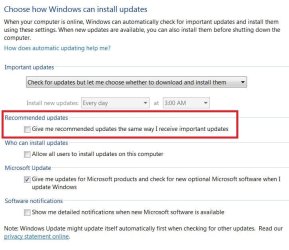
Most of the problem with the win-10 updates is really just a simple misunderstanding of the update settings that mix up the win-10 recommended updates with real Important updates
As long as the Give me recommended updates the same as important updates is Unchecked they should not cause any I'll effects
Just ignore the Optional section How to remove Windows 10 upgrade updates in Windows 7 and 8 - gHacks Tech News
KB2952664
KB2999226
KB3035583
KB3075249
KB3013531
KB3021917
KB3068708
KB3080149
KB3123862
My Computer
At a glance
Win-7-Pro64bit 7-H-Prem-64biti7-5930K 2nd i9-9940x both water blocked VRM'...Trident-z 3200C14 2nd Trident-z 3600C16EVGA 1080ti ftw3 2nd Titan Xp both water blocked
Computer type
PC/Desktop
Computer Manufacturer/Model Number
Custom assembled by me :}
OS
Win-7-Pro64bit 7-H-Prem-64bit
CPU
i7-5930K 2nd i9-9940x both water blocked VRM's too
2nd ASUS X299 Apex/Intel i9-9940x with Custom water loop/7H-Prem-x64/Corsair 450D case/Ram Trident-z 3600C16 4x8gb / Samsung970Evo plus 500gb SSD/Dual ssd EZ swap evo/PSU EVGA SuperNova 1200w-P2 80+Platinum/GPU Titan Xp /8-ML-140 on push-pull on 2-280GTX rads