Solved How do I find the boot option menu for a new SSD cloned from HDD?

xlcgroup

New member
Member
Local time
11:16 AM
Messages
60
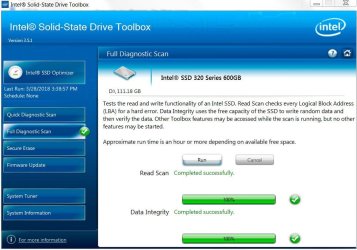
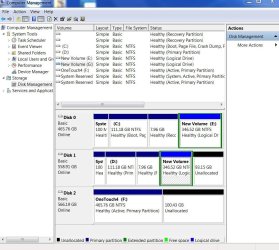
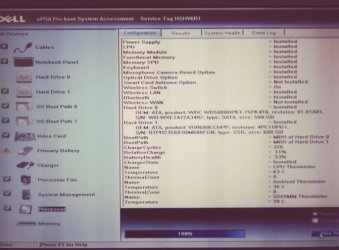
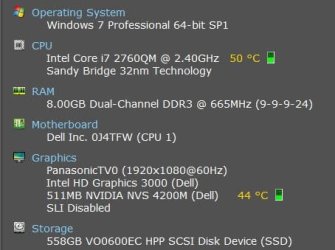
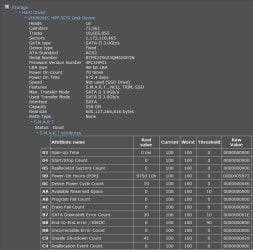
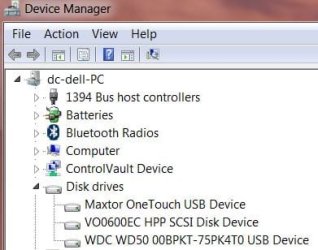
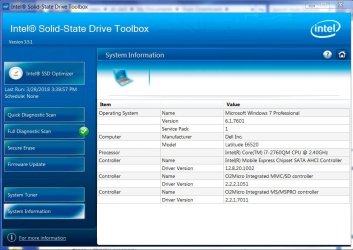
I bought 3 SSD's to upgrade all my machines. I have formatted, made a clone of my C: to my SSD (D:) including all existing partitions which leaves me about 100 GB's of unallocated space. I can confirm that the SSD is displayed under My Computer, Intel SSD Toolbox, ePSA, Disk Management and Speccy.

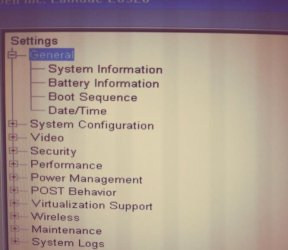
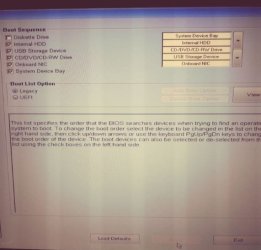
When I go to BIOS (A20), I cannot see the list of boot options at all including Boot from USB, CD, HDD, etc.
I checked every menu and sub-menu. Nothing. Here is what I see. I just want to be able to run the OS from the SSD from now on and use the HDD just as a restore point in case things go south.

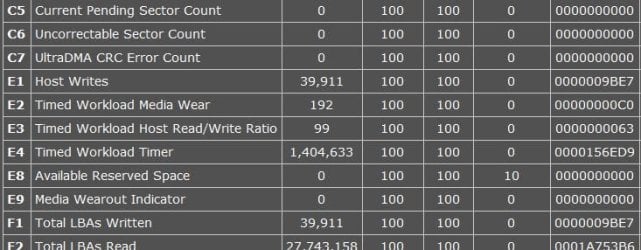
I will include 3 more pics after this post, max of 5. Any help would be greatly appreciated.
 

Attachments
  • intel ssd toolbox.JPG
    intel ssd toolbox.JPG
    88.5 KB · Views: 1
  • Capture 2.JPG
    Capture 2.JPG
    89.5 KB · Views: 0
  • Capture 3.JPG
    Capture 3.JPG
    115.9 KB · Views: 0
Last edited:

My Computer My Computer

At a glance

Windows 7 Pro, 64-bit, SP1intel Core i7-2760QM @ 2.40 GHz - Sandy Bridg...8.00GB Dual-Channel DDR3 @ 665MHz (9-9-9-24)511MB NVIDIA NVS 4200M (Dell)
Computer type
Laptop
Computer Manufacturer/Model Number
DELL LATTITUDE E6520
OS
Windows 7 Pro, 64-bit, SP1
CPU
intel Core i7-2760QM @ 2.40 GHz - Sandy Bridge 32nm
Motherboard
Dell Inc. 0J4TFW (CPU 1)
Memory
8.00GB Dual-Channel DDR3 @ 665MHz (9-9-9-24)
Graphics Card(s)
511MB NVIDIA NVS 4200M (Dell)
Sound Card
NVIDIA High Definition Audio
Monitor(s) Displays
Panasonic 55"
Screen Resolution
1920 x 1080@ 60Hz
Hard Drives
465GB WD WDC WD50000BKPT-75PK4 (SATA)
558GB INTEL 320 SERIES VO0600EC HPP (SATA)
556GB MAXTOR ONETOUCH USB DEVICE (SATA)
Antivirus
MalwareBytes
Browser
Firefox
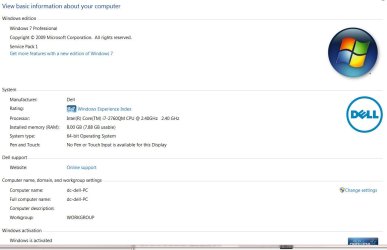
It's a Dell Lattitude E6520 Laptop.

I have never seen a BIOS where I couldn't see any of the drives at all. I can move the order around but I can't get a list so I can't pick from HDD or SSD.

Here are the BIOS pics, please let me know if I am leaving anything out and thank you in advance!
 

Attachments

  • CaptureC.JPG
    CaptureC.JPG
    43.2 KB · Views: 48
  • CaptureF.JPG
    CaptureF.JPG
    38.4 KB · Views: 46
  • CaptureG.JPG
    CaptureG.JPG
    77.1 KB · Views: 2
  • CaptureD.JPG
    CaptureD.JPG
    39.5 KB · Views: 48
  • CaptureB.JPG
    CaptureB.JPG
    26.2 KB · Views: 48

My Computer My Computer

At a glance

Windows 7 Pro, 64-bit, SP1intel Core i7-2760QM @ 2.40 GHz - Sandy Bridg...8.00GB Dual-Channel DDR3 @ 665MHz (9-9-9-24)511MB NVIDIA NVS 4200M (Dell)
Computer type
Laptop
Computer Manufacturer/Model Number
DELL LATTITUDE E6520
OS
Windows 7 Pro, 64-bit, SP1
CPU
intel Core i7-2760QM @ 2.40 GHz - Sandy Bridge 32nm
Motherboard
Dell Inc. 0J4TFW (CPU 1)
Memory
8.00GB Dual-Channel DDR3 @ 665MHz (9-9-9-24)
Graphics Card(s)
511MB NVIDIA NVS 4200M (Dell)
Sound Card
NVIDIA High Definition Audio
Monitor(s) Displays
Panasonic 55"
Screen Resolution
1920 x 1080@ 60Hz
Hard Drives
465GB WD WDC WD50000BKPT-75PK4 (SATA)
558GB INTEL 320 SERIES VO0600EC HPP (SATA)
556GB MAXTOR ONETOUCH USB DEVICE (SATA)
Antivirus
MalwareBytes
Browser
Firefox
How did you clone the HDD to the SSD? What program did you use?
Some programs need to shutdown after cloning to transfer some boot files that are in use.

Does the laptop has two HDD bays? Did you replace the original HDD by the SSD?
 

My Computers My Computers

  • At a glance

    Windows 7 HP 64i5 6600K - 800MHz to 4200MHz4+4G GSkill DDR4 3000IG - Intel 530
    Computer type
    PC/Desktop
    Computer Manufacturer/Model Number
    custom build
    OS
    Windows 7 HP 64
    CPU
    i5 6600K - 800MHz to 4200MHz
    Motherboard
    GA-Z170-HD3P
    Memory
    4+4G GSkill DDR4 3000
    Graphics Card(s)
    IG - Intel 530
    Monitor(s) Displays
    Samsung 226BW
    Screen Resolution
    1680x1050
    Hard Drives
    (1) -1 SM951 – 128GB M.2 AHCI PCIe SSD drive for Windows 7 and Lubuntu
    (2) -1 WD SATA 3 - 1T for Data
    (3) -1 WD SATA 3 - 1T for backup
    PSU
    Thermaltake 450W TR2 gold
    Keyboard
    Old and good Chicony mechanical keyboard
    Mouse
    Logitech mX performance - 9 buttons (had to disable some)
    Internet Speed
    500Mb/s
    Browser
    Firefox 64
    Other Info
    TinyWall firewall
  • At a glance

    Windows 7 Proi7-4500U 800MHz to 3.0GHz(4+4)G DDR3 1600IG intel 4400 + NVIDIA GeForce GT 745M
    Computer type
    Laptop
    System Manufacturer/Model Number
    Asus Q550LF
    OS
    Windows 7 Pro
    CPU
    i7-4500U 800MHz to 3.0GHz
    Motherboard
    Asus Q550LF
    Memory
    (4+4)G DDR3 1600
    Graphics Card(s)
    IG intel 4400 + NVIDIA GeForce GT 745M
    Sound Card
    Realtek
    Monitor(s) Displays
    LG Display LP156WF4-SPH1
    Screen Resolution
    1920 x 1080
    Hard Drives
    BX500 120G SSD for Windows and programs +
    1T HDD for data
    Internet Speed
    500 Mb/s
    Browser
    Firefox
    Other Info
    TinyWall firewall
I used macrium reflect to clone drive from hdd to ssd.

I will try your advice tonight at home. Hope this is all it takes to experience ssd power for the first time! :cool:

Thank you for your help!

Btw, I did try restarting to no avail. I never got around the BIOS change but seems like I did everything else.

The laptop has one hdd bay and I used a drive caddy to be able to swap out my dvd rom. So i was planning on using the caddy as my primary and when i need to use the CD, I can run the OS from hdd. Seems like that would be easier than swapping out the hdd for the sdd considering I want to keep the hdd as a reserve drive in case something happens to the ssd.
 

My Computer My Computer

At a glance

Windows 7 Pro, 64-bit, SP1intel Core i7-2760QM @ 2.40 GHz - Sandy Bridg...8.00GB Dual-Channel DDR3 @ 665MHz (9-9-9-24)511MB NVIDIA NVS 4200M (Dell)
Computer type
Laptop
Computer Manufacturer/Model Number
DELL LATTITUDE E6520
OS
Windows 7 Pro, 64-bit, SP1
CPU
intel Core i7-2760QM @ 2.40 GHz - Sandy Bridge 32nm
Motherboard
Dell Inc. 0J4TFW (CPU 1)
Memory
8.00GB Dual-Channel DDR3 @ 665MHz (9-9-9-24)
Graphics Card(s)
511MB NVIDIA NVS 4200M (Dell)
Sound Card
NVIDIA High Definition Audio
Monitor(s) Displays
Panasonic 55"
Screen Resolution
1920 x 1080@ 60Hz
Hard Drives
465GB WD WDC WD50000BKPT-75PK4 (SATA)
558GB INTEL 320 SERIES VO0600EC HPP (SATA)
556GB MAXTOR ONETOUCH USB DEVICE (SATA)
Antivirus
MalwareBytes
Browser
Firefox
Windows won't boot from a external device.
You must replace the HDD with the SSD.
Unplug the charger from the laptop, take the battery off, open the HDD door, take the screws out and change the HDD by the SSD.
On most laptops, the HDD isn't attached directly to the laptop case. It is inside a metallic frame. In this case you will need to take the frame out the laptop, take out the HDD from the frame, insert the SSD into the frame and then the frame back to the laptop.
Be careful not to change screws as the might be different sizes. Line them up when disassembling and put them back on the reverse order.
Also, there probably be no separate power and SATA cables but only one connector. Be gently as it's fragile.

Be free to ask. You're welcome.

After you able to boot from the SSD, replace the ODD by the original HDD.

Remember: It is never a good idea to have a Backup on the same laptop. If you loose it, you loose everything.
 
Last edited:

My Computers My Computers

  • At a glance

    Windows 7 HP 64i5 6600K - 800MHz to 4200MHz4+4G GSkill DDR4 3000IG - Intel 530
    Computer type
    PC/Desktop
    Computer Manufacturer/Model Number
    custom build
    OS
    Windows 7 HP 64
    CPU
    i5 6600K - 800MHz to 4200MHz
    Motherboard
    GA-Z170-HD3P
    Memory
    4+4G GSkill DDR4 3000
    Graphics Card(s)
    IG - Intel 530
    Monitor(s) Displays
    Samsung 226BW
    Screen Resolution
    1680x1050
    Hard Drives
    (1) -1 SM951 – 128GB M.2 AHCI PCIe SSD drive for Windows 7 and Lubuntu
    (2) -1 WD SATA 3 - 1T for Data
    (3) -1 WD SATA 3 - 1T for backup
    PSU
    Thermaltake 450W TR2 gold
    Keyboard
    Old and good Chicony mechanical keyboard
    Mouse
    Logitech mX performance - 9 buttons (had to disable some)
    Internet Speed
    500Mb/s
    Browser
    Firefox 64
    Other Info
    TinyWall firewall
  • At a glance

    Windows 7 Proi7-4500U 800MHz to 3.0GHz(4+4)G DDR3 1600IG intel 4400 + NVIDIA GeForce GT 745M
    Computer type
    Laptop
    System Manufacturer/Model Number
    Asus Q550LF
    OS
    Windows 7 Pro
    CPU
    i7-4500U 800MHz to 3.0GHz
    Motherboard
    Asus Q550LF
    Memory
    (4+4)G DDR3 1600
    Graphics Card(s)
    IG intel 4400 + NVIDIA GeForce GT 745M
    Sound Card
    Realtek
    Monitor(s) Displays
    LG Display LP156WF4-SPH1
    Screen Resolution
    1920 x 1080
    Hard Drives
    BX500 120G SSD for Windows and programs +
    1T HDD for data
    Internet Speed
    500 Mb/s
    Browser
    Firefox
    Other Info
    TinyWall firewall
Windows won't boot from a external device.
You must replace the HDD with the SSD.
Unplug the charger from the laptop, take the battery off, open the HDD door, take the screws out and change the HDD by the SSD.
On most laptops, the HDD isn't attached directly to the laptop case. It is inside a metallic frame. In this case you will need to take the frame out the laptop, take out the HDD from the frame, insert the SSD into the frame and then the frame back to the laptop.
Be careful not to change screws as the might be different sizes. Line them up when disassembling and put them back on the reverse order.
Also, there probably be no separate power and SATA cables but only one connector. Be gently as it's fragile.

Be free to ask. You're welcome.

After you able to boot from the SSD, replace the ODD by the original SSD.

Remember: It is never a good idea to have a Backup on the same laptop. If you loose it, you loose everything.

I don't think we're on the same page.
I have a drive caddy which allows me to swap out my CD drive for a 2.5" SSD drive enclosure. I swapped it out and it is recognized by the OS, I just couldn't get it to boot from there... until today.


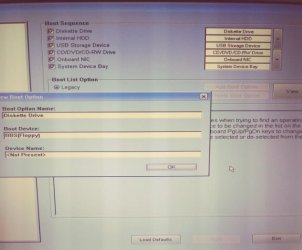
In pic 1, you see my options for the boot menu. "System device bay", the last option on the list is where I found my SSD just now!!! The model number is right and everything.

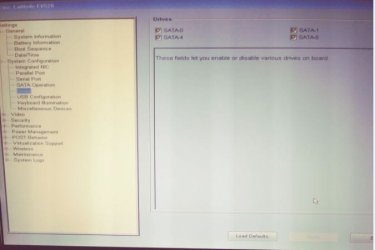
Pic 2 is what device is listed for internal HDD. I didn't know where to find SSD yesterday so I called it a day after hours of research.

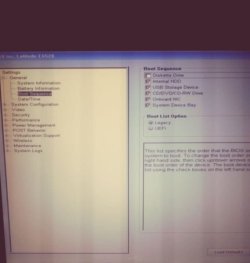
Pic 3 is the BIOS menu. When I hit system device bay, the SSD is used to boot from... and man, what a thing of beauty. From that point to fully loading W7 + 6-7 programs that auto-load on startup takes about 35 seconds.

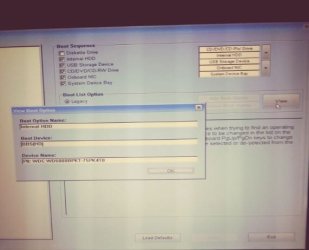
Pic 4 is how I saved my new boot order but left like this, it is still booting from the HDD, I know because it takes 1:47 to fully load when I don't use system device bay to load W7.

I am missing something here but at least I know I can boot from the SSD now, just need to figure out how to do it w/o the use of system device bay.
 

Attachments

  • aa.JPG
    aa.JPG
    27.5 KB · Views: 32
  • bb.JPG
    bb.JPG
    29 KB · Views: 32
  • cc.JPG
    cc.JPG
    27.1 KB · Views: 32
  • dd.JPG
    dd.JPG
    37.2 KB · Views: 33

My Computer My Computer

At a glance

Windows 7 Pro, 64-bit, SP1intel Core i7-2760QM @ 2.40 GHz - Sandy Bridg...8.00GB Dual-Channel DDR3 @ 665MHz (9-9-9-24)511MB NVIDIA NVS 4200M (Dell)
Computer type
Laptop
Computer Manufacturer/Model Number
DELL LATTITUDE E6520
OS
Windows 7 Pro, 64-bit, SP1
CPU
intel Core i7-2760QM @ 2.40 GHz - Sandy Bridge 32nm
Motherboard
Dell Inc. 0J4TFW (CPU 1)
Memory
8.00GB Dual-Channel DDR3 @ 665MHz (9-9-9-24)
Graphics Card(s)
511MB NVIDIA NVS 4200M (Dell)
Sound Card
NVIDIA High Definition Audio
Monitor(s) Displays
Panasonic 55"
Screen Resolution
1920 x 1080@ 60Hz
Hard Drives
465GB WD WDC WD50000BKPT-75PK4 (SATA)
558GB INTEL 320 SERIES VO0600EC HPP (SATA)
556GB MAXTOR ONETOUCH USB DEVICE (SATA)
Antivirus
MalwareBytes
Browser
Firefox
Well, that was short lived. I woke up this morning to try to boot manually from the SSD (System Device Bay, as posted yesterday)... now that System Device Bay is missing and replaced with this. How does that happen? I now have 2 HDD's (same model, WD 500GB) listed under 2 options... Internal HDD (same as yesterday) and now "PO" which is listed as the last option in the pic.

Can someone please help me?
 

Attachments

  • 2018-03-30 at 09-01-33.png
    2018-03-30 at 09-01-33.png
    97.6 KB · Views: 23

My Computer My Computer

At a glance

Windows 7 Pro, 64-bit, SP1intel Core i7-2760QM @ 2.40 GHz - Sandy Bridg...8.00GB Dual-Channel DDR3 @ 665MHz (9-9-9-24)511MB NVIDIA NVS 4200M (Dell)
Computer type
Laptop
Computer Manufacturer/Model Number
DELL LATTITUDE E6520
OS
Windows 7 Pro, 64-bit, SP1
CPU
intel Core i7-2760QM @ 2.40 GHz - Sandy Bridge 32nm
Motherboard
Dell Inc. 0J4TFW (CPU 1)
Memory
8.00GB Dual-Channel DDR3 @ 665MHz (9-9-9-24)
Graphics Card(s)
511MB NVIDIA NVS 4200M (Dell)
Sound Card
NVIDIA High Definition Audio
Monitor(s) Displays
Panasonic 55"
Screen Resolution
1920 x 1080@ 60Hz
Hard Drives
465GB WD WDC WD50000BKPT-75PK4 (SATA)
558GB INTEL 320 SERIES VO0600EC HPP (SATA)
556GB MAXTOR ONETOUCH USB DEVICE (SATA)
Antivirus
MalwareBytes
Browser
Firefox

My Computer My Computer

At a glance

Windows 7 Pro, 64-bit, SP1intel Core i7-2760QM @ 2.40 GHz - Sandy Bridg...8.00GB Dual-Channel DDR3 @ 665MHz (9-9-9-24)511MB NVIDIA NVS 4200M (Dell)
Computer type
Laptop
Computer Manufacturer/Model Number
DELL LATTITUDE E6520
OS
Windows 7 Pro, 64-bit, SP1
CPU
intel Core i7-2760QM @ 2.40 GHz - Sandy Bridge 32nm
Motherboard
Dell Inc. 0J4TFW (CPU 1)
Memory
8.00GB Dual-Channel DDR3 @ 665MHz (9-9-9-24)
Graphics Card(s)
511MB NVIDIA NVS 4200M (Dell)
Sound Card
NVIDIA High Definition Audio
Monitor(s) Displays
Panasonic 55"
Screen Resolution
1920 x 1080@ 60Hz
Hard Drives
465GB WD WDC WD50000BKPT-75PK4 (SATA)
558GB INTEL 320 SERIES VO0600EC HPP (SATA)
556GB MAXTOR ONETOUCH USB DEVICE (SATA)
Antivirus
MalwareBytes
Browser
Firefox
I got it!!! I physically swapped out the HDD for the SSD and it's booting from it!

Only problem, it takes 30 seconds to actually start loading W7, then another 25 for W7 to fully load with all startup programs. It was faster loading to get to the W7 logo on the HDD, it took half as long. Now from that point to getting to the desktop after all strartup programs loading, different story but there shouldn't be any way an HDD should be outperforming an SSD on any level, I would think.

Initially, it wasn't like this with the SSD, everything was lighnting fast from power up to loaded W7 would take 45 seconds or less. I know I should be happy but this is really bugging me.

As soon as I boot up, it'll take me 30 seconds just to see the W7 logo spinning before W7 actually starts loading. Spent last night trying to figure out why while I formatted the 500GB HHD and went to bed frustrated again. :confused:
 

Attachments

  • ssd.JPG
    ssd.JPG
    28.5 KB · Views: 20
  • ssd2.JPG
    ssd2.JPG
    92.1 KB · Views: 1
  • ssd3.JPG
    ssd3.JPG
    48.3 KB · Views: 20
  • ssd4.JPG
    ssd4.JPG
    27.7 KB · Views: 20
  • SSD5.JPG
    SSD5.JPG
    67.6 KB · Views: 1
Last edited:

My Computer My Computer

At a glance

Windows 7 Pro, 64-bit, SP1intel Core i7-2760QM @ 2.40 GHz - Sandy Bridg...8.00GB Dual-Channel DDR3 @ 665MHz (9-9-9-24)511MB NVIDIA NVS 4200M (Dell)
Computer type
Laptop
Computer Manufacturer/Model Number
DELL LATTITUDE E6520
OS
Windows 7 Pro, 64-bit, SP1
CPU
intel Core i7-2760QM @ 2.40 GHz - Sandy Bridge 32nm
Motherboard
Dell Inc. 0J4TFW (CPU 1)
Memory
8.00GB Dual-Channel DDR3 @ 665MHz (9-9-9-24)
Graphics Card(s)
511MB NVIDIA NVS 4200M (Dell)
Sound Card
NVIDIA High Definition Audio
Monitor(s) Displays
Panasonic 55"
Screen Resolution
1920 x 1080@ 60Hz
Hard Drives
465GB WD WDC WD50000BKPT-75PK4 (SATA)
558GB INTEL 320 SERIES VO0600EC HPP (SATA)
556GB MAXTOR ONETOUCH USB DEVICE (SATA)
Antivirus
MalwareBytes
Browser
Firefox
Glad you have it working. I told you to physically swap out the HDD for the SSD on post #5.

I can see that the SSD has been on for 975 days. Did you buy them as used?
I can also see that your SSD is SATA II (3Gb/s) and is compatible with the laptop SATA II interface.

Make sure trim is enabled.
Type this cmd
fsutil behavior query DisableDeleteNotify

It will give you one of two results, either a 0 or a 1. A zero indicates that TRIM is enabled correctly, a one means that it is not. If you have a TRIM-compatible SSD, but find that Windows 7 hasn't enabled the command, you can easily do so by running this command:

fsutil behavior set DisableDeleteNotify 0

As you're going to use the HDD on the drive caddy, I would have bought a small SSD (128G) for windows and programs and use the HDD for data.

As your laptop is quite old, if you want to have a good performance my suggestion is to do a Win 7 clean install. You have no idea what a clean install can do on an old computer.
 

My Computers My Computers

  • At a glance

    Windows 7 HP 64i5 6600K - 800MHz to 4200MHz4+4G GSkill DDR4 3000IG - Intel 530
    Computer type
    PC/Desktop
    Computer Manufacturer/Model Number
    custom build
    OS
    Windows 7 HP 64
    CPU
    i5 6600K - 800MHz to 4200MHz
    Motherboard
    GA-Z170-HD3P
    Memory
    4+4G GSkill DDR4 3000
    Graphics Card(s)
    IG - Intel 530
    Monitor(s) Displays
    Samsung 226BW
    Screen Resolution
    1680x1050
    Hard Drives
    (1) -1 SM951 – 128GB M.2 AHCI PCIe SSD drive for Windows 7 and Lubuntu
    (2) -1 WD SATA 3 - 1T for Data
    (3) -1 WD SATA 3 - 1T for backup
    PSU
    Thermaltake 450W TR2 gold
    Keyboard
    Old and good Chicony mechanical keyboard
    Mouse
    Logitech mX performance - 9 buttons (had to disable some)
    Internet Speed
    500Mb/s
    Browser
    Firefox 64
    Other Info
    TinyWall firewall
  • At a glance

    Windows 7 Proi7-4500U 800MHz to 3.0GHz(4+4)G DDR3 1600IG intel 4400 + NVIDIA GeForce GT 745M
    Computer type
    Laptop
    System Manufacturer/Model Number
    Asus Q550LF
    OS
    Windows 7 Pro
    CPU
    i7-4500U 800MHz to 3.0GHz
    Motherboard
    Asus Q550LF
    Memory
    (4+4)G DDR3 1600
    Graphics Card(s)
    IG intel 4400 + NVIDIA GeForce GT 745M
    Sound Card
    Realtek
    Monitor(s) Displays
    LG Display LP156WF4-SPH1
    Screen Resolution
    1920 x 1080
    Hard Drives
    BX500 120G SSD for Windows and programs +
    1T HDD for data
    Internet Speed
    500 Mb/s
    Browser
    Firefox
    Other Info
    TinyWall firewall
Thanks so much for the advice everyone.

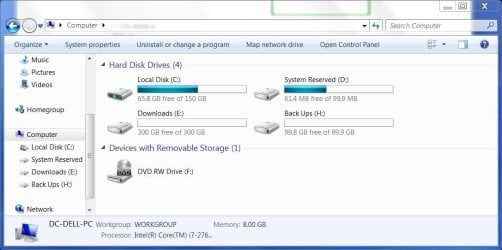
Everything seems to be perfect... except I'm missing a ton of space on all my drives (6, 3/SSD) + 1 external. It wasn't like this initially, must've recently happened. I did have to restore from a backup initially after W10 updater crapped out on me at 98% install. Haven't tried again.

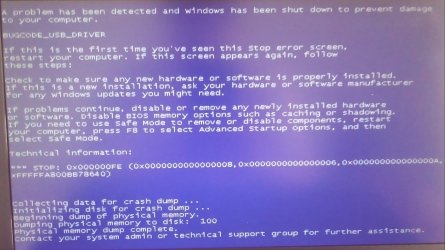
After a few nights working on these SDD's, they are both running well with W7. Each will load 4 programs in about 30-35 seconds now. No time spent on the hourglass or for the desktop items to load, it's instant. The Crucial SSD won't even wait for the Windows logo to fully combine and spin, it skips the spinning process. All those problems with slow boot times are a thing of the past but I had a lot of instances where Windows would just hang up loading or even getting into the boot menu/BIOS, even encountered a BSOD. A lot of powering done improperly was done, at least 20+ times. I know that's not normal. Sometimes, I'd see just a black screen or a black screen with a cursor that was bllinking. I tried using commands to no avail, it wouldn't enter (no characters on display).

IDK... either way, I tried to combine some unallocated space but couldn't. Tried to make a dynamic drive out of one, couldn't. I'm backing up my W7 for the third time (this time both SSD's are recognized and performing well + some updates were installed) throughout this process now and trying to get my space back. Hope I don't have to reformat to get it back. The solutions I find online don't work for me, from what I've read, I can't get far enough to even have those options. :mad:

Mega, I know you did but I was intimidated so I wanted to do it as a last resort. I've only upgraded RAM and a HDD, never a SSD. For some reason, I figured it'd be tougher?

FSUTIL is indeed showing a value of 0.

I did get the SSD's used too, all on EBay. I just got a new 525GB MX300, M.2, Crucial 2280SS SSD. That one is going in the office desktop which is a 2 year old system (from NewEgg) that didn't come with an SSD! 500 GB HDD but has a later generation i7 processor, 8 GB, upgraded graphics card on W10 for Adobe and CAD software. This is going to make a little difference, I bet.

I use this Dell laptop for surfing, office documents and playing online poker so I don't need the latest i7, this one is more than enough. Not pushing 3D limiits or mining bitcoin, just poker chips. :D
I do run a lot of poker software (3) simutaneously with the client along with a browser open and mp3's playing. On my older system, it'd be fine, until I'd be playing 8+ tables.

Performance would slow down, lag settles in and clicking on a button (in the poker client) could cause the whole client to crash if not even time was given when the hourglass icon would appear. That would freeze up the system and then a restart would be in order as not all the poker software will run correctly after a crash, a restart is needed. Add to that, the amount of time it took me to reload W and the pokrer software. After all that, you'd have to open up all the tables one by one, set them up so all are visible. meanwhile sitting back in at the tables so you are dealt cards again... not fun and a lot of hands are being missed everytime this happens, expecially once more than 6 tables are being played.
 

Attachments

  • Capture1.JPG
    Capture1.JPG
    16.3 KB · Views: 19
  • 20180331_091703_Film4-1.jpg
    20180331_091703_Film4-1.jpg
    425.7 KB · Views: 0

My Computer My Computer

At a glance

Windows 7 Pro, 64-bit, SP1intel Core i7-2760QM @ 2.40 GHz - Sandy Bridg...8.00GB Dual-Channel DDR3 @ 665MHz (9-9-9-24)511MB NVIDIA NVS 4200M (Dell)
Computer type
Laptop
Computer Manufacturer/Model Number
DELL LATTITUDE E6520
OS
Windows 7 Pro, 64-bit, SP1
CPU
intel Core i7-2760QM @ 2.40 GHz - Sandy Bridge 32nm
Motherboard
Dell Inc. 0J4TFW (CPU 1)
Memory
8.00GB Dual-Channel DDR3 @ 665MHz (9-9-9-24)
Graphics Card(s)
511MB NVIDIA NVS 4200M (Dell)
Sound Card
NVIDIA High Definition Audio
Monitor(s) Displays
Panasonic 55"
Screen Resolution
1920 x 1080@ 60Hz
Hard Drives
465GB WD WDC WD50000BKPT-75PK4 (SATA)
558GB INTEL 320 SERIES VO0600EC HPP (SATA)
556GB MAXTOR ONETOUCH USB DEVICE (SATA)
Antivirus
MalwareBytes
Browser
Firefox
Just failed my second backup in a row due to insufficent space. I had over that amount when I began the backup, otherwise W7 wouldn't have let me start the backup in the first place.
 

My Computer My Computer

At a glance

Windows 7 Pro, 64-bit, SP1intel Core i7-2760QM @ 2.40 GHz - Sandy Bridg...8.00GB Dual-Channel DDR3 @ 665MHz (9-9-9-24)511MB NVIDIA NVS 4200M (Dell)
Computer type
Laptop
Computer Manufacturer/Model Number
DELL LATTITUDE E6520
OS
Windows 7 Pro, 64-bit, SP1
CPU
intel Core i7-2760QM @ 2.40 GHz - Sandy Bridge 32nm
Motherboard
Dell Inc. 0J4TFW (CPU 1)
Memory
8.00GB Dual-Channel DDR3 @ 665MHz (9-9-9-24)
Graphics Card(s)
511MB NVIDIA NVS 4200M (Dell)
Sound Card
NVIDIA High Definition Audio
Monitor(s) Displays
Panasonic 55"
Screen Resolution
1920 x 1080@ 60Hz
Hard Drives
465GB WD WDC WD50000BKPT-75PK4 (SATA)
558GB INTEL 320 SERIES VO0600EC HPP (SATA)
556GB MAXTOR ONETOUCH USB DEVICE (SATA)
Antivirus
MalwareBytes
Browser
Firefox
You're having so many trouble where should be none.
From the point of view of the computer, a SSD or a HDD are the same. You shouldn't have any issues with the SSD, unless it has a problem.

Lets do the basic.
- Schedule a disk check. Open a CMD window and type chkdsk c: /f. It will ask if you want to schedule a disk check on next boot = yes.
- Reboot. Pay attention on the results.
- Open a CMD window and type sfc /scannow
- Report

As you still have the Recovery partition and the HDD with all your data, why don't you try a Factory Restore from the SSD? It will format the C: partition and load an image that is on the Recovery partition.
Remember to disconnect the HDD before you begin.
For the updates, use the offline updates of SP2 MS releases SP2 for Windows 7 - Windows 7 Help Forums
 

My Computers My Computers

  • At a glance

    Windows 7 HP 64i5 6600K - 800MHz to 4200MHz4+4G GSkill DDR4 3000IG - Intel 530
    Computer type
    PC/Desktop
    Computer Manufacturer/Model Number
    custom build
    OS
    Windows 7 HP 64
    CPU
    i5 6600K - 800MHz to 4200MHz
    Motherboard
    GA-Z170-HD3P
    Memory
    4+4G GSkill DDR4 3000
    Graphics Card(s)
    IG - Intel 530
    Monitor(s) Displays
    Samsung 226BW
    Screen Resolution
    1680x1050
    Hard Drives
    (1) -1 SM951 – 128GB M.2 AHCI PCIe SSD drive for Windows 7 and Lubuntu
    (2) -1 WD SATA 3 - 1T for Data
    (3) -1 WD SATA 3 - 1T for backup
    PSU
    Thermaltake 450W TR2 gold
    Keyboard
    Old and good Chicony mechanical keyboard
    Mouse
    Logitech mX performance - 9 buttons (had to disable some)
    Internet Speed
    500Mb/s
    Browser
    Firefox 64
    Other Info
    TinyWall firewall
  • At a glance

    Windows 7 Proi7-4500U 800MHz to 3.0GHz(4+4)G DDR3 1600IG intel 4400 + NVIDIA GeForce GT 745M
    Computer type
    Laptop
    System Manufacturer/Model Number
    Asus Q550LF
    OS
    Windows 7 Pro
    CPU
    i7-4500U 800MHz to 3.0GHz
    Motherboard
    Asus Q550LF
    Memory
    (4+4)G DDR3 1600
    Graphics Card(s)
    IG intel 4400 + NVIDIA GeForce GT 745M
    Sound Card
    Realtek
    Monitor(s) Displays
    LG Display LP156WF4-SPH1
    Screen Resolution
    1920 x 1080
    Hard Drives
    BX500 120G SSD for Windows and programs +
    1T HDD for data
    Internet Speed
    500 Mb/s
    Browser
    Firefox
    Other Info
    TinyWall firewall
I will run chkdsk and report back. Thank you for the advice but I have resolved the issue after reading this thread:

Cloned to a larger hard drive, but not seeing more free space Solved - Windows 7 Help Forums

I have 1 SSD and no HDD in my laptop since I will have a few external HDD's to make backups of backups.

Well, that was a journey but I sure did learn a lot and I'll feel more comfortable doing these things in the future.

Next, I am going to install a 240GB, BX300 Crucial SSD into a new laptop for a family member. This has a 1TB HDD so I'll clone it, make backups and swap out the CD drive for a drive caddy so they'll be interchangable.

Finally, I am going to install a 525GB, SATA M.2, 2280SS Crucial SSD into a business desktop.

I'm hoping there won't be any more issues, at least on this laptop. Time to make back ups again!
 

Attachments

  • 2018-04-02 at 19-37-25.jpg
    2018-04-02 at 19-37-25.jpg
    59.2 KB · Views: 0

My Computer My Computer

At a glance

Windows 7 Pro, 64-bit, SP1intel Core i7-2760QM @ 2.40 GHz - Sandy Bridg...8.00GB Dual-Channel DDR3 @ 665MHz (9-9-9-24)511MB NVIDIA NVS 4200M (Dell)
Computer type
Laptop
Computer Manufacturer/Model Number
DELL LATTITUDE E6520
OS
Windows 7 Pro, 64-bit, SP1
CPU
intel Core i7-2760QM @ 2.40 GHz - Sandy Bridge 32nm
Motherboard
Dell Inc. 0J4TFW (CPU 1)
Memory
8.00GB Dual-Channel DDR3 @ 665MHz (9-9-9-24)
Graphics Card(s)
511MB NVIDIA NVS 4200M (Dell)
Sound Card
NVIDIA High Definition Audio
Monitor(s) Displays
Panasonic 55"
Screen Resolution
1920 x 1080@ 60Hz
Hard Drives
465GB WD WDC WD50000BKPT-75PK4 (SATA)
558GB INTEL 320 SERIES VO0600EC HPP (SATA)
556GB MAXTOR ONETOUCH USB DEVICE (SATA)
Antivirus
MalwareBytes
Browser
Firefox
Chkdsk came back good. Thanks for the suggestion, Mega. Anything else you can think of that I may have overlooked?

Since my last post, I'm happy to report I have swapped out the original HDD's in place of the SSD's by cloning the HDD in 2 laptops. Turns out the brand new Crucial M.2. 525 GB SSD may not be compatible with the desktop I wanted to upgrade. It is a CyberForce PC from NewEgg, purchased about 4.5 years ago. There may be an adapter but that would take away most of the added speed (so I read) I wanted to add by purchasing the new SSD. Looks like it'll be going back on EBay, brand new too.

I'm currently working on a friend's old HP G7-1337nr. It has a 750 GB HDD and it's 4 GB's short of being packed with almost no software or personal files on it. I've never seen anything like it. So I took out the 1TB from my bro's new laptop (now has the Crucial 256GB SSD as primary) and have reformatted it to clone the 750GB. I will then format the 750, reinstall W7 and have the 1TB as a backup should something fail. After all that, I'll be left with a 1TB and a 500GB HDD when all 3 laptops are up and running, they will be used in drive caddies to hold backups and drivers, I think.
 

My Computer My Computer

At a glance

Windows 7 Pro, 64-bit, SP1intel Core i7-2760QM @ 2.40 GHz - Sandy Bridg...8.00GB Dual-Channel DDR3 @ 665MHz (9-9-9-24)511MB NVIDIA NVS 4200M (Dell)
Computer type
Laptop
Computer Manufacturer/Model Number
DELL LATTITUDE E6520
OS
Windows 7 Pro, 64-bit, SP1
CPU
intel Core i7-2760QM @ 2.40 GHz - Sandy Bridge 32nm
Motherboard
Dell Inc. 0J4TFW (CPU 1)
Memory
8.00GB Dual-Channel DDR3 @ 665MHz (9-9-9-24)
Graphics Card(s)
511MB NVIDIA NVS 4200M (Dell)
Sound Card
NVIDIA High Definition Audio
Monitor(s) Displays
Panasonic 55"
Screen Resolution
1920 x 1080@ 60Hz
Hard Drives
465GB WD WDC WD50000BKPT-75PK4 (SATA)
558GB INTEL 320 SERIES VO0600EC HPP (SATA)
556GB MAXTOR ONETOUCH USB DEVICE (SATA)
Antivirus
MalwareBytes
Browser
Firefox
Back
Top