krainert
New member
Hey all,
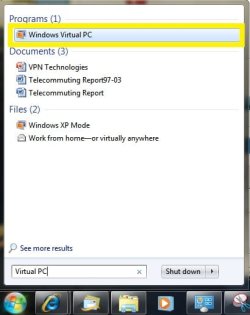
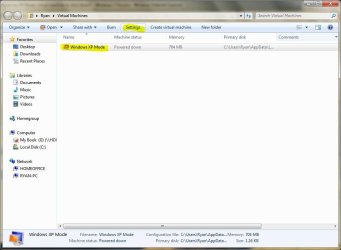
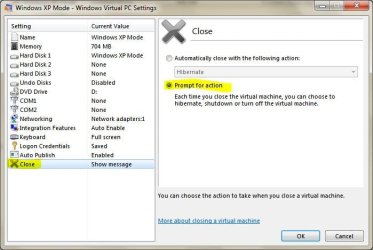
I'm having some trouble with my XP Mode virtual machine; I tried installing an application from an image located outside the virtual drive, which caused a very slow file transfer. The entire emulated desktop froze, and I was forced to terminate the emulation. Unfortunately, Windows 7 managed to send the emulated Windows XP into hibernation so every time I start XP Mode, the entire application freezes, and my HDD usage jumps to 100%. How can I reset the virtual machine or force it to shut down from outside the emulation environment?
Thanks!
I'm having some trouble with my XP Mode virtual machine; I tried installing an application from an image located outside the virtual drive, which caused a very slow file transfer. The entire emulated desktop froze, and I was forced to terminate the emulation. Unfortunately, Windows 7 managed to send the emulated Windows XP into hibernation so every time I start XP Mode, the entire application freezes, and my HDD usage jumps to 100%. How can I reset the virtual machine or force it to shut down from outside the emulation environment?
Thanks!
My Computer
At a glance
Windows 7 Professional 64 bitIntel i7 9203x2 GB 1600 MHz Corsair DDR3 RAMXFX NVIDIA GeForce GTX 295
- OS
- Windows 7 Professional 64 bit
- CPU
- Intel i7 920
- Motherboard
- ASUS Rampage II Extreme Republic of Gamers
- Memory
- 3x2 GB 1600 MHz Corsair DDR3 RAM
- Graphics Card(s)
- XFX NVIDIA GeForce GTX 295
- Monitor(s) Displays
- Samsung SyncMaster T220
- Hard Drives
- 1.5 TB Corsair Barracuda
1 TB external Western Digital My Book Essential
- PSU
- 750W Corsair
- Case
- Antec Nine Hundred