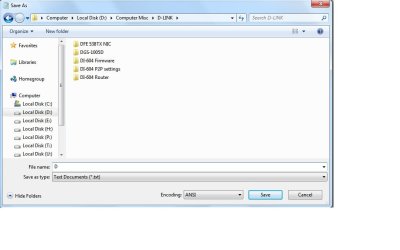
How do I get back drop down list...save as back?

ben07

New member
Power User
Local time
7:26 PM
Messages
111
When I was on 7100 RC x64 Ultimate, whenever I download something to a folder and if that folder already has several files in it all starting with abc...then when I type the first a, Windows would cleverly drop down a list of file names all starting with a and I can select from the drop down list of just simply type in a new file name to save as.........now after installing 7600 x64 Pro RTM, that option is no longer there, there isn't any more drop down list like before......and I don't think this is special feature only for Ultimate...maybe I accidentally turn off this feature? but I couldn't remember anything like that....how do I get that feature back or is there anything in Windows 7 that I can reset to all defaults?:p

Thanks.
 

My Computer My Computer

At a glance

Windows 7 Pro x64 RTMIntel
OS
Windows 7 Pro x64 RTM
CPU
Intel
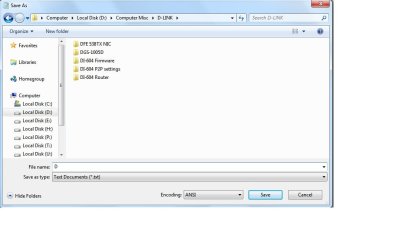
OK, here is the pix.....under 7100 RC x64 Ultimate, the moment I typed in D, Windows 7 would immediately drop down a list of file names all starting with D from that folder, but now in 7600 X64 Pro RTM, it just sit there, just like in the pix....

Perhaps someone could do a simple test on your machine and confirm....create a blank text.txt file any where and try to save the text file to a folder that already have a few files in it (lets say that folder has file1, file2 and file3), now save your file as file4 and see the moment you type in the first "f" , any drop down menu which has file1, file2 and file3 for you to choose? or just like the pix attached?

Thanks.
 

Attachments

  • SA.jpg
    SA.jpg
    40.6 KB · Views: 133

My Computer My Computer

At a glance

Windows 7 Pro x64 RTMIntel
OS
Windows 7 Pro x64 RTM
CPU
Intel
Hey Ben, welcome.

If this is a new install, then you may need to just accumulate the files over time. I am not sure how this works though.

Now, have you saved anything from that before? If not, then that is why it is not there...

~Lordbob
 

My Computer My Computer

At a glance

Windows 7 Ultimate x64, Mint 9Intel i5-2500k2x 4Gb Corsair VENGEANCE DDR3-1600NVidia GeForce N260GTX Twin Frozr
Computer Manufacturer/Model Number
Hera
OS
Windows 7 Ultimate x64, Mint 9
CPU
Intel i5-2500k
Motherboard
ASUS P8P67 Pro
Memory
2x 4Gb Corsair VENGEANCE DDR3-1600
Graphics Card(s)
NVidia GeForce N260GTX Twin Frozr
Sound Card
Realtek HD OnBoard Audio
Monitor(s) Displays
ASUS 24" Monitor
Screen Resolution
1920x1080
Hard Drives
G.SKILL Phoenix Series 60GB SATA II MLC Internal Solid State Drive (SSD)
SAMSUNG Spinpoint F3R 1TB 7200 RPM 32MB Cache SATA II
PSU
Cooler Master Real Power Pro 750W
Case
Cooler Master Haf 932
Cooling
Fans
Keyboard
Razer Tarantula
Mouse
Razer Lachesis
Internet Speed
not fast enough
Hey Ben, welcome.

If this is a new install, then you may need to just accumulate the files over time. I am not sure how this works though.

Now, have you saved anything from that before? If not, then that is why it is not there...

~Lordbob

Thanks Bob:). I just created/saved 5 files to that folder just to test it and now I'm at file6 and still no drop down list....maybe I need to re-image my old 7100 RC X64 Ultimate's image to one of my drive and snap a pix of the drop down pix...:(
 

My Computer My Computer

At a glance

Windows 7 Pro x64 RTMIntel
OS
Windows 7 Pro x64 RTM
CPU
Intel
I just like Ghost:D, lol!

OK, Re-image 7100 RC x64 Ultimate and you can clearly see the drop down file selection from the pix vs the no drop down file selection from 7600 RTM x64 Pro......I couldn't remember what i did or didn't do in Ultimate to get the drop down list...... something to do with disabling indexing/Superfetch or ???

1st pix, Ultimate RC 7100 x64 with drop down file list/selection

2nd pix, Pro RTM 7600 x64 with NO drop down file list/selection
 

Attachments

  • SAUT.jpg
    SAUT.jpg
    39 KB · Views: 72
  • SA.jpg
    SA.jpg
    40.6 KB · Views: 44

My Computer My Computer

At a glance

Windows 7 Pro x64 RTMIntel
OS
Windows 7 Pro x64 RTM
CPU
Intel
Well, I just tested it on mine. It does indeed get a drop down menu.....
I don't know what to tell you. I am going to look into the Folder Settings though. Perhaps something in there.

~Lordbob
 

My Computer My Computer

At a glance

Windows 7 Ultimate x64, Mint 9Intel i5-2500k2x 4Gb Corsair VENGEANCE DDR3-1600NVidia GeForce N260GTX Twin Frozr
Computer Manufacturer/Model Number
Hera
OS
Windows 7 Ultimate x64, Mint 9
CPU
Intel i5-2500k
Motherboard
ASUS P8P67 Pro
Memory
2x 4Gb Corsair VENGEANCE DDR3-1600
Graphics Card(s)
NVidia GeForce N260GTX Twin Frozr
Sound Card
Realtek HD OnBoard Audio
Monitor(s) Displays
ASUS 24" Monitor
Screen Resolution
1920x1080
Hard Drives
G.SKILL Phoenix Series 60GB SATA II MLC Internal Solid State Drive (SSD)
SAMSUNG Spinpoint F3R 1TB 7200 RPM 32MB Cache SATA II
PSU
Cooler Master Real Power Pro 750W
Case
Cooler Master Haf 932
Cooling
Fans
Keyboard
Razer Tarantula
Mouse
Razer Lachesis
Internet Speed
not fast enough
Well, I just tested it on mine. It does indeed get a drop down menu.....
I don't know what to tell you. I am going to look into the Folder Settings though. Perhaps something in there.

~Lordbob

Woot, thanks Lord Bob:D, please let me know if you find something.

I reset everything to "Restore Defaults" on all 3 tabs in Folder Options, but nada:confused:!
 

My Computer My Computer

At a glance

Windows 7 Pro x64 RTMIntel
OS
Windows 7 Pro x64 RTM
CPU
Intel
Great news, Bob!

One nice gal at the DSL forums solved this mystery issue:geek:.

Are you ready?.....who would thought of it has nothing to do with Folder Options or anything near those areas...it's Internet Explorer, lol!

Internet Explorer > Tools > Internet Options > Content > then select the AutoComplete Settings

In the AutoComplete Settings, under "Use AutoComplete for" make sure "Address Bar" is selected > OK > OK

Thanks for testing it out for me and have a great day.

Best regards.
 

My Computer My Computer

At a glance

Windows 7 Pro x64 RTMIntel
OS
Windows 7 Pro x64 RTM
CPU
Intel
Great news, Bob!

One nice gal at the DSL forums solved this mystery issue:geek:.

Are you ready?.....who would thought of it has nothing to do with Folder Options or anything near those areas...it's Internet Explorer, lol!

Internet Explorer > Tools > Internet Options > Content > then select the AutoComplete Settings

In the AutoComplete Settings, under "Use AutoComplete for" make sure "Address Bar" is selected > OK > OK

Thanks for testing it out for me and have a great day.

Best regards.
....
This does not surprise me. I have had nothing but trouble with that program.

I guess I did not realize that this only happened when trying to save as from IE? Or was it with any file?

~Lordbob
 

My Computer My Computer

At a glance

Windows 7 Ultimate x64, Mint 9Intel i5-2500k2x 4Gb Corsair VENGEANCE DDR3-1600NVidia GeForce N260GTX Twin Frozr
Computer Manufacturer/Model Number
Hera
OS
Windows 7 Ultimate x64, Mint 9
CPU
Intel i5-2500k
Motherboard
ASUS P8P67 Pro
Memory
2x 4Gb Corsair VENGEANCE DDR3-1600
Graphics Card(s)
NVidia GeForce N260GTX Twin Frozr
Sound Card
Realtek HD OnBoard Audio
Monitor(s) Displays
ASUS 24" Monitor
Screen Resolution
1920x1080
Hard Drives
G.SKILL Phoenix Series 60GB SATA II MLC Internal Solid State Drive (SSD)
SAMSUNG Spinpoint F3R 1TB 7200 RPM 32MB Cache SATA II
PSU
Cooler Master Real Power Pro 750W
Case
Cooler Master Haf 932
Cooling
Fans
Keyboard
Razer Tarantula
Mouse
Razer Lachesis
Internet Speed
not fast enough
....
This does not surprise me. I have had nothing but trouble with that program.

I guess I did not realize that this only happened when trying to save as from IE? Or was it with any file?

~Lordbob

This is very interesting, by right settings in IE shouldn't have any direct impacts on the OS, but this case proven that's wrong, it does have direct impact on the OS! I'm just glad I got that feature back, cause I save lots of files everyday:p.

Best regards.

p/s any file/folder, not only in IE!
 

My Computer My Computer

At a glance

Windows 7 Pro x64 RTMIntel
OS
Windows 7 Pro x64 RTM
CPU
Intel
This is very interesting, by right settings in IE shouldn't have any direct impacts on the OS, but this case proven that's wrong, it does have direct impact on the OS! I'm just glad I got that feature back, cause I save lots of files everyday:p.

Best regards.

p/s any file/folder, not only in IE!
That is WEIRD.....

>.>
<.<

MS is trying to brainwash us again........
:p

~Lordbob
 

My Computer My Computer

At a glance

Windows 7 Ultimate x64, Mint 9Intel i5-2500k2x 4Gb Corsair VENGEANCE DDR3-1600NVidia GeForce N260GTX Twin Frozr
Computer Manufacturer/Model Number
Hera
OS
Windows 7 Ultimate x64, Mint 9
CPU
Intel i5-2500k
Motherboard
ASUS P8P67 Pro
Memory
2x 4Gb Corsair VENGEANCE DDR3-1600
Graphics Card(s)
NVidia GeForce N260GTX Twin Frozr
Sound Card
Realtek HD OnBoard Audio
Monitor(s) Displays
ASUS 24" Monitor
Screen Resolution
1920x1080
Hard Drives
G.SKILL Phoenix Series 60GB SATA II MLC Internal Solid State Drive (SSD)
SAMSUNG Spinpoint F3R 1TB 7200 RPM 32MB Cache SATA II
PSU
Cooler Master Real Power Pro 750W
Case
Cooler Master Haf 932
Cooling
Fans
Keyboard
Razer Tarantula
Mouse
Razer Lachesis
Internet Speed
not fast enough
I agree, and thanks to ben07's post, I got my drop down list back
 

My Computer My Computer

At a glance

win 7 Ultimate x64
OS
win 7 Ultimate x64
Back
Top