JavaScript is disabled. For a better experience, please enable JavaScript in your browser before proceeding.
You are using an out of date browser. It may not display this or other websites correctly.
You should upgrade or use an
alternative browser .
Solved How do I get it back?
Hardware & Perfomance
Pro User
I was playing around today and I disabled the little program arrow at the bottom right side of the taskbar, any way how to get it back because I don't remember how I disabled it to begin with.
Computer type PC/Desktop Computer Manufacturer/Model Number Frankenstein PC OS Windows 7 Home Premium 64-bit SP1 CPU Intel core i7 920 @ 2.67Ghz; Bloomfield 45nm Technology Motherboard Intel Corporation DX58SO (J1PR) Memory 16GB Dual-Channel DDR3 @ 540MHz (7-7-7-19) Graphics Card(s) 4095MB NVIDIA GeForce GTX 960 (EVGA) Sound Card N/A Integrated Audio Monitor(s) Displays Acer S231HLbid LED Monitor 23" Screen Resolution 1920x1080 1080p 60Hz Hard Drives BOOT: 59GB ADATA SP900 (SSD) PSU EVGA SuperNOVA 750 G1 80+ Gold (120-G1-0750-XR) Case Cooler Master Elite Gaming Case Black 430 Cooling Cooler Master Hyper 212 Heatsink. Front and rear 120mm fan Keyboard Rosewill RIKB-11003 Mouse James Donkey 112S Internet Speed 200/40 Antivirus Avast! Antivirus Free Browser Cyberfox x64 / FireFox / PaleMoon x64; kept up-to-date Other Info Windows Installed on March 21, 2014
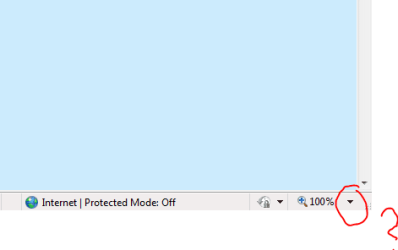
The Zoom arrow? Like this?
Capture.PNG
2.7 KB
· Views: 1
Computer type PC/Desktop Computer Manufacturer/Model Number Golden Mk. I.4 OS Windows 10 Pro x64 ; Xubuntu x64 CPU Intel i7 860 @ 2.80 GHz O/C'ed to 4.0GHz Motherboard Gigabyte P55A-UD3R Rev.1. Award BIOS F13 Memory 16GB Corsair Vengance DDR3 @ 661 MHz Dual Channel (9-9-9-24) Graphics Card(s) EVGA NVidia GTX 560 1024MB Sound Card Realtek Integrated Monitor(s) Displays Dual Samsung SyncMaster 2494HS Screen Resolution 1920*1080 and 1920*1080 Hard Drives 1*Samsung 840 EVO 120GB SSD; PSU Thermaltake ToughPower QFan 750W Case Thermaltake Element S VK60001W2Z Cooling Corsair H60 Water Cooling, 2*230mm and 2*80mm case fans Keyboard Logitech G110 Mouse Logitech MX518
Hardware & Perfomance
Pro User
Thread Starter
The arrow on the taskbar.
Computer type PC/Desktop Computer Manufacturer/Model Number Frankenstein PC OS Windows 7 Home Premium 64-bit SP1 CPU Intel core i7 920 @ 2.67Ghz; Bloomfield 45nm Technology Motherboard Intel Corporation DX58SO (J1PR) Memory 16GB Dual-Channel DDR3 @ 540MHz (7-7-7-19) Graphics Card(s) 4095MB NVIDIA GeForce GTX 960 (EVGA) Sound Card N/A Integrated Audio Monitor(s) Displays Acer S231HLbid LED Monitor 23" Screen Resolution 1920x1080 1080p 60Hz Hard Drives BOOT: 59GB ADATA SP900 (SSD) PSU EVGA SuperNOVA 750 G1 80+ Gold (120-G1-0750-XR) Case Cooler Master Elite Gaming Case Black 430 Cooling Cooler Master Hyper 212 Heatsink. Front and rear 120mm fan Keyboard Rosewill RIKB-11003 Mouse James Donkey 112S Internet Speed 200/40 Antivirus Avast! Antivirus Free Browser Cyberfox x64 / FireFox / PaleMoon x64; kept up-to-date Other Info Windows Installed on March 21, 2014