how do I get my outlook express into windows 7

rustyd

New member
Local time
2:07 PM
Messages
7
First question: Is there a difference between Windows Mail and Windows Live Mail?

Second question: Is one of the two already in Windows 7?

Third question: I was going to do a Windows Easy Transfer from my computer running XP with Outlook Express to my new computer with Windows 7. If Windows 7 already has Windows Mail or Windows Live Mail will all my messages etc. in Outlook be transferred into the new mail program?

Fourth question: If Windows 7 does not have one of the mail programs mentioned should I download one of them into the old computer and move my messages etc. from Outlook into the new program and THEN do an Easy Transfer into the new computer (after I also download the same mail program into that computer if it doesn't already have it)?

If this has already been addressed in another post please direct me there.

THANK YOU!
 

My Computer My Computer

OS
xp 32
I don't know what you stand to gain from "easy transfer". When you move from XP to 7 you have to do a clean install. Win 7 has no email program at all. (It was Vista that came with Windows Mail which was very similar to OE.) The Win 7 replacement for OE is Windows Live Mail which is one of the downloadable apps available via the Suite of programs called "Windows Live Essentials". The 2011 version takes some getting used to, what with the ribbon interface and the "sign-in" option for using some "Live" features like tying emailed photos to Sky Drive and keeping a copy of all your contacts and their organization into groups on the web. But underneath the unfamiliar stuff lies the familiar (although sometimes buggy) OE funtionality. Windows Live Mail can easily import your OE Messages and Contacts. You just need to save your old Outlook Express Messsage store for the emails and your .wab file for the contacts. Also you may notice that Windows 7 has a "User" folder called "Contacts" so be ready to completely ignore it since the WLM you download will have its own method and location for handling contacts. I suspect the Contacts folder you see was put their in anticipation of carrying over Vista's email program which was never implmented in Windows 7.
 
Last edited:

My Computer My Computer

Computer type
PC/Desktop
Computer Manufacturer/Model Number
OQO 2+
OS
Windows 8 Pro w/MC 32-bit
CPU
Intel Atom 1.86 GHz
Motherboard
OQO 2+
Memory
2 GB
Graphics Card(s)
Intel GMA 500
Sound Card
IDT
Monitor(s) Displays
LCD
Screen Resolution
800 x 480 (portable) 1280 x 1024 (docked)
Hard Drives
64 GB SSD
PSU
9 Ah Battery (portable) or OQO Brick (docked)
Case
Shirt Pocket Sized
Cooling
Tiny Fan
Keyboard
Slide out (portable) DiNovo Edge (docked)
Mouse
Eraser head (portable) Logitech Bluetooth (docked)
Internet Speed
WWAN or 802.11G (portable) T1 (docked)
Browser
IE 10
Other Info
DVD-RW OQO Docking Station
I don't know what you mean by: "I don't know what you stand to gain from "easy transfer". When you move from XP to 7 you have to do a clean install."

What do you mean by "clean install". I'm not a techy person at all. I just didnt want to pay Staples $70 to transfer my stuff to my new computer that's why I wanted to use Windows Easy Transfer. But I am confused on what is going to happen to my email messages and everything else in Outlook Express since Outlook will not be on the new computer with Windows 7.

If I download Windows Live Essentials into the new computer then when I make the transfer will everything from Outlook go into Windows Live Mail?
 

My Computer My Computer

OS
xp 32
"If I download Windows Live Essentials into the new computer then when I make the transfer will everything from Outlook go into Windows Live Mail?"

short answer is NO.

on your XP machine--start it up and open Outlook Express--then you will need to 'export' your mail and contacts from OE...here's one way

How to back up and to restore Outlook Express data

then you will need to download and install an email client on your new machine (I advise using Thunderbird as it's interface is similar to Outlook Express)

Mozilla Thunderbird

then -- once you have that installed and functioning--copy the data that you exported from Outlook Express to your new machine--then import in into Thunderbird
 

My Computer My Computer

Computer Manufacturer/Model Number
SALEON model 2.2b
OS
win7 ultimate 32bit
CPU
core2 Extreme QX6850-OCd to 3.15 GHz
Motherboard
ASUS P5G41-M LE
Memory
4 GB
Graphics Card(s)
NVidia 8600 GT
Monitor(s) Displays
23" acer
Hard Drives
one SATA 250GB partitioned equally in half
one SATA 160GB-internal storage
PSU
500W Thermaltake
Case
mini tower
...What do you mean by "clean install"....
If I download Windows Live Essentials into the new computer then when I make the transfer will everything from Outlook go into Windows Live Mail?
I didn't mean to confuse things by using the phrase "clean install". Microsoft calls it a "custom install" but all it means it that during the installation process the hard drive will be "cleaned" and Windows 7 will be installed as it would on a new system. Although I have never used "easy transfer" spcecifically, I imagine it's just a way to move your personal files from XP to 7 and put them in a segregated location as a "data backup". It may very well include the Outlook Express Message Store and the *.wab file that holds all your contacts. You can save these items independently of the easy transfer backup. In any case, when you are ready to install an email program (be it WLM or Thunderbird or whatever) you will need the messsage store and the .wab file as the two sources which you navigate to when doing the import process in the new email program. I know that WLM includes the appropriate Outlook Express import options for messages and contacts but I'm not familiar with Thunderbird or other email programs.
 

My Computer My Computer

Computer type
PC/Desktop
Computer Manufacturer/Model Number
OQO 2+
OS
Windows 8 Pro w/MC 32-bit
CPU
Intel Atom 1.86 GHz
Motherboard
OQO 2+
Memory
2 GB
Graphics Card(s)
Intel GMA 500
Sound Card
IDT
Monitor(s) Displays
LCD
Screen Resolution
800 x 480 (portable) 1280 x 1024 (docked)
Hard Drives
64 GB SSD
PSU
9 Ah Battery (portable) or OQO Brick (docked)
Case
Shirt Pocket Sized
Cooling
Tiny Fan
Keyboard
Slide out (portable) DiNovo Edge (docked)
Mouse
Eraser head (portable) Logitech Bluetooth (docked)
Internet Speed
WWAN or 802.11G (portable) T1 (docked)
Browser
IE 10
Other Info
DVD-RW OQO Docking Station
Video: Transferring files and settings from another PC - Help & How-to - Microsoft Windows

I watched this video and it said Windows Easy Transfer transfers email messages (along with other stuff). Maybe when I make the transfer the Outlook Express messages are transferred and it's just a matter of finding them and importing them into Thunderbird or whatever.
Do you think that might be the case?

But I would still like to know the difference between Windows Mail and Windows Live Mail. I wanted the messages to be stored on my computer like Outlook Express rather than with a company like Yahoo mail. Any thoughts on this?
 

My Computer My Computer

OS
xp 32
Video: Transferring files and settings from another PC - Help & How-to - Microsoft Windows

I watched this video and it said Windows Easy Transfer transfers email messages (along with other stuff). Maybe when I make the transfer the Outlook Express messages are transferred and it's just a matter of finding them and importing them into Thunderbird or whatever.
Do you think that might be the case?

But I would still like to know the difference between Windows Mail and Windows Live Mail. I wanted the messages to be stored on my computer like Outlook Express rather than with a company like Yahoo mail. Any thoughts on this?

OE comes with XP.
Windows Mail comes with Vista. Windows mail is not supported by Win 7 unless you " tweaked " it.
Windows Live mail does not come with any operating system. It is a standalone e-mail program designed to replace Windows Mail which Microsoft has stopped supporting 3-4 years ago.
Windows Live Mail most current version is v2011.

If you are planning to upgrade from XP to Windows 7, you must first make sure your machine has what it takes to install Windows 7.
Windows 7 Upgrade Advisor will tell you yes or no.
Download Details - Microsoft Download Center - Windows 7 Upgrade Advisor

No point to go further until you get the OK sign from Win 7 Advisor.

Then please post back and I'll show you how to " transfer " OE messages and address book to Windows Live Mail.
 

My Computer My Computer

Computer Manufacturer/Model Number
Acer Aspire 7741Z
OS
Windows 7 Home Premium 64-bit, SP1
CPU
Intel Pentium P6200, Cores 2, 2.13 GHz
Memory
4 GB
Graphics Card(s)
Intel HD
Sound Card
unknown
Monitor(s) Displays
17.3 inches
Screen Resolution
1600 x 900
Hard Drives
640 GB, 5400 PRM
Hi,
I'm transferring all data from my old computer with XP and Outlook Express to a new computer with Window 7. I want to somehow have my email messages and folders from Outlook Express accessible on the new computer. I'm hoping I can get them in Thunderbird or Windows Live Mail but I'm stuck. (See my earlier posts and replies)
Thanks.
 

My Computer My Computer

OS
xp 32
1)...it's just a matter of finding them and importing them into Thunderbird or whatever.
Do you think that might be the case?

2) But I would still like to know the difference between Windows Mail and Windows Live Mail.

3)I wanted the messages to be stored on my computer like Outlook Express rather than with a company like Yahoo mail. Any thoughts on this?
1) Yes. It might. You will still have to locate the .wab file and the Messsage Store regardless of how you transfer them.
2) See t-4-2's response.
3) The "Live" designation is confusing since the email message part is the same as it was since Outlook Express, except that with WLM, Hotmail web-based accounts can now be accessed and/or downloaded just like the standard IMAP and POP3 account messages have always been.
 

My Computer My Computer

Computer type
PC/Desktop
Computer Manufacturer/Model Number
OQO 2+
OS
Windows 8 Pro w/MC 32-bit
CPU
Intel Atom 1.86 GHz
Motherboard
OQO 2+
Memory
2 GB
Graphics Card(s)
Intel GMA 500
Sound Card
IDT
Monitor(s) Displays
LCD
Screen Resolution
800 x 480 (portable) 1280 x 1024 (docked)
Hard Drives
64 GB SSD
PSU
9 Ah Battery (portable) or OQO Brick (docked)
Case
Shirt Pocket Sized
Cooling
Tiny Fan
Keyboard
Slide out (portable) DiNovo Edge (docked)
Mouse
Eraser head (portable) Logitech Bluetooth (docked)
Internet Speed
WWAN or 802.11G (portable) T1 (docked)
Browser
IE 10
Other Info
DVD-RW OQO Docking Station
...I'm stuck. (See my earlier posts and replies)
Where are you stuck?
Easy Transfer?
Exporting from OE?
Finding the stuff in OE?
Finding the stuff after "easy transfer"?
Importing in to WLM?
Downloading and installing WLM?
 

My Computer My Computer

Computer type
PC/Desktop
Computer Manufacturer/Model Number
OQO 2+
OS
Windows 8 Pro w/MC 32-bit
CPU
Intel Atom 1.86 GHz
Motherboard
OQO 2+
Memory
2 GB
Graphics Card(s)
Intel GMA 500
Sound Card
IDT
Monitor(s) Displays
LCD
Screen Resolution
800 x 480 (portable) 1280 x 1024 (docked)
Hard Drives
64 GB SSD
PSU
9 Ah Battery (portable) or OQO Brick (docked)
Case
Shirt Pocket Sized
Cooling
Tiny Fan
Keyboard
Slide out (portable) DiNovo Edge (docked)
Mouse
Eraser head (portable) Logitech Bluetooth (docked)
Internet Speed
WWAN or 802.11G (portable) T1 (docked)
Browser
IE 10
Other Info
DVD-RW OQO Docking Station
Hi,
I'm transferring all data from my old computer with XP and Outlook Express to a new computer with Window 7. I want to somehow have my email messages and folders from Outlook Express accessible on the new computer. I'm hoping I can get them in Thunderbird or Windows Live Mail but I'm stuck. (See my earlier posts and replies)
Thanks.

How to transfer OE messages and address book from XP machine to Windows Live Mail in Windows 7 machine.

A. OE messages :
Open OE > Tools > Options > Maintenance > Store Folder will reveal the
location of your Outlook Express files. Write the location down and
navigate to it in Windows Explorer or, copy and paste it into Start > Run.
Copy the *ENTIRE* OE message store folder to a flash drive. ( Folders.dbx
must be included).

Open Win 7 > insert flash drive > Place the Message Store onto the desktop > open WLM > top left, blue button > > Import Messages > Microsoft Outlook Express 6 > Next > Browse to the message store on the desktop, select > OK

*** Note ****
In WinXP, the OE user files (DBX and WAB) are by default
marked as hidden. To view these files in Windows Explorer, you must enable
Show Hidden Files and Folders under Start | Control Panel | Folder Options
Icon | View, or in Windows Explorer | Tools | Folder Options | View.

B. OE Address book
Open the Address Book in OE > File > Export > Address Book (wab) and
save it to the Desktop. Copy to a flash drive.
Open Win 7 > insert flash drive > place the address book onto the desktop > open WLM > bottom left, click Contact icon > toolbar at top, click Import > Windows Address book (wab) > Browse to the address book on the desktop > select > OK

IMPORTANT :
If you use a CD or DVD instead of a flash drive, after placing on
the new machine you must remove the Read Only attribute in Properties
before you import.
 

My Computer My Computer

Computer Manufacturer/Model Number
Acer Aspire 7741Z
OS
Windows 7 Home Premium 64-bit, SP1
CPU
Intel Pentium P6200, Cores 2, 2.13 GHz
Memory
4 GB
Graphics Card(s)
Intel HD
Sound Card
unknown
Monitor(s) Displays
17.3 inches
Screen Resolution
1600 x 900
Hard Drives
640 GB, 5400 PRM
Hi there

The EASY way is to import into OUTLOOK if you have MS office also installed on XP.

I've got W2K3 server running as a VM with OE and Office installed. (works also with XP)

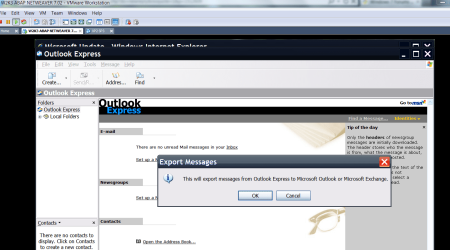
Simply EXPORT the address and messages into OUTLOOK (on the XP machine).

If you don't have outlook on your XP machine you can get a 60 day trial from Ms -- this will also work on W7. Once you've got the mail into outlook you can copy it to other mail systems if you need to -- however I think Outlook 2010 is fine.

Now download pfbackup.exe from MS - install on the XP and W7 systems and backup your OUTLOOK folders on the XP system to a usb / network drive

Open Outlook on the W7 system , open the Backup (the pfbackup.exe you downloaded) and your email will be there where you can move it to your outlook folders. In Outlook 2010 the backup menu will be found in ADDINS, in Outlook 2007 it's in the mani File menu.


Cheers
jimbo
 

Attachments

  • oe.png
    oe.png
    68.9 KB · Views: 18

My Computer My Computer

Computer type
PC/Desktop
Computer Manufacturer/Model Number
Custom built, several laptops HP/ASUS
OS
Linux CENTOS 7 / various Windows OS'es and servers
CPU
Intel i7 Intel i5
Memory
8GB, 16GB
Graphics Card(s)
On Motherboard
Sound Card
Realtek HD audio
Monitor(s) Displays
Apple Cinema display, Samsung LCD
Screen Resolution
1920 X 1080
Hard Drives
4 X 1TB SATA
Mouse
Toshiba wireless laser
Internet Speed
> 20MB up
This is what I've decided to do (let me know if I shouldn't). I downloaded Thunderbird onto my old computer (the one I am using now) and I am going to import my data from Outlook Express into that program as described here: Importing Outlook Express Emails Into Thunderbird And Evolution | HowtoForge - Linux Howtos and Tutorials

Then I am going to back that up with MozBackup as described at the bottom of this page (the last/most recent comment by Ken): Migrate XP to Windows 7 with Easy Transfer and a USB Drive - How-To Geek

Then I will install Thunderbird and Mozbackup on the new computer and then do the Easy Transfer and hope it all works as he says.

The problem is I only have one monitor and will have to be switching it back and forth between the new and the old computer so this is all going to be quite a project.
Thanks.
 

My Computer My Computer

OS
xp 32
accidentally duplicated above reply but I couldn't delete it - only edit it. So ignore this.
 
Last edited:

My Computer My Computer

OS
xp 32
Windows Live Mail

First question: Is there a difference between Windows Mail and Windows Live Mail?

Second question: Is one of the two already in Windows 7?

Third question: I was going to do a Windows Easy Transfer from my computer running XP with Outlook Express to my new computer with Windows 7. If Windows 7 already has Windows Mail or Windows Live Mail will all my messages etc. in Outlook be transferred into the new mail program?

Fourth question: If Windows 7 does not have one of the mail programs mentioned should I download one of them into the old computer and move my messages etc. from Outlook into the new program and THEN do an Easy Transfer into the new computer (after I also download the same mail program into that computer if it doesn't already have it)?

If this has already been addressed in another post please direct me there.

THANK YOU!

Rustyd,

I would install Windows Live Mail on the machine with XP still on it. There is a version for XP on Microsoft's website Windows Live Mail for Windows XP. That way, it will import your contacts, old mail, and settings from Outlook Express (this is what I did).

Then when you want to install Windows 7, you can install the more recent version of Windows Live Mail (2011) and have all your mail information already in Windows Live Mail.

P.S. If I were you, you should email yourself your current, read mail to another email address (Yahoo, Gmail) as a backup.

As you may already know, there is no direct upgrade from XP to 7. Basically, you'll have to do an install of 7. If you have a 7 Upgrade disc, you'll need your XP disc so that 7 can verify you have a legitimate version of XP.
 

My Computer My Computer

Computer Manufacturer/Model Number
Dell Inspiron 1521
OS
Windows 7 Professional
CPU
AMD Turion 64 X2
Motherboard
Model: Dell 0GU163 Chipset: ATI M690G (RS690M) + SB600
Memory
2 GB PC2-5300 (667Mhz)
Graphics Card(s)
ATI Mobility Radeon Xpress 1270
Sound Card
ATI SB600 High Definition Adio Controller; SigmaTel STAC9205
Screen Resolution
1280 x 800
Hard Drives
Hitachi HTS541680J9SA00; 80 Gb
accidentally duplicated above reply but I couldn't delete it - only edit it. So ignore this.
Push the edit button and the next window has a delete button.
 

My Computer My Computer

Computer type
PC/Desktop
Computer Manufacturer/Model Number
OQO 2+
OS
Windows 8 Pro w/MC 32-bit
CPU
Intel Atom 1.86 GHz
Motherboard
OQO 2+
Memory
2 GB
Graphics Card(s)
Intel GMA 500
Sound Card
IDT
Monitor(s) Displays
LCD
Screen Resolution
800 x 480 (portable) 1280 x 1024 (docked)
Hard Drives
64 GB SSD
PSU
9 Ah Battery (portable) or OQO Brick (docked)
Case
Shirt Pocket Sized
Cooling
Tiny Fan
Keyboard
Slide out (portable) DiNovo Edge (docked)
Mouse
Eraser head (portable) Logitech Bluetooth (docked)
Internet Speed
WWAN or 802.11G (portable) T1 (docked)
Browser
IE 10
Other Info
DVD-RW OQO Docking Station
I can't find that delete button and I'm probably looking right at it.

What do you think of my idea about Thunderbird? If it doesn't work I will try your instructions - they were just a little beyond my expertise that's why I thought the Thunderbird procedure might work better for me.
 

My Computer My Computer

OS
xp 32
I'm not familiar with Thunderbird. The two reasons that I suggest Windows Live Mail is:
  1. It's meant as a replacement for Outlook Express so it's an easy transition (Outlook Express is what I used to use and switched to Windows Live Mail).
  2. No importing/exporting on your part. Windows Live Mail will do the work for you.
It also has a built-in calendar, feeds, and newsgroups. Plus, you can access your email online at Windows Hotmail.


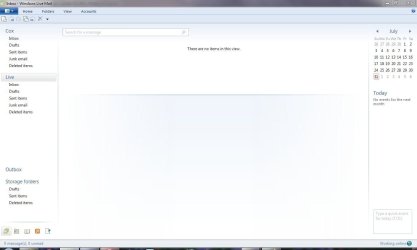
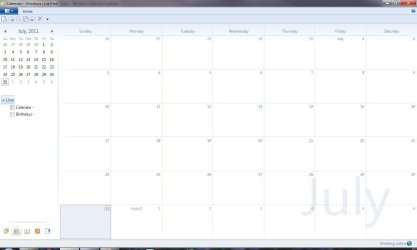
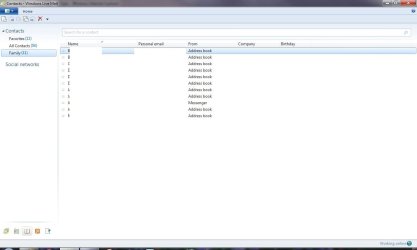
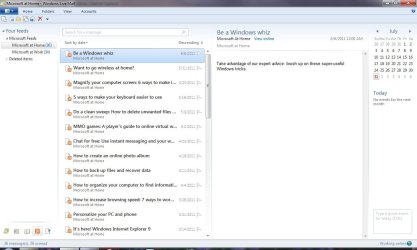
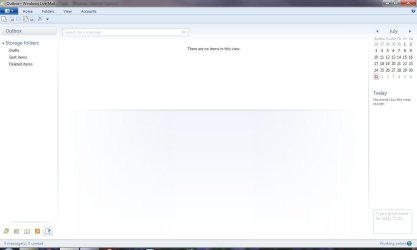
Here's 5 screen caps to show you a preview:
  1. Mail
  2. Calendar
  3. Contacts
  4. Feeds (which I don't use)
  5. Newsgroups (also which I don't use)
 

Attachments

  • Windows Live Mail 01.JPG
    Windows Live Mail 01.JPG
    47 KB · Views: 15
  • Windows Live Mail 02.JPG
    Windows Live Mail 02.JPG
    50.7 KB · Views: 6
  • Windows Live Mail 03.JPG
    Windows Live Mail 03.JPG
    43.5 KB · Views: 8
  • Windows Live Mail 04.JPG
    Windows Live Mail 04.JPG
    90.3 KB · Views: 9
  • Windows Live Mail 05.JPG
    Windows Live Mail 05.JPG
    43.2 KB · Views: 4

My Computer My Computer

Computer Manufacturer/Model Number
Dell Inspiron 1521
OS
Windows 7 Professional
CPU
AMD Turion 64 X2
Motherboard
Model: Dell 0GU163 Chipset: ATI M690G (RS690M) + SB600
Memory
2 GB PC2-5300 (667Mhz)
Graphics Card(s)
ATI Mobility Radeon Xpress 1270
Sound Card
ATI SB600 High Definition Adio Controller; SigmaTel STAC9205
Screen Resolution
1280 x 800
Hard Drives
Hitachi HTS541680J9SA00; 80 Gb
...No importing/exporting on your part. Windows Live Mail will do the work for you...
You still need to locate the message store and the *.wab file in OE and use the "Import" function of WLM to bring the old data over to the new program. That's why the import and export features exist...to make backing up and restoring easier whether it's to/from the same program or to a different one.
 

My Computer My Computer

Computer type
PC/Desktop
Computer Manufacturer/Model Number
OQO 2+
OS
Windows 8 Pro w/MC 32-bit
CPU
Intel Atom 1.86 GHz
Motherboard
OQO 2+
Memory
2 GB
Graphics Card(s)
Intel GMA 500
Sound Card
IDT
Monitor(s) Displays
LCD
Screen Resolution
800 x 480 (portable) 1280 x 1024 (docked)
Hard Drives
64 GB SSD
PSU
9 Ah Battery (portable) or OQO Brick (docked)
Case
Shirt Pocket Sized
Cooling
Tiny Fan
Keyboard
Slide out (portable) DiNovo Edge (docked)
Mouse
Eraser head (portable) Logitech Bluetooth (docked)
Internet Speed
WWAN or 802.11G (portable) T1 (docked)
Browser
IE 10
Other Info
DVD-RW OQO Docking Station
Ron,

Thanks for setting me straight on this. :zip:
 

My Computer My Computer

Computer Manufacturer/Model Number
Dell Inspiron 1521
OS
Windows 7 Professional
CPU
AMD Turion 64 X2
Motherboard
Model: Dell 0GU163 Chipset: ATI M690G (RS690M) + SB600
Memory
2 GB PC2-5300 (667Mhz)
Graphics Card(s)
ATI Mobility Radeon Xpress 1270
Sound Card
ATI SB600 High Definition Adio Controller; SigmaTel STAC9205
Screen Resolution
1280 x 800
Hard Drives
Hitachi HTS541680J9SA00; 80 Gb
Back
Top