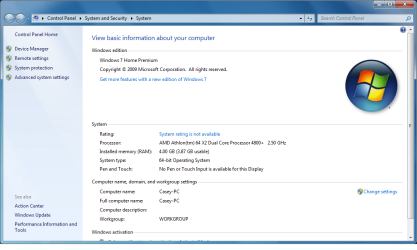
How do I get rid of vista and just have 7?

Case1

New member
Member
VIP
Local time
5:20 PM
Messages
147
Location
Texas
Hi Shawn,

I thought I was doing a clean install for Win 7 and it looks like I have vista and 7 on here. How do I get rid of vista and just have 7?

Thanks,

Casey
 

My Computer My Computer

At a glance

Windows 7 Home PremiumAMD Phenom II 955 Black Edition Quad CoreCorsair XMS3 8GBATI Eyefinity HD 5770 5 mini display ports
Computer type
PC/Desktop
Computer Manufacturer/Model Number
Custom Build
OS
Windows 7 Home Premium
CPU
AMD Phenom II 955 Black Edition Quad Core
Motherboard
MSI 870-G45
Memory
Corsair XMS3 8GB
Graphics Card(s)
ATI Eyefinity HD 5770 5 mini display ports
Sound Card
Realtek High Definition 6.1
Monitor(s) Displays
2 DELL E207WFP 21.5" - 1 Acer 21.5"
Screen Resolution
2 Dells 1680x1050 - Acer 1920x1080
Hard Drives
Intel 40GB SSD
WD 500GB internal
WD 500Gb external
PSU
Cooler Master 500w
Case
Cooler Master 430 Black Elite
Keyboard
HP
Mouse
MIBRU
Internet Speed
10 mbs
Antivirus
Trend Micro
Browser
Chrome

My Computer My Computer

At a glance

Windows 7 Professional x64Intel i7 2600K OC'd @ 4620 MHz16GB GSkill Sniper 2133 Mhz (4x4GB)EVGA GeForce GTX 480 SuperClocked+
Computer Manufacturer/Model Number
Custom
OS
Windows 7 Professional x64
CPU
Intel i7 2600K OC'd @ 4620 MHz
Motherboard
Asus P8Z68-V Pro
Memory
16GB GSkill Sniper 2133 Mhz (4x4GB)
Graphics Card(s)
EVGA GeForce GTX 480 SuperClocked+
Sound Card
Realtek High Definition Audio
Monitor(s) Displays
2x Acer S273HLbmii 27"
Screen Resolution
2 x 1920x1080
Hard Drives
64GB Crucial M4 SSD

Storage: Hitachi 1TB 5400RPM, Samsung 1.5TB 5400RPM
PSU
Corsair HW Series 750w (modular)
Case
Cooler Master HAF 932 Advanced Blue Edition
Cooling
CM Hyper 212+ CPU cooler, 3x 230mm + 1x 140mm case fans
Keyboard
Logitech MK320 (wireless)
Mouse
Logitech MK320 (wireless)
Internet Speed
30 Mb/s : 2 Mb/s
Hello Casey,

Could you also post a screenshot of your Disk Management (dskmgmt.msc) window showing all of your drive(s) layout? This way we will be able to tell which OS was installed first and which one is the boot drive/partition.
 

My Computer My Computer

At a glance

64-bit Windows 11 Pro for WorkstationsIntel i7-8700K OC'd to 5 GHz64 GB (4x16GB) G.SKILL TridentZ RGB DDR4 3600...ASUS ROG-STRIX-GTX1080TI-O11G-GAMING
Computer type
PC/Desktop
Computer Manufacturer/Model Number
Self built custom
OS
64-bit Windows 11 Pro for Workstations
CPU
Intel i7-8700K OC'd to 5 GHz
Motherboard
ASUS ROG Maximus XI Formula Z390
Memory
64 GB (4x16GB) G.SKILL TridentZ RGB DDR4 3600 MHz
Graphics Card(s)
ASUS ROG-STRIX-GTX1080TI-O11G-GAMING
Sound Card
Integrated
Monitor(s) Displays
2 x Samsung Odyssey G7 27"
Screen Resolution
2560x1440
Hard Drives
1TB Samsung 990 PRO M.2,
4TB Samsung 990 PRO PRO M.2,
TerraMaster F8 SSD Plus NAS
PSU
Seasonic Prime Titanium 850W
Case
Thermaltake Core P3
Cooling
Corsair Hydro H115i
Keyboard
Logitech wireless K800
Mouse
Logitech MX Master 4
Internet Speed
2 Gb/s Download and 100 Mb/s Upload
Antivirus
Malwarebyte Anti-Malware Premium
Browser
Google Chrome
Other Info
Logitech Z625 speaker system,
Logitech BRIO 4K Pro webcam,
HP Color LaserJet Pro MFP M477fdn,
APC SMART-UPS RT 1000 XL - SURT1000XLI,
Galaxy S23 Plus phone
Hello Casey,

Could you also post a screenshot of your Disk Management (dskmgmt.msc) window showing all of your drive(s) layout? This way we will be able to tell which OS was installed first and which one is the boot drive/partition.

How do I do a screenshot and put it on the forum?
 

My Computer My Computer

At a glance

Windows 7 Home PremiumAMD Phenom II 955 Black Edition Quad CoreCorsair XMS3 8GBATI Eyefinity HD 5770 5 mini display ports
Computer type
PC/Desktop
Computer Manufacturer/Model Number
Custom Build
OS
Windows 7 Home Premium
CPU
AMD Phenom II 955 Black Edition Quad Core
Motherboard
MSI 870-G45
Memory
Corsair XMS3 8GB
Graphics Card(s)
ATI Eyefinity HD 5770 5 mini display ports
Sound Card
Realtek High Definition 6.1
Monitor(s) Displays
2 DELL E207WFP 21.5" - 1 Acer 21.5"
Screen Resolution
2 Dells 1680x1050 - Acer 1920x1080
Hard Drives
Intel 40GB SSD
WD 500GB internal
WD 500Gb external
PSU
Cooler Master 500w
Case
Cooler Master 430 Black Elite
Keyboard
HP
Mouse
MIBRU
Internet Speed
10 mbs
Antivirus
Trend Micro
Browser
Chrome
Just click on the word screenshot in Brinks post above ;)
 

My Computer My Computer

At a glance

Win7 Enterprise, Win7 x86 (Ult 7600), Win7 x6...AMD fx8350 4ghz, AMD-32 2400mhz, AMD-64 3200m...2gb, 4gb on the Ult 7600, 4gb on Technet RTM,...Draw my own Graphics, several nVidia cards
Computer type
PC/Desktop
Computer Manufacturer/Model Number
Built them myself, Science Experiments !
OS
Win7 Enterprise, Win7 x86 (Ult 7600), Win7 x64 Ult 7600, TechNet RTM on AMD x64 (2.8Ghz)
CPU
AMD fx8350 4ghz, AMD-32 2400mhz, AMD-64 3200mhz, AMDx64 2.8G
Motherboard
SIS 755, ECS-K8M890M-M (Ult 7600), GigaByte & others
Memory
2gb, 4gb on the Ult 7600, 4gb on Technet RTM, 32gb on FX8350
Graphics Card(s)
Draw my own Graphics, several nVidia cards
Sound Card
on motherboard
Monitor(s) Displays
19" flat scr, 28" I-Inc widescr,22" Emprex Widescr, 23" Acer
Screen Resolution
1280 x 1024, 1440 x 900, 1920 x 1080
Hard Drives
6 pata Ide HD's & 2 Sata HD's
added 80gb external on Ult 7600 computer,
numerous extra 1tb, 2TB, 3Tb SATA HD's
A collection of ext HD Docks w/ HDs
PSU
430w, 550w, 600w, 700, 800, etc
Case
All Generic Full Towers
Cooling
Open Air & a few fans, some w/ colored LEDs
Keyboard
Compaq & Dell recycled from GoodWill
Mouse
Made in China Optical Wired Mouse
Internet Speed
Fast Cable InterNet
Antivirus
AVG Free on 24 different Desktops, NO Problems!
Browser
IE 8 is preferred, but use FireFox sometimes
Other Info
Linksys Routers, switches, & Hubs
Too Many USB Flash Drives to count, Biggest is 64GB !
Eight computers in my home network.
Sixteen computers at my business network.
Linked via TeamViewer !
Lots of old used spare computer parts everywhere!
Hello Case1, welcome to Seven Forums!


In the Windows start menu right click computer and click manage, in the left pane of the "Computer Management" window that opens click disk management and post a snip of that.
 

My Computer My Computer

At a glance

W 7 64-bit UltimateIntel Q9550 Yorkfield8GB Dominator 8500C5DATI : XFX 5870
Computer Manufacturer/Model Number
* BFK Customs *
OS
W 7 64-bit Ultimate
CPU
Intel Q9550 Yorkfield
Motherboard
ASUS P5Q Pro
Memory
8GB Dominator 8500C5D
Graphics Card(s)
ATI : XFX 5870
Sound Card
Realtek HD Audio 7-1
Monitor(s) Displays
1x 47" LCD HDMI & 3x 26" LCD HDMI
Screen Resolution
1920x1080P & 1920x1200
Hard Drives
1x 80GB Intel X25-M G2 SSD : 1x 500GB & 1x 640GB WD Caviar Black(s)
PSU
Corsair 620HX
Case
Cooler Master RC-690
Cooling
Tuniq Tower 120, 2x 140mm and 3x 120mm case fans
Keyboard
Microsoft 500
Mouse
Razer Diamondback 3G
Internet Speed
14 Mb/s
Other Info
1x Koutech 3Gb/s SATA HDD Hot Swap Rack
Hello Case1, welcome to Seven Forums!


In the Windows start menu right click computer and click manage, in the left pane of the "Computer Management" window that opens click disk management and post a snip of that.

Is this how
moz-screenshot-4.png


win 7.png
 

My Computer My Computer

At a glance

Windows 7 Home PremiumAMD Phenom II 955 Black Edition Quad CoreCorsair XMS3 8GBATI Eyefinity HD 5770 5 mini display ports
Computer type
PC/Desktop
Computer Manufacturer/Model Number
Custom Build
OS
Windows 7 Home Premium
CPU
AMD Phenom II 955 Black Edition Quad Core
Motherboard
MSI 870-G45
Memory
Corsair XMS3 8GB
Graphics Card(s)
ATI Eyefinity HD 5770 5 mini display ports
Sound Card
Realtek High Definition 6.1
Monitor(s) Displays
2 DELL E207WFP 21.5" - 1 Acer 21.5"
Screen Resolution
2 Dells 1680x1050 - Acer 1920x1080
Hard Drives
Intel 40GB SSD
WD 500GB internal
WD 500Gb external
PSU
Cooler Master 500w
Case
Cooler Master 430 Black Elite
Keyboard
HP
Mouse
MIBRU
Internet Speed
10 mbs
Antivirus
Trend Micro
Browser
Chrome
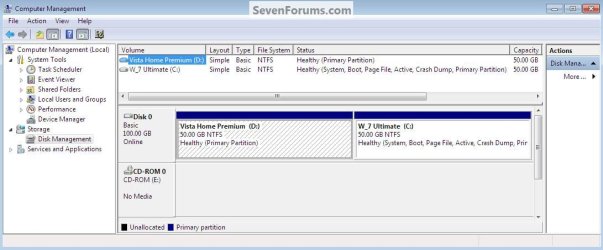
It will look similar to this.


click to enlarge
Dual Vista_W_7.jpg
 

My Computer My Computer

At a glance

W 7 64-bit UltimateIntel Q9550 Yorkfield8GB Dominator 8500C5DATI : XFX 5870
Computer Manufacturer/Model Number
* BFK Customs *
OS
W 7 64-bit Ultimate
CPU
Intel Q9550 Yorkfield
Motherboard
ASUS P5Q Pro
Memory
8GB Dominator 8500C5D
Graphics Card(s)
ATI : XFX 5870
Sound Card
Realtek HD Audio 7-1
Monitor(s) Displays
1x 47" LCD HDMI & 3x 26" LCD HDMI
Screen Resolution
1920x1080P & 1920x1200
Hard Drives
1x 80GB Intel X25-M G2 SSD : 1x 500GB & 1x 640GB WD Caviar Black(s)
PSU
Corsair 620HX
Case
Cooler Master RC-690
Cooling
Tuniq Tower 120, 2x 140mm and 3x 120mm case fans
Keyboard
Microsoft 500
Mouse
Razer Diamondback 3G
Internet Speed
14 Mb/s
Other Info
1x Koutech 3Gb/s SATA HDD Hot Swap Rack
Hello Case1, welcome to Seven Forums!


In the Windows start menu right click computer and click manage, in the left pane of the "Computer Management" window that opens click disk management and post a snip of that.

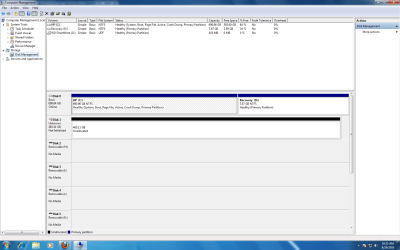
How about this?

DM.png
 

My Computer My Computer

At a glance

Windows 7 Home PremiumAMD Phenom II 955 Black Edition Quad CoreCorsair XMS3 8GBATI Eyefinity HD 5770 5 mini display ports
Computer type
PC/Desktop
Computer Manufacturer/Model Number
Custom Build
OS
Windows 7 Home Premium
CPU
AMD Phenom II 955 Black Edition Quad Core
Motherboard
MSI 870-G45
Memory
Corsair XMS3 8GB
Graphics Card(s)
ATI Eyefinity HD 5770 5 mini display ports
Sound Card
Realtek High Definition 6.1
Monitor(s) Displays
2 DELL E207WFP 21.5" - 1 Acer 21.5"
Screen Resolution
2 Dells 1680x1050 - Acer 1920x1080
Hard Drives
Intel 40GB SSD
WD 500GB internal
WD 500Gb external
PSU
Cooler Master 500w
Case
Cooler Master 430 Black Elite
Keyboard
HP
Mouse
MIBRU
Internet Speed
10 mbs
Antivirus
Trend Micro
Browser
Chrome
Which OS are you using now, right this minute Vista or Windows 7?
 

My Computer My Computer

At a glance

W 7 64-bit UltimateIntel Q9550 Yorkfield8GB Dominator 8500C5DATI : XFX 5870
Computer Manufacturer/Model Number
* BFK Customs *
OS
W 7 64-bit Ultimate
CPU
Intel Q9550 Yorkfield
Motherboard
ASUS P5Q Pro
Memory
8GB Dominator 8500C5D
Graphics Card(s)
ATI : XFX 5870
Sound Card
Realtek HD Audio 7-1
Monitor(s) Displays
1x 47" LCD HDMI & 3x 26" LCD HDMI
Screen Resolution
1920x1080P & 1920x1200
Hard Drives
1x 80GB Intel X25-M G2 SSD : 1x 500GB & 1x 640GB WD Caviar Black(s)
PSU
Corsair 620HX
Case
Cooler Master RC-690
Cooling
Tuniq Tower 120, 2x 140mm and 3x 120mm case fans
Keyboard
Microsoft 500
Mouse
Razer Diamondback 3G
Internet Speed
14 Mb/s
Other Info
1x Koutech 3Gb/s SATA HDD Hot Swap Rack

My Computer My Computer

At a glance

Windows 7 Home PremiumAMD Phenom II 955 Black Edition Quad CoreCorsair XMS3 8GBATI Eyefinity HD 5770 5 mini display ports
Computer type
PC/Desktop
Computer Manufacturer/Model Number
Custom Build
OS
Windows 7 Home Premium
CPU
AMD Phenom II 955 Black Edition Quad Core
Motherboard
MSI 870-G45
Memory
Corsair XMS3 8GB
Graphics Card(s)
ATI Eyefinity HD 5770 5 mini display ports
Sound Card
Realtek High Definition 6.1
Monitor(s) Displays
2 DELL E207WFP 21.5" - 1 Acer 21.5"
Screen Resolution
2 Dells 1680x1050 - Acer 1920x1080
Hard Drives
Intel 40GB SSD
WD 500GB internal
WD 500Gb external
PSU
Cooler Master 500w
Case
Cooler Master 430 Black Elite
Keyboard
HP
Mouse
MIBRU
Internet Speed
10 mbs
Antivirus
Trend Micro
Browser
Chrome
Not in that snip it doesn't.
 

My Computer My Computer

At a glance

W 7 64-bit UltimateIntel Q9550 Yorkfield8GB Dominator 8500C5DATI : XFX 5870
Computer Manufacturer/Model Number
* BFK Customs *
OS
W 7 64-bit Ultimate
CPU
Intel Q9550 Yorkfield
Motherboard
ASUS P5Q Pro
Memory
8GB Dominator 8500C5D
Graphics Card(s)
ATI : XFX 5870
Sound Card
Realtek HD Audio 7-1
Monitor(s) Displays
1x 47" LCD HDMI & 3x 26" LCD HDMI
Screen Resolution
1920x1080P & 1920x1200
Hard Drives
1x 80GB Intel X25-M G2 SSD : 1x 500GB & 1x 640GB WD Caviar Black(s)
PSU
Corsair 620HX
Case
Cooler Master RC-690
Cooling
Tuniq Tower 120, 2x 140mm and 3x 120mm case fans
Keyboard
Microsoft 500
Mouse
Razer Diamondback 3G
Internet Speed
14 Mb/s
Other Info
1x Koutech 3Gb/s SATA HDD Hot Swap Rack
Not in that snip it doesn't.

Is there a way I can tell if Vista is still on my comp? When I installed Win 7 I did a full install OEM and when I got to the partitions I chose the one Vista was on, the hard drive. Was I suppose to delete the partitions to get rid of Vista or do you think when I installed Win 7 it did it automatically? I am so confused LOL.
 

My Computer My Computer

At a glance

Windows 7 Home PremiumAMD Phenom II 955 Black Edition Quad CoreCorsair XMS3 8GBATI Eyefinity HD 5770 5 mini display ports
Computer type
PC/Desktop
Computer Manufacturer/Model Number
Custom Build
OS
Windows 7 Home Premium
CPU
AMD Phenom II 955 Black Edition Quad Core
Motherboard
MSI 870-G45
Memory
Corsair XMS3 8GB
Graphics Card(s)
ATI Eyefinity HD 5770 5 mini display ports
Sound Card
Realtek High Definition 6.1
Monitor(s) Displays
2 DELL E207WFP 21.5" - 1 Acer 21.5"
Screen Resolution
2 Dells 1680x1050 - Acer 1920x1080
Hard Drives
Intel 40GB SSD
WD 500GB internal
WD 500Gb external
PSU
Cooler Master 500w
Case
Cooler Master 430 Black Elite
Keyboard
HP
Mouse
MIBRU
Internet Speed
10 mbs
Antivirus
Trend Micro
Browser
Chrome

My Computer My Computer

At a glance

W 7 64-bit UltimateIntel Q9550 Yorkfield8GB Dominator 8500C5DATI : XFX 5870
Computer Manufacturer/Model Number
* BFK Customs *
OS
W 7 64-bit Ultimate
CPU
Intel Q9550 Yorkfield
Motherboard
ASUS P5Q Pro
Memory
8GB Dominator 8500C5D
Graphics Card(s)
ATI : XFX 5870
Sound Card
Realtek HD Audio 7-1
Monitor(s) Displays
1x 47" LCD HDMI & 3x 26" LCD HDMI
Screen Resolution
1920x1080P & 1920x1200
Hard Drives
1x 80GB Intel X25-M G2 SSD : 1x 500GB & 1x 640GB WD Caviar Black(s)
PSU
Corsair 620HX
Case
Cooler Master RC-690
Cooling
Tuniq Tower 120, 2x 140mm and 3x 120mm case fans
Keyboard
Microsoft 500
Mouse
Razer Diamondback 3G
Internet Speed
14 Mb/s
Other Info
1x Koutech 3Gb/s SATA HDD Hot Swap Rack
OHH ok, so as long as I picked the partition Vista was on, which I did, That sucker is outta here! Now I need to install the new graphics card, ATI HD 3450 I just got. I have an HP pavilion m8013w and I think the video card is built in to the MB. How do I know which slot to put this new card in?

Thanks to you Barefoot, Jonathan, Brink, and Doc for y'alls help!!!
 

My Computer My Computer

At a glance

Windows 7 Home PremiumAMD Phenom II 955 Black Edition Quad CoreCorsair XMS3 8GBATI Eyefinity HD 5770 5 mini display ports
Computer type
PC/Desktop
Computer Manufacturer/Model Number
Custom Build
OS
Windows 7 Home Premium
CPU
AMD Phenom II 955 Black Edition Quad Core
Motherboard
MSI 870-G45
Memory
Corsair XMS3 8GB
Graphics Card(s)
ATI Eyefinity HD 5770 5 mini display ports
Sound Card
Realtek High Definition 6.1
Monitor(s) Displays
2 DELL E207WFP 21.5" - 1 Acer 21.5"
Screen Resolution
2 Dells 1680x1050 - Acer 1920x1080
Hard Drives
Intel 40GB SSD
WD 500GB internal
WD 500Gb external
PSU
Cooler Master 500w
Case
Cooler Master 430 Black Elite
Keyboard
HP
Mouse
MIBRU
Internet Speed
10 mbs
Antivirus
Trend Micro
Browser
Chrome

My Computer My Computer

At a glance

W 7 64-bit UltimateIntel Q9550 Yorkfield8GB Dominator 8500C5DATI : XFX 5870
Computer Manufacturer/Model Number
* BFK Customs *
OS
W 7 64-bit Ultimate
CPU
Intel Q9550 Yorkfield
Motherboard
ASUS P5Q Pro
Memory
8GB Dominator 8500C5D
Graphics Card(s)
ATI : XFX 5870
Sound Card
Realtek HD Audio 7-1
Monitor(s) Displays
1x 47" LCD HDMI & 3x 26" LCD HDMI
Screen Resolution
1920x1080P & 1920x1200
Hard Drives
1x 80GB Intel X25-M G2 SSD : 1x 500GB & 1x 640GB WD Caviar Black(s)
PSU
Corsair 620HX
Case
Cooler Master RC-690
Cooling
Tuniq Tower 120, 2x 140mm and 3x 120mm case fans
Keyboard
Microsoft 500
Mouse
Razer Diamondback 3G
Internet Speed
14 Mb/s
Other Info
1x Koutech 3Gb/s SATA HDD Hot Swap Rack
Hello Case1, welcome to Seven Forums!


In the Windows start menu right click computer and click manage, in the left pane of the "Computer Management" window that opens click disk management and post a snip of that.

How about this?

View attachment 94007

Casey,

From your screenshot, you do not have Vista installed anymore.

You will need to right click on the Disk 1 "Unknown" area and click on Initialize. This will then let you be able to create a new partition with all of that "Unallocated space" on disk 1.

Hope this helps,
Shawn
 

My Computer My Computer

At a glance

64-bit Windows 11 Pro for WorkstationsIntel i7-8700K OC'd to 5 GHz64 GB (4x16GB) G.SKILL TridentZ RGB DDR4 3600...ASUS ROG-STRIX-GTX1080TI-O11G-GAMING
Computer type
PC/Desktop
Computer Manufacturer/Model Number
Self built custom
OS
64-bit Windows 11 Pro for Workstations
CPU
Intel i7-8700K OC'd to 5 GHz
Motherboard
ASUS ROG Maximus XI Formula Z390
Memory
64 GB (4x16GB) G.SKILL TridentZ RGB DDR4 3600 MHz
Graphics Card(s)
ASUS ROG-STRIX-GTX1080TI-O11G-GAMING
Sound Card
Integrated
Monitor(s) Displays
2 x Samsung Odyssey G7 27"
Screen Resolution
2560x1440
Hard Drives
1TB Samsung 990 PRO M.2,
4TB Samsung 990 PRO PRO M.2,
TerraMaster F8 SSD Plus NAS
PSU
Seasonic Prime Titanium 850W
Case
Thermaltake Core P3
Cooling
Corsair Hydro H115i
Keyboard
Logitech wireless K800
Mouse
Logitech MX Master 4
Internet Speed
2 Gb/s Download and 100 Mb/s Upload
Antivirus
Malwarebyte Anti-Malware Premium
Browser
Google Chrome
Other Info
Logitech Z625 speaker system,
Logitech BRIO 4K Pro webcam,
HP Color LaserJet Pro MFP M477fdn,
APC SMART-UPS RT 1000 XL - SURT1000XLI,
Galaxy S23 Plus phone
Hello Case1, welcome to Seven Forums!


In the Windows start menu right click computer and click manage, in the left pane of the "Computer Management" window that opens click disk management and post a snip of that.

How about this?

View attachment 94007

Casey,

From your screenshot, you do not have Vista installed anymore.

You will need to right click on the Disk 1 "Unknown" area and click on Initialize. This will then let you be able to create a new partition with all of that "Unallocated space" on disk 1.

Hope this helps,
Shawn

Hi Shawn,

I am not sure about this step on creating a partition. How many MB's will I need to use and what am I creating the partition for, Windows 7? And would it be wise to create any more partitions?

Thanks,

Casey
 

My Computer My Computer

At a glance

Windows 7 Home PremiumAMD Phenom II 955 Black Edition Quad CoreCorsair XMS3 8GBATI Eyefinity HD 5770 5 mini display ports
Computer type
PC/Desktop
Computer Manufacturer/Model Number
Custom Build
OS
Windows 7 Home Premium
CPU
AMD Phenom II 955 Black Edition Quad Core
Motherboard
MSI 870-G45
Memory
Corsair XMS3 8GB
Graphics Card(s)
ATI Eyefinity HD 5770 5 mini display ports
Sound Card
Realtek High Definition 6.1
Monitor(s) Displays
2 DELL E207WFP 21.5" - 1 Acer 21.5"
Screen Resolution
2 Dells 1680x1050 - Acer 1920x1080
Hard Drives
Intel 40GB SSD
WD 500GB internal
WD 500Gb external
PSU
Cooler Master 500w
Case
Cooler Master 430 Black Elite
Keyboard
HP
Mouse
MIBRU
Internet Speed
10 mbs
Antivirus
Trend Micro
Browser
Chrome
Hello Casey.


When you get to step #7 in this tutorial create a new partition just click "next" don't enter a number and it will accept the default as the size to create the new partition.
 

My Computer My Computer

At a glance

W 7 64-bit UltimateIntel Q9550 Yorkfield8GB Dominator 8500C5DATI : XFX 5870
Computer Manufacturer/Model Number
* BFK Customs *
OS
W 7 64-bit Ultimate
CPU
Intel Q9550 Yorkfield
Motherboard
ASUS P5Q Pro
Memory
8GB Dominator 8500C5D
Graphics Card(s)
ATI : XFX 5870
Sound Card
Realtek HD Audio 7-1
Monitor(s) Displays
1x 47" LCD HDMI & 3x 26" LCD HDMI
Screen Resolution
1920x1080P & 1920x1200
Hard Drives
1x 80GB Intel X25-M G2 SSD : 1x 500GB & 1x 640GB WD Caviar Black(s)
PSU
Corsair 620HX
Case
Cooler Master RC-690
Cooling
Tuniq Tower 120, 2x 140mm and 3x 120mm case fans
Keyboard
Microsoft 500
Mouse
Razer Diamondback 3G
Internet Speed
14 Mb/s
Other Info
1x Koutech 3Gb/s SATA HDD Hot Swap Rack
Hi Ted,

Will I be creating this partition for the new operating sys ( Win 7)?
 

My Computer My Computer

At a glance

Windows 7 Home PremiumAMD Phenom II 955 Black Edition Quad CoreCorsair XMS3 8GBATI Eyefinity HD 5770 5 mini display ports
Computer type
PC/Desktop
Computer Manufacturer/Model Number
Custom Build
OS
Windows 7 Home Premium
CPU
AMD Phenom II 955 Black Edition Quad Core
Motherboard
MSI 870-G45
Memory
Corsair XMS3 8GB
Graphics Card(s)
ATI Eyefinity HD 5770 5 mini display ports
Sound Card
Realtek High Definition 6.1
Monitor(s) Displays
2 DELL E207WFP 21.5" - 1 Acer 21.5"
Screen Resolution
2 Dells 1680x1050 - Acer 1920x1080
Hard Drives
Intel 40GB SSD
WD 500GB internal
WD 500Gb external
PSU
Cooler Master 500w
Case
Cooler Master 430 Black Elite
Keyboard
HP
Mouse
MIBRU
Internet Speed
10 mbs
Antivirus
Trend Micro
Browser
Chrome
Back
Top