Solved How do I get rid of weird virus? (Programs won't open in Windows 7)

PCuser809

New member
Local time
8:46 AM
Messages
19
When I ran Malwarebytes it said it needed to restart to get rid of the viruses it detected and since then I haven't been able to open any software. I used to be able to open only IE but not even that anymore. I did everything I could that I've seen in forums; restoring to another time; going on Safe Mode; even restoring to factory settings.

Any help?

By the way, remember that I can't open anything except some programs that were already in the system (things like Control Panel, Documents, etc--and in Control Panel I can't even run anything), let alone install anything. I can only post this because I'm on a different PC right now. I even tried downloading Malwarebytes into an USB and opening it in my computer but that doesn't work either.

if it helps my computer is an HP Pavilion dm4-2070 64bit with Intel Core i5
 

My Computer My Computer

At a glance

Windows 7 Home Premium 64bit
Computer type
Laptop
Computer Manufacturer/Model Number
HP
OS
Windows 7 Home Premium 64bit
Using the computer that works download and burn 'SystemRescueCD' SystemRescueCd
 

My Computer My Computer

At a glance

Windows 7 Ultimate 32bit SP1Intel(R) Core(TM)2 Quad CPU @ 2.40GHz, 2400 MHz4 GBATI Radeon HD 2600 Pro
Computer type
PC/Desktop
Computer Manufacturer/Model Number
Bruce ... somewhere in his 40's
OS
Windows 7 Ultimate 32bit SP1
CPU
Intel(R) Core(TM)2 Quad CPU @ 2.40GHz, 2400 MHz
Motherboard
INTEL/D975XBX2
Memory
4 GB
Graphics Card(s)
ATI Radeon HD 2600 Pro
Monitor(s) Displays
Samsung SyncMaster 914v
Screen Resolution
1280 x 1024
Hard Drives
2/500GB each ... ST3500630AS ATA Device.
One is not connected
PSU
Rocketfish 700 W
Case
G.Skill Gigabyte Chassis
Keyboard
Standard PS/2 Keyboard
Mouse
Microsoft PS/2 Mouse
Internet Speed
DSL
Antivirus
Avira Internet Security
Browser
IE 11
Other Info
ATI HDMI Audio
Maybe your .exe file associations are off. Download and import exe registry fixes Can't open .EXE files in Windows 7 or Windows Vista . It will download .reg file, that should work on your PC.
Also, try downloading new programs and run them as .com instead of .exe. For many programs this will work.
 

My Computer My Computer

At a glance

Windows 7 64 / Windows 8 64
OS
Windows 7 64 / Windows 8 64
Using the computer that works download and burn 'SystemRescueCD' SystemRescueCd

I have no freaking idea how to operate this whatsoever and the website is no help.

I downloaded the file and then burned it to a CD as an image. No idea how to open it as it has like 13 files and none of them open.

Can you give me a step by step?

Maybe your .exe file associations are off. Download and import exe registry fixes Can't open .EXE files in Windows 7 or Windows Vista . It will download .reg file, that should work on your PC.
Also, try downloading new programs and run them as .com instead of .exe. For many programs this will work.

I can't even open IE, let alone DOWNLOAD something
 

My Computer My Computer

At a glance

Windows 7 Home Premium 64bit
Computer type
Laptop
Computer Manufacturer/Model Number
HP
OS
Windows 7 Home Premium 64bit
Do you have another computer that you could download things on ?

Also on the problematic PC while the PC is booting do you get Repair Your Computer when you press F8 ?
 

My Computer My Computer

At a glance

Windows 7 Ultimate 32-Bit & Windows 7 Ultimat...Intel Core i7 CPU 950 @ 3.07GHzOCZ 6GB (3 x 2GB) 240-Pin DDR3 SDRAM DDR3 160...ATI Radeon HD 5700 Series
Computer Manufacturer/Model Number
Custom Built
OS
Windows 7 Ultimate 32-Bit & Windows 7 Ultimate 64-Bit
CPU
Intel Core i7 CPU 950 @ 3.07GHz
Motherboard
ASUS P6T DELUXE V2
Memory
OCZ 6GB (3 x 2GB) 240-Pin DDR3 SDRAM DDR3 1600 OCZ3X1600R2
Graphics Card(s)
ATI Radeon HD 5700 Series
Sound Card
OnBoard
Hard Drives
WD6400AACS-00M3B0 (640GB SATA )
PSU
CORSAIR 850w
Case
NZXT LEXA
Cooling
Intel Stock Heatsink Fan
Keyboard
Microsoft Wireless Laser Keyboard 7000
Mouse
Microsoft Wireless Laser Mouse 7000
   Warning
You will need a USB FLASH DRIVE


   Tip
Download the Tool from a non infected PC


Download Farbar Recovery Scan Tool


64-Bit Version OS :ar: Farbar Recovery Scan Tool x64 Save the file to a USB Flash drive


Plug the flash drive into the infected PC.

Enter System Recovery Options.

:ar: To enter System Recovery Options from the Advanced Boot Options:
Restart the computer.
As soon as the BIOS is loaded begin tapping the F8 key until Advanced Boot Options appears.
Use the arrow keys to select Repair Your Computer menu item.
Select US as the keyboard language settings, and then click Next.
Select the operating system you want to repair, and then click Next.
Select your user account an click Next.

:ar: To enter System Recovery Options by using Windows installation disc:
Insert the installation disc.
Restart your computer.
If prompted, press any key to start Windows from the installation disc. If your computer is not configured to start from a CD or DVD, check your BIOS settings.
Click Repair your computer.
Select US as the keyboard language settings, and then click Next.
Select the operating system you want to repair, and then click Next.
Select your user account and click Next.

:ar: On the System Recovery Options menu you will get the following

  • Startup Repair

  • System Restore

  • Windows Complete PC Restore

  • Windows Memory Diagnostic Tool

  • Command Prompt

Select Command Prompt

In the command window type X:\FRST64.exe and press Enter
   Note
Replace letter X with the drive letter of your flash drive.

   Tip
Type the commands below to see what your letter is for the USB drive and press ENTER after each command

Code:
Diskpart
List volume
The tool will start to run.
When the tool opens click Yes to disclaimer.
Press Scan button.
FRST will let you know when the scan is complete and has written the FRST.txt to file
Please copy and paste both logs in your reply.(FRST.txt and Addition.txt)
 

My Computer My Computer

At a glance

Windows 7 Ultimate 32-Bit & Windows 7 Ultimat...Intel Core i7 CPU 950 @ 3.07GHzOCZ 6GB (3 x 2GB) 240-Pin DDR3 SDRAM DDR3 160...ATI Radeon HD 5700 Series
Computer Manufacturer/Model Number
Custom Built
OS
Windows 7 Ultimate 32-Bit & Windows 7 Ultimate 64-Bit
CPU
Intel Core i7 CPU 950 @ 3.07GHz
Motherboard
ASUS P6T DELUXE V2
Memory
OCZ 6GB (3 x 2GB) 240-Pin DDR3 SDRAM DDR3 1600 OCZ3X1600R2
Graphics Card(s)
ATI Radeon HD 5700 Series
Sound Card
OnBoard
Hard Drives
WD6400AACS-00M3B0 (640GB SATA )
PSU
CORSAIR 850w
Case
NZXT LEXA
Cooling
Intel Stock Heatsink Fan
Keyboard
Microsoft Wireless Laser Keyboard 7000
Mouse
Microsoft Wireless Laser Mouse 7000
Do you get a blue screen when going into Safe Mode?
 

My Computer My Computer

At a glance

Windows 7 Ultimate 64 Bit and Ubuntu 13.04 64...Intel Core [email protected] (3.1 Turbo)8GB (Used to have 16 but the it caused a bsod...Intel Graphics 4000
Computer type
Laptop
Computer Manufacturer/Model Number
Lenovo ThinkPad E530
OS
Windows 7 Ultimate 64 Bit and Ubuntu 13.04 64 Bit
CPU
Intel Core [email protected] (3.1 Turbo)
Motherboard
I have absolutely no idea
Memory
8GB (Used to have 16 but the it caused a bsod every 5 min)
Graphics Card(s)
Intel Graphics 4000
Screen Resolution
1366x700
Hard Drives
750GB (I think Seagate) 2TB Seagate 7200RPM External HDD 70GB Western Digital @5400RPM
Antivirus
Malwarebytes Pro, AVG 2013, Spyware Blaster and SpyBot.
Browser
Google Chrome and occasionally Firefox
   Warning
You will need a USB FLASH DRIVE


   Tip
Download the Tool from a non infected PC


Download Farbar Recovery Scan Tool


64-Bit Version OS :ar: Farbar Recovery Scan Tool x64 Save the file to a USB Flash drive


Plug the flash drive into the infected PC.

Enter System Recovery Options.

:ar: To enter System Recovery Options from the Advanced Boot Options:
Restart the computer.
As soon as the BIOS is loaded begin tapping the F8 key until Advanced Boot Options appears.
Use the arrow keys to select Repair Your Computer menu item.
Select US as the keyboard language settings, and then click Next.
Select the operating system you want to repair, and then click Next.
Select your user account an click Next.

:ar: To enter System Recovery Options by using Windows installation disc:
Insert the installation disc.
Restart your computer.
If prompted, press any key to start Windows from the installation disc. If your computer is not configured to start from a CD or DVD, check your BIOS settings.
Click Repair your computer.
Select US as the keyboard language settings, and then click Next.
Select the operating system you want to repair, and then click Next.
Select your user account and click Next.

:ar: On the System Recovery Options menu you will get the following

  • Startup Repair

  • System Restore

  • Windows Complete PC Restore

  • Windows Memory Diagnostic Tool

  • Command Prompt

Select Command Prompt

In the command window type X:\FRST64.exe and press Enter
   Note
Replace letter X with the drive letter of your flash drive.

   Tip
Type the commands below to see what your letter is for the USB drive and press ENTER after each command

Code:
Diskpart
List volume
The tool will start to run.
When the tool opens click Yes to disclaimer.
Press Scan button.
FRST will let you know when the scan is complete and has written the FRST.txt to file
Please copy and paste both logs in your reply.(FRST.txt and Addition.txt)

First of all, thank you SO much for doing this :')

Second, here's the logs:

Scan result of Farbar Recovery Scan Tool (FRST.txt) (x64) Version: 13-06-2013
Ran by SYSTEM on 16-06-2013 14:34:58
Running from H:\
Windows 7 Home Premium (X64) OS Language: English(US)
Internet Explorer Version 9
Boot Mode: Recovery

The current controlset is ControlSet001
ATTENTION!:=====> FRST is updated to run from normal or Safe mode to produce a full FRST.txt log and an extra Addition.txt log.

==================== Registry (Whitelisted) ==================

HKLM\...\Run: [IntelWireless] "C:\Program Files\Common Files\Intel\WirelessCommon\iFrmewrk.exe" /tf Intel Wireless Tray [1933584 2011-01-05] (Intel(R) Corporation)
HKLM\...\Run: [SysTrayApp] C:\Program Files\IDT\WDM\sttray64.exe [1128448 2011-02-14] (IDT, Inc.)
HKLM\...\Run: [Apoint] C:\Program Files\Apoint2K\Apoint.exe [569200 2011-02-18] (Alps Electric Co., Ltd.)
HKLM-x32\...\Run: [IAStorIcon] C:\Program Files (x86)\Intel\Intel(R) Rapid Storage Technology\IAStorIcon.exe [283160 2011-01-12] (Intel Corporation)
HKLM-x32\...\Run: [] [x]
HKLM-x32\...\Run: [HP Quick Launch] C:\Program Files (x86)\Hewlett-Packard\HP Quick Launch\HPMSGSVC.exe [586296 2010-11-09] (Hewlett-Packard Development Company, L.P.)
HKLM-x32\...\Run: [Adobe Reader Speed Launcher] "C:\Program Files (x86)\Adobe\Reader 10.0\Reader\Reader_sl.exe" [35736 2010-11-15] (Adobe Systems Incorporated)
HKLM-x32\...\Run: [Adobe ARM] "C:\Program Files (x86)\Common Files\Adobe\ARM\1.0\AdobeARM.exe" [932288 2010-11-15] (Adobe Systems Incorporated)
HKLM-x32\...\Run: [HPOSD] C:\Program Files (x86)\Hewlett-Packard\HP On Screen Display\HPOSD.exe [318520 2011-01-27] (Hewlett-Packard Development Company, L.P.)
HKLM-x32\...\Run: [HP CoolSense] C:\Program Files (x86)\Hewlett-Packard\HP CoolSense\CoolSense.exe -byrunkey [1502776 2011-03-11] (Hewlett-Packard Development Company, L.P.)
HKLM-x32\...\Run: [SunJavaUpdateSched] "C:\Program Files (x86)\Common Files\Java\Java Update\jusched.exe" [249064 2010-10-29] (Sun Microsystems, Inc.)

==================== Services (Whitelisted) =================

S3 MyWiFiDHCPDNS; C:\Program Files\Intel\WiFi\bin\PanDhcpDns.exe [340240 2011-01-05] ()
S2 NIS; C:\Program Files (x86)\Norton Internet Security\Engine\18.5.0.125\ccSvcHst.exe [130000 2010-11-23] (Symantec Corporation)

==================== Drivers (Whitelisted) ====================

S3 BHDrvx64; C:\ProgramData\Norton\{0C55C096-0F1D-4F28-AAA2-85EF591126E7}\NIS_18.5.0.125\Definitions\BASHDefs\20101123.003\BHDrvx64.sys [953904 2010-11-22] (Symantec Corporation)
S3 IDSVia64; C:\ProgramData\Norton\{0C55C096-0F1D-4F28-AAA2-85EF591126E7}\NIS_18.5.0.125\Definitions\IPSDefs\20101201.001\IDSVia64.sys [476792 2010-11-10] (Symantec Corporation)
S3 NAVENG; C:\ProgramData\Norton\{0C55C096-0F1D-4F28-AAA2-85EF591126E7}\NIS_18.5.0.125\Definitions\VirusDefs\20101201.025\ENG64.SYS [117808 2010-12-01] (Symantec Corporation)
S3 NAVEX15; C:\ProgramData\Norton\{0C55C096-0F1D-4F28-AAA2-85EF591126E7}\NIS_18.5.0.125\Definitions\VirusDefs\20101201.025\EX64.SYS [1804336 2010-12-01] (Symantec Corporation)
S3 SRTSP; C:\Windows\system32\drivers\NISx64\1205000.07D\SRTSP64.SYS [735864 2010-11-22] (Symantec Corporation)
S3 SRTSPX; C:\Windows\system32\drivers\NISx64\1205000.07D\SRTSPX64.SYS [40568 2010-11-22] (Symantec Corporation)
S3 SymDS; C:\Windows\system32\drivers\NISx64\1205000.07D\SYMDS64.SYS [450608 2010-10-20] (Symantec Corporation)
S3 SymEFA; C:\Windows\system32\drivers\NISx64\1205000.07D\SYMEFA64.SYS [802864 2010-11-17] (Symantec Corporation)
S3 SymEvent; C:\Windows\system32\Drivers\SYMEVENT64x86.SYS [174640 2011-07-09] (Symantec Corporation)
S3 SymIRON; C:\Windows\system32\drivers\NISx64\1205000.07D\Ironx64.SYS [171128 2010-11-15] (Symantec Corporation)
S3 SymNetS; C:\Windows\system32\drivers\NISx64\1205000.07D\SYMNETS.SYS [382072 2010-11-30] (Symantec Corporation)

==================== NetSvcs (Whitelisted) ===================


==================== One Month Created Files and Folders ========

2013-06-16 14:34 - 2013-06-16 14:34 - 00000000 ____D C:\FRST
2013-06-10 18:07 - 2013-06-10 18:07 - 00000000 ___AH C:\Windows\System32\Drivers\Msft_User_WpdMtpDr_01_09_00.Wdf
2013-06-09 11:53 - 2012-06-02 14:19 - 02428952 ____A (Microsoft Corporation) C:\Windows\System32\wuaueng.dll
2013-06-09 11:53 - 2012-06-02 14:19 - 00186752 ____A (Microsoft Corporation) C:\Windows\System32\wuwebv.dll
2013-06-09 11:53 - 2012-06-02 14:19 - 00057880 ____A (Microsoft Corporation) C:\Windows\System32\wuauclt.exe
2013-06-09 11:53 - 2012-06-02 14:19 - 00044056 ____A (Microsoft Corporation) C:\Windows\System32\wups2.dll
2013-06-09 11:53 - 2012-06-02 14:15 - 02622464 ____A (Microsoft Corporation) C:\Windows\System32\wucltux.dll
2013-06-09 11:53 - 2012-06-02 14:15 - 00036864 ____A (Microsoft Corporation) C:\Windows\System32\wuapp.exe
2013-06-09 11:49 - 2013-06-09 11:49 - 00000000 ___AH C:\Windows\System32\Drivers\Msft_User_WpdFs_01_09_00.Wdf
2013-06-09 11:48 - 2013-06-09 11:48 - 00057560 ____A C:\Users\katheleen\AppData\Local\GDIPFONTCACHEV1.DAT
2013-06-09 11:48 - 2013-06-09 11:48 - 00000000 ___DC C:\Users\katheleen\AppData\Local\MigWiz
2013-06-09 11:47 - 2013-06-09 11:48 - 00000000 ____D C:\users\katheleen
2013-06-09 11:47 - 2013-06-09 11:47 - 00000020 ___SH C:\Users\katheleen\ntuser.ini
2013-06-09 11:47 - 2013-06-09 11:47 - 00000000 ____D C:\Users\katheleen\AppData\Roaming\Intel
2013-06-09 11:47 - 2013-06-09 11:47 - 00000000 ____D C:\Users\katheleen\AppData\Local\VirtualStore

==================== One Month Modified Files and Folders =======

2013-06-16 14:34 - 2013-06-16 14:34 - 00000000 ____D C:\FRST
2013-06-10 18:07 - 2013-06-10 18:07 - 00000000 ___AH C:\Windows\System32\Drivers\Msft_User_WpdMtpDr_01_09_00.Wdf
2013-06-10 18:07 - 2009-07-13 20:51 - 00041560 ____A C:\Windows\setupact.log
2013-06-10 17:22 - 2009-07-13 21:13 - 00713888 ____A C:\Windows\System32\PerfStringBackup.INI
2013-06-10 17:20 - 2009-07-13 20:45 - 00031856 ___AH C:\Windows\System32\7B296FB0-376B-497e-B012-9C450E1B7327-5P-1.C7483456-A289-439d-8115-601632D005A0
2013-06-10 17:20 - 2009-07-13 20:45 - 00031856 ___AH C:\Windows\System32\7B296FB0-376B-497e-B012-9C450E1B7327-5P-0.C7483456-A289-439d-8115-601632D005A0
2013-06-10 17:16 - 2009-07-13 21:08 - 00000006 ___AH C:\Windows\Tasks\SA.DAT
2013-06-10 17:15 - 2009-07-13 21:08 - 00005874 ____A C:\Windows\Tasks\SCHEDLGU.TXT
2013-06-09 12:18 - 2011-04-03 10:12 - 00000000 ____D C:\ProgramData\WildTangent
2013-06-09 12:18 - 2009-07-13 21:38 - 00025600 __ASH C:\Windows\System32\config\BCD-Template.LOG
2013-06-09 12:18 - 2009-07-13 21:32 - 00028672 ____A C:\Windows\System32\config\BCD-Template
2013-06-09 12:05 - 2011-07-09 23:02 - 00253573 ____A C:\Windows\WindowsUpdate.log
2013-06-09 11:53 - 2009-07-13 19:20 - 00000000 __RHD C:\Users\Public\Libraries
2013-06-09 11:49 - 2013-06-09 11:49 - 00000000 ___AH C:\Windows\System32\Drivers\Msft_User_WpdFs_01_09_00.Wdf
2013-06-09 11:48 - 2013-06-09 11:48 - 00057560 ____A C:\Users\katheleen\AppData\Local\GDIPFONTCACHEV1.DAT
2013-06-09 11:48 - 2013-06-09 11:48 - 00000000 ___DC C:\Users\katheleen\AppData\Local\MigWiz
2013-06-09 11:48 - 2013-06-09 11:47 - 00000000 ____D C:\users\katheleen
2013-06-09 11:47 - 2013-06-09 11:47 - 00000020 ___SH C:\Users\katheleen\ntuser.ini
2013-06-09 11:47 - 2013-06-09 11:47 - 00000000 ____D C:\Users\katheleen\AppData\Roaming\Intel
2013-06-09 11:47 - 2013-06-09 11:47 - 00000000 ____D C:\Users\katheleen\AppData\Local\VirtualStore
2013-06-09 11:47 - 2011-02-10 11:23 - 00000000 __AHD C:\SYSTEM.SAV
2013-06-09 11:47 - 2009-07-13 19:20 - 00000000 ____D C:\Windows\System32\Recovery
2013-06-09 11:47 - 2007-01-01 17:32 - 00000000 __SHD C:\Recovery
2013-06-09 11:44 - 2009-07-13 19:20 - 00000000 ____D C:\Windows\rescache
2013-06-09 11:21 - 2007-01-01 17:25 - 00000000 ____D C:\Windows\Panther
2013-06-09 11:20 - 2010-11-20 19:47 - 00006054 ____A C:\Windows\PFRO.log

==================== Known DLLs (Whitelisted) ================


==================== Bamital & volsnap Check =================

C:\Windows\System32\winlogon.exe => MD5 is legit
C:\Windows\System32\wininit.exe => MD5 is legit
C:\Windows\SysWOW64\wininit.exe => MD5 is legit
C:\Windows\explorer.exe => MD5 is legit
C:\Windows\SysWOW64\explorer.exe => MD5 is legit
C:\Windows\System32\svchost.exe => MD5 is legit
C:\Windows\SysWOW64\svchost.exe => MD5 is legit
C:\Windows\System32\services.exe => MD5 is legit
C:\Windows\System32\User32.dll => MD5 is legit
C:\Windows\SysWOW64\User32.dll => MD5 is legit
C:\Windows\System32\userinit.exe => MD5 is legit
C:\Windows\SysWOW64\userinit.exe => MD5 is legit
C:\Windows\System32\Drivers\volsnap.sys => MD5 is legit

==================== EXE ASSOCIATION =====================

HKLM\...\.exe: exefile => OK
HKLM\...\exefile\DefaultIcon: %1 => OK
HKLM\...\exefile\open\command: "%1" %* => OK

==================== Restore Points =========================


==================== Memory info ===========================

Percentage of memory in use: 12%
Total physical RAM: 6091.86 MB
Available physical RAM: 5314.57 MB
Total Pagefile: 6090.01 MB
Available Pagefile: 5308.65 MB
Total Virtual: 8192 MB
Available Virtual: 8191.85 MB

==================== Drives ================================

Drive c: () (Fixed) (Total:582.02 GB) (Free:553.46 GB) NTFS (Disk=0 Partition=2) ==>[System with boot components (obtained from reading drive)]
Drive e: (RECOVERY) (Fixed) (Total:13.85 GB) (Free:1.55 GB) NTFS (Disk=0 Partition=3) ==>[System with boot components (obtained from reading drive)]
Drive f: (HP_TOOLS) (Fixed) (Total:0.1 GB) (Free:0.08 GB) FAT32 (Disk=0 Partition=4)
Drive h: (UDISK) (Removable) (Total:7.63 GB) (Free:2.72 GB) FAT32 (Disk=1 Partition=1)
Drive x: (Boot) (Fixed) (Total:0.25 GB) (Free:0.25 GB) NTFS
Drive y: (SYSTEM) (Fixed) (Total:0.19 GB) (Free:0.16 GB) NTFS (Disk=0 Partition=1) ==>[System with boot components (obtained from reading drive)]

==================== MBR & Partition Table ==================

========================================================
Disk: 0 (Size: 596 GB) (Disk ID: D0E0CD91)
Partition 1: (Active) - (Size=199 MB) - (Type=07 NTFS)
Partition 2: (Not Active) - (Size=582 GB) - (Type=07 NTFS)
Partition 3: (Not Active) - (Size=14 GB) - (Type=07 NTFS)
Partition 4: (Not Active) - (Size=103 MB) - (Type=0C)

========================================================
Disk: 1 (Size: 8 GB) (Disk ID: 04030201)
Partition 1: (Not Active) - (Size=8 GB) - (Type=0C)


LastRegBack: 2007-01-01 17:26

==================== End Of Log ============================

 

My Computer My Computer

At a glance

Windows 7 Home Premium 64bit
Computer type
Laptop
Computer Manufacturer/Model Number
HP
OS
Windows 7 Home Premium 64bit

My Computer My Computer

At a glance

Windows 7 Home Premium 64bit
Computer type
Laptop
Computer Manufacturer/Model Number
HP
OS
Windows 7 Home Premium 64bit
PCuser809,

On your initial post...

When I ran Malwarebytes it said it needed to restart to get rid of the viruses it detected and since then I haven't been able to open any software. I used to be able to open only IE but not even that anymore.
Do you get any kind of message when you try to open a program?

Is this happening with .exe files, or with any type of file?

I did everything I could that I've seen in forums; restoring to another time; going on Safe Mode; even restoring to factory settings.

What happened when you tried to restore to another time?

What happened when you tried restoring to factory settings?

Drive c: () (Fixed) (Total:582.02 GB) (Free:553.46 GB) NTFS (Disk=0 Partition=2) ==>[System with boot components (obtained from reading drive)]
Strange...would expect an HP machine to have a label.
Other partitions are labeled...
 

My Computer My Computer

At a glance

Windows 7 Home Premium
Computer type
PC/Desktop
Computer Manufacturer/Model Number
An ol' eMachines
OS
Windows 7 Home Premium
Internet Speed
Fine for me...I'm retired!
Please go back to the Command Prompt like you did in Post #8
However, unplug the USB pendrive.

In the Command Prompt window type the commands below, one at a time, and, after each, press: Enter
Code:
Diskpart
List volume

Write down the info under the following titles, and provide it in your reply:
(The info under the titles on this capture is just an example. Your info will be different.)
 

Attachments

  • Capture List Volume.PNG
    Capture List Volume.PNG
    6.4 KB · Views: 3

My Computer My Computer

At a glance

Windows 7 Home Premium
Computer type
PC/Desktop
Computer Manufacturer/Model Number
An ol' eMachines
OS
Windows 7 Home Premium
Internet Speed
Fine for me...I'm retired!
PCuser809,

On your initial post...

When I ran Malwarebytes it said it needed to restart to get rid of the viruses it detected and since then I haven't been able to open any software. I used to be able to open only IE but not even that anymore.
Do you get any kind of message when you try to open a program?

Is this happening with .exe files, or with any type of file?

It's kind of complicated. Um, I can open photo editing programs (Gimp, Liveroom, etc.) and Control Panel and Documents (the folder), but I can't open Word files themselves, IE, most programs, none of my anti-viruses, and commands/wizards in Control Panel...I don't know if that falls under a category. It seems random to me.

I did everything I could that I've seen in forums; restoring to another time; going on Safe Mode; even restoring to factory settings.

What happened when you tried to restore to another time?

What happened when you tried restoring to factory settings?

When I restored it, it undid anything I might have downloaded during that time, but the documents were intact, and I still couldn't open any programs.

When I reset to factory settings, it erased every single file or program I had, documents, pics... Basically it was like when I bought it, only i still couldn't open anything, so the virus was still there.

Drive c: () (Fixed) (Total:582.02 GB) (Free:553.46 GB) NTFS (Disk=0 Partition=2) ==>[System with boot components (obtained from reading drive)]
Strange...would expect an HP machine to have a label.
Other partitions are labeled...

Ohh. Do you think that's part of the problem?
 

My Computer My Computer

At a glance

Windows 7 Home Premium 64bit
Computer type
Laptop
Computer Manufacturer/Model Number
HP
OS
Windows 7 Home Premium 64bit
Do you think that's part of the problem?

Not necessarily.

Are you able to obtain the info requested on Post #11?
 

My Computer My Computer

At a glance

Windows 7 Home Premium
Computer type
PC/Desktop
Computer Manufacturer/Model Number
An ol' eMachines
OS
Windows 7 Home Premium
Internet Speed
Fine for me...I'm retired!
Please go back to the Command Prompt like you did in Post #8
However, unplug the USB pendrive.

In the Command Prompt window type the commands below, one at a time, and, after each, press: Enter
Code:
Diskpart
List volume

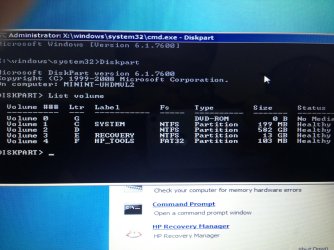
Write down the info under the following titles, and provide it in your reply:
(The info under the titles on this capture is just an example. Your info will be different.)

Took a picture: (The last column was "info" but it was blank for all of them so I omitted it)
 

Attachments

  • IMG_0177.jpg
    IMG_0177.jpg
    915.8 KB · Views: 10

My Computer My Computer

At a glance

Windows 7 Home Premium 64bit
Computer type
Laptop
Computer Manufacturer/Model Number
HP
OS
Windows 7 Home Premium 64bit
Are you able to obtain the info requested on Post #11?

Not sure if you saw it already, but just in case, yes I took a picture of it (it's in my reply).
 

My Computer My Computer

At a glance

Windows 7 Home Premium 64bit
Computer type
Laptop
Computer Manufacturer/Model Number
HP
OS
Windows 7 Home Premium 64bit
Thanks for the info, PCuser809.

Answering this from a 7" tablet which is a pain to use.

Got to check the partition info, etc...

Will be back later' when I get home from hospital (tests).


Thanks for your patience!
 

My Computer My Computer

At a glance

Windows 7 Home Premium
Computer type
PC/Desktop
Computer Manufacturer/Model Number
An ol' eMachines
OS
Windows 7 Home Premium
Internet Speed
Fine for me...I'm retired!
Thanks for the info, PCuser809.

Answering this from a 7" tablet which is a pain to use.

Got to check the partition info, etc...

Will be back later' when I get home from hospital (tests).


Thanks for your patience!

Don't worry about it! Thank you for helping me out.

Hope your tests go well! :)
 

My Computer My Computer

At a glance

Windows 7 Home Premium 64bit
Computer type
Laptop
Computer Manufacturer/Model Number
HP
OS
Windows 7 Home Premium 64bit
My apology for the delay. :o

Sure glad to be on a computer vs. a tablet....:banghead:


:info: Once more, please go back to the Command Prompt like you did in Post #8

In the command window type (or copy/paste with mouse) the command inside the code box below, and press: Enter

Code:
chkdsk c: /f /r

Please wait until the check is done.

Post back whether chkdsk reported any errors.


:info: Now, back to the Command Prompt...

Type (or copy/paste with mouse) the command inside the code box below, and press: Enter

Code:
sfc /scannow /offbootdir=D:\ /offwindir=D:\Windows

Post back whether sfc /scannow reported it found corrupted files and repaired them, or whether it reported something else.
 

My Computer My Computer

At a glance

Windows 7 Home Premium
Computer type
PC/Desktop
Computer Manufacturer/Model Number
An ol' eMachines
OS
Windows 7 Home Premium
Internet Speed
Fine for me...I'm retired!
Oh, it's no problem at all, don't apologize! :D

Code:
chkdsk c: /f /r

Please wait until the check is done.

Post back whether chkdsk reported any errors.

It said it found no problems, but it failed to transfer logged messages to the event log with status 50 (not sure if the last part means anything).

Code:
sfc /scannow /offbootdir=D:\ /offwindir=D:\Windows

Post back whether sfc /scannow reported it found corrupted files and repaired them, or whether it reported something else.

It said it found corrupt files but was unable to fix some of them. Also, it said the "details are included in the CBS.Log windir\Logs\CBS\CBS.log. For example, C:\Windows\Logs\CBS\CBS.log"
 

My Computer My Computer

At a glance

Windows 7 Home Premium 64bit
Computer type
Laptop
Computer Manufacturer/Model Number
HP
OS
Windows 7 Home Premium 64bit
Upload the CBS.log file

Location : C:\Windows\Logs\CBS\CBS.log
 

My Computer My Computer

At a glance

Windows 7 Ultimate 32-Bit & Windows 7 Ultimat...Intel Core i7 CPU 950 @ 3.07GHzOCZ 6GB (3 x 2GB) 240-Pin DDR3 SDRAM DDR3 160...ATI Radeon HD 5700 Series
Computer Manufacturer/Model Number
Custom Built
OS
Windows 7 Ultimate 32-Bit & Windows 7 Ultimate 64-Bit
CPU
Intel Core i7 CPU 950 @ 3.07GHz
Motherboard
ASUS P6T DELUXE V2
Memory
OCZ 6GB (3 x 2GB) 240-Pin DDR3 SDRAM DDR3 1600 OCZ3X1600R2
Graphics Card(s)
ATI Radeon HD 5700 Series
Sound Card
OnBoard
Hard Drives
WD6400AACS-00M3B0 (640GB SATA )
PSU
CORSAIR 850w
Case
NZXT LEXA
Cooling
Intel Stock Heatsink Fan
Keyboard
Microsoft Wireless Laser Keyboard 7000
Mouse
Microsoft Wireless Laser Mouse 7000
Back
Top