
Solved How do I increase my Vram?

jnos400

New member
Local time
11:57 PM
Messages
3
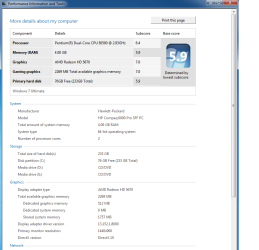
Hi, I was reading online and can't seem to find any good answers so I was curious if there was anyway to increase my Vram, as you can see in the picture at the bottom my graphics card has a total of about 2.2 GB in ram but I can only use 512 MB of it which I don't understand and is fairly frustrating considering this is the pc I typically game on and the graphics card was a little expensive, not to mention the fact that I can't run total war rome 2 which I payed $60 for a while back, so can anyone help me with this? All help is appreciated thank you!
HP info.png
 

My Computer

Computer type
PC/Desktop
OS
Windows 7 ultimate x64
You need to buy a new graphics card if you want more VRAM.
 

My Computer

Computer type
PC/Desktop
Computer Manufacturer/Model Number
Alienware Aurora ALX R4
OS
Windows 10 Pro (x64)
CPU
Intel Core i7-3930K (3.2GHz - 4.5GHz)
Motherboard
Alienware Aurora-R4 x79
Memory
4x Samsung 4GB PC3-12800 DDR3 (16GB 1600MHz)
Graphics Card(s)
Nvidia Geforce GTX 690
Sound Card
SteelSeries Siberia Elite
Monitor(s) Displays
Dell UltraSharp U3011
Screen Resolution
2560x1600
Hard Drives
Samsung 850 Pro 256 GB, Seagate 1TB Desktop Hybrid HDD, 2x Western Digital 4TB Green HDD
PSU
875W Some Dell PSU <.<
Case
Alienware Aurora ALX
Cooling
Custom Liquid Cooling (EK CPU & GPU blocks) dual EK 480RAD
Keyboard
Logitech G710+ Mechanical
Mouse
Logitech G700s
Internet Speed
Verizon Fios (50 mbps average)
Other Info
Server: Intel NUC D54250WYK: i5-4250U, 16GB, 256 GB mSATA, Windows Server 2012 R2
But even if I do buy a new graphics card I can only purchase half height (low profile) ones and the max those go up to is 2 GB so would it even make a difference if I bought a new one?
 

My Computer

Computer type
PC/Desktop
OS
Windows 7 ultimate x64
Hi Jnos400, welcome to the Seven Forums.

The answer is exactly what Logicearth told you above. Your GPU card has only 512 MB, not 2.2 GB as you thought. Of that 2.2 GB, 1,757 MB is shared memory, meaning the GPU is allowed to use that amount of your system RAM, "borrow" it if needed when its own 512 MB is not enough.

A game needing a lot of RAM itself does not always leave as much available RAM to "borrow" to the GPU as would be needed. In your case, you have 4 GB RAM, 512 MB GPU and not too fast processor so you fulfill the absolute minimum specs to run Total War Rome 2 (Rome II Recommended Specs - Total War Wiki), but a GPU with 1 GB dedicated memory and better processor are recommended.

Notice also that comparing your CPU and GPU, if you could get the game running it would be a bit slower than when no shared memory is used; your shared RAM cannot handle gfx instructions as fast as the dedicated GPU memory so when shared would be used, the processing would be slowed down.

Kari
 

My Computer

Computer type
Laptop
Computer Manufacturer/Model Number
HP ENVY 17-1150eg
OS
Windows 10 Pro x64 EN-GB
CPU
1.6 GHz Intel Core i7-720QM Processor
Memory
6 GB
Graphics Card(s)
ATI Mobility Radeon HD 5850 Graphics
Sound Card
Beats sound system with integrated subwoofer
Monitor(s) Displays
17" laptop display, 22" LED and 32" Full HD TV through HDMI
Screen Resolution
1600*900 (1), 1920*1080 (2&3)
Hard Drives
Internal: 2 x 500 GB SATA Hard Disk Drive 7200 rpm
External: 2TB for backups, 3TB USB3 network drive for media
Cooling
As Envy runs a bit warm, I have it on a Cooler Master pad
Keyboard
Logitech diNovo Media Desktop Laser (bluetooth)
Mouse
Logitech Performance Mouse MX
Internet Speed
50/10 Mbps VDSL
Antivirus
Windows Defender 4.3.9431.0
Browser
Maxthon 3.5.2., IE11
I want a new graphics card but again I can't find any half heights over 2 GB anywhere, although thank you for the help you did a really good job of explaining it to me.
 

My Computer

Computer type
PC/Desktop
OS
Windows 7 ultimate x64
A graphics card with 2Gb of Dedicated VRAM is 4 times what you have now, I'm pretty darn sure that you won't need more dedicated video memory than that unless you're planning on playing games on Ultra Settings in 4k, and for that you would need a whole new computer.
 

My Computer

Computer type
PC/Desktop
Computer Manufacturer/Model Number
Self Built
OS
Windows 7 Ultimate x64
CPU
Intil i7-860
Motherboard
Gigabyte GA-P55a-UD6
Memory
16Gb Corsair XMS3 1600MHz
Graphics Card(s)
MSI N470GTXTwin FrozR II
Monitor(s) Displays
Samsung S23A700D
Hard Drives
1x Samsung 840Pro SSD 256Gb for Windows
2x WD Green 2Tb (for Storage)
1x Western Digital Caviar Black 2 TB 7200 RPM (also for storage)
1x Samsung HD501LJ 500Gb for Ubuntu
PSU
Antec TruePower New Blue Modular 750W
Case
Antec 300
Cooling
Cosair H70
Internet Speed
60Mb/s DL, 3Mb/s UL
Antivirus
Norton Internet Security
Browser
IE, FF, Chrome
You need to be careful though, some of the most budget graphics cards come with 2GB of Vram now a days, I should know, I bought one for my lounge PC, it was only like £30 but I knew it would not run games. I got it for the HDMI out so I could stream stuff to my TV.
Just because a card has 2GB of Vram does not necessarily mean it will run games well. As usual in life, the more the pay the better you get. But I would imagine if your PC can only hold slim graphics cards then the PSU will be a slimline one too and maybe only 200-300 watts which will massively limit what card you can upgrade to.
 

My Computer

OS
Windows 7 Professional 64 bit
Note also that if you're changing your graphics hardware, you'll have to reactivate your Windows copy by online service or by phone if it came as a pre-installed OS.
 

My Computer

Computer type
PC/Desktop
Computer Manufacturer/Model Number
Custom Build
OS
Windows 7 Professional SP1 - x64 [Non-UEFI Boot]
CPU
Ivy Bridge Core i5 3570K (Delidded)
Motherboard
Asus P8Z77-V LE PLUS
Memory
G.Skill "Ares" DDR3 PC3-12800 - 1600MHz (16Gb)
Graphics Card(s)
Asus Dual-RX480-O4G
Sound Card
Creative Sound Blaster Z w/5.1 sound system
Monitor(s) Displays
Asus IPS 23"
Screen Resolution
16/9
Hard Drives
Internal:
500Go Sata 6Gb/s (x2)
500Go Sata 3Gb/s (x2)
SSD 60Go Sata 6Gb/s
PSU
In Win C 900W Series 80+ Platinum
Case
Thermaltake Chaser A71
Cooling
Custom Water Cooling Loop
Keyboard
Cooler Master QuickFire XTi
Mouse
Razer Imperator 2012 (4G)
Antivirus
MSE
Browser
IE 11.0.xxx Rtm
Other Info
"Raid0" with Intel Smart Response Technology (HDD/SSD)

My Computer

Computer type
PC/Desktop
Computer Manufacturer/Model Number
Skylake Special #666
OS
Windows 10 Pro x64
CPU
Intel Core i7 6700K
Motherboard
Asus Sabertooth Z170 Mark 1
Memory
GSkill TridentZ RGB 16GB 3600 16-16-16-36
Graphics Card(s)
EVGA GTX 980 Ti SC x2
Sound Card
Realtek High Definition
Monitor(s) Displays
AOC G2460PG
Screen Resolution
1920 x 1080 144Hz
Hard Drives
Samsung 860 Pro 256GB, Seagate Barracuda 4TB x2
PSU
EVGA 1000 P2, EVGA White Custom Braided Cables
Case
Corsair Vengeance C70 Gunmetal Black
Cooling
Corsair H100i v2, Corsair ML120 x2, Thermal Grizzly Kryonaut
Keyboard
Logitech G910 Orion Spectrum
Mouse
Logitech G700s
Internet Speed
Verizon Fios Quantum Gateway 75/75
Antivirus
Windows Defender, Malwarebytes Free 3.8.3
Browser
Chrome
Other Info
Corsair SP120 x4, LG Blu-ray Drive, Durabrand HT-395 100 Watt Dolby Digital Amp, Corsair H2100 Wireless 7.1 Headset
Back
Top