
How do I install 32-bit drivers on a 64-bit system?

pooketz

New member
Local time
7:01 AM
Messages
2
Location
Peterborough
Dear all,

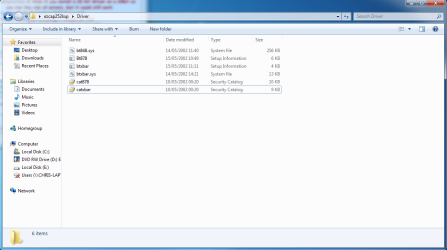
I'm writing with regards to my Ez Capture V1A3-D PCI capture card which arrived in the post today. Much to my disappointment, there were only 32-bit drivers provided with it and I face a similar restriction searching online too. The most relevant one I can find is the 32-bit XP driver.

I've tried installing the drivers I do have through Device Manager, but I get the message asking me to ensure my drivers are designed for a 64-bit operating system. Without the driver, it seems that no video capture software will detect the device because I don't think it's ''plug and play''.

Any help here would be most appreciated.

Best regards!
Pooketz
 

Attachments
  • Pooketzdevice.png
    Pooketzdevice.png
    38.2 KB · Views: 123

My Computer My Computer

Computer Manufacturer/Model Number
HP Touchsmart 520 PC
OS
64-bit
If you find out how to do that - please let me know.

One of the problems of using 64 bit windows I am afraid.

If you really need that software - install 32 bit windows .
 

My Computers My Computers

System One System Two

  • Computer type
    PC/Desktop
    OS
    7 X64
    CPU
    i5 8400
    Motherboard
    gigabyte b365m ds3h
    Memory
    2x8gb 3200mhz
    Hard Drives
    various
    PSU
    pure power 11 400w cm
    Case
    Coolermaster
    Cooling
    cryorig m9i
  • Computer type
    PC/Desktop
    OS
    7x64
    CPU
    g5400
    Motherboard
    ga b365m ds3h
    Memory
    8gb ddr4 2400
    PSU
    xfx pro 450w
As you rightly say, the device has no drivers for Windows 7 64-bit.

AVerMedia AVerTV Global - TV Tuners, Media Player, IPTV and Multimedia Products - EZCapture

I'd be inclined to return the card and explain it is incompatible with Windows 7 then see if you can find a 64-bit version of something similar.

However, if you really do want to use it you could use XP Mode under a virtual machine.

http://www.microsoft.com/windows/virtual-pc/default.aspx

XP Mode only uses 32-bit drivers even if the host machine is 64-bit.

Alternatively, you could dual-boot Windows XP and Windows 7, but that will mean you incur more cost to buy XP.
 

My Computer My Computer

Computer Manufacturer/Model Number
HP Pavilion Elite 495UK
OS
Windows 7 Ultimate SP1 64-Bit
CPU
Intel Core i7 870 @ 2.93GHz
Motherboard
MSI 2A9C (CPU1)
Memory
8Gb Dual-Channel DDR3 @ 664MHz
Graphics Card(s)
nVidia GeForce GTX 460 1024MB dedicated RAM
Sound Card
Realtek HD Audio
Monitor(s) Displays
HP2310i
Screen Resolution
1920 x 1080
Hard Drives
1x1954GB Hitachi HDS22020ALA 330 (RAID), 1x1954GB Hitachi External for backup and storage
PSU
460W
Case
HP Elite
Cooling
Air cooled
Keyboard
Logitech K750 solar-powered keyboard
Mouse
Logitech Wireless M180 mouse
Internet Speed
2Mb
Other Info
Pure Avanti Flow Internet Radio with iPod Dock, 64Gb iPod, HP USB Speakers, Sony MDR-V500 Headphones, Sony Vaio F-Series Laptop
Sometimes Vista 64 drivers work ok in Win 7 64bit, but if this is a new card you just received, I would return it right away, it's just too much hustle, without drivers the card is useless and pretty much most of new computers come with 64bit, not even sure if Win8 will have 32 bit version at all, so going forward this will only get worse. Running this under XP, dual boot or virtual, you need license etc., even if the card is free, it just not worth it. I'm assuming you looked on internet and couldn't find 64 drivers at all?
BTW capture card is one of few devices or programs that actually could greatly benefit from extra memory available in 64 bit system, making this even more strange.
 

My Computer My Computer

OS
win7hp64
As you rightly say, the device has no drivers for Windows 7 64-bit.

AVerMedia AVerTV Global - TV Tuners, Media Player, IPTV and Multimedia Products - EZCapture

I'd be inclined to return the card and explain it is incompatible with Windows 7 then see if you can find a 64-bit version of something similar.

However, if you really do want to use it you could use XP Mode under a virtual machine.

Windows Virtual PC: Home Page

XP Mode only uses 32-bit drivers even if the host machine is 64-bit.

Alternatively, you could dual-boot Windows XP and Windows 7, but that will mean you incur more cost to buy XP.


Actually, nice suggestion, I'll try this tonight!
Interestingly enough, you live in the same city as me, perhaps I should invite you over to check this out. :p
Haha, thanks a bunch.
 

My Computer My Computer

Computer Manufacturer/Model Number
HP Touchsmart 520 PC
OS
64-bit
Both of us live in Peterborough and meet up on a world-wide forum!

If you do need help with XP Mode you can PM me as giving out personal details on here is perhaps not a good idea. :p
 

My Computer My Computer

Computer Manufacturer/Model Number
HP Pavilion Elite 495UK
OS
Windows 7 Ultimate SP1 64-Bit
CPU
Intel Core i7 870 @ 2.93GHz
Motherboard
MSI 2A9C (CPU1)
Memory
8Gb Dual-Channel DDR3 @ 664MHz
Graphics Card(s)
nVidia GeForce GTX 460 1024MB dedicated RAM
Sound Card
Realtek HD Audio
Monitor(s) Displays
HP2310i
Screen Resolution
1920 x 1080
Hard Drives
1x1954GB Hitachi HDS22020ALA 330 (RAID), 1x1954GB Hitachi External for backup and storage
PSU
460W
Case
HP Elite
Cooling
Air cooled
Keyboard
Logitech K750 solar-powered keyboard
Mouse
Logitech Wireless M180 mouse
Internet Speed
2Mb
Other Info
Pure Avanti Flow Internet Radio with iPod Dock, 64Gb iPod, HP USB Speakers, Sony MDR-V500 Headphones, Sony Vaio F-Series Laptop
Back
Top