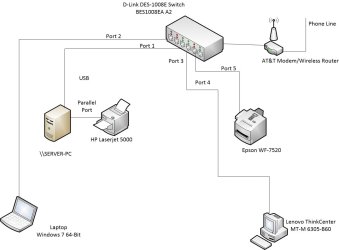
I have a small network (picture attached) with one printer connected through the switch/router and other (HP Laserjet) direct attached to on workstation called SERVER-PC. It is shared over this network. How do I install it on the workstations (Laptop and Lenovo PC) such that all existing and new users who log into the workstations will have access to it.
Attachments
Net_Printer.jpg
54.1 KB
· Views: 1
My Computer
At a glance
Microsoft Windows 7 Professional 64-bit 7601 ...Intel(R) Core(TM) i3-4150 CPU @ 3.50GHz8.00 GBIntel(R) HD Graphics 4400
Computer type
PC/Desktop
Computer Manufacturer/Model Number
Dell Inspiron I3847-3850BK
OS
Microsoft Windows 7 Professional 64-bit 7601 Multiprocessor Free Service Pack 1
CPU
Intel(R) Core(TM) i3-4150 CPU @ 3.50GHz
Motherboard
Dell Inc. 088DT1
Memory
8.00 GB
Graphics Card(s)
Intel(R) HD Graphics 4400
Sound Card
(1) Realtek High Definition Audio (2) Intel(R) Display Aud
Monitor(s) Displays
Samsung LCD TV, 3 HDMI ports
Screen Resolution
1920 x 1080 x 32 bits (4294967296 colors) @ 60 Hz
Hard Drives
C300-CTF C300-CTFDDAC128M SCSI Disk Device
PSU
220W
Case
Dell
Keyboard
Basic
Mouse
Basic
Internet Speed
Ethernet, 802.11b/g/n wireless LAN (Dell Wireless 1705)
Antivirus
Microsoft Security Essentials
Browser
Chrome Version 38.0.2125.101 m, IE 10.0.92
Other Info
Intel H81 Express chipset, in 1 card reader, DVD/CD burner, 1 PCI Express x16 & 2 PCI Express x1, HDMI output for HDTV. VGA. 8 USB ports (2 USB3, 6 USB2), Audio in/out jacks. 3-stack audio jacks supporting 5.1 surround sound. Windows Media Center.
for the first time adding it
From each computer or workstation
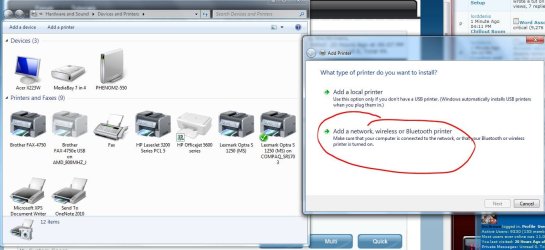
Start>Devices and Printers
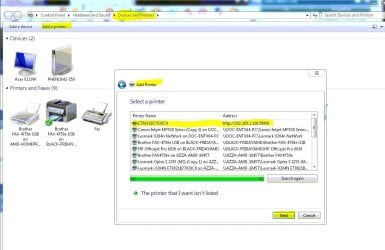
Add a printer
Add a network, wireless or Bluetooth printer
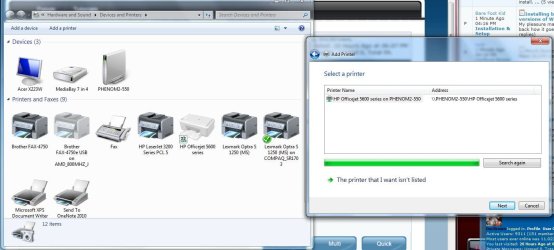
Let it search for any printers on the network
it will ususlly turn up as a http:// 192.168.x.xxx.xxxx
address
Highlight that one and click next
Let it install the drivers & print a test page
Attachments
Add_Network_Printer.JPG
101.1 KB
· Views: 1
Add_Network_Printer_002.JPG
99.8 KB
· Views: 1
Add_Network printer.JPG
93.1 KB
· Views: 1
My Computer
At a glance
Win7 Enterprise, Win7 x86 (Ult 7600), Win7 x6...AMD fx8350 4ghz, AMD-32 2400mhz, AMD-64 3200m...2gb, 4gb on the Ult 7600, 4gb on Technet RTM,...Draw my own Graphics, several nVidia cards
Computer type
PC/Desktop
Computer Manufacturer/Model Number
Built them myself, Science Experiments !
OS
Win7 Enterprise, Win7 x86 (Ult 7600), Win7 x64 Ult 7600, TechNet RTM on AMD x64 (2.8Ghz)
6 pata Ide HD's & 2 Sata HD's
added 80gb external on Ult 7600 computer,
numerous extra 1tb, 2TB, 3Tb SATA HD's
A collection of ext HD Docks w/ HDs
PSU
430w, 550w, 600w, 700, 800, etc
Case
All Generic Full Towers
Cooling
Open Air & a few fans, some w/ colored LEDs
Keyboard
Compaq & Dell recycled from GoodWill
Mouse
Made in China Optical Wired Mouse
Internet Speed
Fast Cable InterNet
Antivirus
AVG Free on 24 different Desktops, NO Problems!
Browser
IE 8 is preferred, but use FireFox sometimes
Other Info
Linksys Routers, switches, & Hubs
Too Many USB Flash Drives to count, Biggest is 64GB !
Eight computers in my home network.
Sixteen computers at my business network.
Linked via TeamViewer !
Lots of old used spare computer parts everywhere!
Thank you for the step by step instructions. I apologize not not making my query clear. I have used this process for the first user account on one of the client machines but when I add a new user on that machine, the printer doesn't show up there. It doesn't even display among available devices and printers. Rather than installing printers each time a user logs on, I wanted to install them once and have them apply to All Users.
I'm unable to see an IP address for this machine attached printer.
I understand there is a 'Per Machine' vs 'Per user' installation of printers and wanted to know how to do it in light of my fumbling attempts. I posted this issue earlier in this forum but have had no response so I thought I should describe my need differently.
Last edited:
My Computer
At a glance
Microsoft Windows 7 Professional 64-bit 7601 ...Intel(R) Core(TM) i3-4150 CPU @ 3.50GHz8.00 GBIntel(R) HD Graphics 4400
Computer type
PC/Desktop
Computer Manufacturer/Model Number
Dell Inspiron I3847-3850BK
OS
Microsoft Windows 7 Professional 64-bit 7601 Multiprocessor Free Service Pack 1
CPU
Intel(R) Core(TM) i3-4150 CPU @ 3.50GHz
Motherboard
Dell Inc. 088DT1
Memory
8.00 GB
Graphics Card(s)
Intel(R) HD Graphics 4400
Sound Card
(1) Realtek High Definition Audio (2) Intel(R) Display Aud
Monitor(s) Displays
Samsung LCD TV, 3 HDMI ports
Screen Resolution
1920 x 1080 x 32 bits (4294967296 colors) @ 60 Hz
Hard Drives
C300-CTF C300-CTFDDAC128M SCSI Disk Device
PSU
220W
Case
Dell
Keyboard
Basic
Mouse
Basic
Internet Speed
Ethernet, 802.11b/g/n wireless LAN (Dell Wireless 1705)
Antivirus
Microsoft Security Essentials
Browser
Chrome Version 38.0.2125.101 m, IE 10.0.92
Other Info
Intel H81 Express chipset, in 1 card reader, DVD/CD burner, 1 PCI Express x16 & 2 PCI Express x1, HDMI output for HDTV. VGA. 8 USB ports (2 USB3, 6 USB2), Audio in/out jacks. 3-stack audio jacks supporting 5.1 surround sound. Windows Media Center.
This not a domain based network. This may be a dumb question but can one set up group policy for workstations on a non-domain (no AD) network? How do I do that?
My Computer
At a glance
Microsoft Windows 7 Professional 64-bit 7601 ...Intel(R) Core(TM) i3-4150 CPU @ 3.50GHz8.00 GBIntel(R) HD Graphics 4400
Computer type
PC/Desktop
Computer Manufacturer/Model Number
Dell Inspiron I3847-3850BK
OS
Microsoft Windows 7 Professional 64-bit 7601 Multiprocessor Free Service Pack 1
CPU
Intel(R) Core(TM) i3-4150 CPU @ 3.50GHz
Motherboard
Dell Inc. 088DT1
Memory
8.00 GB
Graphics Card(s)
Intel(R) HD Graphics 4400
Sound Card
(1) Realtek High Definition Audio (2) Intel(R) Display Aud
Monitor(s) Displays
Samsung LCD TV, 3 HDMI ports
Screen Resolution
1920 x 1080 x 32 bits (4294967296 colors) @ 60 Hz
Hard Drives
C300-CTF C300-CTFDDAC128M SCSI Disk Device
PSU
220W
Case
Dell
Keyboard
Basic
Mouse
Basic
Internet Speed
Ethernet, 802.11b/g/n wireless LAN (Dell Wireless 1705)
Antivirus
Microsoft Security Essentials
Browser
Chrome Version 38.0.2125.101 m, IE 10.0.92
Other Info
Intel H81 Express chipset, in 1 card reader, DVD/CD burner, 1 PCI Express x16 & 2 PCI Express x1, HDMI output for HDTV. VGA. 8 USB ports (2 USB3, 6 USB2), Audio in/out jacks. 3-stack audio jacks supporting 5.1 surround sound. Windows Media Center.