
How do I keep my Office 2016/365 signed in continuously?

450125

New member
Power User
Local time
12:20 PM
Messages
281
I have a similar setup of Office 2016 installed on my Windows 7 home computer and my Windows 10 work computer.

On the work computer, it was just boom, install, associate a login (email address or user ID, plus password) with the installation, and as long as I use an Office program periodically (I think it's once every 30 days), no problem.

On the home computer, it's a more-recent installation - past 30 days, and I associated a different email address/password combo with this.

BUT - at unpredictable intervals, I seem to be required to sign in. Sometimes the interval is more than a day or two; it's always been less than a week.

Today I went into my credential manager - something I'd not even known existed - and noticed that there was a password, but no login (email address) associated with the Office installation. So I added that.

Hoping that fixes it. But, in case it doesn't, what else might I do to make the Office 2016 installation "stick" without requiring occasional logins?
 

My Computer My Computer

At a glance

Win7 Professional 64Intel I3 550 (3.2 GHz)8 gig (2x4gig Kingston DDR 3)Intel HD graphics (from CPU)
Computer Manufacturer/Model Number
custom-built
OS
Win7 Professional 64
CPU
Intel I3 550 (3.2 GHz)
Motherboard
GIGABYTE|GA-H55M-S2V H55 1156 R
Memory
8 gig (2x4gig Kingston DDR 3)
Graphics Card(s)
Intel HD graphics (from CPU)
Sound Card
Realtek ALC888B
Monitor(s) Displays
ViewSonic
Screen Resolution
1280x1024
Hard Drives
Seagate ST3250310CS (250 gig C drive for OS and programs)
WDC WD5000AAKS-00V1A0 (2x500 gig drives, software mirrored in a RAID 1 configuration, as a D drive, for documents and data)
Internet Speed
download > 15 mbps; upload approx 1 mbps
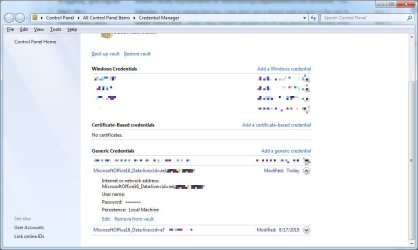
As I'd feared, setting the credential in my credential manager did not fix the problem.

attachment.php


When I started Excel today, it showed the correct user ID (just my initials, not my email address), and said I was not signed in. So I signed in and that was fine. But in the credential manager, my "user name" (my email address) was blank as shown above after doing so.

After exiting Excel, I was able to start Word, and my login was remembered, probably from the signing in through Excel.

The other Office16 credential in the screen shot above was still correct, with my user name remembered.

So still looking for how to stay logged in to Office.
 

Attachments

  • Credential Manager 01.jpg
    Credential Manager 01.jpg
    58.6 KB · Views: 12

My Computer My Computer

At a glance

Win7 Professional 64Intel I3 550 (3.2 GHz)8 gig (2x4gig Kingston DDR 3)Intel HD graphics (from CPU)
Computer Manufacturer/Model Number
custom-built
OS
Win7 Professional 64
CPU
Intel I3 550 (3.2 GHz)
Motherboard
GIGABYTE|GA-H55M-S2V H55 1156 R
Memory
8 gig (2x4gig Kingston DDR 3)
Graphics Card(s)
Intel HD graphics (from CPU)
Sound Card
Realtek ALC888B
Monitor(s) Displays
ViewSonic
Screen Resolution
1280x1024
Hard Drives
Seagate ST3250310CS (250 gig C drive for OS and programs)
WDC WD5000AAKS-00V1A0 (2x500 gig drives, software mirrored in a RAID 1 configuration, as a D drive, for documents and data)
Internet Speed
download > 15 mbps; upload approx 1 mbps
Does this YouTube video help you at all?.

YouTube
 

My Computer My Computer

At a glance

Windows 7 Home Premium 64 bit sp1Intel i5 3570 3.4Ghz Ivy Bridge SKT 1155 quad...G-Skill Rip Jaws 16Gb (8x2) DDR3 -1600 PC3 12...Gigabyte NVIDIA GT610 1Gb DDR3 810/1200 PCI-E...
Computer type
PC/Desktop
Computer Manufacturer/Model Number
Self built using existing case
OS
Windows 7 Home Premium 64 bit sp1
CPU
Intel i5 3570 3.4Ghz Ivy Bridge SKT 1155 quad core
Motherboard
Gigabyte Z77-HD3 SKT 1155 2xSata 3, 4x USB 3.0
Memory
G-Skill Rip Jaws 16Gb (8x2) DDR3 -1600 PC3 12800 CL 10 red
Graphics Card(s)
Gigabyte NVIDIA GT610 1Gb DDR3 810/1200 PCI-E 2.0 Silent
Sound Card
NVIDIA High Definition & Realtech High Definition Audio
Monitor(s) Displays
2 x Philips 226V4L 16:9 aspect ratio
Screen Resolution
1920 x 1080 HD
Hard Drives
Samsung 840 Pro 256gb SSD, SATA 3.
Hitachi Touro Portable 1tb, USB 3.0 HDD used for image b/ups.
PSU
Corsair VS450
Case
Codeng
Cooling
PSU fan & CPU fan
Keyboard
Logitech
Mouse
Logitech Wireless trackball M570
Internet Speed
Wireless 3G. 3mg down & 550kb up.
Antivirus
Bitdefender Internet Security 2020
Browser
Opera (Current Version) & Firefox
Other Info
MS Office 2013 Pro. Davis weather station software. MGE Nova 600 avr UPS.
Does this YouTube video help you at all?.

YouTube
I had watched that very video before posting, and it didn't really help much. And if you view the ratings, it's currently disliked by a third of those rating it - a pretty high number.

Apologies for my struggles to clearly and cleanly explain my dilemma. I'll try again.

Part of my problem is that, for a nonprofit board I'm on, I have web-only Office 365 access. This is a lesser-known offering from Microsoft; qualifying organizations can have a free multiuser version of Office 365, with the full suite of Office offerings, but runnable only from the web, with some very minor reduced functionality versus the full-featured desktop versions.

On my Windows 10 office computer, I have no problem concurrently running both my desktop Office 2016, and the browser-only Office 365. Office 2016 is registered to my work email. I'm never asked to log in, either for the browser O365, or the desktop O2106.

At home - Windows 7 - I am never asked to log in to the browser O365, but was asked - today, yesterday, the day before - to log in for the desktop Office 2016. I use my work email address as my login for Office 2016, just as I do at work.

The video you provided seems more geared to someone who wants to be joined at the hip with Microsoft, which I don't. I use Firefox for my browser, and the only desktop Microsoft products I use are the Office 2016 suite. The only Outlook/Mail I use is with the browser-based Office 365.

Thanks for reading. Net of it is that I'd like, in Windows 7 at home, as I have in Windows 10 at work, to be able to concurrently use web-based Office 365 for the nonprofit board I'm on, and desktop Office 2016 for everything else, without having to sign into either.
 

My Computer My Computer

At a glance

Win7 Professional 64Intel I3 550 (3.2 GHz)8 gig (2x4gig Kingston DDR 3)Intel HD graphics (from CPU)
Computer Manufacturer/Model Number
custom-built
OS
Win7 Professional 64
CPU
Intel I3 550 (3.2 GHz)
Motherboard
GIGABYTE|GA-H55M-S2V H55 1156 R
Memory
8 gig (2x4gig Kingston DDR 3)
Graphics Card(s)
Intel HD graphics (from CPU)
Sound Card
Realtek ALC888B
Monitor(s) Displays
ViewSonic
Screen Resolution
1280x1024
Hard Drives
Seagate ST3250310CS (250 gig C drive for OS and programs)
WDC WD5000AAKS-00V1A0 (2x500 gig drives, software mirrored in a RAID 1 configuration, as a D drive, for documents and data)
Internet Speed
download > 15 mbps; upload approx 1 mbps
Back
Top