
You are using an out of date browser. It may not display this or other websites correctly.
You should upgrade or use an alternative browser.
You should upgrade or use an alternative browser.
How do I load a recovery disc if my PC can't see the CD/DVD drives?
- Thread starter Biggie947
- Start date

Can you see the DVD drive in BIOS?
My Computer
At a glance
Win 7 Pro x64/Win 10 Pro x64 dual bootAMD FX 8350 Vishera @ 420016 GB Mushkin Blackline DDR3-2400 @ 1866 (9-1...XFX Radeon R9 280 Double D Black Edition
- Computer type
- PC/Desktop
- Computer Manufacturer/Model Number
- Mellon Labs (custom build)
- OS
- Win 7 Pro x64/Win 10 Pro x64 dual boot
- CPU
- AMD FX 8350 Vishera @ 4200
- Motherboard
- ASUS M5A97 R2.0
- Memory
- 16 GB Mushkin Blackline DDR3-2400 @ 1866 (9-10-10-10-31)
- Graphics Card(s)
- XFX Radeon R9 280 Double D Black Edition
- Sound Card
- Realtek HD Audio on MB. Sounds great.
- Monitor(s) Displays
- Acer 24", Acer 22"
- Screen Resolution
- 3840 x 1080
- Hard Drives
- 1 x Mushkin Chronos 120 GB SSD (Win 10)
1 x Samsung 850 EVO 250 GB SSD (Win 7)
1 x WD 1TB SATA Blue
1 x WD 1TB SATA Green
- PSU
- Corsair TX-750
- Case
- CoolerMaster HAF 912+
- Cooling
- Coolermaster Seidon 240M Liquid AIO. 6 case fans
- Keyboard
- Logitech G710+
- Mouse
- Logitech G500s
- Internet Speed
- Much better since I got fiber, but still way overpriced.
- Antivirus
- MSE, Malware Bytes for scanning
- Browser
- Firefox
- Other Info
- Corsair VOID USB headphones.
A Mellon Labs X-1 - LCD Smartie driven system status display.
Brought to you by the letter E

Do you have any other Operating System discs you can put in the drive to see if it detects them ?
XP or Vista etc ?
If your drive is seen in the bios, then your pc is seeing it. It could be the disc you are trying to use, is this a recovery disc for this particular pc ?
The reason I ask is because many people try to use a disc from another manufacturer and expect it to work.
XP or Vista etc ?
If your drive is seen in the bios, then your pc is seeing it. It could be the disc you are trying to use, is this a recovery disc for this particular pc ?
The reason I ask is because many people try to use a disc from another manufacturer and expect it to work.
My Computer
At a glance
Windows 10 Pro x64Intel Core i7 6700KGSkill TridentZ RGB 16GB 3600 16-16-16-36EVGA GTX 980 Ti SC x2
- Computer type
- PC/Desktop
- Computer Manufacturer/Model Number
- Skylake Special #666
- OS
- Windows 10 Pro x64
- CPU
- Intel Core i7 6700K
- Motherboard
- Asus Sabertooth Z170 Mark 1
- Memory
- GSkill TridentZ RGB 16GB 3600 16-16-16-36
- Graphics Card(s)
- EVGA GTX 980 Ti SC x2
- Sound Card
- Realtek High Definition
- Monitor(s) Displays
- AOC G2460PG
- Screen Resolution
- 1920 x 1080 144Hz
- Hard Drives
- Samsung 860 Pro 256GB, Seagate Barracuda 4TB x2
- PSU
- EVGA 1000 P2, EVGA White Custom Braided Cables
- Case
- Corsair Vengeance C70 Gunmetal Black
- Cooling
- Corsair H100i v2, Corsair ML120 x2, Thermal Grizzly Kryonaut
- Keyboard
- Logitech G910 Orion Spectrum
- Mouse
- Logitech G700s
- Internet Speed
- Verizon Fios Quantum Gateway 75/75
- Antivirus
- Windows Defender, Malwarebytes Free 3.8.3
- Browser
- Chrome
- Other Info
- Corsair SP120 x4, LG Blu-ray Drive, Durabrand HT-395 100 Watt Dolby Digital Amp, Corsair H2100 Wireless 7.1 Headset

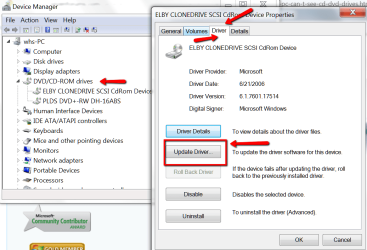
My Computer
At a glance
Vista, Windows7, Mint Mate, Zorin, Windows 8from 1.6GHz Duo to i7
- Computer Manufacturer/Model Number
- HP, Dell, Gateway, Toshiba - 4 laptops and 2 desktops
- OS
- Vista, Windows7, Mint Mate, Zorin, Windows 8
- CPU
- from 1.6GHz Duo to i7
- Monitor(s) Displays
- 2x HP w2207
- Hard Drives
- 5x HDD, 7x SSD, 12x Externals
- Keyboard
- with trackball - no mices
- Mouse
- Trackball mice
- Internet Speed
- DSL 6000

- Local time
- 9:49 AM
- Messages
- 50,634
If not, reset the BIOS to defaults. Set HDD first to boot in BIOS.
Try triggering the CD to boot using the one-time BIOS Boot menu key given on first screen.
Does it prompt to Press Any Key to boot DVD...?
If not try burning another disk for your licensed version from the Clean Reinstall tutorial in my signature links below, using tool provided. Repair utility is on second screen.
If that fails try writing to flash stick to also boot from Bios Boot menu key.
If that fails try unplugging the DVD drive to boot the stick.
What is the exact problem requiring Repair CD?
Try triggering the CD to boot using the one-time BIOS Boot menu key given on first screen.
Does it prompt to Press Any Key to boot DVD...?
If not try burning another disk for your licensed version from the Clean Reinstall tutorial in my signature links below, using tool provided. Repair utility is on second screen.
If that fails try writing to flash stick to also boot from Bios Boot menu key.
If that fails try unplugging the DVD drive to boot the stick.
What is the exact problem requiring Repair CD?
You are a little confusing, your title says your PC doesn`t see the dvd/cd drive, but yet you say it sees it in the bios. Then you say the pc does not see any dvds/cds.
So do you ever get to windows ? Does windows function properly ?
So do you ever get to windows ? Does windows function properly ?
My Computer
At a glance
Windows 10 Pro x64Intel Core i7 6700KGSkill TridentZ RGB 16GB 3600 16-16-16-36EVGA GTX 980 Ti SC x2
- Computer type
- PC/Desktop
- Computer Manufacturer/Model Number
- Skylake Special #666
- OS
- Windows 10 Pro x64
- CPU
- Intel Core i7 6700K
- Motherboard
- Asus Sabertooth Z170 Mark 1
- Memory
- GSkill TridentZ RGB 16GB 3600 16-16-16-36
- Graphics Card(s)
- EVGA GTX 980 Ti SC x2
- Sound Card
- Realtek High Definition
- Monitor(s) Displays
- AOC G2460PG
- Screen Resolution
- 1920 x 1080 144Hz
- Hard Drives
- Samsung 860 Pro 256GB, Seagate Barracuda 4TB x2
- PSU
- EVGA 1000 P2, EVGA White Custom Braided Cables
- Case
- Corsair Vengeance C70 Gunmetal Black
- Cooling
- Corsair H100i v2, Corsair ML120 x2, Thermal Grizzly Kryonaut
- Keyboard
- Logitech G910 Orion Spectrum
- Mouse
- Logitech G700s
- Internet Speed
- Verizon Fios Quantum Gateway 75/75
- Antivirus
- Windows Defender, Malwarebytes Free 3.8.3
- Browser
- Chrome
- Other Info
- Corsair SP120 x4, LG Blu-ray Drive, Durabrand HT-395 100 Watt Dolby Digital Amp, Corsair H2100 Wireless 7.1 Headset
Similar threads
- Replies
- 7
- Views
- 53K
