i cannot find my windows media center but my windows media player is still working...ive looked everywhere and i have already tried toggling it on and off via the control panel with no luck, i just cant seem to locate it can someone please help? also if it has been accidentally uninstalled is it possible to download it free of charge?
Go to the Start Orb >All Programs >with the scroll bar all the way up >It should be listed about 2/3 of the way down.
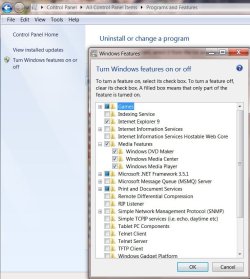
If it is not there; go to Control Panel\All Control Panel Items\Programs and Features >in the left panel menu click on Turn Windows Features On or Off.
Allow the list time to populate, then look for Media Features, click on the + sign, if Windows Media Center is not checked, click on the box to check it.
You can click on the box next to Media Features if you want to turn all three of the features on.
Here's mine:
Reboot your machine, check again in Start Orb >All Programs > with the scroll bar all the way up >It should be listed about 2/3 of the way down.
My Computer
At a glance
Originally Win 7 Hm Prem x64 Ver 6.1.7600 Bui...Intel i3 530 2.93GHz, 2933MHz 2 Cores 4 Logic...6GB of 1,333MHz DDR3 SDRAM32MB Intel Graphics Media Accelerator HD IGChip
Computer type
PC/Desktop
Computer Manufacturer/Model Number
Gateway DX4831-01e (Mid-Tower Desktop)
OS
Originally Win 7 Hm Prem x64 Ver 6.1.7600 Build 7601-SP1 | Upgraded to Windows 10 December 14, 2019