How do I maintain meeting notes in Onenote from outlook calendar

csilver

New member
Local time
7:00 AM
Messages
2
I have many meetings with the same client, each has a meeting in Outlook. I want to maintain all notes from these meetings in Onenote.

In OneNote I have a notebook "clients", and want a section per client. What I'd like is to open the meeting in Outlook, click on the "oneNote" button, and be brought right to the client's section in Onenote and a new page open for that meeting's notes.

I'd also like to get to the OneNote section from the outlook contact area when selecting a contact form that client and using the "OneNote" button.

Is this level of integration possible?

Thanks for any help!

- Craig
 

My Computer My Computer

At a glance

Windows 7 64-bit
OS
Windows 7 64-bit
Such things do exist already in Office 2010.

OneNote 2010 – Outlook Integration
(Icon - Onenote button with little chaine)

You need highlight or open appointment and this button will show up at Outlook ribbon
5618.clip_5F00_image001_5F00_009534AE.jpg


Same button with each contact.

Onenote add-in should be enabled in Outlook. Check here how to access add-ins configurations.
 

My Computer My Computer

At a glance

Windows 8.1 ; Windows 7 x86 (Dec2008-Jan2013)
Computer type
PC/Desktop
OS
Windows 8.1 ; Windows 7 x86 (Dec2008-Jan2013)
Other Info
"The scale icon at the top right of a post or tutorial is how you can give rep to the member."
Neutron16,

I have the OneNote button, and use it. The problem I'm trying to resolve is the organization in OneNote when I use that button. How do I have OneNote open into the right client's section?
 

My Computer My Computer

At a glance

Windows 7 64-bit
OS
Windows 7 64-bit
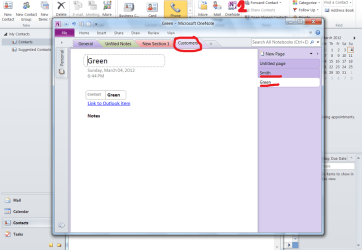
Sections are horizontal tabs, pages are vertical tabs. You can create contacts as individual pages under predefined section in OneNote from Outlook. New Sections can only be created from within OneNote.

Here is the process:
Open OneNote, create a new section like Customers (Suppliers, Vendors, etc.)

Then in Outlook, Create a new contact or select an old one. Let's say you selected Mr Smith. Click OneNote button. A pop-up window will ask you to select a section. Select Customers. Your contact will show up as another page under Customers section in OneNote.
Same with Mr Green. Check out screenshot. You can even go back to Outlook contact info with the link!

Once you have done that for one contact, this link will work both ways and stick unless one of items get deleted.
When you want to open Outlook contact from OneNote you need to click on that link on the page, to go to OneNote from Outlook you select contact and click OneNote button.
 

Attachments

  • smith_green.png
    smith_green.png
    57.3 KB · Views: 51

My Computer My Computer

At a glance

Windows 8.1 ; Windows 7 x86 (Dec2008-Jan2013)
Computer type
PC/Desktop
OS
Windows 8.1 ; Windows 7 x86 (Dec2008-Jan2013)
Other Info
"The scale icon at the top right of a post or tutorial is how you can give rep to the member."
Back
Top