How do I make 5GHz network work?

MDRI

New member
Member
VIP
Local time
9:34 PM
Messages
163
Thanks for replies to my postings. I have Linksys AC1750 Dual Band WiFi router. My Lenovo Z580 is not showing 5G WiFi.

I am attaching the my Network spec.


I did search in google and suggests Click the Advanced tab, click 802.11n mode, under value Select Enable.

I find 802.11n mode enabled on my Z580.

Interface name: Wireless Network Connection

Driver : Intel(R) Centrino(R) Wireless-N 2200
Vendor : Intel Corporation
Provider : Intel
Date : 11/29/2011
Version : 15.0.0.75
INF file : C:\Windows\INF\oem9.inf
Files : 4 total
C:\Windows\system32\DRIVERS\NETwNs64.sys
C:\Windows\system32\NETwNc64.dll
C:\Windows\system32\NETwNr64.dll
C:\Windows\system32\drivers\vwifibus.sys
Type : Native Wi-Fi Driver
Radio types supported : 802.11b 802.11g


Some one suggest that we need to have 802.11ac to activate 5G wifi.


How do I connect t 5G wifi in my Z580?

I like to pick the insight of this forum.

Thanks for helping.
 

Attachments
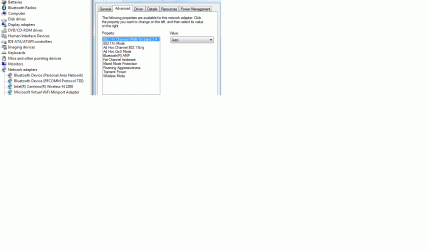
  • z580Gspec.gif
    z580Gspec.gif
    37 KB · Views: 5

My Computer

Computer type
Laptop
Computer Manufacturer/Model Number
Lenovo IdeaPad Z580, x64-based PC
OS
Win 7 64 bit, 6.1.7601 Service Pack 1 Build 7601
CPU
1 Processor(s) Installed. [01]: Intel64 Family 6 Model 58 St
Memory
8,056 MB
Graphics Card(s)
Intel HD 4000
Antivirus
Windows Security Essential
Browser
FireFox, Chrome
Your post tells me:
Radio types supported : 802.11b 802.11g

That tells me that you can not run 802.11n or ac. you need an adaptor to support those modes
 

My Computer

Computer type
PC/Desktop
Computer Manufacturer/Model Number
Custom Build
OS
windows 7 ultimate x64
CPU
AMD FX 6 CORE PROCESSOR
Memory
16 GB
Graphics Card(s)
on MB
Sound Card
on MB
Monitor(s) Displays
Acer
Screen Resolution
1920x1080
Hard Drives
Seagate ( C:\)
Case
mini tower
Keyboard
Logitech wireless
Mouse
Logitech wireless
Antivirus
MSE
Browser
IE11
Actually its because thats a single channel card, and thats all the driver supports.
and that drivers out of date
Curious tho my older 5100 drivers support both.
And it also depends on the router if its not 5 capable you wont get it.
Doesn't matter whether its a/b/c/g or n thats max transfer capability, totally different from what the OP's talking about

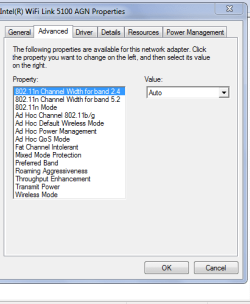
Your screenshot is on the right sub-section, if you hit the dropdown arrow it will only show 2.4?.

You could try other drivers that are dual channel MIGHT get lucky.
In my screenshot below the IMPORTANT line is
PREFERRED BAND
note the pro-set part is not required, bloat.

Roy
 

Attachments

  • 2 or 5.PNG
    2 or 5.PNG
    12.1 KB · Views: 25
Last edited:

My Computer

Computer type
PC/Desktop
Computer Manufacturer/Model Number
medionl/Aspire 6930G/acer x55a
OS
W7 home premium 32bit/W7HP 64bit/w10 tp insider ring
CPU
E5300 dual core
Motherboard
medion MS7366
Memory
3gb
Graphics Card(s)
Nvidia Geforce 7100 Nforce 630i
Monitor(s) Displays
avixc
Internet Speed
n (isp resticted to 72)
Antivirus
mse/pands
Browser
palemoon
Other Info
Belkin Fd7050 n USB using Railink RT2870 drivers, more upto date
If its g type it belongs in a museum it has a max speed of 50 meg all now are at least n type 300 meg or ac 3 gig you can get an adpater now for £10 for ac
 

My Computer

Computer type
PC/Desktop
OS
win 8 32 bit
Actually its because thats a single channel card, and thats all the driver supports.
and that drivers out of date
Curious tho my older 5100 drivers support both.
And it also depends on the router if its not 5 capable you wont get it.
Doesn't matter whether its a/b/c/g or n thats max transfer capability, totally different from what the OP's talking about

Your screenshot is on the right sub-section, if you hit the dropdown arrow it will only show 2.4?.

You could try other drivers that are dual channel MIGHT get lucky.
In my screenshot below the IMPORTANT line is
PREFERRED BAND
note the pro-set part is not required, bloat.

Roy

if you hit the dropdown arrow it will only show 2.4?.

Which drop down , I am no able to see 2.4.

You could try other drivers that are dual channel MIGHT get lucky.

What are the other drivers? Where can I find it?

WiFi Connection Issues: 5Ghz band not found? How do I determine wifi settings & limitations
WiFi Connection Issues: 5Ghz band not found? How do I - Microsoft Community

as per above, it shows enabled on my Z580.

Are there any hardware limitation on my Z580, that won't work on 5G WiFi

My router is 5G capable !

Thanks for sharing.
 

My Computer

Computer type
Laptop
Computer Manufacturer/Model Number
Lenovo IdeaPad Z580, x64-based PC
OS
Win 7 64 bit, 6.1.7601 Service Pack 1 Build 7601
CPU
1 Processor(s) Installed. [01]: Intel64 Family 6 Model 58 St
Memory
8,056 MB
Graphics Card(s)
Intel HD 4000
Antivirus
Windows Security Essential
Browser
FireFox, Chrome
as torchwood pointed out, you have a single channel card in your computer, that is why I said you need an adaptor capable of n or ac mode. I don't see how a driver change will do anything if your card is not capable of such speed. like samurai said, get a new adaptor for about 10 to 15 $ on Ebay.
Sven
 

My Computer

Computer type
PC/Desktop
Computer Manufacturer/Model Number
Custom Build
OS
windows 7 ultimate x64
CPU
AMD FX 6 CORE PROCESSOR
Memory
16 GB
Graphics Card(s)
on MB
Sound Card
on MB
Monitor(s) Displays
Acer
Screen Resolution
1920x1080
Hard Drives
Seagate ( C:\)
Case
mini tower
Keyboard
Logitech wireless
Mouse
Logitech wireless
Antivirus
MSE
Browser
IE11
Thanks for your replies. I am using Linksys AC1600 Router (EA6400). I am getting 30mbps on wired connection, but getting 7mbps down load, 4Mbps upload on WiFi.

Is there a way to increase WiFi speed?

What are the setting get higher speed?

Thanks for sharing.
 

My Computer

Computer type
Laptop
Computer Manufacturer/Model Number
Lenovo IdeaPad Z580, x64-based PC
OS
Win 7 64 bit, 6.1.7601 Service Pack 1 Build 7601
CPU
1 Processor(s) Installed. [01]: Intel64 Family 6 Model 58 St
Memory
8,056 MB
Graphics Card(s)
Intel HD 4000
Antivirus
Windows Security Essential
Browser
FireFox, Chrome
Back
Top