I have a Logitech G510s keyboard and it has a multi-function LCD. When my computer enters screensaver mode the keyboard LCD goes blank and returns to normal upon exit of screensaver. I contacted Logitech support and the reply was :
"This is not a feature that you can control using any of our software. Your computer sends less power to USB ports during screensaver mode which makes it difficult to maintain functionality on the keyboard. You may be able to set this up through windows settings. In that case I would refer you to windows support so they can help you set this functionality. Let me know how it goes."
Is there a way to isolate the port the keyboard is connected to so that the keyboard stays 'active' during screensaver?
-thx
Last edited:
My Computer
At a glance
Microsoft Windows 7 Home Premium 64-bit 7601 ...Pentium(R) Dual-Core CPU E5300 @ 2.60GHz6.00 GBIntel(R) G33/G31 Express Chipset Family
Computer type
PC/Desktop
Computer Manufacturer/Model Number
HP (HP-P6212F)
OS
Microsoft Windows 7 Home Premium 64-bit 7601 Multiprocessor Free Service Pack 1
CPU
Pentium(R) Dual-Core CPU E5300 @ 2.60GHz
Motherboard
PEGATRON CORPORATION Benicia
Memory
6.00 GB
Graphics Card(s)
Intel(R) G33/G31 Express Chipset Family
Sound Card
Realtek High Definition Audio
Monitor(s) Displays
24'' HP WS LCD
Screen Resolution
1920 x 1080 x 32 bits (4294967296 colors) @ 60 Hz
Hard Drives
(1) ATA Hitachi HDT72106 SCSI Disk Device (2) Generic- Compact Flash USB Device (3) Generic- MS/MS-Pro USB Device (4) Generic- SD/MMC USB Device (5) Generic- SM/xD-Picture USB Device (6) Verbatim STORE N GO USB Device
thx oscer1 - so far, cannot 'mark as solved' this topic.
My Computer
At a glance
Microsoft Windows 7 Home Premium 64-bit 7601 ...Pentium(R) Dual-Core CPU E5300 @ 2.60GHz6.00 GBIntel(R) G33/G31 Express Chipset Family
Computer type
PC/Desktop
Computer Manufacturer/Model Number
HP (HP-P6212F)
OS
Microsoft Windows 7 Home Premium 64-bit 7601 Multiprocessor Free Service Pack 1
CPU
Pentium(R) Dual-Core CPU E5300 @ 2.60GHz
Motherboard
PEGATRON CORPORATION Benicia
Memory
6.00 GB
Graphics Card(s)
Intel(R) G33/G31 Express Chipset Family
Sound Card
Realtek High Definition Audio
Monitor(s) Displays
24'' HP WS LCD
Screen Resolution
1920 x 1080 x 32 bits (4294967296 colors) @ 60 Hz
Hard Drives
(1) ATA Hitachi HDT72106 SCSI Disk Device (2) Generic- Compact Flash USB Device (3) Generic- MS/MS-Pro USB Device (4) Generic- SD/MMC USB Device (5) Generic- SM/xD-Picture USB Device (6) Verbatim STORE N GO USB Device
Perhaps I do not understand "screensaver" mode. I always thought it was a 'monitor only' function (similar to simply turning off the monitor) and all else would run 'business as usual'?
(sending less power to the ports for 'sleep' I can understand)
My Computer
At a glance
Microsoft Windows 7 Home Premium 64-bit 7601 ...Pentium(R) Dual-Core CPU E5300 @ 2.60GHz6.00 GBIntel(R) G33/G31 Express Chipset Family
Computer type
PC/Desktop
Computer Manufacturer/Model Number
HP (HP-P6212F)
OS
Microsoft Windows 7 Home Premium 64-bit 7601 Multiprocessor Free Service Pack 1
CPU
Pentium(R) Dual-Core CPU E5300 @ 2.60GHz
Motherboard
PEGATRON CORPORATION Benicia
Memory
6.00 GB
Graphics Card(s)
Intel(R) G33/G31 Express Chipset Family
Sound Card
Realtek High Definition Audio
Monitor(s) Displays
24'' HP WS LCD
Screen Resolution
1920 x 1080 x 32 bits (4294967296 colors) @ 60 Hz
Hard Drives
(1) ATA Hitachi HDT72106 SCSI Disk Device (2) Generic- Compact Flash USB Device (3) Generic- MS/MS-Pro USB Device (4) Generic- SD/MMC USB Device (5) Generic- SM/xD-Picture USB Device (6) Verbatim STORE N GO USB Device
Sorry I miss read your op thought you where talking about sleep mode. But now I relised it was Screensaver mode. I do not know if the ports get less power when Screensaver is active. I personally don't use Screensaver just use sleep.
EDIT: you could just have the monitor turn off at a set time of inactivity and have screensaver set to none.
Microsoft Windows 7 Home Premium 64-bit 7601 ...Pentium(R) Dual-Core CPU E5300 @ 2.60GHz6.00 GBIntel(R) G33/G31 Express Chipset Family
Computer type
PC/Desktop
Computer Manufacturer/Model Number
HP (HP-P6212F)
OS
Microsoft Windows 7 Home Premium 64-bit 7601 Multiprocessor Free Service Pack 1
CPU
Pentium(R) Dual-Core CPU E5300 @ 2.60GHz
Motherboard
PEGATRON CORPORATION Benicia
Memory
6.00 GB
Graphics Card(s)
Intel(R) G33/G31 Express Chipset Family
Sound Card
Realtek High Definition Audio
Monitor(s) Displays
24'' HP WS LCD
Screen Resolution
1920 x 1080 x 32 bits (4294967296 colors) @ 60 Hz
Hard Drives
(1) ATA Hitachi HDT72106 SCSI Disk Device (2) Generic- Compact Flash USB Device (3) Generic- MS/MS-Pro USB Device (4) Generic- SD/MMC USB Device (5) Generic- SM/xD-Picture USB Device (6) Verbatim STORE N GO USB Device
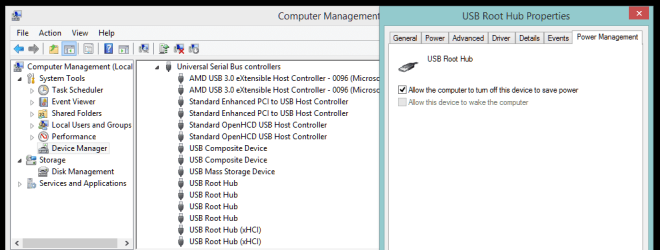
Check the Power Management tab on the associated devices in Dev mgr.
Untick
Allow computer to turn off this device...
Note: This option is inactive (grayed out) for my Logitech wireless KB, but active for the hub which also controls the wireless mouse.
The keyboard device might have the tab, or you might have to determine the associated USB device entries and look at those devices. You might only be able to affect the hub, not a port on the hub - I'm not sure.
If you select View by Connection in DevMgr, it makes it easier to identify the relationship of the devices.
I don't know if any of the above will help, but please post your findings yea or nay - thanks.
There is also the USB selective suspend setting in your Power plan (global USB setting, default enabled).
My Computer
At a glance
x64 (6.3.9600) Win8.1 Pro & soon dual boot x6...AMD A6-3420M APU with Radeon(tm) HD Graphics6.00 GBAMD Radeon(TM) HD 6520G
thx slartybart - prior to posting I 'googled' this issue and came across your dev mgr suggestions. no joy. Tell me more about the USB selective setting, not familiar with it or know where it is. Will it address my issue, i.e. isolate and disable the keyboard port so that screensaver 'ignores it?
My Computer
At a glance
Microsoft Windows 7 Home Premium 64-bit 7601 ...Pentium(R) Dual-Core CPU E5300 @ 2.60GHz6.00 GBIntel(R) G33/G31 Express Chipset Family
Computer type
PC/Desktop
Computer Manufacturer/Model Number
HP (HP-P6212F)
OS
Microsoft Windows 7 Home Premium 64-bit 7601 Multiprocessor Free Service Pack 1
CPU
Pentium(R) Dual-Core CPU E5300 @ 2.60GHz
Motherboard
PEGATRON CORPORATION Benicia
Memory
6.00 GB
Graphics Card(s)
Intel(R) G33/G31 Express Chipset Family
Sound Card
Realtek High Definition Audio
Monitor(s) Displays
24'' HP WS LCD
Screen Resolution
1920 x 1080 x 32 bits (4294967296 colors) @ 60 Hz
Hard Drives
(1) ATA Hitachi HDT72106 SCSI Disk Device (2) Generic- Compact Flash USB Device (3) Generic- MS/MS-Pro USB Device (4) Generic- SD/MMC USB Device (5) Generic- SM/xD-Picture USB Device (6) Verbatim STORE N GO USB Device
I never fully understood the USB selective suspend setting.
Control Panel>Power Options>change plan settings>change advanced power settings
>USB settings> USB selective suspend setting [Enabled | Disabled]
I would think that you want it disabled.
Will it help with the issue on your machine? I tried it a few times (enabled/disabled) to solve different issues without finding a resolution. It might be the answer you're looking for or it might be another dead end.