How Do i make laptop boot fast.. taking much time on HP logo screen

yashish109

New member
Local time
12:35 PM
Messages
8
Hi, All...
I have HP DV6 1111au laptop .. with 2gb memory n 320gb HDD..
Just few days back.. it started to boot on very slowly thought its working very smoothly..
I ran all the tests on HDD n memory, change the RAM, HDD.. but still the problem persists..
I read a lot around about the booting process being slow but could not find any appropriate solution fot this slow boot..
The booting options also load really slow, sometimes boot time is 5 min. on main HP logo screen sometimes its .. 10-25mins.. n sometimes it cannot get started.. then I have to manually restart it.. but when if its ON when restart command being given.. it boots up rilly fast..

I have hard reset over the laptop.. changing BIOS settings.. i.e loading the default one.. also tried to update the BIOS, which is F.18 version.. no new update ...

Please help me.. all people and experts out here.. rilly .. need help...
 

My Computer My Computer

At a glance

Win 8 32bitAMD ATHLON X642GB
Computer type
Laptop
Computer Manufacturer/Model Number
HP
OS
Win 8 32bit
CPU
AMD ATHLON X64
Memory
2GB
Hard Drives
320GB
Antivirus
NA
Browser
Chrome, Mozilla, IE
Hello and welcome yashish mate have a read of this
http://www.sevenforums.com/tutorials/11728-optimize-windows-7-a.html Just make sure you back the registry up - not that there is anything to go the authour is a very cluey fellow but more that you may change the wrong values and I always back it up as matter of course after a reinstall or making changes - then you can go back
http://www.sevenforums.com/tutorials/4230-registry-backup-restore.html (same authour)

Now the HP screen you can stop that through the BIOS but not being familiar with yours I cannot say just what to change.

It could also be the hard drive is getting either clogged up or just plain old.

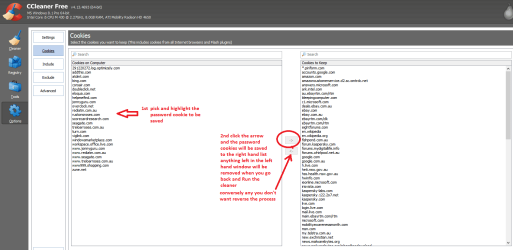
Run CCleaner to remove unwanted temp files and cookies but do save the cookies for sites that require passwords see pic
I am assuming too that you have defragmented this drive often??

Also try these in safe mode if necessary
http://www.sevenforums.com/tutorials/1538-sfc-scannow-command-system-file-checker.html
http://www.sevenforums.com/tutorials/433-disk-check.html < use the /f and /r options in Option 2 if necessary

If nothing of this works then it may need a test on the drive this is the usual one used
SeaTools for Windows | Seagate
 

Attachments

  • CCLEANER COOKIES.PNG
    CCLEANER COOKIES.PNG
    33.5 KB · Views: 2

My Computer My Computer

At a glance

Desk1 7 Home Prem / Desk2 10 Pro / Main lap A...Desk1 i5 3750K / Laptop i7 GTX 860M / Desk2 i...Desk1 8GB (1866) / Desk2 16GB (1333) / Laptop...Desk 1& 2NVidia GTX 650 & Laptops on board Intel
Computer type
PC/Desktop
Computer Manufacturer/Model Number
Own build (new) Desk1 / Asus ROG Win 7 / Desk2 1st build
OS
Desk1 7 Home Prem / Desk2 10 Pro / Main lap Asus ROG 10 Pro 2 laptop Toshiba 7 Pro Asus P2520 7 & 10
CPU
Desk1 i5 3750K / Laptop i7 GTX 860M / Desk2 i5 2500
Motherboard
Desk1 Asus P877-V / Desk2 Gigabyte H67 UD3H / Laptop ?
Memory
Desk1 8GB (1866) / Desk2 16GB (1333) / Laptop 8Gb DDR3
Graphics Card(s)
Desk 1& 2NVidia GTX 650 & Laptops on board Intel
Sound Card
Desk 1 & 2 -XONAR DG Realtek High Def audio Laptop
Monitor(s) Displays
Desk 1 Benq HD 2450 / Desk2 Philips 24" / Laptop 17.5"
Screen Resolution
1920x1080 D1 & D2 & Laptop 1
Hard Drives
Desk1 Samsung 120GB 830 SSD
Asus ROG 256GB 850 Pro SSD
Desk2 Samsung 840 256 SSD
Toshiba 120GB EVO
PSU
Desk 1 Corsair HX 1050/ Laptop ? / Desk 2 Corsair HX 650
Case
Desk 1 Cooler HAF XM ? Toshiba laptop / Desk2 Coolermaster
Cooling
Fans on all Desk1 -2 Desk2 - all Coolermasters 5 Laptop ?
Keyboard
Desk 1 MS Sidewinder X6 Desk 2 MS Sidewinder X 4
Mouse
Desk 1&2 - Gigabyte MS 900 gamer - laptop - Logitec wireless
Internet Speed
ADSL2+
Other Info
One other Desktop (tester) and spare Toshba laptop both with SSD's
Running Kaspersky 2016 ISS on all machines config'd identically
Logitec audio stereo systems on each machine (x3)
Canon MG5250MFC
Router/modem TP-Link running WPA2SK
i did all the things.. regarding the boot time reduction

Hey ,
Thnx for the reply..

I have changed the CMOS battery n also tested whether the new cell makes any difference, but no difference is shown by the laptop.
It still gets stuck on the bios screen as frozen. for sometime.. n again gets active in a mean while..
I dnt know wat to be done for the thing to be woeking as normally ..

Asked and read about the solutions for the same..
"check the motherboard, get it repaied or rewrite the bios with help of some one who is expert in it.., but the chances are .. dat MOBO could get permanently damaged"

Dis is wat i got through out all the research..
I dnt want the laptop to be damaged as all is working really cool when OS is booted.. but the time BIOS takes to load is much.. really much .. 3-30minutes.....
 

My Computer My Computer

At a glance

Win 8 32bitAMD ATHLON X642GB
Computer type
Laptop
Computer Manufacturer/Model Number
HP
OS
Win 8 32bit
CPU
AMD ATHLON X64
Memory
2GB
Hard Drives
320GB
Antivirus
NA
Browser
Chrome, Mozilla, IE

My Computer My Computer

At a glance

Desk1 7 Home Prem / Desk2 10 Pro / Main lap A...Desk1 i5 3750K / Laptop i7 GTX 860M / Desk2 i...Desk1 8GB (1866) / Desk2 16GB (1333) / Laptop...Desk 1& 2NVidia GTX 650 & Laptops on board Intel
Computer type
PC/Desktop
Computer Manufacturer/Model Number
Own build (new) Desk1 / Asus ROG Win 7 / Desk2 1st build
OS
Desk1 7 Home Prem / Desk2 10 Pro / Main lap Asus ROG 10 Pro 2 laptop Toshiba 7 Pro Asus P2520 7 & 10
CPU
Desk1 i5 3750K / Laptop i7 GTX 860M / Desk2 i5 2500
Motherboard
Desk1 Asus P877-V / Desk2 Gigabyte H67 UD3H / Laptop ?
Memory
Desk1 8GB (1866) / Desk2 16GB (1333) / Laptop 8Gb DDR3
Graphics Card(s)
Desk 1& 2NVidia GTX 650 & Laptops on board Intel
Sound Card
Desk 1 & 2 -XONAR DG Realtek High Def audio Laptop
Monitor(s) Displays
Desk 1 Benq HD 2450 / Desk2 Philips 24" / Laptop 17.5"
Screen Resolution
1920x1080 D1 & D2 & Laptop 1
Hard Drives
Desk1 Samsung 120GB 830 SSD
Asus ROG 256GB 850 Pro SSD
Desk2 Samsung 840 256 SSD
Toshiba 120GB EVO
PSU
Desk 1 Corsair HX 1050/ Laptop ? / Desk 2 Corsair HX 650
Case
Desk 1 Cooler HAF XM ? Toshiba laptop / Desk2 Coolermaster
Cooling
Fans on all Desk1 -2 Desk2 - all Coolermasters 5 Laptop ?
Keyboard
Desk 1 MS Sidewinder X6 Desk 2 MS Sidewinder X 4
Mouse
Desk 1&2 - Gigabyte MS 900 gamer - laptop - Logitec wireless
Internet Speed
ADSL2+
Other Info
One other Desktop (tester) and spare Toshba laptop both with SSD's
Running Kaspersky 2016 ISS on all machines config'd identically
Logitec audio stereo systems on each machine (x3)
Canon MG5250MFC
Router/modem TP-Link running WPA2SK
I have lil confusion about the kaspersky.. thng

thnx for helpin me ..

i have read about the Rescue disk kaspersky on its own site..
it says . when its impossible to boot the OS .. run this software..

Here, in my case,, .. OS is booting normally.. infact really fast .. no doubt in that..
but the bios loading form master boot record is delayed ..
i think.. the loading programme on the ROM is .. may b corrupted o having some issue.. i dont know exactly wat.. i studied abt it .. in my academics.. Linux systems ..

I wl surely run this software.. n let u know abt the results..
Thanx
 

My Computer My Computer

At a glance

Win 8 32bitAMD ATHLON X642GB
Computer type
Laptop
Computer Manufacturer/Model Number
HP
OS
Win 8 32bit
CPU
AMD ATHLON X64
Memory
2GB
Hard Drives
320GB
Antivirus
NA
Browser
Chrome, Mozilla, IE
I have laptop fully empty with no stuff.. in it but the OS in it .. only .. still ... it boots really slow.. ie bios settings are slow to be in loading.. OS is booting normally ..

without having anything in laptop.. from where. it could get infected.. ???
n the thing abt scanning.. dnt have any viruses in it ..
I have loaded CentOS also.. ran it from GRUB controls.. bt still the same issue persists..

"OS loades normally but the BIOS setting at the very beginning from power ON.. it gets stuck there.. n takes 3-30mins to get into OS.. "
 

My Computer My Computer

At a glance

Win 8 32bitAMD ATHLON X642GB
Computer type
Laptop
Computer Manufacturer/Model Number
HP
OS
Win 8 32bit
CPU
AMD ATHLON X64
Memory
2GB
Hard Drives
320GB
Antivirus
NA
Browser
Chrome, Mozilla, IE
Yashish mate the good news is you only have 2GB RAM the bad I think you ought to run a test on it because if that is faulty it follows the load will be slow.
So try this

MEMTEST

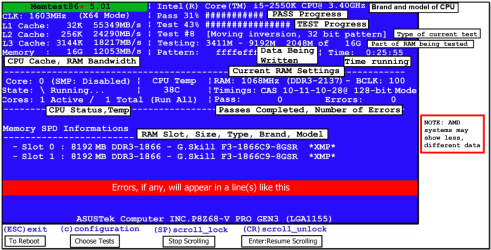
http://www.sevenforums.com/tutorials/105647-ram-test-memtest86.html this one you will need to make a bootabledisk set the BIOS to optical (or USB ifpreferred) boot the machine and let it run for at LEAST 8 passes unless the errors come up straight away. Takesfair time to complete and some leave itrunning overnight.
NB
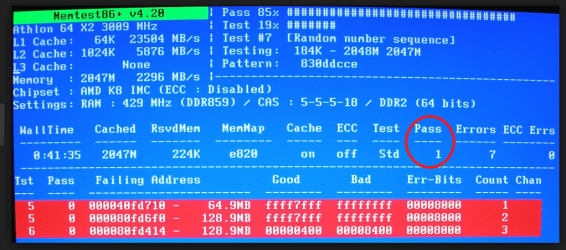
When you run the memtest if the errorscome up straight away a in my pic then you will need to test each stick if you havemore than one and if it is only onethen test again in another slot because it could also be a fault on the board.
So for example two slots A&B / sticks 1&2 if the errors come up remove all sticks try stick 1 in slot A if no errors try stick 1 in slot B if no errors then stick 2 in slot A and then stick 2 in slot B.
If there are errors this will narrow down the problems spot as it could be the slot and not the stick. A lengthy process but only necessary if you get errors.
 

Attachments

  • MEMTEST INFO.PNG
    MEMTEST INFO.PNG
    108.1 KB · Views: 1
  • MEMTEST-ERROR.PNG
    MEMTEST-ERROR.PNG
    237.1 KB · Views: 1

My Computer My Computer

At a glance

Desk1 7 Home Prem / Desk2 10 Pro / Main lap A...Desk1 i5 3750K / Laptop i7 GTX 860M / Desk2 i...Desk1 8GB (1866) / Desk2 16GB (1333) / Laptop...Desk 1& 2NVidia GTX 650 & Laptops on board Intel
Computer type
PC/Desktop
Computer Manufacturer/Model Number
Own build (new) Desk1 / Asus ROG Win 7 / Desk2 1st build
OS
Desk1 7 Home Prem / Desk2 10 Pro / Main lap Asus ROG 10 Pro 2 laptop Toshiba 7 Pro Asus P2520 7 & 10
CPU
Desk1 i5 3750K / Laptop i7 GTX 860M / Desk2 i5 2500
Motherboard
Desk1 Asus P877-V / Desk2 Gigabyte H67 UD3H / Laptop ?
Memory
Desk1 8GB (1866) / Desk2 16GB (1333) / Laptop 8Gb DDR3
Graphics Card(s)
Desk 1& 2NVidia GTX 650 & Laptops on board Intel
Sound Card
Desk 1 & 2 -XONAR DG Realtek High Def audio Laptop
Monitor(s) Displays
Desk 1 Benq HD 2450 / Desk2 Philips 24" / Laptop 17.5"
Screen Resolution
1920x1080 D1 & D2 & Laptop 1
Hard Drives
Desk1 Samsung 120GB 830 SSD
Asus ROG 256GB 850 Pro SSD
Desk2 Samsung 840 256 SSD
Toshiba 120GB EVO
PSU
Desk 1 Corsair HX 1050/ Laptop ? / Desk 2 Corsair HX 650
Case
Desk 1 Cooler HAF XM ? Toshiba laptop / Desk2 Coolermaster
Cooling
Fans on all Desk1 -2 Desk2 - all Coolermasters 5 Laptop ?
Keyboard
Desk 1 MS Sidewinder X6 Desk 2 MS Sidewinder X 4
Mouse
Desk 1&2 - Gigabyte MS 900 gamer - laptop - Logitec wireless
Internet Speed
ADSL2+
Other Info
One other Desktop (tester) and spare Toshba laptop both with SSD's
Running Kaspersky 2016 ISS on all machines config'd identically
Logitec audio stereo systems on each machine (x3)
Canon MG5250MFC
Router/modem TP-Link running WPA2SK
no results .. evrythng is good

i did wat u suggested but no improvement...
evrythng is ok with the test...
 

My Computer My Computer

At a glance

Win 8 32bitAMD ATHLON X642GB
Computer type
Laptop
Computer Manufacturer/Model Number
HP
OS
Win 8 32bit
CPU
AMD ATHLON X64
Memory
2GB
Hard Drives
320GB
Antivirus
NA
Browser
Chrome, Mozilla, IE
If it gets stuck on the BIOS screen, then there could be something wrong with one of the system components. The BIOS checks whether all components and internal and external devices are working correctly and it seems to get hung up on one of them. Do you have any external devices attached. If yes, disconnect them for a test.
 

My Computer My Computer

At a glance

Vista, Windows7, Mint Mate, Zorin, Windows 8from 1.6GHz Duo to i7
Computer Manufacturer/Model Number
HP, Dell, Gateway, Toshiba - 4 laptops and 2 desktops
OS
Vista, Windows7, Mint Mate, Zorin, Windows 8
CPU
from 1.6GHz Duo to i7
Monitor(s) Displays
2x HP w2207
Hard Drives
5x HDD, 7x SSD, 12x Externals
Keyboard
with trackball - no mices
Mouse
Trackball mice
Internet Speed
DSL 6000
no issues.. no changes occured

I did the clean boot..
but still having the same issue..
could not figure out the real problem..
 

My Computer My Computer

At a glance

Win 8 32bitAMD ATHLON X642GB
Computer type
Laptop
Computer Manufacturer/Model Number
HP
OS
Win 8 32bit
CPU
AMD ATHLON X64
Memory
2GB
Hard Drives
320GB
Antivirus
NA
Browser
Chrome, Mozilla, IE
Back
Top