Hi Folks
I have been trying for weeks to get my thinkpad T420 [windows 7 pro 64 bit] to play through my new Anker Soundcore bluetooth speaker. I have already applied quite a few fixes from the web but still no joy. It kept trying to install a driver for it and failing, but Anker say it doesn't need a special driver. the last fix [ using microsoft standard serial over bluetooth link com5 port seemed to crack it - the yellow troubleshooting arrow has gone at last !!!- but still no sound -it doesn't appear in the list of playback devices -any thoughts?
Cheers
Geoff
My Computer
At a glance
Microsoft Windows 7 Professional 64-bit 7601 ...Intel(R) Core(TM) i5-2520M CPU @ 2.50GHz4.00 GBIntel(R) HD Graphics 3000
Computer type
Laptop
Computer Manufacturer/Model Number
lenovo thinkpad T420
OS
Microsoft Windows 7 Professional 64-bit 7601 Multiprocessor Free Service Pack 1
CPU
Intel(R) Core(TM) i5-2520M CPU @ 2.50GHz
Motherboard
LENOVOBase Board4236CTO
Memory
4.00 GB
Graphics Card(s)
Intel(R) HD Graphics 3000
Sound Card
(1) Conexant 20672 SmartAudio HD (2) Intel(R) Display Audi
Hello and welcome CA mate Blu tooth stuff can be extremely frustrating tto add on but fist can you please do this for us
[FONT=Calibri, serif]SYSTEMSPECS[/FONT]
[FONT=Calibri, serif]Nowbefore we can help we do need to know what is in your machine soplease do this [/FONT]System Info - See Your System Specs[FONT=Calibri, serif][/FONT]
[FONT=Calibri, serif]oreither enter the specs of your system in your forum profile the specswill appear when we click on that little box bottom left of the postscreen it is for me the preferable option as it is easy. As you mayappreciate it is very hard when you don’t know what one is workingwith for example a diesel or petrol engine.[/FONT]
[FONT=Calibri, serif](pretypedto save time)[/FONT]
Now I generally prefer a Blu tooth mouse with my laptops and from my own experience it does depend on a few things like the OS one is using - for example my main laptop will use a BT mouse in 7 but not in 10, and it doesn't follow that any expensive devices will work any better or at all over a cheap one .
Now let us know what procedure/s you have used already to add the device to the machine.
If the machine is BT capable then in the notification area after you have opened it click on show the icon and notifications it should drop a BT icon onto the taskbar. Click on it and it should open out a few options such as Add a device Show BT devices etc make sure the speaker is switched on and click Add a device the machine should then go "looking" for one. Once it comes up then the rest should be relatively obvious to follow adding the device.
If the device is already added then it should be showing in the Show BT devices window and if it does then I would assume there is something wrong with the device ie your speaker
From the very brief specs you have put on the forum it looks like that machine is BT compliant. Now one last thing and that is for a while now the versions of BT have been getting better and better and I think form memory the current and latest version is 4.1 but I stand to be corrected on that and also maybe the version in the machine may not be up to date enough for the speaker version so have a research and find out what version is in the machine and also the speakers version. I could be wrong on this but also it maybe different version will not play with each other.
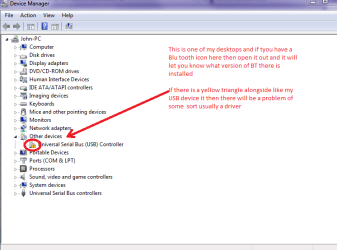
NB If you open the Control Panel and then Device manager go to the Blu tooth and open it if it has yellow triangle alongside then there s a problem with it usually a driver see my pic
Attachments
BT.PNG
18.6 KB
· Views: 23
My Computer
At a glance
Desk1 7 Home Prem / Desk2 10 Pro / Main lap A...Desk1 i5 3750K / Laptop i7 GTX 860M / Desk2 i...Desk1 8GB (1866) / Desk2 16GB (1333) / Laptop...Desk 1& 2NVidia GTX 650 & Laptops on board Intel
Computer type
PC/Desktop
Computer Manufacturer/Model Number
Own build (new) Desk1 / Asus ROG Win 7 / Desk2 1st build
OS
Desk1 7 Home Prem / Desk2 10 Pro / Main lap Asus ROG 10 Pro 2 laptop Toshiba 7 Pro Asus P2520 7 & 10
One other Desktop (tester) and spare Toshba laptop both with SSD's
Running Kaspersky 2016 ISS on all machines config'd identically
Logitec audio stereo systems on each machine (x3)
Canon MG5250MFC
Router/modem TP-Link running WPA2SK
Thanks i have added more specs hope that helps. The laptop def has BT, and i have got the speaker to pair and it appears in my list of devices as a little icon of a BT headset - but its not in that list in the device manager!? there are 2 bluetooth radios whatever they are. it was in that list [with a yellow triangle] but it wouldn't work - said had no driver but would never install any driver for it successfully... the last fix i tried was using a COM port standard serial over bluetooth link COM5 [ i have no idea what any of that means btw! ] now the triangle has gone which i thought was good but i can't find the speaker in the device manager or the list of audio devices....
thanks for helping
cheers
Geoff
My Computer
At a glance
Microsoft Windows 7 Professional 64-bit 7601 ...Intel(R) Core(TM) i5-2520M CPU @ 2.50GHz4.00 GBIntel(R) HD Graphics 3000
Computer type
Laptop
Computer Manufacturer/Model Number
lenovo thinkpad T420
OS
Microsoft Windows 7 Professional 64-bit 7601 Multiprocessor Free Service Pack 1
CPU
Intel(R) Core(TM) i5-2520M CPU @ 2.50GHz
Motherboard
LENOVOBase Board4236CTO
Memory
4.00 GB
Graphics Card(s)
Intel(R) HD Graphics 3000
Sound Card
(1) Conexant 20672 SmartAudio HD (2) Intel(R) Display Audi
Hello Geoff mate look these things are very temperamental I know from my own experiences that it may take several goes at pairing and or find devices to actually get them going.
That port has something to do with networking but I am not 100% sure of exactly what it does stuff like that can get very convoluted and way off my pay scale.
The bit I don't quite get though is why the speaker is showing up as phones?? but hey who knows what they build into the system these days.
So if it were me I would just keep at deleting the device and adding it again it should be as simple as that. Now the speaker does it have a driver?? I have never seen one with one but as I said who would know now.
All I do is make sure the device is switched on and obviously transmitting (making itself visible" and then ask the machine to search for devices.
Now another couple of things you can do is to disable your AV temporarily and also make sure you are away from any interference to the machine. For example if you are sitting in the kitchen and Mum is talking on the cordless or mobile phone, someone might be flicking through TV channels and the microwave is blasting away the sheer amount of radio interference at be "confusing" your machine so find a spot where you are reasonably isolated from that sort of radio "clutter" and remember as I do it does take some persistence at times. The flip side is that you at never get the thing to work ie I have a BT mouse that works on this machine in 7 but will not have a bar of it in 10
John
My Computer
At a glance
Desk1 7 Home Prem / Desk2 10 Pro / Main lap A...Desk1 i5 3750K / Laptop i7 GTX 860M / Desk2 i...Desk1 8GB (1866) / Desk2 16GB (1333) / Laptop...Desk 1& 2NVidia GTX 650 & Laptops on board Intel
Computer type
PC/Desktop
Computer Manufacturer/Model Number
Own build (new) Desk1 / Asus ROG Win 7 / Desk2 1st build
OS
Desk1 7 Home Prem / Desk2 10 Pro / Main lap Asus ROG 10 Pro 2 laptop Toshiba 7 Pro Asus P2520 7 & 10
One other Desktop (tester) and spare Toshba laptop both with SSD's
Running Kaspersky 2016 ISS on all machines config'd identically
Logitec audio stereo systems on each machine (x3)
Canon MG5250MFC
Router/modem TP-Link running WPA2SK