How do I make my WiFi driver work?

BlueCheese

New member
My WiFi driver doesn't work. What should I do?

Hello everybody.

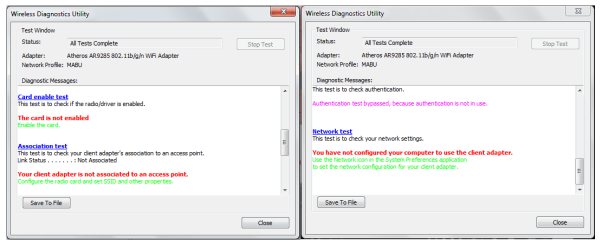
I have a problem on the Wifi driver on my computer. Recently, I've uninstalled some programs from it but by I also uninstalled my ethernet driver by mistake (It was an Atheros driver, but I cannot remember exactly which version). As a result, I can't connect to the Internet from that computer. I searched the lastest Atheros driver I could find (Atheros AR9285 802.11b/g/n WiFi Adapter) and installed it and enabled it through the device manager, but nothing changed. Also, it made appear a program to analyse the problem and I ran the troubleshooting test and the result (or problem that the driver has) are listed on the image I uploaded along with this message but I don't really comprehend what listed on the result because I have no clue what it is and also the language barrier doesn't help either (since my computer is in spanish).
I don't really understand what is the problem. Wasn't the driver recognized? Or it needs some sort of manual activation?
Also, there's another internet driver installed on the computer named Realtek PCIe Family Controller, but I have no idea what is its purpose or if it has something to do with to problem
By the way, I have a Windows 7 Home premium 32-bits.
Sorry for my bad english.
 

Attachments
  • problem.png
    problem.png
    65.4 KB · Views: 41
Last edited:

My Computer

Computer Manufacturer/Model Number
HP Presario CQ56 - 106LA Notebook PC
OS
Windows 7 Home Premium 32bit
CPU
AMD Athlon(tm) II P320 Dual-Core Processor 2.10 GHz
Motherboard
Hewlett-Packard - 1604
Memory
2 GB RAM
Graphics Card(s)
AMD M880G with ATI Mobility Radeon HD 4250
Sound Card
Realtek High Def Audio
Monitor(s) Displays
PnP Generic
Screen Resolution
1366x768
Hard Drives
Hitachi HTS545032B9A300 SATA Disk Device 299 GB
Keyboard
PS/2
Welcome to the Seven Forums. Please fill up your System Specs properly for more meaningful help.

It is not clear from your post whether you need an Ethernet Driver of Wi-Fi Driver or both. If you need an Ethernet Driver then download Realtek_Install_Win7_7045_05192011 from Download Realtek_Install_Win7_7045_05192011 - GEGEREKA! LIVE downloads and install it.

I am not saying that it shall work in all cases but it would in most situations. I suggest that you uninstall/disable the existing Ethernet Drivers before installing this one.
 

My Computer

Computer Manufacturer/Model Number
Custom Built
OS
Windows 7 Pro with SP1 32bit
Motherboard
Intel D845GVS1 X86-based PC
Memory
2 gigs of RAM
Graphics Card(s)
Intel(R) 82845G/GL/GE/PE/GV Graphics Controller
Sound Card
Realtek AC'97 Audio
Monitor(s) Displays
Samsung SyncMaster 931BF Black 19" LCD Monitor
Screen Resolution
1280X960
Hard Drives
1. SAMSUNG SP0822N ATA Device ~ 80 GigaBytes

2. Seagate FreeAgent Go USB Device ~ 500 GigaBytes
Keyboard
COMPAQ Standard PS/2 Keyboard
Mouse
iBall Laser Precise Speedster
Internet Speed
4 mb/sec
The problem comes from the ethernet driver (the Atheros driver) since I uninstalled the one that came in default with the computer and I installed another version (Atheros AR9285 802.11b/g/n WiFi Adapter) but it didn't work.
I uninstalled all the Wifi/ethernet drivers I had and installed the one you recommended me, but instead it re enabled those I uninstalled previously so I decided to eliminate that driver too. In fact, every time I installed a new driver I wouldn't change anything so I uninstalled them all. Now, I don't have any Wifi/ethernet driver in that computer.
I would like to install new Wifi/ethernet drivers, but I don't really know which drivers install or if I would be better to stick with those that came with the computer.
Also, I'm trying to fill the specs but it's a little bit confusing.
 

My Computer

Computer Manufacturer/Model Number
HP Presario CQ56 - 106LA Notebook PC
OS
Windows 7 Home Premium 32bit
CPU
AMD Athlon(tm) II P320 Dual-Core Processor 2.10 GHz
Motherboard
Hewlett-Packard - 1604
Memory
2 GB RAM
Graphics Card(s)
AMD M880G with ATI Mobility Radeon HD 4250
Sound Card
Realtek High Def Audio
Monitor(s) Displays
PnP Generic
Screen Resolution
1366x768
Hard Drives
Hitachi HTS545032B9A300 SATA Disk Device 299 GB
Keyboard
PS/2

My Computer

Computer Manufacturer/Model Number
Custom Built
OS
Windows 7 Pro with SP1 32bit
Motherboard
Intel D845GVS1 X86-based PC
Memory
2 gigs of RAM
Graphics Card(s)
Intel(R) 82845G/GL/GE/PE/GV Graphics Controller
Sound Card
Realtek AC'97 Audio
Monitor(s) Displays
Samsung SyncMaster 931BF Black 19" LCD Monitor
Screen Resolution
1280X960
Hard Drives
1. SAMSUNG SP0822N ATA Device ~ 80 GigaBytes

2. Seagate FreeAgent Go USB Device ~ 500 GigaBytes
Keyboard
COMPAQ Standard PS/2 Keyboard
Mouse
iBall Laser Precise Speedster
Internet Speed
4 mb/sec
Thanks for the program to fill the specs.

Also, I realized that the internet drivers that where indicated in the Systeminfo were marked as false. Has that information something to do with the fact that I can't to internet?
 

My Computer

Computer Manufacturer/Model Number
HP Presario CQ56 - 106LA Notebook PC
OS
Windows 7 Home Premium 32bit
CPU
AMD Athlon(tm) II P320 Dual-Core Processor 2.10 GHz
Motherboard
Hewlett-Packard - 1604
Memory
2 GB RAM
Graphics Card(s)
AMD M880G with ATI Mobility Radeon HD 4250
Sound Card
Realtek High Def Audio
Monitor(s) Displays
PnP Generic
Screen Resolution
1366x768
Hard Drives
Hitachi HTS545032B9A300 SATA Disk Device 299 GB
Keyboard
PS/2
It would appear that you are using incorrect drivers and that is why the Internet connection does not work. You should uninstall them and install the correct driver(s).

I am almost certain that Realtek Drivers (Download Realtek RTL81xx LAN Driver 7.009 for Win7 Driver for Windows 7 / Windows 7 x64 - Softpedia and Realtek RTL8187L Wireless Driver 1.316 for Windows 7 - TechSpot Drivers) for Ethernet and Wi-Fi shall work.


Thanks for the program to fill the specs.

Also, I realized that the internet drivers that where indicated in the Systeminfo were marked as false. Has that information something to do with the fact that I can't to internet?
 

My Computer

Computer Manufacturer/Model Number
Custom Built
OS
Windows 7 Pro with SP1 32bit
Motherboard
Intel D845GVS1 X86-based PC
Memory
2 gigs of RAM
Graphics Card(s)
Intel(R) 82845G/GL/GE/PE/GV Graphics Controller
Sound Card
Realtek AC'97 Audio
Monitor(s) Displays
Samsung SyncMaster 931BF Black 19" LCD Monitor
Screen Resolution
1280X960
Hard Drives
1. SAMSUNG SP0822N ATA Device ~ 80 GigaBytes

2. Seagate FreeAgent Go USB Device ~ 500 GigaBytes
Keyboard
COMPAQ Standard PS/2 Keyboard
Mouse
iBall Laser Precise Speedster
Internet Speed
4 mb/sec
I installed the Realtek RTL8187L Wireless Driver 1.316 but not the second one because I don't how to do it.
But what really bothers me is that each time I install a new driver (and the last one wasn´t a exception) they don't appear and instead these two drivers (Atheros AR9285 802.11b/g/n WiFi Adapter and Realtek PCIe Family Controller) appear out of nowhere. The problem is that the Atheros driver was one of the no funtionnal drivers I installed before and uninstalled and the other came with the computer, which I also uninstalled, so I don't know from where they come.
I think those two drivers are making some kind of problem for the ones I try to install and I don't know how to remove them properly and
definitely from the computer.

Also, each time I install and uninstall a driver, another "driver" (it appears as a driver in the device managent and in the control panel) appears called Microsoft Virtual Wifi Miniport adapter #x. Each time I install and uninstall a driver, it changes of number. Its now by 8
. I'm not really sure if it has something to do, but I found it strange.
 

My Computer

Computer Manufacturer/Model Number
HP Presario CQ56 - 106LA Notebook PC
OS
Windows 7 Home Premium 32bit
CPU
AMD Athlon(tm) II P320 Dual-Core Processor 2.10 GHz
Motherboard
Hewlett-Packard - 1604
Memory
2 GB RAM
Graphics Card(s)
AMD M880G with ATI Mobility Radeon HD 4250
Sound Card
Realtek High Def Audio
Monitor(s) Displays
PnP Generic
Screen Resolution
1366x768
Hard Drives
Hitachi HTS545032B9A300 SATA Disk Device 299 GB
Keyboard
PS/2

My Computer

Computer type
PC/Desktop
Computer Manufacturer/Model Number
self build
OS
win 7 ultimate32bit, Win8.1pro wmc 32bit
CPU
amd phenom x4 9600
Motherboard
asus m2n32-sli deluxe
Memory
corsair twinxs 2x2gb
Graphics Card(s)
2x nvidia 1gb 8500gt
Sound Card
onboard
Monitor(s) Displays
23" PB Viseo 233d
Screen Resolution
1920x1080
Hard Drives
maxtor sata 500gb
maxtor sata 320gb
fujitsu sata200gb
PSU
oryxx tornado 750w
Case
thermaltake xaser lll
Cooling
artic freezer64 pro + 7 case fans
NOTE: I need to post about my problem, since I found same difficulties. Instead of doing another post, I'm to edit this one adding more information. The old post is between lines.

---------------------------------------------------------------------------------
I already searched in the manufacturer's page and I gave up there, but I didn't searched in other languages (only spanish), so I'll give it a try.
Anyway, I'm almost sure that I already found some of those drivers in other pages and I tried to install them, but they didn't work (or at least I couldn't make them work
confused.gif
). What I mostly fear is that they're not going to work, not because they would be incompatible, but because I've been having this issue repeatedly, which I already stated in my last post, but I quote here:

But what really bothers me is that each time I install a new driver (and the last one wasn´t a exception) they don't appear and instead these two drivers (Atheros AR9285 802.11b/g/n WiFi Adapter and Realtek PCIe Family Controller) appear out of nowhere. The problem is that the Atheros driver was one of the no funtionnal drivers I installed before and uninstalled and the other came with the computer, which I also uninstalled, so I don't know from where they come.
I think those two drivers are making some kind of problem for the ones I try to install and I don't know how to remove them properly and
definitely from the computer.

So, what I am searching first is how to get rid of them, because they don't let me resolve the problem.
---------------------------------------------------------------------------------

I managed to uninstall all network drivers permanently from that computer, and I began to see which driver I had to install from the manufacturer's page.
The Realtek PCIe Family Controller driver worked fine.
Regrettably, none of the WLAN drivers worked, even some of the installer didn't showed up! And those who were "installed" don't appear in the device manager or control panel.
I ended up with an Atheros driver once more, which didn't fail as all the others, but it's the same version as the one I installed before. In other words, I went back to square one.
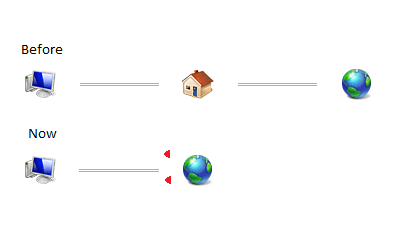
The only differences this time is that the conexion icon looks different and, the one I fear the most, the connection scheme in the control panel is different (I made a drawing of it with paint to recreate it which is attached with this message).
I don't know what it means. And I have no clue what to do since everything I tried hasn't succeeded so far.
What should I do? Should I give up and ask a technician or is there another solution to the problem?
 

Attachments

  • Sin título.png
    Sin título.png
    14.1 KB · Views: 5
Last edited:

My Computer

Computer Manufacturer/Model Number
HP Presario CQ56 - 106LA Notebook PC
OS
Windows 7 Home Premium 32bit
CPU
AMD Athlon(tm) II P320 Dual-Core Processor 2.10 GHz
Motherboard
Hewlett-Packard - 1604
Memory
2 GB RAM
Graphics Card(s)
AMD M880G with ATI Mobility Radeon HD 4250
Sound Card
Realtek High Def Audio
Monitor(s) Displays
PnP Generic
Screen Resolution
1366x768
Hard Drives
Hitachi HTS545032B9A300 SATA Disk Device 299 GB
Keyboard
PS/2
Back
Top