
Solved How do I make programs open directly on the icon in the taskbar?

The silent

New member
Local time
3:06 AM
Messages
5
Good day every1,
I have given up several replaceable programs because of this problem...

as already stated in the title:
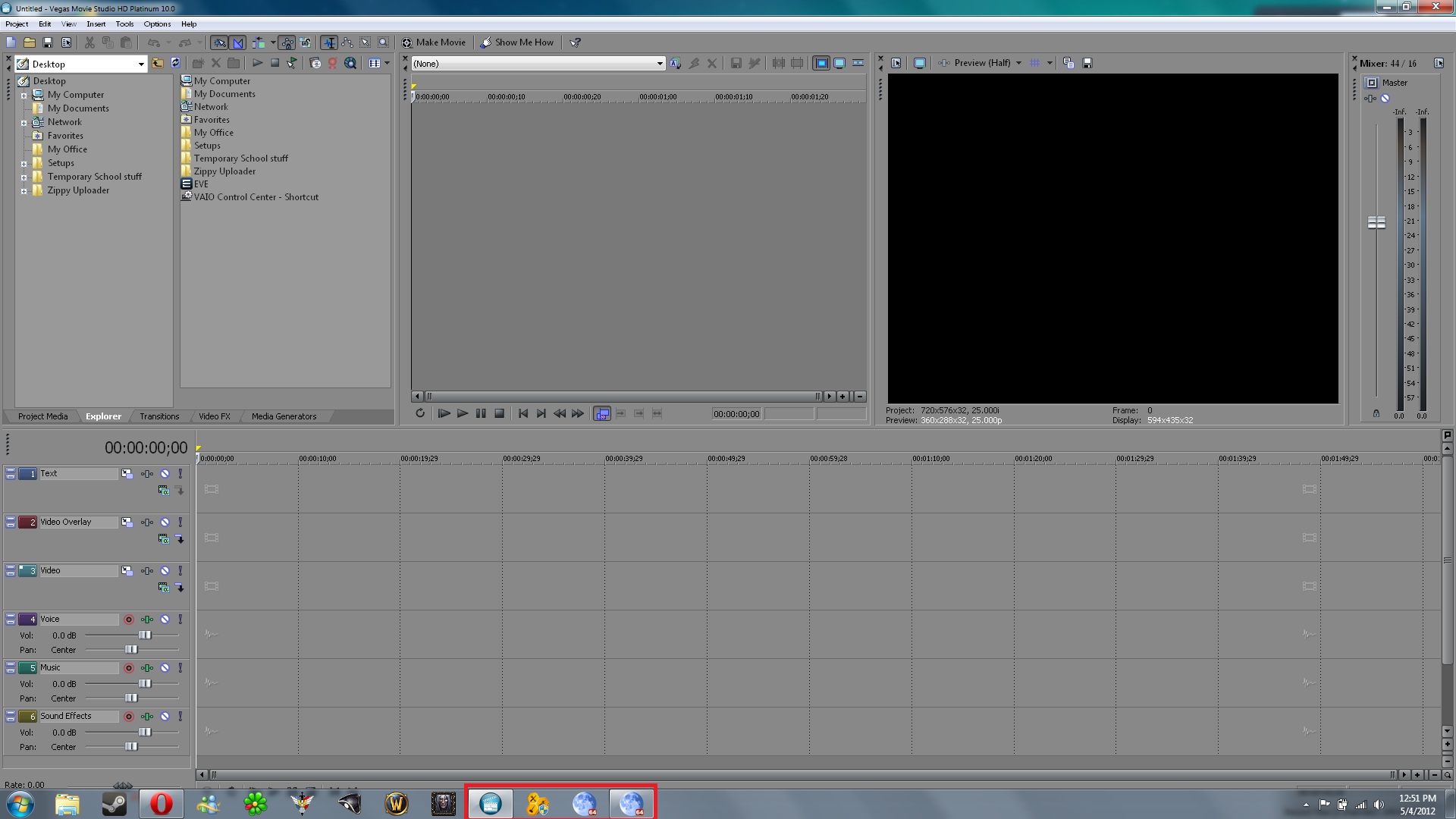
I want my programs to open ON the icon in the taskbar... for some programs it works, for others strangely it doesn't...

Meaning I click on the icon, and instead of opening itself where the icon is located it opens a new window right next to it....:huh:
32cFK.jpg
32cFK.jpg
Untitled.jpg

as you can see sony vegas opened normally ON the icon of it, but Pale Moon opened next to it, this is VERY annoying-.-
 
Last edited:

My Computer My Computer

At a glance

windows 7 home premium 64BitIntel i7-2670QM6GB @ 1333MhzGt540M
Computer Manufacturer/Model Number
Sony Vaio F
OS
windows 7 home premium 64Bit
CPU
Intel i7-2670QM
Motherboard
NA
Memory
6GB @ 1333Mhz
Graphics Card(s)
Gt540M
Sound Card
Realtek HD
Hard Drives
Toshiba
500GB @ 7200RPM
Welcome to the Seven Forums
Try this, after it opens the one next to it right click on it and pin it to the taskbar then unpin the 1st one.
Jerry
 

My Computer My Computer

At a glance

Win 7 Pro x64 / Win 10 ProIntel(R) Core(TM) i7-3630QM CPU @ 2.40GHz12 GB(1) Intel(R) HD Graphics 4000 (2) NVIDIA GeFo...
Computer type
Laptop
Computer Manufacturer/Model Number
Sager NP9170
OS
Win 7 Pro x64 / Win 10 Pro
CPU
Intel(R) Core(TM) i7-3630QM CPU @ 2.40GHz
Motherboard
CLEVO P170EM
Memory
12 GB
Graphics Card(s)
(1) Intel(R) HD Graphics 4000 (2) NVIDIA GeForce GTX 675M
Sound Card
(1) Realtek High Definition Audio (2) Intel(R) Display Aud
Monitor(s) Displays
17.3
Screen Resolution
1920x1080
Hard Drives
(1) Samsung 860 EVO 500GB(OS) (1) Samsung 860 EVO 500GB(Data)
Keyboard
Backlite
Antivirus
MSE, Malwarebytes Pro
Browser
Firefox
Other Info
DESKTOP: Custom-built.
OS: Win 10 Pro x64.
CASE: Rosewill R5.
CPU: Intel I5 4670K CPU @ 3.40GHz.
CPU COOLER: Cool Master Hyper 212 EVO.
MOTHERBOARD: Asus Z87-A.
MEMORY: Kingston HyperX 2x4 GB.
GPU: Nvidia Geforce 650 TI.
PSU: Corsair TX750.
DRIVES: (1) Samsung 840 120 GB SSD (2) Western Digital blue 500 GB 7200 RPM.
Awesome!!!
this solved the problem!
damn I dont believe that I haven't heard of this forum!

It's MARVELOUS!

thanks again Bongo/Jerry :)
 

My Computer My Computer

At a glance

windows 7 home premium 64BitIntel i7-2670QM6GB @ 1333MhzGt540M
Computer Manufacturer/Model Number
Sony Vaio F
OS
windows 7 home premium 64Bit
CPU
Intel i7-2670QM
Motherboard
NA
Memory
6GB @ 1333Mhz
Graphics Card(s)
Gt540M
Sound Card
Realtek HD
Hard Drives
Toshiba
500GB @ 7200RPM
You're Welcome, check out the Tutorials they are great
Jerry
 

My Computer My Computer

At a glance

Win 7 Pro x64 / Win 10 ProIntel(R) Core(TM) i7-3630QM CPU @ 2.40GHz12 GB(1) Intel(R) HD Graphics 4000 (2) NVIDIA GeFo...
Computer type
Laptop
Computer Manufacturer/Model Number
Sager NP9170
OS
Win 7 Pro x64 / Win 10 Pro
CPU
Intel(R) Core(TM) i7-3630QM CPU @ 2.40GHz
Motherboard
CLEVO P170EM
Memory
12 GB
Graphics Card(s)
(1) Intel(R) HD Graphics 4000 (2) NVIDIA GeForce GTX 675M
Sound Card
(1) Realtek High Definition Audio (2) Intel(R) Display Aud
Monitor(s) Displays
17.3
Screen Resolution
1920x1080
Hard Drives
(1) Samsung 860 EVO 500GB(OS) (1) Samsung 860 EVO 500GB(Data)
Keyboard
Backlite
Antivirus
MSE, Malwarebytes Pro
Browser
Firefox
Other Info
DESKTOP: Custom-built.
OS: Win 10 Pro x64.
CASE: Rosewill R5.
CPU: Intel I5 4670K CPU @ 3.40GHz.
CPU COOLER: Cool Master Hyper 212 EVO.
MOTHERBOARD: Asus Z87-A.
MEMORY: Kingston HyperX 2x4 GB.
GPU: Nvidia Geforce 650 TI.
PSU: Corsair TX750.
DRIVES: (1) Samsung 840 120 GB SSD (2) Western Digital blue 500 GB 7200 RPM.
Back
Top