How do I move " press Ctrl+Alt+Del to log on " in login screen

alyxz

New member
Local time
10:54 AM
Messages
2
How do I move " press Ctrl+Alt+Del to log on " in login screen

hi,

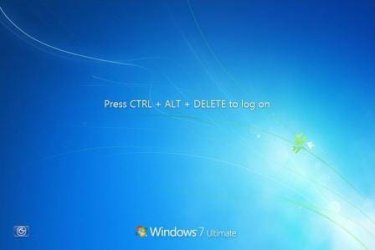
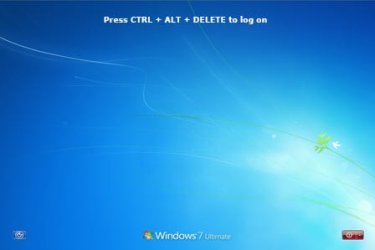
i want to move the press Ctrl+Alt+Del to log on to little above or down below so that i can view my background image nicely.
"currently it is located in the center" i want the writing to be on top or down


thanks in advance.
 

My Computer My Computer

At a glance

windows 7 home premium x64
OS
windows 7 home premium x64
im having a dell pc. and i dont think it will have any settings in the bios related to what i want.

attached 2 pictures, one is the original and the other one is the way i want

thank you
 

Attachments

  • ctrl-alt-del-logon.jpg
    ctrl-alt-del-logon.jpg
    16 KB · Views: 8
  • ctrl-alt-del-logon_top.jpg
    ctrl-alt-del-logon_top.jpg
    24.2 KB · Views: 9

My Computer My Computer

At a glance

windows 7 home premium x64
OS
windows 7 home premium x64
I'm sorry to say that I don't believe this is possible. The way I handle it at work is I create the backgrounds to accommodate the Ctrl+Alt+Delete and the subsequent password/login prompt. If you have photo editing software you can customize your own image for the login screen.

See here on changing the login screen wallpaper: http://www.sevenforums.com/tutorials/5382-log-screen-change.html
 
Last edited by a moderator:

My Computer My Computer

At a glance

Windows 7 Ultimate x64, BackTrack Linux 5 R2,...Intel Core i7 920 OC to 3.6GHzCorsair 6GB DDR3ATI Radeon 4890
Computer Manufacturer/Model Number
Custom Build
OS
Windows 7 Ultimate x64, BackTrack Linux 5 R2, Windows XP
CPU
Intel Core i7 920 OC to 3.6GHz
Motherboard
ASUS P6T Deluxe V2
Memory
Corsair 6GB DDR3
Graphics Card(s)
ATI Radeon 4890
Monitor(s) Displays
ASUS 23"
Screen Resolution
1920x1080
Hard Drives
150GB Velociraptor
640GB
PSU
Corsair 850w
Case
CoolerMaster HAF932
Cooling
CoolerMaster V8
Internet Speed
30Mbps
Back
Top