How do I move the BCD?

Pilotwings64

New member
Local time
3:51 PM
Messages
16
I just installed Windows 7 and the Boot Configuration Database is on my F drive. I want it on my C drive, or at least not on my F drive. Does anyone know how I can accomplish this?

Thanks,
Justin
 

My Computer

OS
Windows 7 32bit

My Computer

Computer type
PC/Desktop
Computer Manufacturer/Model Number
Self Built
OS
Win 10 Pro x64
CPU
Intel I5-2500K @3.3GHz
Motherboard
Asrock P67 Extreme4
Memory
16GB G.Skill Ripjaws X (4x4GB)
Graphics Card(s)
EVGA GeForce 750 Ti SC 2GB
Sound Card
ASUS Xonar DG 5.1 Channels 24-bit 96KHz PCI Interface Sound
Monitor(s) Displays
auria eq2367
Screen Resolution
1920 x 1080
Hard Drives
250GB Samsung 850 EVO SSD
1TB WD Blue
1TB Hitachi
PSU
SeaSonic X 650W 80 Plus Gold
Case
Corsair Obsidian 750D
Cooling
Corsair H60, Three 140mm case fans
Keyboard
Logitech Wireless Keyboard K520
Mouse
Logitech Wireless Mouse M310
Internet Speed
Wave Broadband ~ 100 dn 5 up
Antivirus
Windows Defender, Malwarebytes Premium
Browser
Edge, IE11, Chrome
Other Info
Laptop specs: HP g7-1365dx /
CPU: AMD A6-3420M APU with Radeon(tm) HD Graphics /
RAM: Crucial 8Gb (2x4Gb) /
SSD: Crucial M4-CT128M4SSD2 ATA Device/ FW 000F /
GFX: AMD Radeon HD 6520G /
OS: Windows 10 Pro x64
Do you have a multi-boot system?
 

My Computer

Computer type
PC/Desktop
Computer Manufacturer/Model Number
Dwarf Dwf/11/2012 r09/2013
OS
Windows 8.1 Pro RTM x64
CPU
Intel Core-i5-3570K 4-core @ 3.4GHz (Ivy Bridge) (OC 4.4GHz)
Motherboard
ASRock Z77 Extreme4-M
Memory
4 x 4GB DDR3-1600 Corsair Vengeance CMZ8GX3M2A1600C9B (16GB)
Graphics Card(s)
MSI GeForce GTX770 Gaming OC 2GB
Sound Card
Realtek High Definition on board solution (ALC 898)
Monitor(s) Displays
ViewSonic VA1912w Widescreen (VGA)
Screen Resolution
1440x900
Hard Drives
OCZ Agility 3 SSD 120GB SATA III x2 (RAID 0)
Samsung HD501LJ 500GB SATA II x2
Hitachi HDS721010CLA332 1TB SATA II
Iomega 1.5TB Ext USB 2.0
WD 2.0TB Ext USB 3.0
PSU
XFX Pro Series 850W Semi-Modular
Case
Gigabyte IF233
Cooling
1 x 120mm Front Inlet 1 x 120mm Rear Exhaust
Keyboard
Microsoft Comfort Curve Keyboard 3000 (USB)
Mouse
Microsoft Comfort Mouse 3000 for Business (USB)
Internet Speed
NetGear DG834Gv3 ADSL Modem/Router (Ethernet) ~4.0 Mb/s (O2)
Antivirus
Avast! 8.0.1497
Browser
IE 11
Other Info
Optical Drive: HL-DT-ST BD-RE BH10LS30 SATA Bluray
Lexmark S305 Printer/Scanner/Copier (USB)
WEI Score: 8.1/8.1/8.5/8.5/8.25
Asus Eee PC 1011PX Netbook (Windows 7 x86 Starter)
Dwarf
I don't have multi boot system yet, but I might. If I find out that some of my critical programs don't work with Windows 7, I will have to include XP in the mix for a while.

derekimo
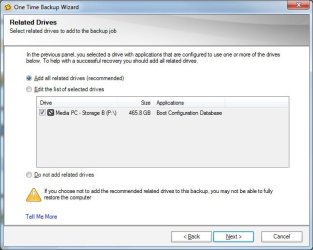
I tried your suggestion. The first picture is the important part of what I saw. It seems to be saying that everything is on the C drive. Is that true? Still, when I use Norton Ghost to back up the C drive, I get the message displayed in the second picture.

Note: the F drive is now the P drive.

Thanks again,
Justin
 

Attachments

  • cmd.jpg
    cmd.jpg
    7.3 KB · Views: 25
  • ghost.jpg
    ghost.jpg
    36.4 KB · Views: 28

My Computer

OS
Windows 7 32bit
Pilotwing,

Provided you have your Win7 install disc, there’s an easy solution.

Boot into windows and enter Computer Management, then click Storage, then Disk Management.

Right click your C: drive and select “Mark Partition as Active.” This tells Windows you’ll be booting from this drive.

Restart your computer and enter your BIOS. Set your boot order so that the Optical Drive is at the top.

Save and exit.

Boot into your Win7 install disc, and go to the recovery options. Run Startup Repair and you are done. Afterwards, you can set your C: drive back to top of the boot order.
 
Last edited:

My Computer

Computer Manufacturer/Model Number
Too many to describe...
OS
Windows 7 x64 pro/ Windows 7 x86 Pro/ XP SP3 x86
This picture is what I see in the Computer Management window. C is already active. What concerns me is that P is also active. I also already set my dvd drive as the first in my bios boot order.

I'm basically concerned about two things.

1. I'll decide I need a dual boot system and the ghost images I've already created will be useless because the BCD isn't included in them. BTW it took about 4 hours for win7 to install on my media pc, so I don't want to have to do that again.
2. Since drive P is "active" windows will do other things to it that I don't want done. It's a drive for file storage, nothing else.

Are either one of these concerns reasonable?
 

Attachments

  • manage.jpg
    manage.jpg
    35.3 KB · Views: 28

My Computer

OS
Windows 7 32bit
D/l this , View attachment sisparV6.zip

( as always, rt click it select properties>unblock>apply>ok )

Rt click it and select Extract.

Rt click on sisparV6.cmd and RUN AS ADMINISTRATOR.

Select C as the new system partition.

Enter N to adding existing boot menu items.

Select Y to making a partition Inactive.

Select P as the partition to make Inactive.

That's it.
 

My Computers

System One System Two

  • Computer type
    PC/Desktop
    OS
    7 X64
    CPU
    i5 8400
    Motherboard
    gigabyte b365m ds3h
    Memory
    2x8gb 3200mhz
    Hard Drives
    various
    PSU
    pure power 11 400w cm
    Case
    Coolermaster
    Cooling
    cryorig m9i
  • Computer type
    PC/Desktop
    OS
    7x64
    CPU
    g5400
    Motherboard
    ga b365m ds3h
    Memory
    8gb ddr4 2400
    PSU
    xfx pro 450w
Pilotwings,

Am somewhat confused now so just clarify a few things.

1) You have 2 separate hard drives with the os on one and boot files on the other?

2) You dont want the 2nd hdd to be bootable?
 

My Computer

Computer Manufacturer/Model Number
Too many to describe...
OS
Windows 7 x64 pro/ Windows 7 x86 Pro/ XP SP3 x86
Bill2

I have many hard drives in this computer. I installed windows 7 on the c drive, but for some reason it made the P drive the system drive. That seems to be the problem. Since the P drive is just for file storage, I don't want it to be bootable.

SIW2

I will try that right now. Thanks.
 

My Computer

OS
Windows 7 32bit
Ok, ya try SIW2's suggestion. Just FYI, it can be done from within windows as well via diskpart.

Open an elevated cmd prompt
Run diskpart
In diskpart run> list volume
In diskpart run>select partition (x)
In your case, X is P:
Then in diskpart run> inactive

Refresh your disk management screento ensure the correct partition was changed.
 

My Computer

Computer Manufacturer/Model Number
Too many to describe...
OS
Windows 7 x64 pro/ Windows 7 x86 Pro/ XP SP3 x86
SIW2
That seemed to work except for one thing. The P drive is still the system drive. Do you have anything for that?

Thanks again
 

Attachments

  • manage2.jpg
    manage2.jpg
    49.3 KB · Views: 8

My Computer

OS
Windows 7 32bit
Bill2

Can I use an elevated command prompt to make the c drive the system drive?
 

My Computer

OS
Windows 7 32bit
BTW did my thread get moved into "Hardware & Devices" or did I accidentally start this thread in here?
 

My Computer

OS
Windows 7 32bit
Pilotwings,

In Windows OS, system partition is the one where the boot files are located. In your case that is P: as of now so its normal. And as for making C: drive, the system drive, that is about shifting the mbr to C: drive. I have already described the methodology in my previous posts.
 

My Computer

Computer Manufacturer/Model Number
Too many to describe...
OS
Windows 7 x64 pro/ Windows 7 x86 Pro/ XP SP3 x86
Okay. It looks like all I had to do after all that was restart. Now everything looks fine.

Thanks to everyone who helped me.
 

My Computer

OS
Windows 7 32bit
How do I mark this thread as resolved?
Click on the red triangle at the top right of the first post, and request that the thread/post be marked as Solved and a Staff member will do so. I've already marked this thread for you.
 

My Computer

Computer type
PC/Desktop
Computer Manufacturer/Model Number
Dwarf Dwf/11/2012 r09/2013
OS
Windows 8.1 Pro RTM x64
CPU
Intel Core-i5-3570K 4-core @ 3.4GHz (Ivy Bridge) (OC 4.4GHz)
Motherboard
ASRock Z77 Extreme4-M
Memory
4 x 4GB DDR3-1600 Corsair Vengeance CMZ8GX3M2A1600C9B (16GB)
Graphics Card(s)
MSI GeForce GTX770 Gaming OC 2GB
Sound Card
Realtek High Definition on board solution (ALC 898)
Monitor(s) Displays
ViewSonic VA1912w Widescreen (VGA)
Screen Resolution
1440x900
Hard Drives
OCZ Agility 3 SSD 120GB SATA III x2 (RAID 0)
Samsung HD501LJ 500GB SATA II x2
Hitachi HDS721010CLA332 1TB SATA II
Iomega 1.5TB Ext USB 2.0
WD 2.0TB Ext USB 3.0
PSU
XFX Pro Series 850W Semi-Modular
Case
Gigabyte IF233
Cooling
1 x 120mm Front Inlet 1 x 120mm Rear Exhaust
Keyboard
Microsoft Comfort Curve Keyboard 3000 (USB)
Mouse
Microsoft Comfort Mouse 3000 for Business (USB)
Internet Speed
NetGear DG834Gv3 ADSL Modem/Router (Ethernet) ~4.0 Mb/s (O2)
Antivirus
Avast! 8.0.1497
Browser
IE 11
Other Info
Optical Drive: HL-DT-ST BD-RE BH10LS30 SATA Bluray
Lexmark S305 Printer/Scanner/Copier (USB)
WEI Score: 8.1/8.1/8.5/8.5/8.25
Asus Eee PC 1011PX Netbook (Windows 7 x86 Starter)
You're welcome. :)
 

My Computer

Computer type
PC/Desktop
Computer Manufacturer/Model Number
Dwarf Dwf/11/2012 r09/2013
OS
Windows 8.1 Pro RTM x64
CPU
Intel Core-i5-3570K 4-core @ 3.4GHz (Ivy Bridge) (OC 4.4GHz)
Motherboard
ASRock Z77 Extreme4-M
Memory
4 x 4GB DDR3-1600 Corsair Vengeance CMZ8GX3M2A1600C9B (16GB)
Graphics Card(s)
MSI GeForce GTX770 Gaming OC 2GB
Sound Card
Realtek High Definition on board solution (ALC 898)
Monitor(s) Displays
ViewSonic VA1912w Widescreen (VGA)
Screen Resolution
1440x900
Hard Drives
OCZ Agility 3 SSD 120GB SATA III x2 (RAID 0)
Samsung HD501LJ 500GB SATA II x2
Hitachi HDS721010CLA332 1TB SATA II
Iomega 1.5TB Ext USB 2.0
WD 2.0TB Ext USB 3.0
PSU
XFX Pro Series 850W Semi-Modular
Case
Gigabyte IF233
Cooling
1 x 120mm Front Inlet 1 x 120mm Rear Exhaust
Keyboard
Microsoft Comfort Curve Keyboard 3000 (USB)
Mouse
Microsoft Comfort Mouse 3000 for Business (USB)
Internet Speed
NetGear DG834Gv3 ADSL Modem/Router (Ethernet) ~4.0 Mb/s (O2)
Antivirus
Avast! 8.0.1497
Browser
IE 11
Other Info
Optical Drive: HL-DT-ST BD-RE BH10LS30 SATA Bluray
Lexmark S305 Printer/Scanner/Copier (USB)
WEI Score: 8.1/8.1/8.5/8.5/8.25
Asus Eee PC 1011PX Netbook (Windows 7 x86 Starter)
Back
Top