How do I partition a hard drive without losing data?

SarahJ

New member
Local time
3:34 PM
Messages
2
Hi,
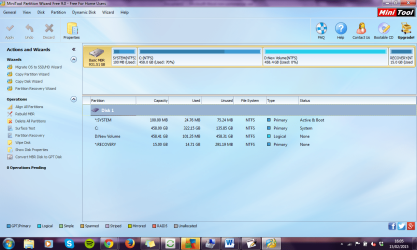
My external hard drive (WD Passport) is not showing up on my computer. I think it must have disconnected from my laptop before it had finished writing the files. I can find it in 'disk management, hard drives' but its not showing up in partition managers. See pics below. I really need the photos that are on the hard drive so re-formatting is not an option.
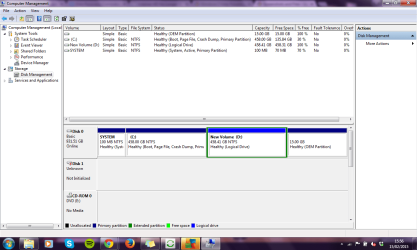
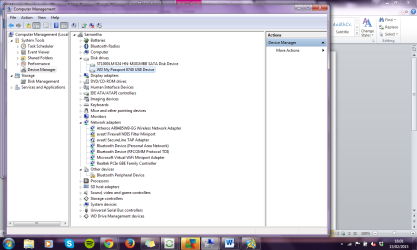
screenshot.png
screenshot2.png
screenshot3.png

TIA
 

My Computer My Computer

Computer type
Laptop
Computer Manufacturer/Model Number
Samsung
OS
windows 7 home premium
You can't, to my knowledge, partition a hard disk without losing the data that is on it.

It sounds as though your drive has failed. There are recovery options that are sometimes available. I'll let more experienced members of the forum help with that. Just don't do anything with that drive until a more experienced member can help you, please.
 

My Computer My Computer

Computer type
PC/Desktop
Computer Manufacturer/Model Number
Mellon Labs (custom build)
OS
Win 7 Pro x64/Win 10 Pro x64 dual boot
CPU
AMD FX 8350 Vishera @ 4200
Motherboard
ASUS M5A97 R2.0
Memory
16 GB Mushkin Blackline DDR3-2400 @ 1866 (9-10-10-10-31)
Graphics Card(s)
XFX Radeon R9 280 Double D Black Edition
Sound Card
Realtek HD Audio on MB. Sounds great.
Monitor(s) Displays
Acer 24", Acer 22"
Screen Resolution
3840 x 1080
Hard Drives
1 x Mushkin Chronos 120 GB SSD (Win 10)
1 x Samsung 850 EVO 250 GB SSD (Win 7)
1 x WD 1TB SATA Blue
1 x WD 1TB SATA Green
PSU
Corsair TX-750
Case
CoolerMaster HAF 912+
Cooling
Coolermaster Seidon 240M Liquid AIO. 6 case fans
Keyboard
Logitech G710+
Mouse
Logitech G500s
Internet Speed
Much better since I got fiber, but still way overpriced.
Antivirus
MSE, Malware Bytes for scanning
Browser
Firefox
Other Info
Corsair VOID USB headphones.

A Mellon Labs X-1 - LCD Smartie driven system status display.

Brought to you by the letter E
Hello SarahJ ,

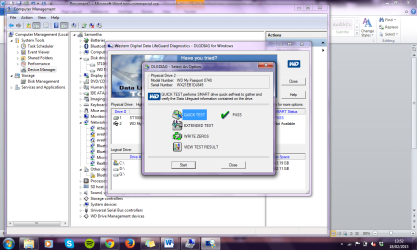
It is possible that your HDD has failed but it could just be underpowered due to bad cable or port. My passport devices are getting power through the USB cable. Please try to use a different short USB 3.0 cable, make sure you plug it directly into the USB port without any USB hubs or splitters. Try to connect it to a different USB 3.0 port and to a different PC. If that doesn't help you can use WD DLG quick test to display the SMART status of the device. You can download WD DLG here: Support Answers. Please post a screenshot of the results and for now run only the Quick test.

Keep us posted.
 

My Computer My Computer

Computer type
PC/Desktop
OS
Windows
I have just purchased a new cable which I was hoping would solve the issue, but it hasn't.
Not sure which results you want for the WD DLG. Is there more than just this ...
DGL.png
 

My Computer My Computer

Computer type
Laptop
Computer Manufacturer/Model Number
Samsung
OS
windows 7 home premium
Back
Top