How do I perform a full backup?

Shanester

New member
Local time
6:34 PM
Messages
36
Location
Canada
Greetings,

How do I perform a full backup?

I've already set backup up; however, every time I click "Back up now", it does an incremental backup (not a full backup).

Thanks,
Shane.
 

My Computer

Computer Manufacturer/Model Number
HP Pavilion dv7-4180us
OS
Windows 7 Home Premium SP1 64-bit
CPU
Intel i5
Memory
4 GB
Graphics Card(s)
ATI Mobility
Screen Resolution
1600 x 900
Internet Speed
10 Mbps
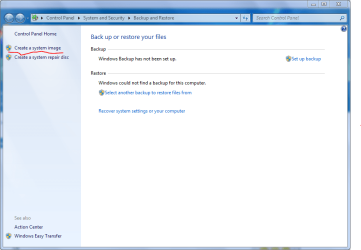
control panel > System and Security > Backup & Restore

Select create a system image
 

Attachments

  • Capture.PNG
    Capture.PNG
    34.6 KB · Views: 40

My Computer

Computer Manufacturer/Model Number
Toshiba P300
OS
Windows 8 Pro
CPU
Intel Centrino Dual Core P7450 2.13GHz
Memory
4gb
Graphics Card(s)
ATI Mobility Raedon HD3650
Hard Drives
Toshiba MK3252GSX ATA
Internet Speed
Wish it were faster
Full Backup

A full backup backs up all of the files that I've selected, whereas a system image backs up the entire hard drive. One of the requirements for performing a system image is that your external hard must be as large (or larger) than the hard drive you're backing up - even if the files on your hard drive would fit onto your external drive.

My hard drive is 400 GB, but my external drive is only 200 GB, so I can't perform a system image.

So, does anyone know how I can perform a full backup?

Thanks,
Shane.
 

My Computer

Computer Manufacturer/Model Number
HP Pavilion dv7-4180us
OS
Windows 7 Home Premium SP1 64-bit
CPU
Intel i5
Memory
4 GB
Graphics Card(s)
ATI Mobility
Screen Resolution
1600 x 900
Internet Speed
10 Mbps
You may have an issue of semantics.

"Full" may refer to the first pass, when all the files you chose were backed up.

"Incremental" may simply mean all files created after the original Full, while still keeping everything from the first pass.

Between the full and the incremental, you may well in fact have everything you wanted.

Have you checked the destination location to see if newly created files are there? If they are, then I'd guess you would be satisfied?

I use a program called "Second Copy" and that is the way it works, but the terms "Full" and "Incremental" are not used. The first pass copies all chosen files. The second and later passes copy anything new to the backup location and delete from the backup location anything that has also been deleted from the source folders.

If I wanted to do a "Full' backup as you may be using the term, I would have to delete ALL of my backup files from the destination drive and then do a new "first pass". But why would I want to do that when everything is already there as requested? Unless the program has broken or I have made a fresh installation, etc. In my case a new "full" backup would take an hour or two, but the second pass (incremental) takes only seconds because only newly created files are copied.
 

My Computer

Computer type
PC/Desktop
Computer Manufacturer/Model Number
Ignatz Special; 4 speed manual gearbox; factory air conditioning; one of one
OS
Windows 7 Home Premium SP1, 64-bit
CPU
Intel Skylake i5-6600K, not overclocked
Motherboard
AsRock Z170M Extreme 4, micro ATX
Memory
8 GB HyperX DDR4-2666 (2 x 4 GB)
Graphics Card(s)
none; graphics are integrated on CPU
Sound Card
onboard: Realtek ALC1150; external: USB Behringer UF0-202
Monitor(s) Displays
Dell S2340M 23 inch IPS
Screen Resolution
1600 x 900
Hard Drives
System: Crucial MX100 series SSD, 128 GB;
Data: Samsung Spinpoint 103SJ, 1 TB;
Backup: WD Caviar Green WD30EZRX-00D8PB0, 3 TB
PSU
Rosewill SilentNight 500 watt fanless, semi-modular
Case
Antec Solo II
Cooling
Noctua NH-U12S; Noctua F12 intake, Noctua S12A exhaust
Keyboard
Microsoft 200 6JH-00001 USB
Mouse
Dell or Microsoft optical wired; USB
Antivirus
Microsoft Security Essentials and Malwarebytes Premium
Browser
Pale Moon
Other Info
All fans PWM; speeds at idle: CPU circa 500 rpm; intake circa 600 rpm; exhaust circa 600 rpm; CPU temps 27 idle and 47 C load in a warm room (27 C/81 F) when running Intel Extreme Tuning Utility stress test.
If your back up drive is 15% of the hard drive and at least 30GB, you can do the back up per MS.
 

My Computer

Computer type
PC/Desktop
Computer Manufacturer/Model Number
Dell XPS 420
OS
Windows 10, Home Clean Install
CPU
Intel Core2 processsor Q8200(2.33Ghz 1333FSB) Quad Core Tech
Motherboard
Dell
Memory
6 gb
Graphics Card(s)
ATI Radeon 256MB HD3650
Sound Card
Intergrated 7.1 Channel Audio
Monitor(s) Displays
Dell SP2009W 20"
Hard Drives
640 GB Serial ATA Hard drive
Cooling
Fan
Keyboard
Dell USB Keyboard
Mouse
Dell Premium Optical USB
Internet Speed
DSL 2.85
A full backup backs up all of the files that I've selected, whereas a system image backs up the entire hard drive. One of the requirements for performing a system image is that your external hard must be as large (or larger) than the hard drive you're backing up - even if the files on your hard drive would fit onto your external drive.

My hard drive is 400 GB, but my external drive is only 200 GB, so I can't perform a system image.

So, does anyone know how I can perform a full backup?

Thanks,
Shane.
Use this imaging program and you will not have that problem. Besides it is faster, the images are smaller, you can mount the images and it is more reliable than Win7 imaging. It is a win/win program and it is free.
 

My Computer

Computer Manufacturer/Model Number
HP, Dell, Gateway, Toshiba - 4 laptops and 2 desktops
OS
Vista, Windows7, Mint Mate, Zorin, Windows 8
CPU
from 1.6GHz Duo to i7
Monitor(s) Displays
2x HP w2207
Hard Drives
5x HDD, 7x SSD, 12x Externals
Keyboard
with trackball - no mices
Mouse
Trackball mice
Internet Speed
DSL 6000
A full backup backs up all of the files that I've selected, whereas a system image backs up the entire hard drive. One of the requirements for performing a system image is that your external hard must be as large (or larger) than the hard drive you're backing up - even if the files on your hard drive would fit onto your external drive.

My hard drive is 400 GB, but my external drive is only 200 GB, so I can't perform a system image.

So, does anyone know how I can perform a full backup?

Thanks,
Shane.
Use this imaging program and you will not have that problem. Besides it is faster, the images are smaller, you can mount the images and it is more reliable than Win7 imaging. It is a win/win program and it is free.

Have you tried clonezilla? I clone my drives as a backup. Then I place them on the shelf.
 

My Computer

Computer Manufacturer/Model Number
Built by Mark
OS
Windows 7 x64
CPU
Intel Core i7 930
Motherboard
Gigabyte GA-X58A-UD3R Bios F5
Memory
OCZ 6GBkit OCZ3G1600LV6GK 8-8-8-24-2T 1.65V
Graphics Card(s)
(2) HIS ATI Radeon HD 5770 CROSSFIRE (H577QT1GD)
Sound Card
On board Realtek HD
Monitor(s) Displays
Samsung SyncMaster 2343 22" Wide Screen
Screen Resolution
2048x1152
Hard Drives
Two Western Digital 320 Gig Blue series WDC WD3200AAKS-00L9A0
PSU
Corsiar 750 watts TX750W
Case
Antec NINE Hundred Two (air filters & adjustable fan speed)
Cooling
Cooler Master Hyper 212 Plus CPU cooler
Keyboard
Logitech
Mouse
Logitech MX310
Internet Speed
20 meg down/ 5 meg up
Other Info
Hewlett Packard Deskjet 932C printer
Epson 4990 Photo scanner
Full Backup

For a description of "Full" vs. "Incremental", please see this article:

http://support.microsoft.com/kb/136621

In Windows Backup, if I delete a file from my hard drive, the file isn't removed from backup the next time an incremental backup runs. The only way to remove the file is to run a full backup, which is what I'm trying to do.

whs, thanks for the suggestion about the imaging application, but right now I only want to backup my documents (not my programs).

Thanks,
Shane.
 

My Computer

Computer Manufacturer/Model Number
HP Pavilion dv7-4180us
OS
Windows 7 Home Premium SP1 64-bit
CPU
Intel i5
Memory
4 GB
Graphics Card(s)
ATI Mobility
Screen Resolution
1600 x 900
Internet Speed
10 Mbps
whs, thanks for the suggestion about the imaging application, but right now I only want to backup my documents (not my programs).


I image my data and my system at different intervals. But, of course, my data is sitting on a seperate data partition which I would highly recommend for a variety of practical and security reasons. Data Partition on Vimeo
 

My Computer

Computer Manufacturer/Model Number
HP, Dell, Gateway, Toshiba - 4 laptops and 2 desktops
OS
Vista, Windows7, Mint Mate, Zorin, Windows 8
CPU
from 1.6GHz Duo to i7
Monitor(s) Displays
2x HP w2207
Hard Drives
5x HDD, 7x SSD, 12x Externals
Keyboard
with trackball - no mices
Mouse
Trackball mice
Internet Speed
DSL 6000
Back
Top