I guess this is best explained with images, so here's what I want. (If possible of course).
So in this screenshot you can see my Start Menu, notice that some of this icons (Steam, Curse Client and Origin) have an arrow next to them? When you hover, or click, with the mouse the Task menu opens up.
What I want is to add an icon of Microsoft Office and make it so that the arrow is there too (just like Steam, Origin and Curse Client) and make it so that when I click or hover the Task menu will appear, and on the list will be MS Word, MS Excel, MS PowerPoint, etc
I would like to know if it's at all possible and if so how can I do it?
Any help would be appreciated.
My Computer
At a glance
Windows 7 Ultimate x64AMD Phenom II X4 965 Black Edition ProcessorCorsair Vengeance 8GB (2x4GB) DDR3-1600Nvidia GeForce GTX 650 Ti
Computer type
PC/Desktop
Computer Manufacturer/Model Number
Custom build
OS
Windows 7 Ultimate x64
CPU
AMD Phenom II X4 965 Black Edition Processor
Motherboard
MSI 970A-G46
Memory
Corsair Vengeance 8GB (2x4GB) DDR3-1600
Graphics Card(s)
Nvidia GeForce GTX 650 Ti
Hard Drives
Samsung 850 EVO 250GB 2.5-Inch SATA III Internal SSD
Western Digital 250GB WDC Blue WD2500AAKX-001CA0
Win-7-Pro64bit 7-H-Prem-64biti7-5930K 2nd i9-9940x both water blocked VRM'...Trident-z 3200C14 2nd Trident-z 3600C16EVGA 1080ti ftw3 2nd Titan Xp both water blocked
Computer type
PC/Desktop
Computer Manufacturer/Model Number
Custom assembled by me :}
OS
Win-7-Pro64bit 7-H-Prem-64bit
CPU
i7-5930K 2nd i9-9940x both water blocked VRM's too
2nd ASUS X299 Apex/Intel i9-9940x with Custom water loop/7H-Prem-x64/Corsair 450D case/Ram Trident-z 3600C16 4x8gb / Samsung970Evo plus 500gb SSD/Dual ssd EZ swap evo/PSU EVGA SuperNova 1200w-P2 80+Platinum/GPU Titan Xp /8-ML-140 on push-pull on 2-280GTX rads
Hi,
Not sure what's up it goes to a question on answers.com I'm not signed in so it just went to the question for me just now ?
I edited and added another link see what it does,
Cheers.
FWIW I like your tutorial better thanks for posting it,
I must of used the wrong search term on the tutorial search otherwise I would of posted your tut
My Computer
At a glance
Win-7-Pro64bit 7-H-Prem-64biti7-5930K 2nd i9-9940x both water blocked VRM'...Trident-z 3200C14 2nd Trident-z 3600C16EVGA 1080ti ftw3 2nd Titan Xp both water blocked
Computer type
PC/Desktop
Computer Manufacturer/Model Number
Custom assembled by me :}
OS
Win-7-Pro64bit 7-H-Prem-64bit
CPU
i7-5930K 2nd i9-9940x both water blocked VRM's too
2nd ASUS X299 Apex/Intel i9-9940x with Custom water loop/7H-Prem-x64/Corsair 450D case/Ram Trident-z 3600C16 4x8gb / Samsung970Evo plus 500gb SSD/Dual ssd EZ swap evo/PSU EVGA SuperNova 1200w-P2 80+Platinum/GPU Titan Xp /8-ML-140 on push-pull on 2-280GTX rads
Personally I find pinning tons of frequently used items to the start menu or creating jumplists leads to a very crowded start menu. You might consider an alternative.
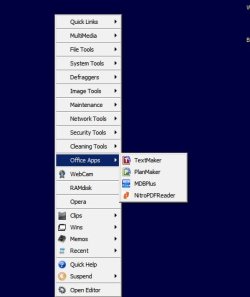
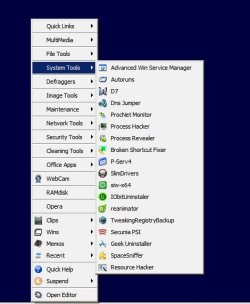
Here's examples. I don't have MS Office installed but when I want to launch an Office App I just press "WinKey+Z" to open up a launch menu.
Launch Office Apps:
Example of adding even more apps under sub-menu's:
Can pin any file, folder or drive and get quick access. Can launch multiple files with a single click. Let us know if you're interested.
My Computer
At a glance
Microsoft Windows 7 Home Premium 64-bit 7601 ...AMD C-60 APU with Radeon(tm) HD Graphics4.00 GBAMD Radeon HD 6290 Graphics
Computer type
Laptop
Computer Manufacturer/Model Number
ASUS
OS
Microsoft Windows 7 Home Premium 64-bit 7601 Multiprocessor Free Service Pack 1
CPU
AMD C-60 APU with Radeon(tm) HD Graphics
Motherboard
ASUSTeK COMPUTER INC. X501U
Memory
4.00 GB
Graphics Card(s)
AMD Radeon HD 6290 Graphics
Sound Card
(1) AMD High Definition Audio Device (2) Realtek High Defi