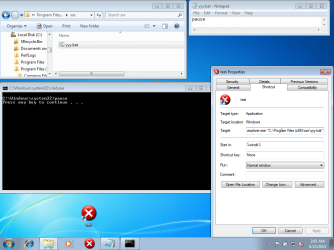
I want to execute 2 programs in a row from C:/Program Files (x86)/xxx/yyy.bat which contains programs: #1, then #2 .
Then I want to PIN it to the Taskbar to make it easy as I use it all the time.
There is lots of BS about how to do this using CMD.exe, etc and wasted lots of time following bad instructions.
Anyone ever done this successfully? OR is there a better way to execute one program that needs to be run before the next one, and then PIN the shortcut, etc as BAT can not on my system (Windows 7, 64bit, Home Premium) be pinned directly.
Would appreciate a workable answer.
Thanks
Then I want to PIN it to the Taskbar to make it easy as I use it all the time.
There is lots of BS about how to do this using CMD.exe, etc and wasted lots of time following bad instructions.
Anyone ever done this successfully? OR is there a better way to execute one program that needs to be run before the next one, and then PIN the shortcut, etc as BAT can not on my system (Windows 7, 64bit, Home Premium) be pinned directly.
Would appreciate a workable answer.
Thanks
My Computer
At a glance
windows 7 ultimate2 quads @ 2.43gb
- Computer Manufacturer/Model Number
- HP pavilion
- OS
- windows 7 ultimate
- CPU
- 2 quads @ 2.4
- Memory
- 3gb
- Monitor(s) Displays
- tv
- Hard Drives
- many vendors