how do i re assign a button on my keyboard?

ekurtz1

New member
Local time
11:58 PM
Messages
1
Location
Chicago
i have a button specifically for outlook but i use gmail. how to i change it so it opens firefox and takes me to gmail?

I already tried intellitype, but thats only for microsoft keyboards

i tried keytweak and another on the name escapes me
 
Last edited:

My Computer My Computer

Computer Manufacturer/Model Number
HP Pavilion dv6-3230us
OS
Windows 7 Home Premium x64
CPU
Intel Core i3 CPU M 370 @ 2.40 GHz (x4)
Memory
4GB
Graphics Card(s)
Intel(R) HD Graphics
Sound Card
IDT High Definition Audio CODEC
Monitor(s) Displays
Generic PnP Monitor
Hard Drives
ST9500325AS
Keyboard
Standard PS/2 Keyboard
Mouse
Synaptics PS/2 Port TouchPad
i have a button specifically for outlook but i use gmail. how to i change it so it opens firefox and takes me to gmail?

Hello ekurtz, welcome to the forum

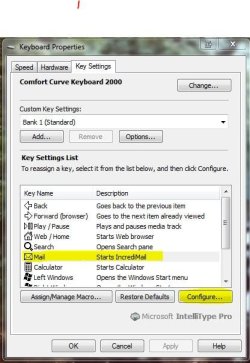
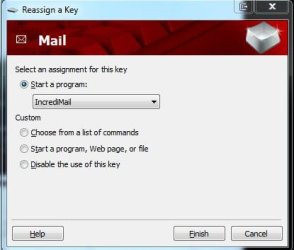
I would guess that there is a special software for your keyboard
Capture.JPG
Capture1.JPG
But without details I cannot help more
It is also possible that this key cannot be changed
 

My Computer My Computer

Computer Manufacturer/Model Number
Something I threw together
OS
Windows 7 Ultimate x64
CPU
Intel Core i7-2600K
Motherboard
Asus P8P67
Memory
16 GB G Skill F3-10666 CL9D-4GBRL
Graphics Card(s)
ATI Radeon HD 6870
Sound Card
ATI Radeon HDMI / Realtek ALC892
Monitor(s) Displays
2 x 22" standard monitors / LG32LC56v TV to watch films
Screen Resolution
1920 x1080
Hard Drives
2 x OCZ Vertex2 111.79GB
3 x Samsung103SJ
1 x Samsung103UJ
1 x WD3200BEVT
1 x Hitachi5K320-160
PSU
Thermaltake Toughpower Cable Management 750W
Case
Antec 300
Cooling
Noctua NH-U12P SE2 and 5 120mm Case fans
Keyboard
Microsoft Comfort Curve Keyboard 2000
Mouse
Hama M3110 / Logitech M305
Internet Speed
16000
Other Info
I have also used Fedora, Suse, Ubuntu Linux
And all other Windows from 95 to date except ME
i use the comfort curve also and can reasign keys using the microsoft software ,however the op is using a laptop and i checked mine and can see no way to do it .
It may be possible using this!
Index of /krumsick
i havent tested it yet.
http://www.microsoft.com/download/en/details.aspx?DisplayLang=en&id=22339

edit: i had a look at the key tweaker software and couldnt figure out how to change the url. im not shure if this software just changes one key to another ,so you would end up with a different key opening outlook and not gmail. will keep checking.
 
Last edited:

My Computer My Computer

Computer Manufacturer/Model Number
Hewlett packard/p6512uk
OS
Microsoft Windows 7 Home Premium 64-bit 7600
CPU
IIx4 amd athelon 635 processor
Motherboard
FOXCONN 2AA9
Memory
2x2gb
Graphics Card(s)
ati radeon HD 5450
Sound Card
(1) Realtek High Definition Audio (2) AMD High Definition
Monitor(s) Displays
samsung lcd tv 32"
Screen Resolution
1360x 768
Hard Drives
(1) WDC WD10 01FAES-60Z2A0 SATA Disk Device (2) Maxtor OneTouch USB Device (3) ST310003 33AS USB Device (4) WD My Book 1111 USB Device
PSU
?
Cooling
air!
Keyboard
wireless hp
Mouse
wireless Hp,optical
Internet Speed
1.10mb/s
Antivirus
MSE
Browser
Firefox
ok the best i have come up with so far is to open your gmail drag the icon/favicon on the url address bar to your desktop then put it elsewhere perhaps in documents,
then in documents right click the gmail shortcut ,select propetries and in the shortcut key field, click in it ,then select the key you want to use. this will reassign the keys to open your gmail. just tried it for seven forums and it works. although it makes you press ctrl, alt and the key you chose. but is a work around,the same process can be applied to a program.
 

My Computer My Computer

Computer Manufacturer/Model Number
Hewlett packard/p6512uk
OS
Microsoft Windows 7 Home Premium 64-bit 7600
CPU
IIx4 amd athelon 635 processor
Motherboard
FOXCONN 2AA9
Memory
2x2gb
Graphics Card(s)
ati radeon HD 5450
Sound Card
(1) Realtek High Definition Audio (2) AMD High Definition
Monitor(s) Displays
samsung lcd tv 32"
Screen Resolution
1360x 768
Hard Drives
(1) WDC WD10 01FAES-60Z2A0 SATA Disk Device (2) Maxtor OneTouch USB Device (3) ST310003 33AS USB Device (4) WD My Book 1111 USB Device
PSU
?
Cooling
air!
Keyboard
wireless hp
Mouse
wireless Hp,optical
Internet Speed
1.10mb/s
Antivirus
MSE
Browser
Firefox
ok the best i have come up with so far is to open your gmail drag the icon/favicon on the url address bar to your desktop then put it elsewhere perhaps in documents,
then in documents right click the gmail shortcut ,select propetries and in the shortcut key field, click in it ,then select the key you want to use. this will reassign the keys to open your gmail. just tried it for seven forums and it works. although it makes you press ctrl, alt and the key you chose. but is a work around,the same process can be applied to a program.

I don't understand about clicking in it the shortcut key field.
 

My Computer My Computer

Computer type
PC/Desktop
OS
windows 7 home premium
Back
Top