
Hi. I hope you'll be able to help me. I've searched the forum for a thread with my issue - didn't seem to find it though.
I've just found an oldish computer with Vista 32 bit as OS. I've got my hands on a win7 upgrade and installed Win 7 on my D-drive without problems. Vista is on the C-drive.
I moved on and installed all my programmes and stuff, figuring that I would later find out how to remove the dual boot and Vista completely. So I browsed around and thought I had it all done, which resulted in a situation, where I couldn't boot at all.
So I had to upgrade the Vista on my c-drive to Win7, which leaves me with win7 on one partition (D-drive) with all my supporting programmes etc installed, and a OS-only installation on the other partition (C-drive).
Now I want to remove the OS-only installation on the C-drive, but how?
I have 2 useable partitions on 1 drive (3 partitions actually, but 1 is predefined for re-install by Acer)
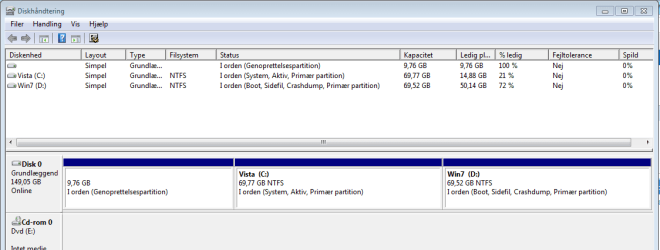
I've attached a screenshot of my diskmanager in the Win7 I want to keep, which is in the d-drive. (Sry about the danish language - it says: C: System, Active, Primary partition & D: Boot, page file, crash dump, Primary partition)
What should I do in order to first remove the OS-installation on C: from my Boot and then delete it, so I'll only have the OS on D:?
I've just found an oldish computer with Vista 32 bit as OS. I've got my hands on a win7 upgrade and installed Win 7 on my D-drive without problems. Vista is on the C-drive.
I moved on and installed all my programmes and stuff, figuring that I would later find out how to remove the dual boot and Vista completely. So I browsed around and thought I had it all done, which resulted in a situation, where I couldn't boot at all.
So I had to upgrade the Vista on my c-drive to Win7, which leaves me with win7 on one partition (D-drive) with all my supporting programmes etc installed, and a OS-only installation on the other partition (C-drive).
Now I want to remove the OS-only installation on the C-drive, but how?
I have 2 useable partitions on 1 drive (3 partitions actually, but 1 is predefined for re-install by Acer)
I've attached a screenshot of my diskmanager in the Win7 I want to keep, which is in the d-drive. (Sry about the danish language - it says: C: System, Active, Primary partition & D: Boot, page file, crash dump, Primary partition)
What should I do in order to first remove the OS-installation on C: from my Boot and then delete it, so I'll only have the OS on D:?
Attachments
My Computer
- OS
- Win 7 homed premium 32 bit


 is System, boot, page file, active and crashdump now, so I should be good to wipe partition 1 & 2 right? and that will remove the other option during boot?