how do I remove the search box from browser "Save As" dialog?

mms2

New member
Local time
3:10 PM
Messages
5
how do I remove the search box from browser "Save As" dialog?

Greetings

The Windows 7 "Save As" dialog isn't as resizable as the XP version. Called "Save As" in Firefox, "Save Webpage" in IE.

If I could remove the search box to the right of the path at the dialog top I could make the dialog narrower and not obscure so much of the web page. When I tried shrinking search box relative to the path box, I couldn't eliminate it or make the dialog narrower because the path box widened.

I don't need the search box at all--the path and carats (little triangles to right of path parts) do fine.

Thank you for advice.
 

My Computer My Computer

At a glance

Windows7 Professional 64-bit
Computer type
Laptop
Computer Manufacturer/Model Number
Lenovo
OS
Windows7 Professional 64-bit
Hi mms2 :)

Welcome to to forum.
I don't know if mozilla (Firefox) and IE actually share the same "dialog".
But I have found MozilaZine forum, for all things mozilla, very helpful.

Like you I would like to trim the c__p out of some dialogs.


My Computer My Computer

At a glance

XP Pro (x86) | 7 HP (x86) & (x64) | 7 Pro (x64)
Computer type
PC/Desktop
Computer Manufacturer/Model Number
Toshiba, Lenovo (laptops) + 4 rigs
OS
XP Pro (x86) | 7 HP (x86) & (x64) | 7 Pro (x64)
I started with the Mozilla forum. They didn't have a solution and suggested trying here. They thought it's a Windows7 feature -- not part of Firefox when I posted a screenshot.

I remember you could remove the search box from IE years ago and hoped someone had a fix for this one.
 

My Computer My Computer

At a glance

Windows7 Professional 64-bit
Computer type
Laptop
Computer Manufacturer/Model Number
Lenovo
OS
Windows7 Professional 64-bit
mm2 said:
I remember you could remove the search box from IE years ago and hoped someone had a fix for this one.

What version of IE are you running ?
IE-9 is default with Win-7
I also noted on MS IE download page there is only IE-2014 subsequent to IE-9
My IE (is v9) and has no Search box that I can find, but then I don't use IE browser either.

IE 9 dlg.png

When I googled "remove search box from internet exlporer" there are many help links to choose from.

The Softpedia-news page offers a key path BUT without any delimiter characters
HKEY_LOCAL_MACHINESoftwarePoliciesMicrosoftInternet ExplorerInfodeliveryRestrictions
Name:= NoSearchBox
Type:= DWORD
Data:=1
ie, 1:=hide search box, 0:=show the search box

In my Win-7 32bit Home Premium ... the path stops at
HKEY_LOCAL_MACHINE\SOFTWARE\Policies\Microsoft
----------
The
IE7: How To Remove the Search Bar
page quotes a "\" delimited key-path
HKEY_LOCAL_MACHINE\SOFTWARE\Policies\Microsoft\Internet Explorer\Infodelivery\Restrictions
----------

I am not experienced enough to advise you further
 
Last edited:

My Computer My Computer

At a glance

XP Pro (x86) | 7 HP (x86) & (x64) | 7 Pro (x64)
Computer type
PC/Desktop
Computer Manufacturer/Model Number
Toshiba, Lenovo (laptops) + 4 rigs
OS
XP Pro (x86) | 7 HP (x86) & (x64) | 7 Pro (x64)
mm2 said:
I remember you could remove the search box from IE years ago and hoped someone had a fix for this one.

What version of IE are you running ?
IE-9 is default with Win-7
I also noted on MS IE download page there is only IE-2014 subsequent to IE-9
My IE (is v9) and has no Search box that I can find, but then I don't use IE browser either.

View attachment 314376

When I googled "remove search box from internet exlporer" there are many help links to choose from.

The Softpedia-news page offers a key path BUT without any delimiter characters
HKEY_LOCAL_MACHINESoftwarePoliciesMicrosoftInternet ExplorerInfodeliveryRestrictions
Name:= NoSearchBox
Type:= DWORD
Data:=1
ie, 1:=hide search box, 0:=show the search box

In my Win-7 32bit Home Premium ... the path stops at
HKEY_LOCAL_MACHINE\SOFTWARE\Policies\Microsoft
----------
The
IE7: How To Remove the Search Bar
page quotes a "\" delimited key-path
HKEY_LOCAL_MACHINE\SOFTWARE\Policies\Microsoft\Internet Explorer\Infodelivery\Restrictions
----------

I am not experienced enough to advise you further


Sorry for any misunderstanding--I was using IE as an example. Easy enough to remove the IE searchbox these days. So I hoped something similar existed for Save As dialogs.
 

My Computer My Computer

At a glance

Windows7 Professional 64-bit
Computer type
Laptop
Computer Manufacturer/Model Number
Lenovo
OS
Windows7 Professional 64-bit
Hi mm2 :)

Can you send us a screenshot of the SaveAs dialog you are referring to.
What program files are you trying to "Save" ?

Here are two of my "SaveAs" dilg on this (internet only) laptop ... Win7 32bit Home Premium
No sign of a "Search" box on either of them.

When I get into my office later today I will check MS Office apps

Notepad save-as.png

Metapad_SaveAs.png
 

My Computer My Computer

At a glance

XP Pro (x86) | 7 HP (x86) & (x64) | 7 Pro (x64)
Computer type
PC/Desktop
Computer Manufacturer/Model Number
Toshiba, Lenovo (laptops) + 4 rigs
OS
XP Pro (x86) | 7 HP (x86) & (x64) | 7 Pro (x64)
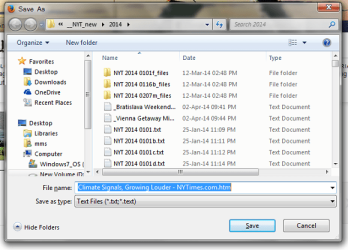
This is the search box from Firefox a couple nights ago. Note the "Search 2014" box. "2014" was the folder open for the target file to save to, as the path to left shows. It assumes I want to search for something before saving, which I don't need to do. I have folders expanded to show the directory tree at left. It's wider than the Places Bar in the old style dialog.

I save mostly text and image files from websites for my research. I delete the text file name extensions if not ".txt" and the dialog saves in correct format.
 

Attachments

  • searchbox.png
    searchbox.png
    49.8 KB · Views: 26

My Computer My Computer

At a glance

Windows7 Professional 64-bit
Computer type
Laptop
Computer Manufacturer/Model Number
Lenovo
OS
Windows7 Professional 64-bit
This is the search box from Firefox a couple nights ago. Note the "Search 2014" box. "2014" was the folder open for the target file to save to, as the path to left shows. It assumes I want to search for something before saving, which I don't need to do. I have folders expanded to show the directory tree at left. It's wider than the Places Bar in the old style dialog.

I save mostly text and image files from websites for my research. I delete the text file name extensions if not ".txt" and the dialog saves in correct format.

I notice your last image is a "Firefox" SaveAs Window.

I use "Palemoon" 32bit ... a fork of Firefox. (Freeware)
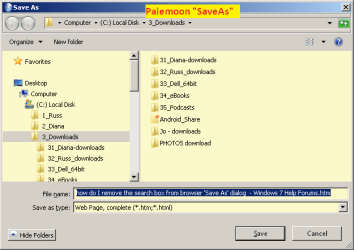
It looks a lot like Firefox BUT with a lot of crud removed. NOTE no Search box.
The Palemoon project
FAQs
Palemoon forum

Palemoon's default settings are not the same as Firefox. The developers theme is more classic style.
Offers two "Download" progress windows -- classic or Library-window
If you try to resize ANY "SaveAs" dialog by dragging there is a limit to the size reduction, else the tree panes just disappear.
This 32-bit Palemoon "SaveAs" is at its minimum size.

Palemoon, save-as.png

-------
UPDATE
-------

Just booted my 64bit Win7
All SaveAs dialogs have a "Search" field in top right corner :(

Also just noticed your OS is 64bit, mine is 32bit

I am now out of my depth, we need help with the registry
 

My Computer My Computer

At a glance

XP Pro (x86) | 7 HP (x86) & (x64) | 7 Pro (x64)
Computer type
PC/Desktop
Computer Manufacturer/Model Number
Toshiba, Lenovo (laptops) + 4 rigs
OS
XP Pro (x86) | 7 HP (x86) & (x64) | 7 Pro (x64)
Greetings

The Windows 7 "Save As" dialog isn't as resizable as the XP version. Called "Save As" in Firefox, "Save Webpage" in IE.

If I could remove the search box to the right of the path at the dialog top I could make the dialog narrower and not obscure so much of the web page. When I tried shrinking search box relative to the path box, I couldn't eliminate it or make the dialog narrower because the path box widened.

I don't need the search box at all--the path and carats (little triangles to right of path parts) do fine.

Thank you for advice.
The increased size of the File > Save As and File > Open dialog boxes is one of the first annoyances that I noticed with W7. I have scripts that require those windows to be a certain size. Works fine in XP, but someone decided that we should have less control over such things like window size. The window will probably not let you make it any narrower - even if you remove the search box.

The dialog box that you are seeing is generated by the Windows OS. Any application can ask for the window to be created (with any title). I'm not sure what modification GrayGhost2 is using that enables the dialog box to be created without the normal fields, but both W7 32bit and W7 64bit has the search field that you seek to eliminate.
 

My Computer My Computer

At a glance

W7 Pro SP1 64biti78GBIntel HD Graphics
Computer type
Laptop
Computer Manufacturer/Model Number
Employer provided Dell Latitude
OS
W7 Pro SP1 64bit
CPU
i7
Memory
8GB
Graphics Card(s)
Intel HD Graphics
Hard Drives
crappy SSD
Antivirus
Employer mandated Symantec Endpoint Protection
Browser
Pale Moon 64bit, IE11 64bit & Chrome 64bit
I suspect you are correct about the OS lockout for resizing. The fact that no Tweak.UI exists for Windows 7 speaks volumes. One major reason I stuck with XP till the bitter end.
 

My Computer My Computer

At a glance

Windows7 Professional 64-bit
Computer type
Laptop
Computer Manufacturer/Model Number
Lenovo
OS
Windows7 Professional 64-bit

My Computer My Computer

At a glance

XP Pro (x86) | 7 HP (x86) & (x64) | 7 Pro (x64)
Computer type
PC/Desktop
Computer Manufacturer/Model Number
Toshiba, Lenovo (laptops) + 4 rigs
OS
XP Pro (x86) | 7 HP (x86) & (x64) | 7 Pro (x64)
Back
Top