How do I replace hard disk with right one .. ?

Filip Crnogorac

New member
Local time
10:37 PM
Messages
6
I have HP Pavilion G7 1232sg laptop with broken HD. I was looking on internet for that specific HD but I didnt find it.
How can I find it and does it need to be for HP Pavilion G7 1232sg or I can use any HD I want.
 

My Computer

Computer type
Laptop
Computer Manufacturer/Model Number
HP Pavilion g series
OS
Windows 7 Ultimate x64
Seems you've got a 500Gb Sata 2,5" running 5400RPM in your laptop.

You could pick up the same HDD brand running 5400Rpm or one running 7200Rpm, but be aware that the 7200Rpm will produce more heat while running faster.

You could also upgrade to a SSD 2,5" but at cost for less GB but running much faster than traditional magnetic HDD.

If you're on the way to change your laptop Hard Drive, i would recommend to make Recovery DVD to save the hidden recovery partition of your laptop.

You should find it in the HP Software (HP Recovery Manager) how to make those Recovery DVD before replacing drive.
 

My Computer

Computer type
PC/Desktop
Computer Manufacturer/Model Number
Custom Build
OS
Windows 7 Professional SP1 - x64 [Non-UEFI Boot]
CPU
Ivy Bridge Core i5 3570K (Delidded)
Motherboard
Asus P8Z77-V LE PLUS
Memory
G.Skill "Ares" DDR3 PC3-12800 - 1600MHz (16Gb)
Graphics Card(s)
Asus Dual-RX480-O4G
Sound Card
Creative Sound Blaster Z w/5.1 sound system
Monitor(s) Displays
Asus IPS 23"
Screen Resolution
16/9
Hard Drives
Internal:
500Go Sata 6Gb/s (x2)
500Go Sata 3Gb/s (x2)
SSD 60Go Sata 6Gb/s
PSU
In Win C 900W Series 80+ Platinum
Case
Thermaltake Chaser A71
Cooling
Custom Water Cooling Loop
Keyboard
Cooler Master QuickFire XTi
Mouse
Razer Imperator 2012 (4G)
Antivirus
MSE
Browser
IE 11.0.xxx Rtm
Other Info
"Raid0" with Intel Smart Response Technology (HDD/SSD)

My Computer

Computer type
PC/Desktop
Computer Manufacturer/Model Number
Ignatz Special; 4 speed manual gearbox; factory air conditioning; one of one
OS
Windows 7 Home Premium SP1, 64-bit
CPU
Intel Skylake i5-6600K, not overclocked
Motherboard
AsRock Z170M Extreme 4, micro ATX
Memory
8 GB HyperX DDR4-2666 (2 x 4 GB)
Graphics Card(s)
none; graphics are integrated on CPU
Sound Card
onboard: Realtek ALC1150; external: USB Behringer UF0-202
Monitor(s) Displays
Dell S2340M 23 inch IPS
Screen Resolution
1600 x 900
Hard Drives
System: Crucial MX100 series SSD, 128 GB;
Data: Samsung Spinpoint 103SJ, 1 TB;
Backup: WD Caviar Green WD30EZRX-00D8PB0, 3 TB
PSU
Rosewill SilentNight 500 watt fanless, semi-modular
Case
Antec Solo II
Cooling
Noctua NH-U12S; Noctua F12 intake, Noctua S12A exhaust
Keyboard
Microsoft 200 6JH-00001 USB
Mouse
Dell or Microsoft optical wired; USB
Antivirus
Microsoft Security Essentials and Malwarebytes Premium
Browser
Pale Moon
Other Info
All fans PWM; speeds at idle: CPU circa 500 rpm; intake circa 600 rpm; exhaust circa 600 rpm; CPU temps 27 idle and 47 C load in a warm room (27 C/81 F) when running Intel Extreme Tuning Utility stress test.
Seems you've got a 500Gb Sata 2,5" running 5400RPM in your laptop.

You could pick up the same HDD brand running 5400Rpm or one running 7200Rpm, but be aware that the 7200Rpm will produce more heat while running faster.

You could also upgrade to a SSD 2,5" but at cost for less GB but running much faster than traditional magnetic HDD.

If you're on the way to change your laptop Hard Drive, i would recommend to make Recovery DVD to save the hidden recovery partition of your laptop.

You should find it in the HP Software (HP Recovery Manager) how to make those Recovery DVD before replacing drive.

Problem is that I have broken screen.I was playing on monitor when I get 1(301) error. That errors is because HD is physically damaged. I played on monitor that show image when windows loads.

So I dont know how to make recovery DVD without fixing screen. If u know some trick how to make monitor turn on sooner that would be great because screen on laptop is 300 dolars and I dont have that much money now :cry:

Please help if u can :)
 

My Computer

Computer type
Laptop
Computer Manufacturer/Model Number
HP Pavilion g series
OS
Windows 7 Ultimate x64
Seems you've got a 500Gb Sata 2,5" running 5400RPM in your laptop.

You could pick up the same HDD brand running 5400Rpm or one running 7200Rpm, but be aware that the 7200Rpm will produce more heat while running faster.

You could also upgrade to a SSD 2,5" but at cost for less GB but running much faster than traditional magnetic HDD.

If you're on the way to change your laptop Hard Drive, i would recommend to make Recovery DVD to save the hidden recovery partition of your laptop.

You should find it in the HP Software (HP Recovery Manager) how to make those Recovery DVD before replacing drive.

Problem is that I have broken screen.I was playing on monitor when I get 1(301) error. That errors is because HD is physically damaged. I played on monitor that show image when windows loads.

So I dont know how to make recovery DVD without fixing screen. If u know some trick how to make monitor turn on sooner that would be great because screen on laptop is 300 dolars and I dont have that much money now :cry:

Please help if u can :)

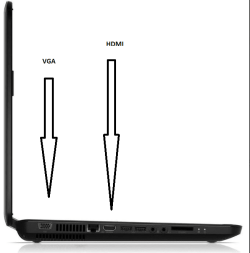
Haven't you got a VGA or HDMI entry to plug to an external monitor?
 

Attachments

  • Capture.PNG
    Capture.PNG
    16.8 KB · Views: 12

My Computer

Computer type
PC/Desktop
Computer Manufacturer/Model Number
Custom Build
OS
Windows 7 Professional SP1 - x64 [Non-UEFI Boot]
CPU
Ivy Bridge Core i5 3570K (Delidded)
Motherboard
Asus P8Z77-V LE PLUS
Memory
G.Skill "Ares" DDR3 PC3-12800 - 1600MHz (16Gb)
Graphics Card(s)
Asus Dual-RX480-O4G
Sound Card
Creative Sound Blaster Z w/5.1 sound system
Monitor(s) Displays
Asus IPS 23"
Screen Resolution
16/9
Hard Drives
Internal:
500Go Sata 6Gb/s (x2)
500Go Sata 3Gb/s (x2)
SSD 60Go Sata 6Gb/s
PSU
In Win C 900W Series 80+ Platinum
Case
Thermaltake Chaser A71
Cooling
Custom Water Cooling Loop
Keyboard
Cooler Master QuickFire XTi
Mouse
Razer Imperator 2012 (4G)
Antivirus
MSE
Browser
IE 11.0.xxx Rtm
Other Info
"Raid0" with Intel Smart Response Technology (HDD/SSD)
Back
Top