How do I report a bug with high DPI to Microsoft?

deloford

New member
Local time
3:27 PM
Messages
7
I believe I have found a bug in Windows 7 which makes high DPI (150%) virtually unusable, how do I report this bug to Microsoft?

Also could someone else test this on their Windows 7 to see if it is just my setup or maybe an NVidia bug.

Here are the steps to repeat the bug.

  • Ensure you are running Aero
  • Go to Display->Change DPI to 150%
  • Log Off->Log On
  • Open a non DPI aware program such as Itunes, Spotify, Vuze, VLC, Chrome (NOT FireFox, Explorer, Outlook)
  • Try to drag the window around or resize the window
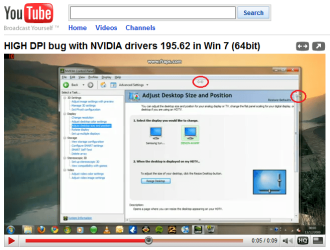
When I do this on a clean install of Win 7 Home Premium (64bit) with all latest drivers/updates I get very unstable mouse flicker as shown here.

I have reported the bug to NVidia here with of course no reply but I want to find out from ATI users whether it affects their machines.

I even emailed Steven Sinofsky (President of Windows) and he said "its something your end" which made me laugh, at least he replied I guess.. more than I was expecting. :)

Anyway all help appreciated I really want to be able use Win7 on my projector, many thanks. :D if it is not present on ATI I will buy one tomorrow!
 

My Computer My Computer

At a glance

Windows Seven
OS
Windows Seven
Nope, don't get what's shown in the video. Maybe a problem with your graphic card drivers, or may even be a problem with your mouse drivers for that matter, if you're using a specific mouse and it's drivers. Maybe even slow performance of hardware having an effect? Couldn't really say, just testing it, didn't have the problem.
 

My Computer My Computer

At a glance

Windows 7 Ultimate x64 SP1Core i7 920 (D0) @ 4Ghz, *26c idle *65c full ...12GB DDR3 Corsair Dominator -CMD12GX3M6A1600C...Zotac Geforce GTX 770
Computer type
PC/Desktop
Computer Manufacturer/Model Number
Airbot 2.0
OS
Windows 7 Ultimate x64 SP1
CPU
Core i7 920 (D0) @ 4Ghz, *26c idle *65c full load on air
Motherboard
Asus P6X58D Premium - Sata 6Gb/s - USB 3.0
Memory
12GB DDR3 Corsair Dominator -CMD12GX3M6A1600C8 at 1600MHz
Graphics Card(s)
Zotac Geforce GTX 770
Sound Card
ASUS Xonar D2X
Monitor(s) Displays
1 LG 24" Flatron W2453V-PF 1 Samsung 24" P2450H both 2ms RT
Screen Resolution
1920x1080@60hz
Hard Drives
1 Samsung 250GB 840 Evo SSD
1 OCZ Vertex2 180GB SSD
1 TB Samsung Spinpoint F1 7200RPM 32MB cache
2 500GB WD Caviar Blacks 7200RPM 32MB cache (WD5001AALS)

Pioneer DVD Burner DVR-S18M
PSU
Corsair HX1000W
Case
Cooler Master HAF 932
Cooling
Case Fans *3 230mm, *1 140mm/CPU - *Tuniq Tower 120 Extreme
Keyboard
Logitech Wireless MK700
Mouse
Logitech Wireless MK700
Internet Speed
DL 15 Mbps UL 0.98 Mbps
Antivirus
None
Browser
Firefox Nightly
Other Info
Processor-7.7 *RAM- 7.9 *Graphics-7.9 *Gaming Graphics- 7.9 *SSD- 7.8 W.E.I final score= 7.7
*Phone- LG Nexus 5
As with Airbot, I do not have the problem of which you posted. I watched your video on Youtube, and believe it's a problem with your mouse and it's drivers, as is clearly show in this snapshot I took of the youtube video:

high_dpi_bug.png
Double mouse pointers? Definitely a mouse problem...​
 

My Computer My Computer

At a glance

Windows 7 Professional 32-bit SP1AMD A4/A63.00GB EDOVMware SVGA 3D
Computer type
PC/Desktop
Computer Manufacturer/Model Number
Virtual Machine
OS
Windows 7 Professional 32-bit SP1
CPU
AMD A4/A6
Motherboard
Intel Corporation 440BX Desktop Reference Platform
Memory
3.00GB EDO
Graphics Card(s)
VMware SVGA 3D
Sound Card
High Definition Audio Device
Monitor(s) Displays
Generic Non-PnP Monitor on VMware SVGA 3D
Screen Resolution
1440x900
Hard Drives
1 x 60GB VMware Virtual SATA Hard Drive ATA Device
Antivirus
Kaspersky Total Security
Thank you, you are correct it is Logitech SetPoint software that causes the issue.

I am idiot because I saw the double mouse too and removed the mouse drivers with Device Manager but what I needed to do was go Programs and Features and Uninstall Logitech Setpoint!

I will report this to Logitech, apologies to people at NVidia and MS who I was hounding :) However I suspect a lot of people have SetPoint installed so this is clearly still quite a big issue.

Again thanks for your help!
 

My Computer My Computer

At a glance

Windows Seven
OS
Windows Seven
Glad you found it. Although, I have logitech setpoint and drivers as well, no problems.
 

My Computer My Computer

At a glance

Windows 7 Ultimate x64 SP1Core i7 920 (D0) @ 4Ghz, *26c idle *65c full ...12GB DDR3 Corsair Dominator -CMD12GX3M6A1600C...Zotac Geforce GTX 770
Computer type
PC/Desktop
Computer Manufacturer/Model Number
Airbot 2.0
OS
Windows 7 Ultimate x64 SP1
CPU
Core i7 920 (D0) @ 4Ghz, *26c idle *65c full load on air
Motherboard
Asus P6X58D Premium - Sata 6Gb/s - USB 3.0
Memory
12GB DDR3 Corsair Dominator -CMD12GX3M6A1600C8 at 1600MHz
Graphics Card(s)
Zotac Geforce GTX 770
Sound Card
ASUS Xonar D2X
Monitor(s) Displays
1 LG 24" Flatron W2453V-PF 1 Samsung 24" P2450H both 2ms RT
Screen Resolution
1920x1080@60hz
Hard Drives
1 Samsung 250GB 840 Evo SSD
1 OCZ Vertex2 180GB SSD
1 TB Samsung Spinpoint F1 7200RPM 32MB cache
2 500GB WD Caviar Blacks 7200RPM 32MB cache (WD5001AALS)

Pioneer DVD Burner DVR-S18M
PSU
Corsair HX1000W
Case
Cooler Master HAF 932
Cooling
Case Fans *3 230mm, *1 140mm/CPU - *Tuniq Tower 120 Extreme
Keyboard
Logitech Wireless MK700
Mouse
Logitech Wireless MK700
Internet Speed
DL 15 Mbps UL 0.98 Mbps
Antivirus
None
Browser
Firefox Nightly
Other Info
Processor-7.7 *RAM- 7.9 *Graphics-7.9 *Gaming Graphics- 7.9 *SSD- 7.8 W.E.I final score= 7.7
*Phone- LG Nexus 5
Well that might explain why SetPoint got WHQL!

The only thing I can think is I had made loads of changes in SetPoint like acceleration and all those custom fields like "use extra precision" so perhaps that caused the conflict. Other than that though it is a pretty fresh installation on 1.5 year old machine. Also, the bug only appears after you log off and on again (where DPI is changed from logon screen to user session), but I guess you did do that.

I will be damned if I am doing anymore research, wasted quite enough time, but I might try the next version of SetPoint (current is 4.80 for Win 7 64bit).

I've reported to Logitech so its up to them now :D
 

My Computer My Computer

At a glance

Windows Seven
OS
Windows Seven
Yep, I created the conditions you specified. I haven't tinkered much past the default settings, so you might just make sure you have the latest, I have latest...

Control Center version 4.80.103
Driver version 4.82.11

and maybe restore everything to default and see if it still happens. Might be some of your modifications from default settings.
 

My Computer My Computer

At a glance

Windows 7 Ultimate x64 SP1Core i7 920 (D0) @ 4Ghz, *26c idle *65c full ...12GB DDR3 Corsair Dominator -CMD12GX3M6A1600C...Zotac Geforce GTX 770
Computer type
PC/Desktop
Computer Manufacturer/Model Number
Airbot 2.0
OS
Windows 7 Ultimate x64 SP1
CPU
Core i7 920 (D0) @ 4Ghz, *26c idle *65c full load on air
Motherboard
Asus P6X58D Premium - Sata 6Gb/s - USB 3.0
Memory
12GB DDR3 Corsair Dominator -CMD12GX3M6A1600C8 at 1600MHz
Graphics Card(s)
Zotac Geforce GTX 770
Sound Card
ASUS Xonar D2X
Monitor(s) Displays
1 LG 24" Flatron W2453V-PF 1 Samsung 24" P2450H both 2ms RT
Screen Resolution
1920x1080@60hz
Hard Drives
1 Samsung 250GB 840 Evo SSD
1 OCZ Vertex2 180GB SSD
1 TB Samsung Spinpoint F1 7200RPM 32MB cache
2 500GB WD Caviar Blacks 7200RPM 32MB cache (WD5001AALS)

Pioneer DVD Burner DVR-S18M
PSU
Corsair HX1000W
Case
Cooler Master HAF 932
Cooling
Case Fans *3 230mm, *1 140mm/CPU - *Tuniq Tower 120 Extreme
Keyboard
Logitech Wireless MK700
Mouse
Logitech Wireless MK700
Internet Speed
DL 15 Mbps UL 0.98 Mbps
Antivirus
None
Browser
Firefox Nightly
Other Info
Processor-7.7 *RAM- 7.9 *Graphics-7.9 *Gaming Graphics- 7.9 *SSD- 7.8 W.E.I final score= 7.7
*Phone- LG Nexus 5
Ok you tempted me back! :D

I reinstalled the latest SetPoint (same as yours) and as it installed I dragged a window around, as the progress reached 100% the flickering started again, all default settings. Once installed fiddling with the settings makes no difference.

Keyboard : diNovo Edge
Mouse : MX Revolution
 

My Computer My Computer

At a glance

Windows Seven
OS
Windows Seven
Ok tried removing the keyboard (diNovo Edge) which has a mousepad and the main mouse now works fine.

It appears to be a problem with the diNovo Edge keyboard mousepad drivers!

They are not DPI aware. :mad:

Thanks for your help Airbot, seems I will have to chose between having a keyboard and using SetPoint! :shock:
 

My Computer My Computer

At a glance

Windows Seven
OS
Windows Seven
I have wireless MK700 mouse and keyboard, so I can not recreate that situation being I don't have the same. It may just be a case of having to wait it out for new drivers. You've reported it to logitech, so hopefully they will look into it. You might also fill out your system specs as detailed as you can, so others can have the info for any further problems. Sorry I don't know what else to suggest past this.
 

My Computer My Computer

At a glance

Windows 7 Ultimate x64 SP1Core i7 920 (D0) @ 4Ghz, *26c idle *65c full ...12GB DDR3 Corsair Dominator -CMD12GX3M6A1600C...Zotac Geforce GTX 770
Computer type
PC/Desktop
Computer Manufacturer/Model Number
Airbot 2.0
OS
Windows 7 Ultimate x64 SP1
CPU
Core i7 920 (D0) @ 4Ghz, *26c idle *65c full load on air
Motherboard
Asus P6X58D Premium - Sata 6Gb/s - USB 3.0
Memory
12GB DDR3 Corsair Dominator -CMD12GX3M6A1600C8 at 1600MHz
Graphics Card(s)
Zotac Geforce GTX 770
Sound Card
ASUS Xonar D2X
Monitor(s) Displays
1 LG 24" Flatron W2453V-PF 1 Samsung 24" P2450H both 2ms RT
Screen Resolution
1920x1080@60hz
Hard Drives
1 Samsung 250GB 840 Evo SSD
1 OCZ Vertex2 180GB SSD
1 TB Samsung Spinpoint F1 7200RPM 32MB cache
2 500GB WD Caviar Blacks 7200RPM 32MB cache (WD5001AALS)

Pioneer DVD Burner DVR-S18M
PSU
Corsair HX1000W
Case
Cooler Master HAF 932
Cooling
Case Fans *3 230mm, *1 140mm/CPU - *Tuniq Tower 120 Extreme
Keyboard
Logitech Wireless MK700
Mouse
Logitech Wireless MK700
Internet Speed
DL 15 Mbps UL 0.98 Mbps
Antivirus
None
Browser
Firefox Nightly
Other Info
Processor-7.7 *RAM- 7.9 *Graphics-7.9 *Gaming Graphics- 7.9 *SSD- 7.8 W.E.I final score= 7.7
*Phone- LG Nexus 5
Back
Top