
Solved Opening Ports in a Firewall -- What to do? How does it work?

BuddhaNature

New member
Local time
2:51 AM
Messages
24
I recently took out a subscription to a VPN — ProtonVPN. On information gained from them I set ports to use (open?) for outgoing connections (from my computer) to their servers. Settings as are a shown here:
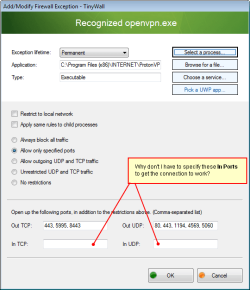
Tinywall Ports Example (annotated).png

On testing, the settings work fine. However, what I don't understand is why I don't have to make settings for "In TCP" and "In UDP". I understand that setting the outgoing ports to use allows the data stream from my computer to be sent to the VPN server. What I do not understand, with these settings, is how the VPN server can send its data stream to me when I haven't made any "In" settings in the firewall. So could someone please explain this to me? I don't need a highly technical explanation just the bare bones would do I think. Is it the case that Windows just sets up the connection to work both ways from the outgoing ports I have set? (Something like that must be happening, I think, but I'm not sure.)
 

My Computer My Computer

At a glance

Windows 7 Pro. x64 SP1
Computer type
PC/Desktop
OS
Windows 7 Pro. x64 SP1
You only need to open inports if something is connecting from outside as the vpn is opening ports it can ensure it can open any inbound ports as its got an open connection some may use upnp in which case it can open what it wants
 

My Computer My Computer

At a glance

win 8 32 bit
Computer type
PC/Desktop
OS
win 8 32 bit
Thank you for the response samuria.

From what you are saying it would seem that for programs where users don't have any knowledge of what specific ports to open then the best general choice would be to use the setting "Allow outgoing UDP and TCP traffic". Am I correct to assume that?

(I mean, that would be a better setting to use than "Unrestricted UDP and TCP traffic"?)
 

My Computer My Computer

At a glance

Windows 7 Pro. x64 SP1
Computer type
PC/Desktop
OS
Windows 7 Pro. x64 SP1
Generally speaking "inbound" and "outgoing" refer to who initiates the connection, rather than controlling the direction of the data flow once it has been established.

All firewalls REALLY do is to control who can open a connection to where based on their rules. They drop and completely prevent those that fail the validation, and allow those that do. But once a connection is allowed, data is free to flow as it wants within that particullar link.

So when you allow an "outgoing connection" it means that you allow a program in your computer to start talking to someone else out there. Conversely, allowing an "incomming connection" means that you allow a program running in your computer to listen and accept connections coming from the outside world.
In both cases, once the initial connection is allowed and made both parties can send data as they want. For example browsers send which pages you want and web servers send the whole thing back, it's always a back and forth talk.


for programs where users don't have any knowledge of what specific ports to open then the best general choice would be to use the setting "Allow outgoing UDP and TCP traffic". Am I correct to assume that?
(I mean, that would be a better setting to use than "Unrestricted UDP and TCP traffic"?)
Not really, the best choice is to learn what ports and protocols do the programs use and only allow those, blocking everything else. In security it's often know as the principle of least privilege. Only give access to what it intends to use, and nothing more, keeping open ports to the bare minimum.

The next best thing would be to allow unrestricted access to only that program you know use the network. Not bad sometimes, but avoid if you can.

The next best would be to allow every outgoing connection. Generally this equals to NO firewall protection at all, specailly in home environments, as everything is allowed, and incoming ones more often than not are only possible from the local network. This is Windows Firewall default.

The next step would be to allow everything, or even disable or uninstall the firewall. Just allow everything.

Like with every security program, firewalls require some understanding of what's going on. In particular you must know the basics of protocols, ports, processes and the like to get something good out of it. Solely installing it and forgeting it's there gives peace of mind, but not protection against anything.
 

My Computer My Computer

At a glance

Windows 7 Ultimate x64Intel Core i7-740QM8 GB DDR3NVIDIA GeForce 330GT
Computer type
Laptop
Computer Manufacturer/Model Number
Toshiba Sattelite A665-S6092
OS
Windows 7 Ultimate x64
CPU
Intel Core i7-740QM
Memory
8 GB DDR3
Graphics Card(s)
NVIDIA GeForce 330GT
Screen Resolution
1366x768
Hard Drives
Samsung 840 SSD 500GB
1TB USB3 external HD
Cooling
Coolermaster Notepal U3 notebook cooling pad
Internet Speed
3mbps ASDL
Antivirus
ClamWin 0.98.7
Browser
Opera 12.17 x86 (main), Firefox 38 (sec), IE11 (last resort)
Thank you for your detailed response Alenjandro85 — greatly appreciated. I think I understand things well enough now for my own needs. And I have the bare minimum I need to do a bit more research on this.

However, I now wonder why most software on my system doesn't specify, at their download websites, what ports it uses to connect to servers for things like 'update notifications' and so on. To me, now, that seems like dereliction of duty in helping the software's users to keep their systems safe. I think I'm going to have to go through the slow process of contacting the software developers for information on what ports to open for their software.

Thanks again.
 

My Computer My Computer

At a glance

Windows 7 Pro. x64 SP1
Computer type
PC/Desktop
OS
Windows 7 Pro. x64 SP1
Back
Top