How do I restore the .exe files deletion warning popup in Win7 ?

pastorsalici

New member
Local time
8:33 PM
Messages
3
Location
Buenos Aires, Argentina
When you delete an .exe file, Win7 opens a popup warning and it's got a selection box to "don't ask again for all files of this type" (or something like that).

I left unintentionaly the selection on, and as a result the popup warning is not opening, and .exe files are deleted in just one step.

Is there a way to restore the popup warning ?

Thanks a lot
 

My Computer My Computer

At a glance

Windows 7 Ultimate 32
OS
Windows 7 Ultimate 32
Hi
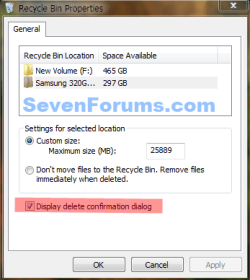
Go to recycle Bin open it right click in the middle and
select properties its at the bottom of the pop-up put a check in the box
Good Luck
 

My Computer My Computer

At a glance

Win 7 Ultimate sp-1 64 Bit+Vista Ultimate sp-...Intel Core 2 [email protected] GHZ socket 775 LGA8 gb stepping 7-7-7-20ATI HD-4850 Dell
Computer type
PC/Desktop
Computer Manufacturer/Model Number
Dell XPS 430-Dell XPS 8700
OS
Win 7 Ultimate sp-1 64 Bit+Vista Ultimate sp-2 64 Bit
CPU
Intel Core 2 [email protected] GHZ socket 775 LGA
Motherboard
Dell Inc. 0G254H (CPU)
Memory
8 gb stepping 7-7-7-20
Graphics Card(s)
ATI HD-4850 Dell
Sound Card
IDT High Definition Audio CODEC
Monitor(s) Displays
DELL S2209W
Screen Resolution
(1920x1080@60Hz)
Hard Drives
2 Crucial M4SSD 64gb Win7 Ultimate 64 bit SSD {Raid-0}
2 750 GB Seagate sata {Raid-0}Vista Ultimate 64 Bit
1 1000 GB Seagate {SATA}-Backup
PSU
430 W
Case
Dell XPS 430
Cooling
CPU Fan-Hard drive Fan-GPU Fan on card-PSU Fan
Keyboard
Dell
Mouse
MS 2000
Hello, what program are you using to delete.exe files? I just tried that and have no check-box.
Here is what Jerry referred to----
Recyclebin.PNG
 

My Computer My Computer

At a glance

Windows 7 Ultimate X64 SP1Intel i5-2550K, Differing ~4.4-4.8GHz No buil...16GB G.Skill Sniper 1866MHz @ 2133MHz 2x8GBASUS GTX650TIB-DC2OC-2GD5, (650TI Boost)
Computer type
PC/Desktop
Computer Manufacturer/Model Number
Home Built Desktop By DataTech
OS
Windows 7 Ultimate X64 SP1
CPU
Intel i5-2550K, Differing ~4.4-4.8GHz No built in GPU
Motherboard
ASUS P8Z68-V PRO/GEN3
Memory
16GB G.Skill Sniper 1866MHz @ 2133MHz 2x8GB
Graphics Card(s)
ASUS GTX650TIB-DC2OC-2GD5, (650TI Boost)
Sound Card
Onboard Realtek 5-1
Monitor(s) Displays
Samsung P2570HD
Screen Resolution
1920x1080
Hard Drives
Samsung 840 Pro 256GB SSD for OS, 500GB Seagate Constellation (Enterprise drive) for Data
PSU
Corsair HX650W
Case
Inwin Dragon Rider
Cooling
Hyper 212 EVO w/two Noctua fans, push-pull, @1300 RPM
Keyboard
E-Z Eyes, bright yellow keys with large characters
Mouse
steelseries SENSEI Laser Pro Gaming
Internet Speed
48-51Mbs Mbs down, 11 Mbs up Xfinity Cable
Antivirus
Norton Internet Security 2013
Browser
IE 10, Opera, Pale Moon if needed
Other Info
4 case fans, LG BluRay-RE, ASUS DVD-RW, Mr. Fusion power supply, 1.21 gigawatts.
Thank you Britton30 & Jerryw !

I had never unchecked the "Display delete confirmation" at the recycle bin, it is checked.

The warning message appeared only once in my recently installed win7 notebook, but that time it came with a check in the "don't ask again for this kind of files" and I did'n uncheck it, so it never apeared again. In my desktop I DID uncheck the box and every time I want to delete a .exe file the popup shows up.

I think there must be something whithin the register, but haven't found it yet.

There was a similar case in Outlook 2007, for previewing attached files, if you uncheck the warning box, then that screen never appeared again and you had no chance to re check the box. To solve it you must delete a register item associated with the file extension.

Thanks again for your time, hope we´ll find a way.
Regards
 

My Computer My Computer

At a glance

Windows 7 Ultimate 32
OS
Windows 7 Ultimate 32
does the confirmation window pop up when you delete other file types?
 

My Computer My Computer

At a glance

Windows 7 Ultimate X64 SP1Intel i5-2550K, Differing ~4.4-4.8GHz No buil...16GB G.Skill Sniper 1866MHz @ 2133MHz 2x8GBASUS GTX650TIB-DC2OC-2GD5, (650TI Boost)
Computer type
PC/Desktop
Computer Manufacturer/Model Number
Home Built Desktop By DataTech
OS
Windows 7 Ultimate X64 SP1
CPU
Intel i5-2550K, Differing ~4.4-4.8GHz No built in GPU
Motherboard
ASUS P8Z68-V PRO/GEN3
Memory
16GB G.Skill Sniper 1866MHz @ 2133MHz 2x8GB
Graphics Card(s)
ASUS GTX650TIB-DC2OC-2GD5, (650TI Boost)
Sound Card
Onboard Realtek 5-1
Monitor(s) Displays
Samsung P2570HD
Screen Resolution
1920x1080
Hard Drives
Samsung 840 Pro 256GB SSD for OS, 500GB Seagate Constellation (Enterprise drive) for Data
PSU
Corsair HX650W
Case
Inwin Dragon Rider
Cooling
Hyper 212 EVO w/two Noctua fans, push-pull, @1300 RPM
Keyboard
E-Z Eyes, bright yellow keys with large characters
Mouse
steelseries SENSEI Laser Pro Gaming
Internet Speed
48-51Mbs Mbs down, 11 Mbs up Xfinity Cable
Antivirus
Norton Internet Security 2013
Browser
IE 10, Opera, Pale Moon if needed
Other Info
4 case fans, LG BluRay-RE, ASUS DVD-RW, Mr. Fusion power supply, 1.21 gigawatts.
Britton30, thanks for your response.

When I delete ANY file, a window shows up with the message: "Are you sure you want to move this file to the Recycle Bin ?".
When I shift-delete ANY file, a window shows up with the message: "Are you sure you want to permanently delete this file ?".

The FIRST time I shift-deleted an .exe file, this window showed up, and when I answered "yes", there showed up another popup window with a message "Are you sure you want to delete an application file?" (maybe the text is not exact but this was the idea); this popup window had a check box in it with the choice: "don't ask again for this kind of files" (maybe the text is not exact but this was the idea), the check box was selected. When I clicked "yes" to the question "Are you sure...application file", I didn´t uncheck the check box.

Next time (and subsequent times) I shift-delete an .exe file, the first popup window shows (the one with the question for permanently delete...) but when I answer "yes" the file is deleted without further questions.

Now I realize I should have unchecked the selection box "don't ask again...", to preserve the extra question.

Hope I made me clear this time, if not, please let me know.

Thanks A LOT for your time !
Regards
 

My Computer My Computer

At a glance

Windows 7 Ultimate 32
OS
Windows 7 Ultimate 32
No, I understood it was only for the .exe files. What you are describing is what happens when I use shift/delete as well. No check boxes with that nor moving to the Bin nor right-click-delete. I am not seeing the second window.:confused:
Untitled.png
 

My Computer My Computer

At a glance

Windows 7 Ultimate X64 SP1Intel i5-2550K, Differing ~4.4-4.8GHz No buil...16GB G.Skill Sniper 1866MHz @ 2133MHz 2x8GBASUS GTX650TIB-DC2OC-2GD5, (650TI Boost)
Computer type
PC/Desktop
Computer Manufacturer/Model Number
Home Built Desktop By DataTech
OS
Windows 7 Ultimate X64 SP1
CPU
Intel i5-2550K, Differing ~4.4-4.8GHz No built in GPU
Motherboard
ASUS P8Z68-V PRO/GEN3
Memory
16GB G.Skill Sniper 1866MHz @ 2133MHz 2x8GB
Graphics Card(s)
ASUS GTX650TIB-DC2OC-2GD5, (650TI Boost)
Sound Card
Onboard Realtek 5-1
Monitor(s) Displays
Samsung P2570HD
Screen Resolution
1920x1080
Hard Drives
Samsung 840 Pro 256GB SSD for OS, 500GB Seagate Constellation (Enterprise drive) for Data
PSU
Corsair HX650W
Case
Inwin Dragon Rider
Cooling
Hyper 212 EVO w/two Noctua fans, push-pull, @1300 RPM
Keyboard
E-Z Eyes, bright yellow keys with large characters
Mouse
steelseries SENSEI Laser Pro Gaming
Internet Speed
48-51Mbs Mbs down, 11 Mbs up Xfinity Cable
Antivirus
Norton Internet Security 2013
Browser
IE 10, Opera, Pale Moon if needed
Other Info
4 case fans, LG BluRay-RE, ASUS DVD-RW, Mr. Fusion power supply, 1.21 gigawatts.
These "Are you sure..." type of message boxes can be created by non-Windows software. Could be your installed security software was asking about deleting .exe files and you could restore that message box by wading through its settings and finding the right box to tick.
 

My Computer My Computer

At a glance

Windows 7
OS
Windows 7
Back
Top