Solved How do I restore?

Cash

New member
Local time
10:20 PM
Messages
26
Greetings,

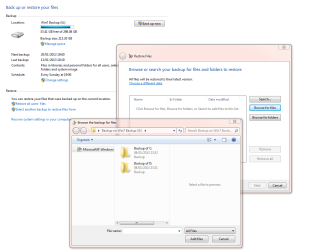
I recently did a clean install of Win 7 Home Premium x64, installed all drivers and exhausted all available updates via windows update. I made a partition on my external hard drive and saved the backup of the image there.

http://i.imgur.com/QJtTA.png

How do I restore using that partition? When I try, it doesn't seem to see the backup on F.

Once my first problem has been solved, I'd like to hide this drive from My Computer each time I plug it into any computer including my own. I don't want any accidents to happen specially from someone else's computer.

http://i.imgur.com/nBxak.png

Any advice would be greatly appreciated.
 

My Computer

OS
Windows 7 Home Premium x64
To restore a Windows image you need to click on "recover system settings or your computer", then "advanced recovery methods" then "use a system image you created earlier". That will reboot your computer so you can start the process. The other method is to boot into your system repair disk and restore your image from there.
 

My Computer

Computer Manufacturer/Model Number
Customized build from CyberPower
OS
Windows 7 Home Premium 64bit SP 1
CPU
Intel i5 2500k
Motherboard
Asus P8P67 Deluxe
Memory
8 gigabytes Corsair PC3-12800 DDR3
Graphics Card(s)
EVGA GeForce GTX 460 superclocked
Sound Card
Integrated
Monitor(s) Displays
ViewSonic 23" LCD
Screen Resolution
1980 x 1080
Hard Drives
120 Gb Samsung 840 Pro SSD
120 Gb Kingston Hyper X SSD
1 Tb WD Caviar Black HDD
PSU
Coolermaster 1000 watt modular
Case
Coolermaster HAF X full tower
Cooling
Coolermaster Hyper 212 plus
Keyboard
Logitech USB
Mouse
Microsoft 3 button
Internet Speed
download 1.5 Mb/sec upload 300Kb/sec

My Computer

Computer Manufacturer/Model Number
Customized build from CyberPower
OS
Windows 7 Home Premium 64bit SP 1
CPU
Intel i5 2500k
Motherboard
Asus P8P67 Deluxe
Memory
8 gigabytes Corsair PC3-12800 DDR3
Graphics Card(s)
EVGA GeForce GTX 460 superclocked
Sound Card
Integrated
Monitor(s) Displays
ViewSonic 23" LCD
Screen Resolution
1980 x 1080
Hard Drives
120 Gb Samsung 840 Pro SSD
120 Gb Kingston Hyper X SSD
1 Tb WD Caviar Black HDD
PSU
Coolermaster 1000 watt modular
Case
Coolermaster HAF X full tower
Cooling
Coolermaster Hyper 212 plus
Keyboard
Logitech USB
Mouse
Microsoft 3 button
Internet Speed
download 1.5 Mb/sec upload 300Kb/sec
To restore a Windows image you need to click on "recover system settings or your computer", then "advanced recovery methods" then "use a system image you created earlier". That will reboot your computer so you can start the process. The other method is to boot into your system repair disk and restore your image from there.

I just did what you said. It said that it cannot find the image on my computer.
 

My Computer

OS
Windows 7 Home Premium x64
Did you actually save the system image to your external HDD, or did you move it there afterward? Also, I see that you have a folder called "image backup, do not touch". If you moved the image to that folder, Windows might not see it. Or if you renamed the image itself, then Windows can't see that either. Windows imaging works, but it is very picky. That is why I prefer using Macrium Reflect to make system images. http://www.sevenforums.com/tutorials/73828-imaging-free-macrium.html
 

My Computer

Computer Manufacturer/Model Number
Customized build from CyberPower
OS
Windows 7 Home Premium 64bit SP 1
CPU
Intel i5 2500k
Motherboard
Asus P8P67 Deluxe
Memory
8 gigabytes Corsair PC3-12800 DDR3
Graphics Card(s)
EVGA GeForce GTX 460 superclocked
Sound Card
Integrated
Monitor(s) Displays
ViewSonic 23" LCD
Screen Resolution
1980 x 1080
Hard Drives
120 Gb Samsung 840 Pro SSD
120 Gb Kingston Hyper X SSD
1 Tb WD Caviar Black HDD
PSU
Coolermaster 1000 watt modular
Case
Coolermaster HAF X full tower
Cooling
Coolermaster Hyper 212 plus
Keyboard
Logitech USB
Mouse
Microsoft 3 button
Internet Speed
download 1.5 Mb/sec upload 300Kb/sec
Did you actually save the system image to your external HDD, or did you move it there afterward? Also, I see that you have a folder called "image backup, do not touch". If you moved the image to that folder, Windows might not see it. Or if you renamed the image itself, then Windows can't see that either. Windows imaging works, but it is very picky. That is why I prefer using Macrium Reflect to make system images. http://www.sevenforums.com/tutorials/73828-imaging-free-macrium.html

I saved it there using the backup feature. The backup feature still detects it but not the restore feature.
 

My Computer

OS
Windows 7 Home Premium x64
You try using the "create a system image" feature, which is on the left hand side of the Backup and Restore window and see if that would work for you. Other than that, I don't have any good answers for why your first attempt isn't working. Like I mentioned before, Windows imaging is picky.
 

My Computer

Computer Manufacturer/Model Number
Customized build from CyberPower
OS
Windows 7 Home Premium 64bit SP 1
CPU
Intel i5 2500k
Motherboard
Asus P8P67 Deluxe
Memory
8 gigabytes Corsair PC3-12800 DDR3
Graphics Card(s)
EVGA GeForce GTX 460 superclocked
Sound Card
Integrated
Monitor(s) Displays
ViewSonic 23" LCD
Screen Resolution
1980 x 1080
Hard Drives
120 Gb Samsung 840 Pro SSD
120 Gb Kingston Hyper X SSD
1 Tb WD Caviar Black HDD
PSU
Coolermaster 1000 watt modular
Case
Coolermaster HAF X full tower
Cooling
Coolermaster Hyper 212 plus
Keyboard
Logitech USB
Mouse
Microsoft 3 button
Internet Speed
download 1.5 Mb/sec upload 300Kb/sec
Back
Top