
Hi folks, Allow me to elaborate on my question. I have a D-Link 7-port USB hub, and connected to the first port I have an Integral USB SD card reader that I always keep connected. Recently, I purchased another Integral USB SD card reader for use with my PS3. To check that it worked, I put it in my D-Link hub 2nd port, but while the device registered it would not recognise any SD cards I put into it. So I tried it in ports 3, 4, 5, etc to see if it would work but it didn't. I eventually blew inside the opening and it worked and wondered whether there was a bit of dust on the connection.
The thing is, I have heard that when you plug in a USB device it creates a driver but that driver remains connected even after you have removed the USB device.
I would be very interested in knowing if/how I can remove the unused drivers which were created when I tested the SD card reader on my USB hub safely, (without using system restore), to start fresh, as obviously I don't want a load of unused drivers clogging up. Does anyone have any methods or is there some USB driver management software that can do it?
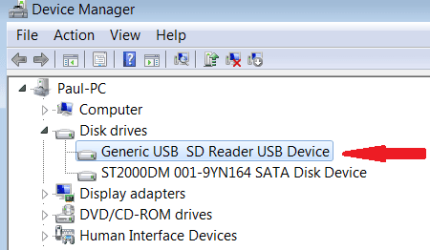
Does Windows download a separate driver for each of the 7 USB ports I plugged the USB Card Reader into, or is there simply one driver? Example: Would I enter device manager, select Generic USB Hub and right-click uninstall or would I choose Generic USB SD Reader Device, and right-click uninstall?
Thanks.
The thing is, I have heard that when you plug in a USB device it creates a driver but that driver remains connected even after you have removed the USB device.
I would be very interested in knowing if/how I can remove the unused drivers which were created when I tested the SD card reader on my USB hub safely, (without using system restore), to start fresh, as obviously I don't want a load of unused drivers clogging up. Does anyone have any methods or is there some USB driver management software that can do it?
Does Windows download a separate driver for each of the 7 USB ports I plugged the USB Card Reader into, or is there simply one driver? Example: Would I enter device manager, select Generic USB Hub and right-click uninstall or would I choose Generic USB SD Reader Device, and right-click uninstall?
Thanks.
Attachments

Last edited:
My Computer
At a glance
Windows 7 x64 SP1
- OS
- Windows 7 x64 SP1

