How do I set defaulta to EDIT with one program but OPEN with another?

mediaman09

New member
Member
VIP
Local time
3:25 AM
Messages
260
Location
Toronto
All I want to do, as I have done in the past, is to default my browser to IE, and set my HTML editing tool to another program.

I have wasted hours (as is always the case with Windwos 7) to try and do this, but none the Control Panel 'set default" optiona distinguish between OPENING and file and EDITING a file.

And IE9 restricts HTML editors to Micorsoft product only.. like MS Word - which bloats files beyond beleif, and causing me endlesss problems for the most simplest of pages. ARRGGHHH !!!

If I used Open With on an HTML fine, I can choose and default Composer.EXE ; works great for editing, but no longer opens IE for browsing on a double click.

Totally frustrating user experience.

Is there anyway to EDIT with one program but OPEN with another? XP dis this no problem.
 
Last edited:

My Computer My Computer

Computer type
PC/Desktop
Computer Manufacturer/Model Number
DELL XPS 8500 // DELL XPS Studio 9100 // DELL Dim 9200
OS
DELL Win 7 Home Premium 64 Bit
CPU
Intel Core i7-930 (8MB L2, 2.8GHz) // ntel Core 2 Quad Q6600
Motherboard
?? // Dell A02 BIOS // ??
Memory
16GB // 18GB DDR3 SDRAM 1333Mhhz 6 DIMMS (3x2, 3x4) //4 GB
Graphics Card(s)
AMD HD7570 // AMD Radeon HD6750 // ATI Radeon HD5670 1 GB GD
Sound Card
?? // THX TruStudio PC //?
Monitor(s) Displays
Dual Dell 2405 WFP-HC24 //SAmsung 27" // Triple 19" LCD
Screen Resolution
1900 x 1200
Hard Drives
Main :WD Caviar Black 1 TB SATA WD1002FAEX
Backup :WD Caviar Black 1 TB SATA WD1002FAEX
PSU
?? // Ultra 900W // ??
ShellMenuView is a small utility that display the list of static menu items that appeared in the context menu when you right-click a file/folder on Windows Explorer, and allows you to easily disable unwanted menu items.
Get ShellMenuView.
 

My Computer My Computer

OS
Win7 Ultimate x64 SP1 / WCP x64 / Ubuntu 11 x64
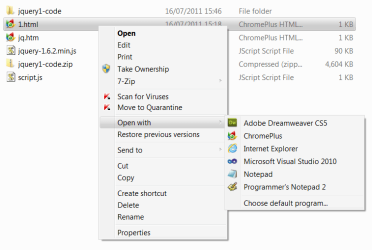
or, as a workaround, you can have multiple programs in your 'open with' list - of course, only one of them is the default, but they can still all be individually selected if needed:

openwith.png
 

My Computer My Computer

Computer Manufacturer/Model Number
mickey megabyte 1234
OS
ultimate 64 sp1
CPU
i5 2500K [email protected]
Motherboard
MSI P67A-GD53
Memory
8 gigs GSkill Ripjaws 1600
Graphics Card(s)
amd hd6950
Sound Card
creative x-fi gamer
Monitor(s) Displays
samsung 24"
Screen Resolution
1920x1080
Hard Drives
ocz vertex 2e 60 gig, samsung f3 1tb, buffalo 2tb ext
PSU
antec 550
Case
antec three hundred
Cooling
i'm a cooling fan
Keyboard
saitek eclipse ii
Mouse
logitech g3
Internet Speed
about 4 Mbps
Other Info
i love win7
Hmm, what about Pages / View Source in IE. How does one set that? Currently, its poininting to a program I have since uninstalled...so gather there is a way - a registry setting perhaps??
 

My Computer My Computer

Computer type
PC/Desktop
Computer Manufacturer/Model Number
DELL XPS 8500 // DELL XPS Studio 9100 // DELL Dim 9200
OS
DELL Win 7 Home Premium 64 Bit
CPU
Intel Core i7-930 (8MB L2, 2.8GHz) // ntel Core 2 Quad Q6600
Motherboard
?? // Dell A02 BIOS // ??
Memory
16GB // 18GB DDR3 SDRAM 1333Mhhz 6 DIMMS (3x2, 3x4) //4 GB
Graphics Card(s)
AMD HD7570 // AMD Radeon HD6750 // ATI Radeon HD5670 1 GB GD
Sound Card
?? // THX TruStudio PC //?
Monitor(s) Displays
Dual Dell 2405 WFP-HC24 //SAmsung 27" // Triple 19" LCD
Screen Resolution
1900 x 1200
Hard Drives
Main :WD Caviar Black 1 TB SATA WD1002FAEX
Backup :WD Caviar Black 1 TB SATA WD1002FAEX
PSU
?? // Ultra 900W // ??
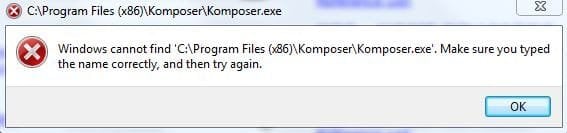
I googled this and found some suggested registry changes ... it now recognizes the new location of the editor ( ie no longer points to old editor), but doesnt like the entry enough to execute. If I close the error, Notepap will pop up

I also tried this program : View Source Editor, the easy way to change the editor in Internet Explorer

I am now going through the trouble shooting suggestions here:
View Source Not Working in Internet Explorer at Registry Guide for Windows

So, seriously, all this, just to point to an HTML editor!! Hours and hours and hours of lost time .

Windows 7 - its great in those rare times when it works for more than a few days stragiht - but I truly despise it most of the time. I am stuck with it at the office, and hence at home, but ARRRGGGHHH !!

Sorry for tha rant. Jst total frustation with a sevent generation product.
 

Attachments

  • komp.JPG
    komp.JPG
    19.1 KB · Views: 2

My Computer My Computer

Computer type
PC/Desktop
Computer Manufacturer/Model Number
DELL XPS 8500 // DELL XPS Studio 9100 // DELL Dim 9200
OS
DELL Win 7 Home Premium 64 Bit
CPU
Intel Core i7-930 (8MB L2, 2.8GHz) // ntel Core 2 Quad Q6600
Motherboard
?? // Dell A02 BIOS // ??
Memory
16GB // 18GB DDR3 SDRAM 1333Mhhz 6 DIMMS (3x2, 3x4) //4 GB
Graphics Card(s)
AMD HD7570 // AMD Radeon HD6750 // ATI Radeon HD5670 1 GB GD
Sound Card
?? // THX TruStudio PC //?
Monitor(s) Displays
Dual Dell 2405 WFP-HC24 //SAmsung 27" // Triple 19" LCD
Screen Resolution
1900 x 1200
Hard Drives
Main :WD Caviar Black 1 TB SATA WD1002FAEX
Backup :WD Caviar Black 1 TB SATA WD1002FAEX
PSU
?? // Ultra 900W // ??
Open with... works just fine. When you select the application, you have to ensure you do not tick the box that says "always use the selected program to open this kind of file". Once you use open with one time, that application should show up in the list of apps displayed when you choose open with.

That's how it works on my computers, anyway.
 

My Computer My Computer

Computer Manufacturer/Model Number
Dell XPS 15 L502x
OS
Windows 7 Ultimate x64 SP1
CPU
Core i7-2670QM
Memory
8GB DDR3 PC3-10600
Graphics Card(s)
Intel HD Graphics 3000 + GeForce GT 540M
Screen Resolution
1920x1080
Hard Drives
1TB 5400RPM Seagate

My Computer My Computer

Computer type
Laptop
Computer Manufacturer/Model Number
Hewlett-Packard/G62-107SA Notebook
OS
Microsoft Windows 7 Home Premium 64-bit Service Pack 1
CPU
Intel(R) Core(TM) i3 CPU M 330 @ 2.13GHz
Motherboard
Hewlett-Packard 1425
Memory
8 GB DDR3
Graphics Card(s)
Intel(R) HD Graphics
Sound Card
Realtek High Definition Audio
Monitor(s) Displays
Builtin
Screen Resolution
1366 x 768 x 32 bits (4294967296 colors) @ 60 Hz
Hard Drives
250 GB SATA Hard Disk Drive 7200 rpm
2TB Seagate GoFlex USB 2 Drive
1TB Iomega Prestige USB 2 Drive
1.5TB Iomega Prestige USB 2 Drive (Samsung)
2TB WD MyBook Live NAS.
Mouse
Logitech Anywhere MX
Internet Speed
152 Mbs download 10 Mbs upload
Antivirus
Norton 360
Browser
Chrome
View Source should work fine as well.

I gave it another 30 minutes and got it to work, by:

1) deleting temp internet files
2) moving the soruce code to a cleane file path, eg C:\Tools\Kompozer\Kompozer.exe
3) searching the registry for Kompozer and changing the path accordingly.


So,
  • Left click on a HTML file will open IE (good)
  • Right click . Open With will let me temporarily chooe my HTML editor (good)
  • View Soruce will always bring up my editor (good)
  • IE / Page / Edit- the one thing that should work, is restcited to MS apps only. I will try next to change that to Notepad if I can. This is only because bad habits die hard, and I always go theer by mistake!
 

My Computer My Computer

Computer type
PC/Desktop
Computer Manufacturer/Model Number
DELL XPS 8500 // DELL XPS Studio 9100 // DELL Dim 9200
OS
DELL Win 7 Home Premium 64 Bit
CPU
Intel Core i7-930 (8MB L2, 2.8GHz) // ntel Core 2 Quad Q6600
Motherboard
?? // Dell A02 BIOS // ??
Memory
16GB // 18GB DDR3 SDRAM 1333Mhhz 6 DIMMS (3x2, 3x4) //4 GB
Graphics Card(s)
AMD HD7570 // AMD Radeon HD6750 // ATI Radeon HD5670 1 GB GD
Sound Card
?? // THX TruStudio PC //?
Monitor(s) Displays
Dual Dell 2405 WFP-HC24 //SAmsung 27" // Triple 19" LCD
Screen Resolution
1900 x 1200
Hard Drives
Main :WD Caviar Black 1 TB SATA WD1002FAEX
Backup :WD Caviar Black 1 TB SATA WD1002FAEX
PSU
?? // Ultra 900W // ??
View Source
To help others, just wanted to point out an easier way to change what View Source calls up:

1. Open Internet Explorer
2. Press the F12 button to start the Developer Tools
3. From the File menu, click Customize Internet Explorer View Source
4. Select one of the following options:
* Default Viewer
* Notepad
* Other…
If you choose Other…, you’ll be prompted to select the executable file of your preferred text editor. Use this option to set your third-party text editing program (e.g. Notepad+) to set as the default source editor.

Page Edit
I finally got Notepad to appear in the drop down list IE / Internet Options / Programs / HTML Editing, by using a clean Regsitry setting under HKEY_LOCAL_MACHINE\SOFTWARE\Classes\.htm\OpenWithList . I selected Notepad, and it appears in the IE / Page menu. After a machine reboot, it worked.

Summary
Left click on a HTML file will open IE (good)
Right click . Open With will let me temporarily chooe my HTML editor (good)
View Soruce will always bring up my HTML editor (good)
IE / Page / Edit : Notepad
 

Attachments

  • edit.JPG
    edit.JPG
    14 KB · Views: 69
Last edited:

My Computer My Computer

Computer type
PC/Desktop
Computer Manufacturer/Model Number
DELL XPS 8500 // DELL XPS Studio 9100 // DELL Dim 9200
OS
DELL Win 7 Home Premium 64 Bit
CPU
Intel Core i7-930 (8MB L2, 2.8GHz) // ntel Core 2 Quad Q6600
Motherboard
?? // Dell A02 BIOS // ??
Memory
16GB // 18GB DDR3 SDRAM 1333Mhhz 6 DIMMS (3x2, 3x4) //4 GB
Graphics Card(s)
AMD HD7570 // AMD Radeon HD6750 // ATI Radeon HD5670 1 GB GD
Sound Card
?? // THX TruStudio PC //?
Monitor(s) Displays
Dual Dell 2405 WFP-HC24 //SAmsung 27" // Triple 19" LCD
Screen Resolution
1900 x 1200
Hard Drives
Main :WD Caviar Black 1 TB SATA WD1002FAEX
Backup :WD Caviar Black 1 TB SATA WD1002FAEX
PSU
?? // Ultra 900W // ??
Back
Top